

ChatGPT is the AI many students already use. It explains, drafts, debugs code, searches the web and talks out loud, and it has picked up real study features: a study mode on every plan that teaches through questions and hints, knowledge checks with feedback, flashcards you can make from your notes, and Projects that keep the files and chats for one subject together.
So the fair question is whether a separate study app still earns a place. PocketNote's case is narrower and specific: a library of your course material that stays organised by module, answers grounded in and cited to those files, and study tools built from them, including spaced-repetition flashcards, quizzes that explain every option, a spoken oral exam, a study plan to your exam date, audio reviews, lecture recording and handwritten notes.
This page compares the two feature by feature as of November 2026, and it is honest about the large areas where ChatGPT is simply the better tool.
At a glance
PocketNote vs ChatGPT
| Feature | PocketNote | ChatGPT |
|---|---|---|
| Built for | Studying your course material | Almost any task, study included |
| Where answers come from | Your library, cited to the source | Its training, the web and your uploads |
| Organising a course | Colour-coded folders and notebooks | Projects with files and instructions |
| Study mode | Study tools built from your files | Study mode on all plans |
| Flashcards | Spaced repetition: Again / Hard / Good / Easy | Yes; missed cards come back for practice |
| Quizzes | Every option explained | Knowledge checks with feedback |
| Oral exam | Prof. Poki probes until you can explain it | Voice chat; ask it to quiz you |
| Planning to an exam date | Daily plan, reminders, mastery scores | Progress tracking in study mode |
| Handwritten notes | Write on iPad with Apple Pencil | Upload a photo of your notes |
| General knowledge, coding, web research | Not its focus | A major strength |
| Free plan | Free to start | Free, with limited uploads and memory |
| Paid plans | Basic and Plus | Go, Plus and Pro; Business and Edu |
Checked against each product's own website and help pages, November 2026. Plans and features change; confirm current details there.
What ChatGPT does well for students
Breadth is the obvious strength. ChatGPT can explain a concept five different ways, check an essay against a rubric, walk through a proof, write and fix code, translate a passage, and research a question across the web with deep research. Voice mode makes it a conversation partner, and memory, limited on the free plan and expanded on paid ones, lets it carry context from one chat to the next. It reads the PDFs and images you upload, so a photo of a problem sheet or a page of the textbook is enough to start a conversation.
Its study mode is a genuine learning feature. OpenAI's page describes guided learning through questions, hints and step-by-step explanations instead of quick answers; support that adapts to your level and remembers past sessions; knowledge checks with quizzes and open-ended questions that give feedback on weak areas; and progress tracking that shows what you have mastered and what to review next. OpenAI lists it on every plan, including Free.
Projects add some organisation. A project groups chats, uploaded files and instructions for one subject, and the pricing page lists Projects on every plan as well. For a student who wants one assistant for everything, this is a capable setup.
ChatGPT's flashcards and study mode, read closely
ChatGPT now makes native flashcards. OpenAI's help article describes the flow: ask for cards on a topic or upload your notes, flip each card, mark whether you knew it, and the cards you miss come back for more practice. You can shuffle a deck, ask ChatGPT to change it, and find saved decks in your library later.
What the article doesn't describe is a schedule that spaces reviews out over days and weeks. That is the part spaced repetition adds: a card you knew today returns in a few days, then a week, then longer, so your time goes on the cards you are about to forget rather than the ones you already know. PocketNote does this for every card. You rate it Again, Hard, Good or Easy, and it comes back when you are about to forget it.
OpenAI also reminds users that study mode can make mistakes, suggests double-checking high-stakes material such as exam topics, and asks students to follow their school's AI policy for graded work. That advice applies to every AI tool, PocketNote included, and it is one reason answers cited to your own course files are worth having.

Where a chat stops being a course library
ChatGPT is organised around conversations. Even inside a project, your material sits behind a chat window, and the answer to a question can blend your file with what the model already knows or what it found on the web. For general understanding that blend is helpful. For an exam set by your lecturer, you usually want to know whether an answer came from the slides or from somewhere else, because mark schemes follow what was taught.
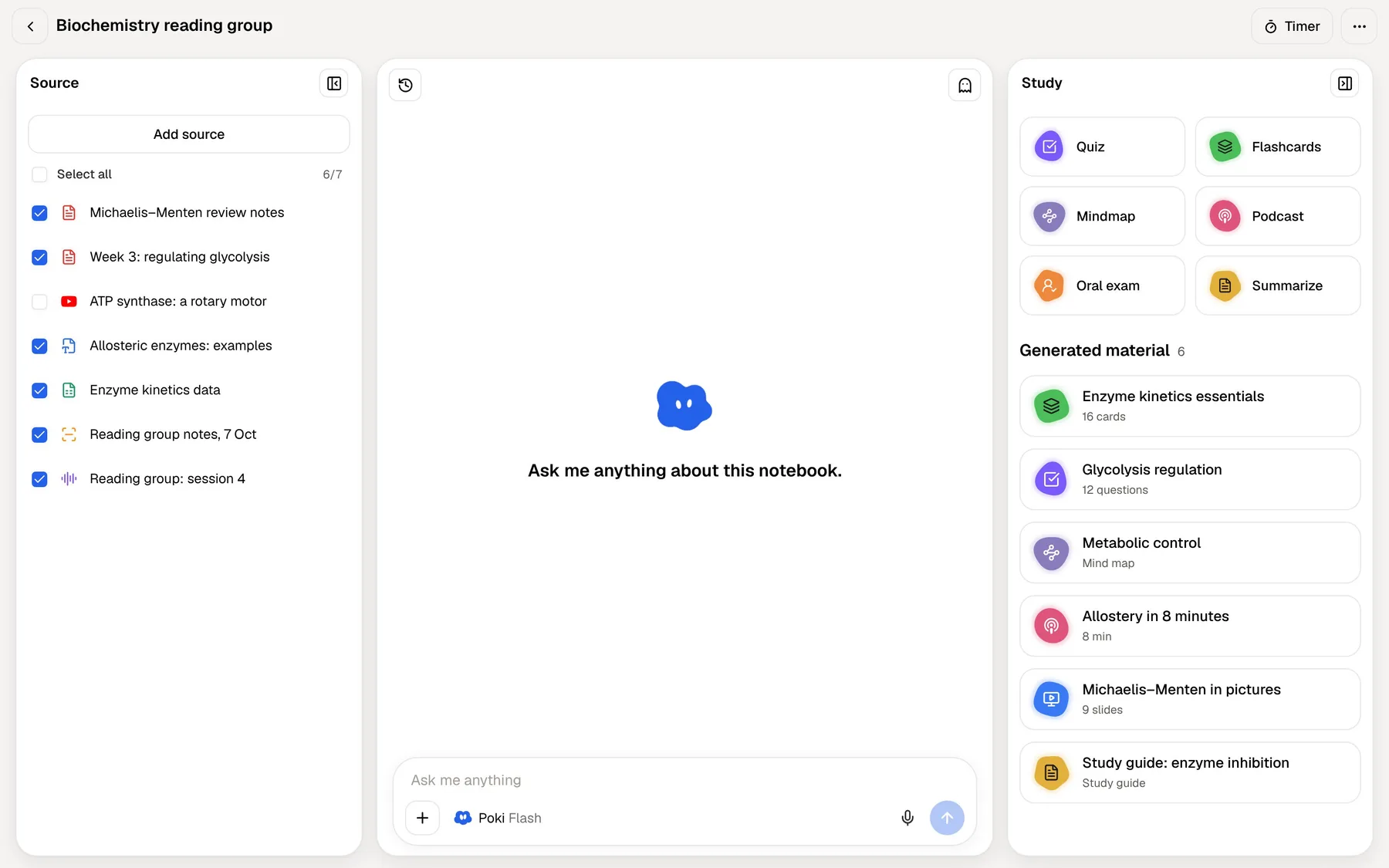
PocketNote is organised around the material. Each module gets a colour-coded folder holding its PDFs, Word and Excel files, lecture recordings, YouTube and web links, and your own notes. Poki answers from those and cites the source, and it shows its steps as it works: searched your notes, read the item, started a quiz. If you need to check an answer, the cited source is right there.
The difference grows over a term. In a long chat history, the good explanation from week two is somewhere up a thread. In PocketNote, Poki can write that answer into one of your notes, where it sits next to the lecture it explains and turns up in search, and the flashcards and quizzes can draw on it later.
Neither approach is better in general. They suit different jobs, and studying for a specific exam on specific material is the job PocketNote is built around.
A week of one module in PocketNote
Here is what a normal teaching week looks like when the module lives in PocketNote. Most steps are a tap on material that is already in the folder rather than a prompt written from scratch.
If you write notes by hand on an iPad, they go in the same folder and count as sources. Apple Pencil works with lined, grid and Cornell templates, the "tape" tool hides answers so you can test yourself on your own pages, and Note Replay records audio while you write, so playing it back shows what you were writing at each moment of the lecture.
The result, by the weekend, is notes you didn't have to type, a deck that knows which cards you struggle with, and a record of what you have mastered, all tied to the module's own material. Day by day, it goes like this:
- Lecture day: record the lecture in the app and get a transcript, a summary and notes. Add the lecturer's PDF slides and the textbook chapter to the same folder.
- Next day: ask Poki about the parts you didn't follow, with answers cited to the slides. Generate flashcards from the lecture and do the first review.
- Midweek: take a quiz on the week's material. Every option comes with an explanation, so wrong answers teach you something.
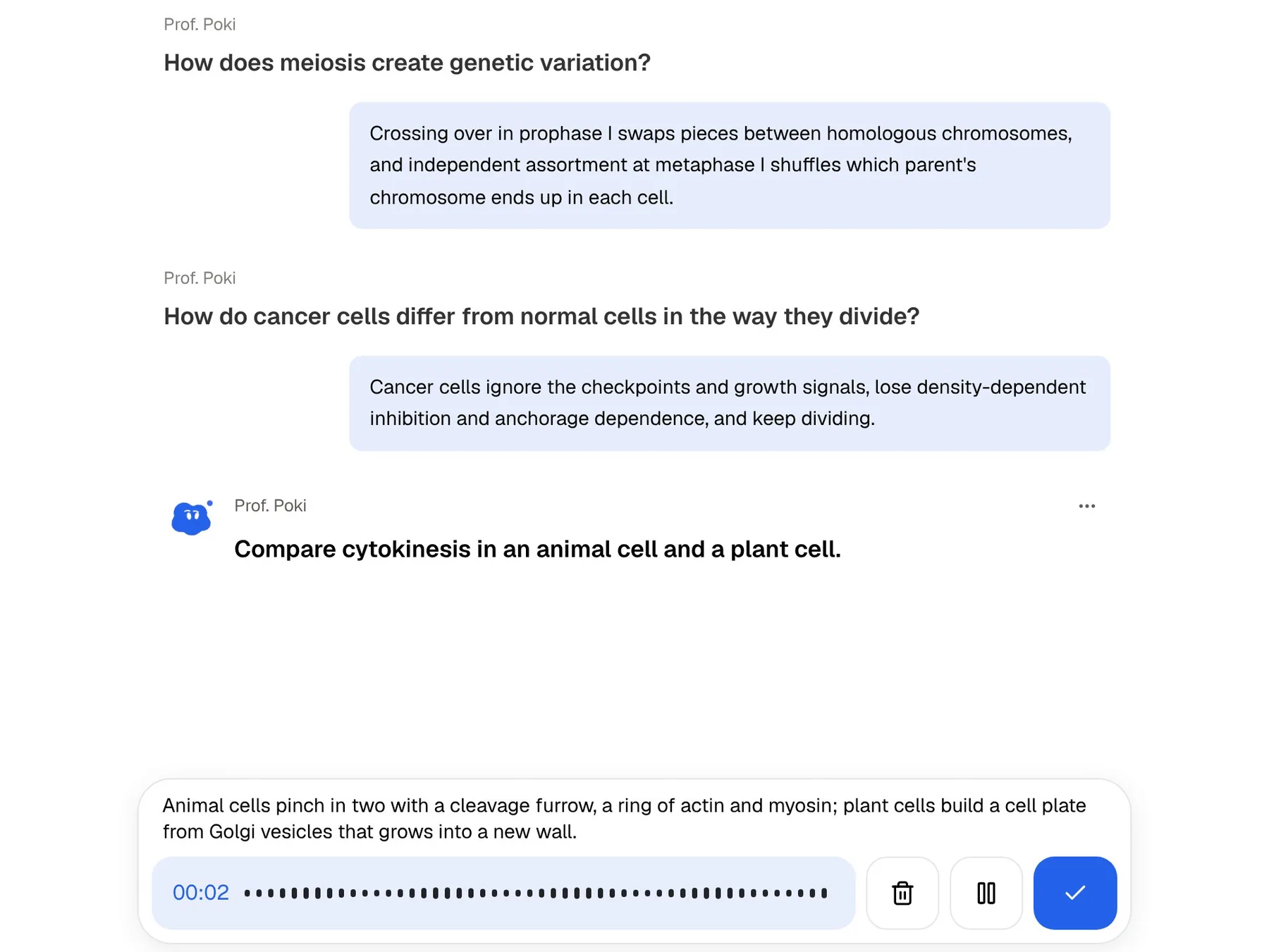
- Weekend: the cards you found hard come back as they fall due. Prof. Poki gives you an oral exam on the topic and keeps asking follow-up questions until your explanation holds together.
Practising out loud: voice chat and the oral exam
ChatGPT's voice mode will quiz you if you ask it to, and it is good conversation practice in general. PocketNote's oral exam is built for one thing. Prof. Poki asks about your material, out loud or in text, listens to your answer and probes whatever you left vague, until you can explain it. Because it works from your sources, the questions match what you were taught rather than the topic in general.
Explaining an idea out loud is a demanding test of whether you understand it, which is why oral exams, vivas and tutorials exist. Paid PocketNote plans also add live voice, so you can talk to Poki about any of your material and hear the answer without reading a screen.
Where ChatGPT is the better choice
PocketNote is not a general web-research chatbot. Poki is strongest on your own material, and for much of what students do with AI, ChatGPT is the better tool. If you only open a study tool the night before an exam, ChatGPT's study mode and flashcards may be all you need.
- Anything outside your notes. General knowledge, background reading and topics your course material doesn't cover.
- Coding and data work. Writing, running and debugging code is a core strength.
- Web research. Deep research gathers and summarises sources from across the web.
- Writing feedback. Checking a draft against a rubric, restructuring an argument, tightening prose.
- Breadth in one place. Images, voice, files, the web and many tools in a single assistant, with apps on most devices.
Plans and student pricing
ChatGPT has a free plan with limited uploads, memory and deep research. For individuals there are Go, which OpenAI notes may include ads, Plus and Pro, which comes in several usage tiers; Business covers teams and Edu is for universities that deploy ChatGPT campus-wide. Prices vary by country, so check OpenAI's pricing page for the figure where you live. Student offers have come and gone; the pricing page links to a page for college students, and your university may already provide ChatGPT Edu.
PocketNote is free to start. Basic adds live voice, premium models and connectors; Plus adds unlimited notebooks and apps, the longest podcasts and all models. See pocketnote.app for current plans.
Using ChatGPT and PocketNote together
Plenty of students will use both, and the split is straightforward. Use ChatGPT for broad explanations, code, writing feedback and anything that needs the web. Use PocketNote for each module itself, where you want answers tied to the slides, cards on a spaced schedule and a plan that counts down to the exam.
You also choose the model inside PocketNote, from leading AI models by several providers, with premium models on paid plans, so studying in a dedicated app doesn't mean settling for a weaker model. And your files are not used to train public AI models.
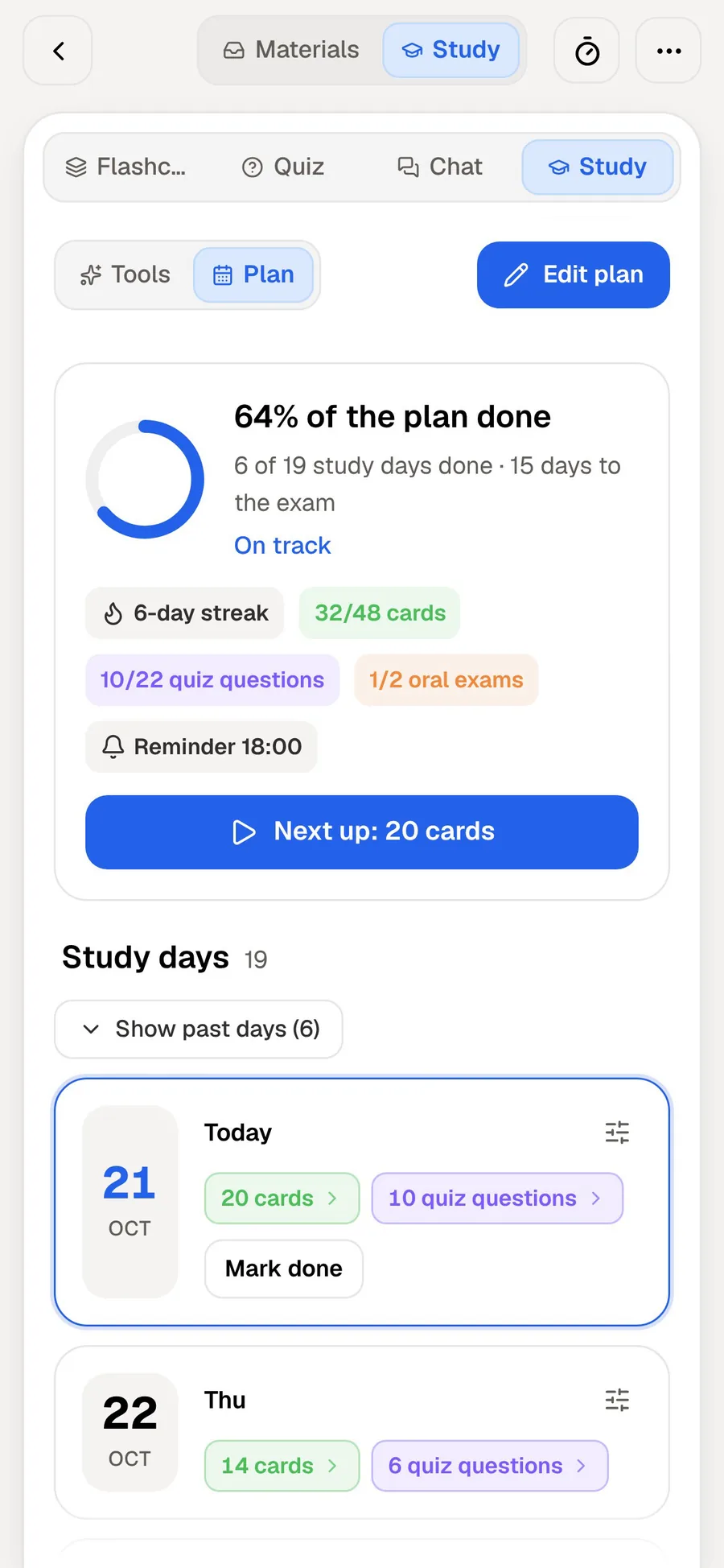
Set the exam date in the study plan and PocketNote plans what to cover each day, reminds you, and tracks memory, applied and mastery scores for each topic, so you can see where the next hour is best spent.
The verdict
Which one should you pick?
Pick PocketNote if…
- You want one organised library per module, with answers cited to it.
- You want spaced repetition that schedules every card over days and weeks, not only a repeat of the ones you missed.
- You want an oral exam, explained quizzes and a study plan built around your exam date.
- You record lectures or write notes by hand on an iPad.
Pick ChatGPT if…
- You need a general assistant: explanations of anything, code, writing feedback and web research.
- You want one tool for study, work and everything else, with voice and images.
- Quick sessions with study mode and its flashcards are enough for your course.
Try it yourself
See it with your own notes
PocketNote is an AI study app built around your own course material. Poki answers from your files with citations, can mark up your PDFs, and turns lectures, slides and notes into flashcards with spaced repetition, explained quizzes, an oral exam, mind maps and audio reviews. The study plan sets the pace to your exam date.
It runs on the web, iPhone and iPad and is free to start. Keep ChatGPT for everything else.
Frequently asked questions
Sources
Keep reading