
ChatPDF does what its name says. Drop in a PDF, ask a question, and get an answer with a citation that scrolls you to the right spot in the document. You can try it without an account, it works in any language, and a free account adds folders and chats across several PDFs. It has also grown: it now chats with YouTube videos and websites, makes flashcards with a practice mode, and turns documents into slides.
PocketNote starts from the same place, a document you need to understand, and keeps going. It holds a whole course of PDFs, lectures, notes and links, answers from all of it with citations, and builds flashcards, explained quizzes, an oral exam and a study plan from the material.
Both can answer a question about a PDF. The difference is how much of studying each one covers. This page goes through it honestly, including where ChatPDF is the simpler and better pick.
At a glance
PocketNote vs ChatPDF
| Feature | PocketNote | ChatPDF |
|---|---|---|
| Built for | A course's worth of material | Fast questions about a document |
| File types | PDF, Word, Excel, CSV, TXT, Markdown, audio | PDF, Word, PowerPoint, Markdown, TXT |
| Other sources | YouTube, web links, lecture recording | YouTube videos and websites |
| Citations | Yes, to the source | Yes, scroll to the spot in the PDF |
| Several documents at once | Folders and notebooks | Folders; multi-PDF chats |
| Marks up your PDF | Poki highlights, underlines, circles | Not advertised |
| Flashcards | Spaced repetition: Again / Hard / Good / Easy | Spaced-repetition practice: easy / medium / hard |
| Quizzes with explanations | Yes, for every option | Not advertised |
| Oral exam and study plan | Yes, both | Not advertised |
| Slides | Slide decks from your sources | AI Slides, export to .pptx |
| Your own notes | Typed notes and handwriting on iPad | Not advertised |
| Free plan | Free to start | 2 documents a day |
| Apps | Web, iPhone, iPad | Web; desktop and mobile apps listed |
Checked against each product's own website, November 2026. Plans and features change; confirm current details there.
What ChatPDF does well
Speed is the point. You can open ChatPDF, drop in a file and ask a question without making an account, which makes it an easy first try. Answers carry clickable citations that scroll to the matching place in the PDF, so checking an answer takes seconds. Because there is no account to create, it is also an easy way to find out whether AI help suits a particular kind of reading before you commit to anything.
It is broader than its name. Its FAQ lists Word, PowerPoint, Markdown and text files alongside PDFs, and it can chat about YouTube videos and websites. A free account saves your chat history, lets you group files in folders and lets you ask about several PDFs in one conversation. It accepts documents in any language and answers in any language, which helps when your reading is in one language and you think in another.
Two newer tools move it toward studying. AI Flashcards turns a document into question-and-answer cards with a practice mode that uses spaced repetition: you mark each card easy, medium or hard, and you can export the cards to Anki, Quizlet or Brainscape formats or as CSV. AI Slides turns a document into an editable outline and then a PowerPoint file.
Where ChatPDF stops short
ChatPDF is organised around documents and conversations. That works for a question about one reading, but a course is more than a pile of PDFs. ChatPDF doesn't advertise a lecture recorder, a place to write your own typed or handwritten notes, or anything that plans revision around an exam date.
The study tools are narrower too. ChatPDF's flashcard page describes a practice mode and exports; it doesn't describe quizzes that explain each answer, a spoken oral exam, or mastery tracking across topics. For a single document that may be all you need; across a whole module, the missing pieces start to matter.
Then there is the free allowance. ChatPDF's FAQ says the free plan lets you analyse two documents a day. That is fine for a single reading, but tight in a revision week when you want to work through a module's slides, readings and past papers in one sitting.
Answers also live in chat threads. A good explanation you got in week two sits in a conversation somewhere, not in a set of notes you can revise from. In PocketNote, Poki can write an answer straight into one of your notes, where you can edit it, add a diagram and find it again by search.
A PDF in PocketNote
Import the same PDF into PocketNote, or pull it from Google Drive, OneDrive or Dropbox, and ask Poki about it. Poki answers from the document with citations, and it can answer across the sources in a notebook at once, so a question about mitosis can draw on the lecture slides, the textbook chapter and your own notes together. Poki shows its steps as it works, so you can see which notes it searched and which item it read before it answered.
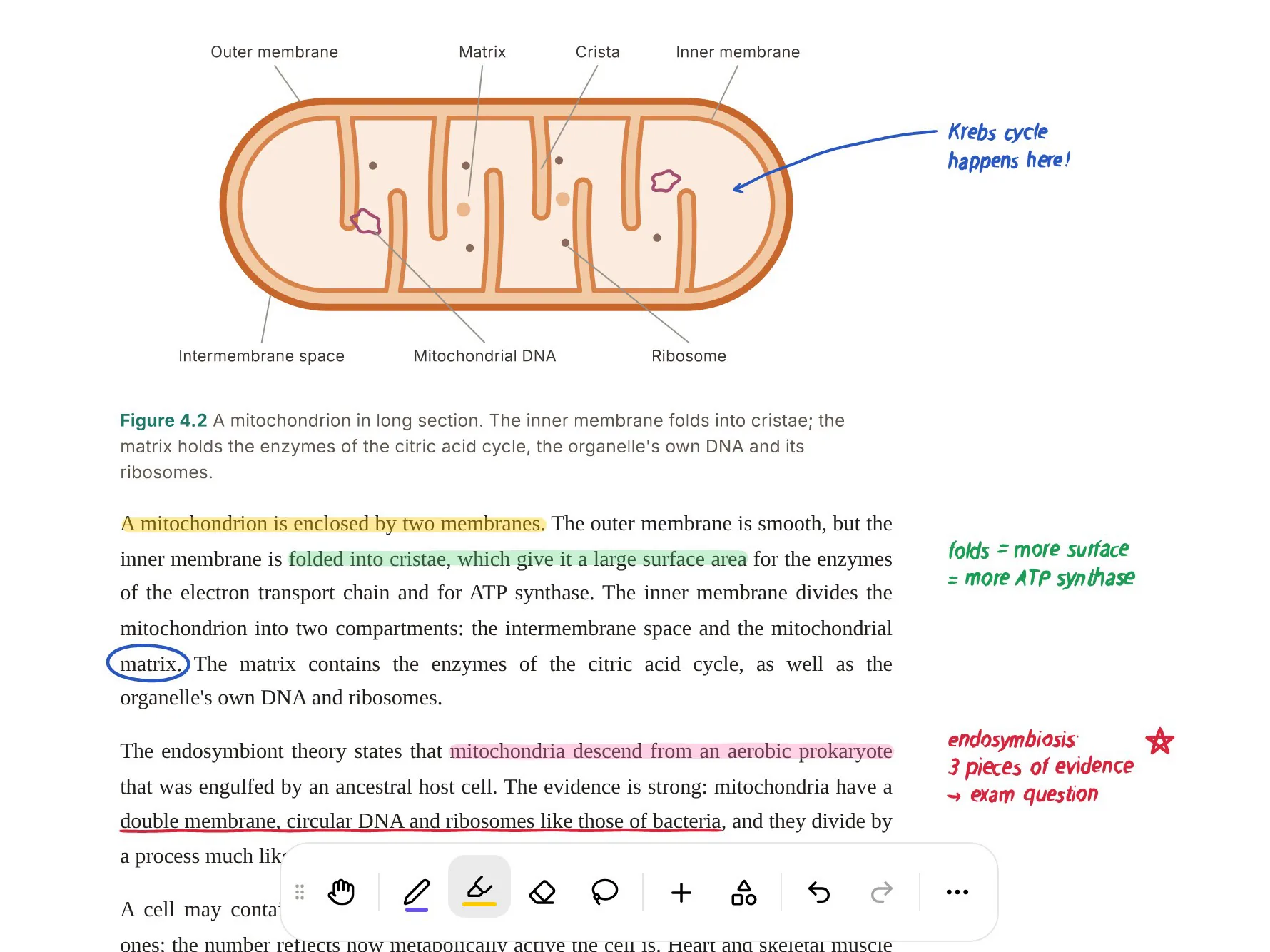
Poki also works on the page itself. It can look at a PDF page as you see it, including your own highlights and handwriting, and it can highlight, underline or circle passages when you ask, for example "highlight the key definitions on page 3". If it marks the wrong thing, one tap undoes its marks.
You can write on the PDF too: highlight, write and draw directly on the page, with Apple Pencil on iPad or in the browser. Those marks are part of what Poki sees, so you can ask it about the passage you circled.

Flashcards, head to head
Both apps now generate flashcards from a document, and both bring difficult cards back more often. The differences are in the rating scale and in what surrounds the cards.
ChatPDF's strength is portability. You can export cards to Anki, Quizlet, Brainscape or CSV and study them wherever you like. Its practice mode uses three ratings: easy, medium and hard.
PocketNote uses four ratings, Again, Hard, Good and Easy, and schedules each card to return when you are about to forget it. The cards sit next to quizzes in which every answer comes with an explanation of why it is right and why the other options are wrong, the oral exam, and a study plan that takes your exam date, plans each day's work, reminds you, and tracks memory, applied and mastery scores.
Whichever tool makes them, check generated cards against the source before you rely on them. Delete cards that test trivia and rewrite any that are ambiguous; a short, well-chosen source usually gives better cards than a long one.
If all you want is a deck to take into Anki, ChatPDF does that well. If you want the cards to be one part of a revision plan, that is the job PocketNote is built for.

Reading in one language, studying in another
ChatPDF accepts PDFs in any language and chats in any language, according to its homepage. That suits international students reading in a second language: upload the English paper, ask in Spanish, read the answer in Spanish.
PocketNote handles the same situation from the study side. It produces study material in more than 50 languages, and the material can be in a different language from the source. English lecture slides can become flashcards, a quiz or an audio review in your first language, or the reverse when you need to learn terms in the language of the exam.
Which way round to study is a real choice. If the exam is in English you will eventually need the English terms, so a sensible pattern is to understand a hard topic in your first language and then drill the key vocabulary in the language you will be writing in. PocketNote lets you make both versions from the same source.
Where ChatPDF is the better choice
ChatPDF is the lighter tool, and for some jobs lighter is better. These are the cases where we would point a student to it.
- One quick question. No sign-up and no setup: for a single reading the night before a seminar, it is the fastest route.
- Exporting flashcards. If you already live in Anki or Quizlet, ChatPDF's exports fit straight in.
- PowerPoint files. ChatPDF reads .ppt and .pptx directly; PowerPoint isn't on PocketNote's import list, so slides need saving as PDF first.
- A desktop app. ChatPDF offers a desktop download; on a computer, PocketNote runs in the browser.
- Building a presentation. AI Slides exports an editable PowerPoint file you can keep working on.
Free plans and paid plans
ChatPDF's FAQ says the free plan lets you analyse two documents a day, and that ChatPDF Plus provides unlimited document analysis and more advanced features. Its flashcard and slide tools also have daily limits on the free plan, which Plus removes. The Plus price wasn't shown on the pages we checked in November 2026, so confirm it on ChatPDF's site before you subscribe.
PocketNote is free to start. Paid Basic adds live voice, premium models and connectors; Plus adds unlimited notebooks and apps, the longest podcasts and all models. See pocketnote.app for current plans.
A practical test: count the documents you would want to work through in your busiest week. If it is two or three, ChatPDF's free plan may cover you. If it is a whole module, look at what each paid plan includes, and check again before a busy term, because allowances change.
Moving from ChatPDF to PocketNote
There is little to migrate, because ChatPDF works on your own files. Upload the same PDFs, Word files and text files to PocketNote, and save any PowerPoint slides as PDF first. If you made flashcards in ChatPDF you can keep them in Anki, but generating new cards in PocketNote from the original documents keeps each card tied to a source Poki can cite.
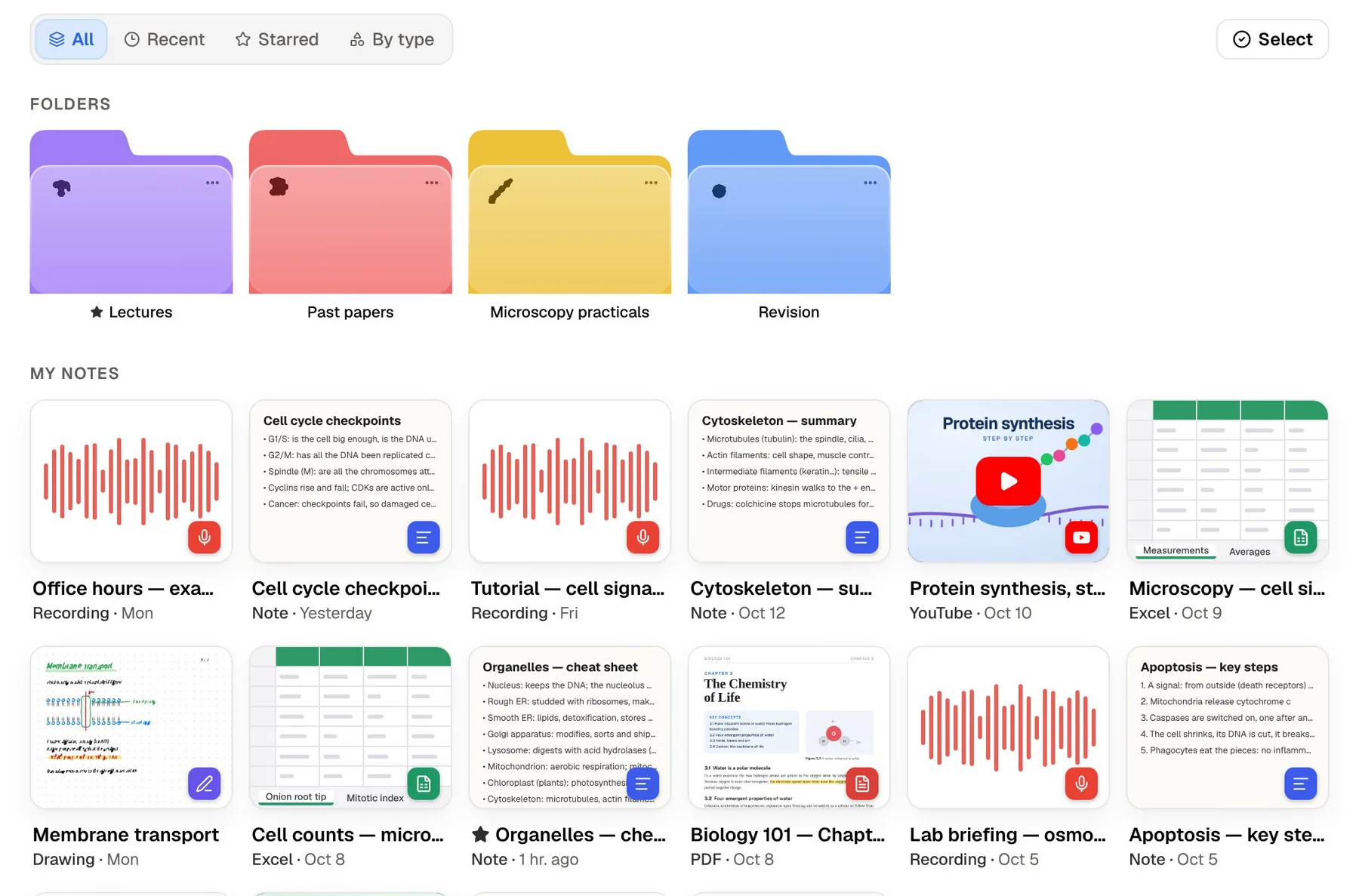
Then add what ChatPDF doesn't advertise, the lecture recordings and your handwritten notes, alongside the YouTube videos and web articles from the reading list. Everything sits in colour-coded folders, with starred and recent items and one search across all of it.
If you prefer listening to reading, generate a podcast-style audio review of the folder. Captions follow the voices, so you can glance down when a term is unfamiliar.
The verdict
Which one should you pick?
Pick PocketNote if…
- You are studying a whole course, not one document, and want every source in one searchable library.
- You want Poki to mark up your PDF and to read your own highlights and handwriting on it.
- You want quizzes that explain every answer, an oral exam and a study plan, not only flashcards.
- You want lecture recordings and handwritten iPad notes in the same library as your PDFs.
Pick ChatPDF if…
- You want the fastest way to ask one document a question, without signing up.
- You want flashcards you can export to Anki, Quizlet or Brainscape.
- You work from PowerPoint files or want a desktop app.
Try it yourself
See it with your own notes
PocketNote keeps a course in one place: PDFs and Word files, Excel sheets, audio and lecture recordings, YouTube and web links, and your typed and handwritten notes. Poki answers from all of it with citations and can work directly on your PDFs. The same material becomes spaced-repetition flashcards, explained quizzes, an oral exam, mind maps, slide decks and audio reviews.
It is free to start on the web, iPhone and iPad, and your files are not used to train public AI models.
Frequently asked questions
Sources
Keep reading