
Cram.com is one of the longer-running flashcard sites on the web. It grew out of Flashcard Exchange, a site that dates back to 2001, and its iPhone app now describes a library of over 7 million flashcard sets created by students and educators. You search for a set, or type your own cards with hints and images, then drill them in one of several study modes.
PocketNote starts from the other end. Instead of finding a deck someone else made, you give it your own lecture slides, PDFs, recordings or handwritten notes, and it generates the flashcards, quizzes and other study material from them. Its assistant, Poki, answers questions from those same files and cites where each answer came from.
So the real choice is between ready-made decks you borrow or type, and cards built from what your course actually covered. This comparison uses Cram's App Store listing and public record, and PocketNote's own feature list, checked in November 2026.
At a glance
PocketNote vs Cram.com
| Feature | PocketNote | Cram.com |
|---|---|---|
| What it is | AI study app built on your course material | Flashcard site and app with a public library |
| Public deck library | Not offered | Over 7 million sets (per its App Store listing) |
| Making cards | Generated from your files, links and lectures | Type your own; AI card generation in the app |
| Spaced repetition | Built in: Again / Hard / Good / Easy | A Spaced Repetition study mode |
| Other ways to study | Explained quizzes, oral exam, mind maps | Preview, Learn, Test, Cram mode, games |
| Maths notation | LaTeX in typed notes | KaTeX formatting on cards (iPhone app) |
| Listening | Podcast-style audio reviews of your material | Read Aloud for cards; voice attachments |
| Lecture recording | Yes, with transcript, summary and notes | Not advertised |
| AI answers from your notes | Poki, with citations to your sources | Not advertised |
| Platforms | Web, iPhone, iPad | Web and mobile apps |
| Price | Free to start; Basic and Plus plans | Free app with ads |
Checked against Cram's App Store listing and PocketNote's own site, November 2026. Plans and features change; confirm current details with each product.
What Cram.com does well
Cram's appeal is speed. Making a card means typing a term and a definition, and recent updates to the iPhone app (versions 1.7 and 1.8) brought a reworked editor with hints and images, photo and voice attachments, folders and cloud sync. If your teacher hands out a vocabulary list on Monday, you can have a deck by Monday evening.
The library is the other draw. With millions of public sets, there is a good chance someone has already typed up the terms for a standard course, a language chapter or a certification exam. For widely taught material, searching before you type can save an evening.
The study modes give you choice. The app lists Preview, Learn, Test, Spaced Repetition and Cram, and recent versions added read-aloud with language detection, KaTeX formatting for maths and chemistry, AI card generation and three arcade-style study games. The App Store lists the app as free, and it contains ads.
The editor has grown up too. The rebuilt app supports reordering cards, editing them inline and searching a deck by text or card number, which helps once a set runs into the hundreds.
The trouble with borrowed decks
A public deck is someone else's summary of someone else's course. It may use different terminology, skip what your lecturer stressed, or include mistakes nobody caught. That isn't a criticism of Cram in particular; it is true of any shared library, and it means a borrowed deck needs checking against your own notes before you trust it.
If you do borrow, a quick check goes a long way: compare the first twenty cards with your lecture slides, delete anything your course didn't cover, and fix terms your lecturer names differently. Ten minutes of checking costs less than learning a wrong definition.
The other limit is the format itself. A deck of terms is good for definitions, dates and vocabulary. It is weaker for the parts of an exam that ask you to explain a process, compare two ideas or apply a concept to a new case, because those answers rarely fit on the back of a card.
PocketNote doesn't have a public library at all, and that is a real gap if you want an instant deck for a common topic. What it does instead is make the deck from the material in front of you, and then give you other ways to test the parts that don't fit on a card.
Cards made from your own lecture
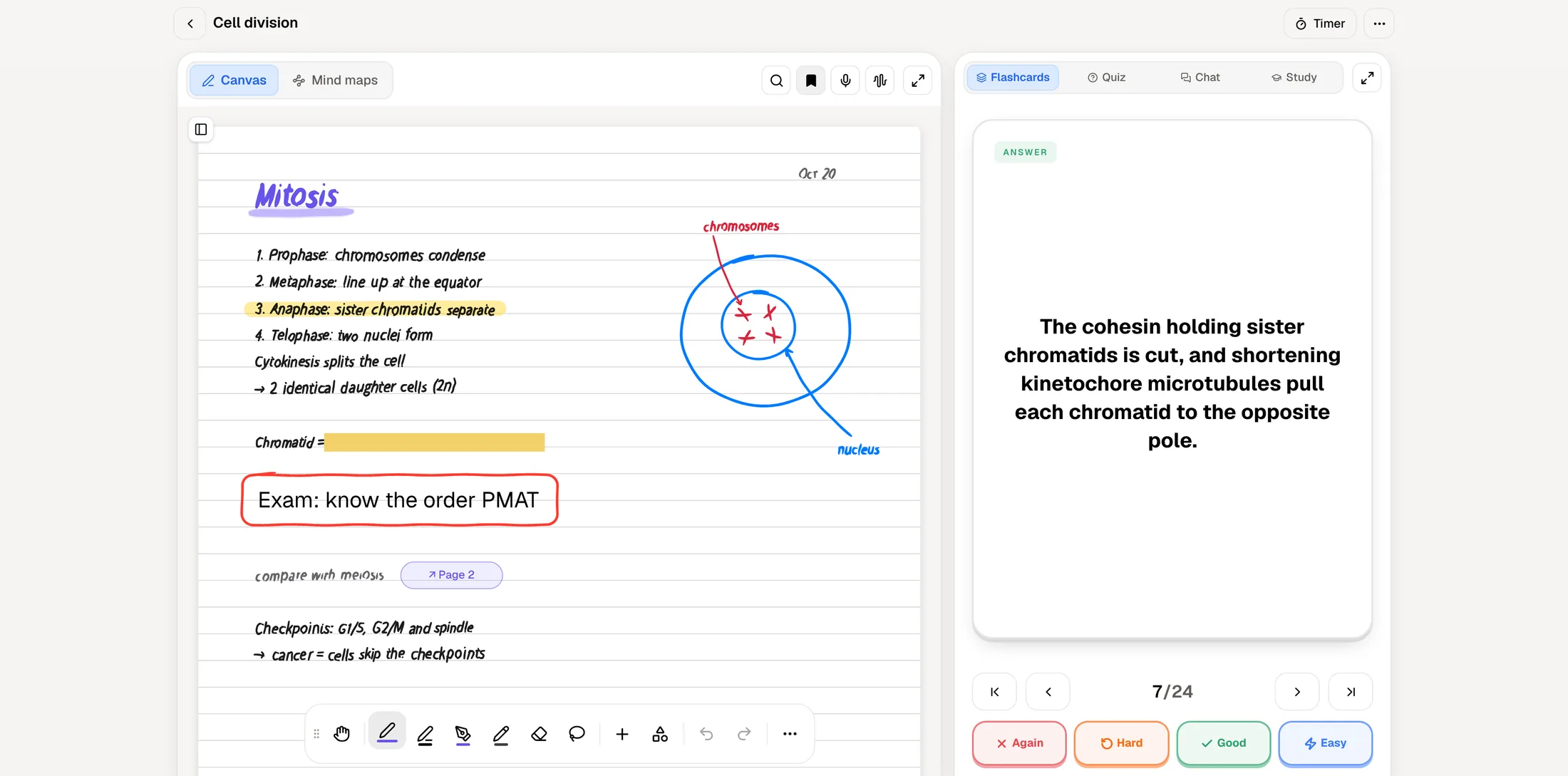
Here is the same evening in PocketNote. You import the lecture PDF, or paste the YouTube link of the recorded class, and ask for flashcards. They are generated from that material, so the wording follows what your lecturer used and the cards cover what was actually taught.
If you write notes by hand on an iPad, the cards can come from those too: the split view shows your handwritten page on one side and a flashcard made from it on the other. And if you recorded the lecture in the app, its transcript, summary and notes become material for cards in the same way.
You still need to read generated cards with a critical eye, as with any AI output. The difference is that every card comes from a source you chose, so a doubtful card can always be checked against the original.
Because the cards come from a source, you can always go back to it. If a card about anaphase looks thin, ask Poki what the lecture says about it and it answers from that material with a citation. It can also write a clarification into your notes from the chat, so the fix lives next to the lecture.
Reviewing: Cram's modes and PocketNote's scheduler
Cram gives you a menu of ways to drill. Its modes are Preview, Learn, Test, Spaced Repetition and Cram, so you can switch between a quick look through a set, a structured pass, a self-test and spaced review depending on how close the exam is.
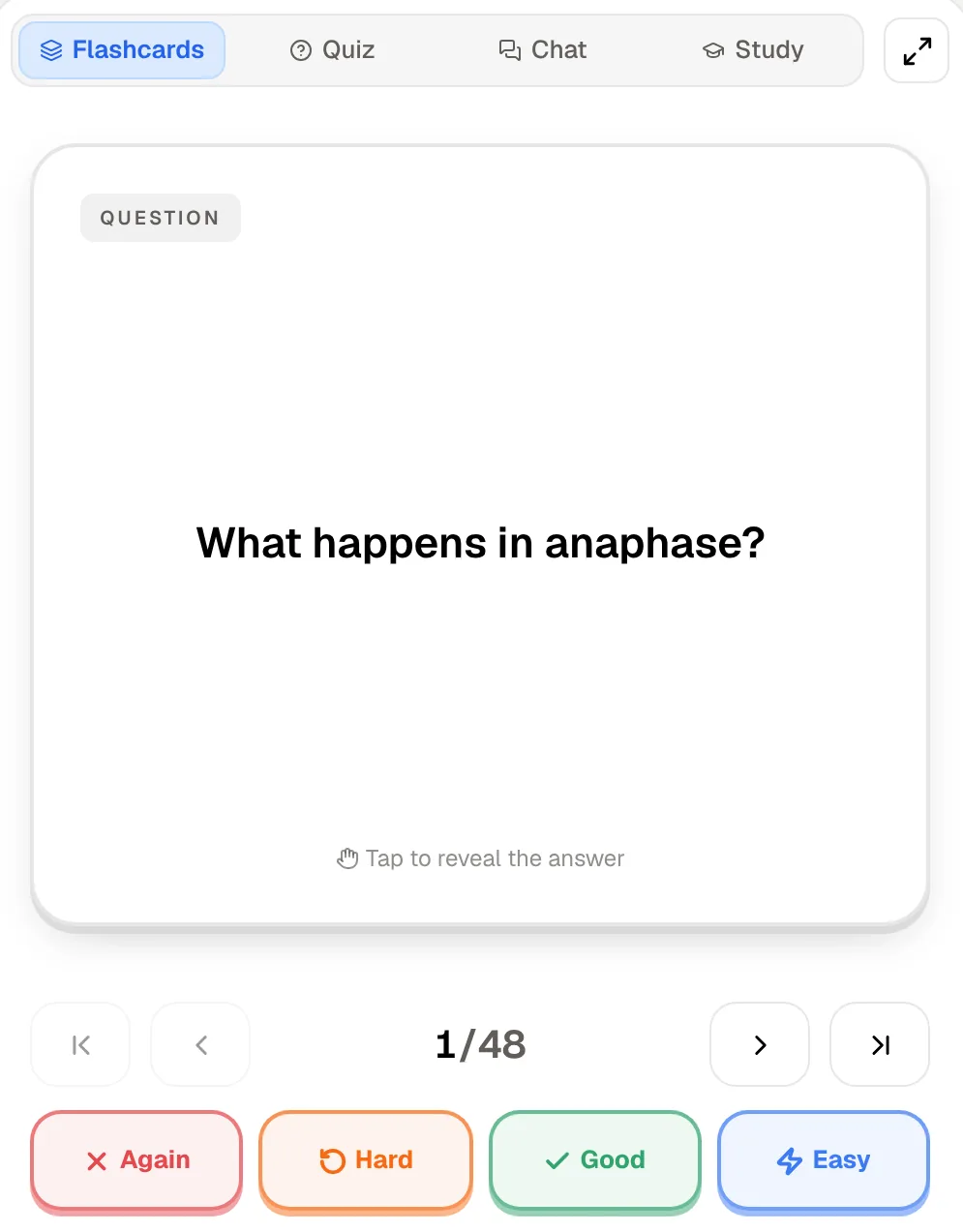
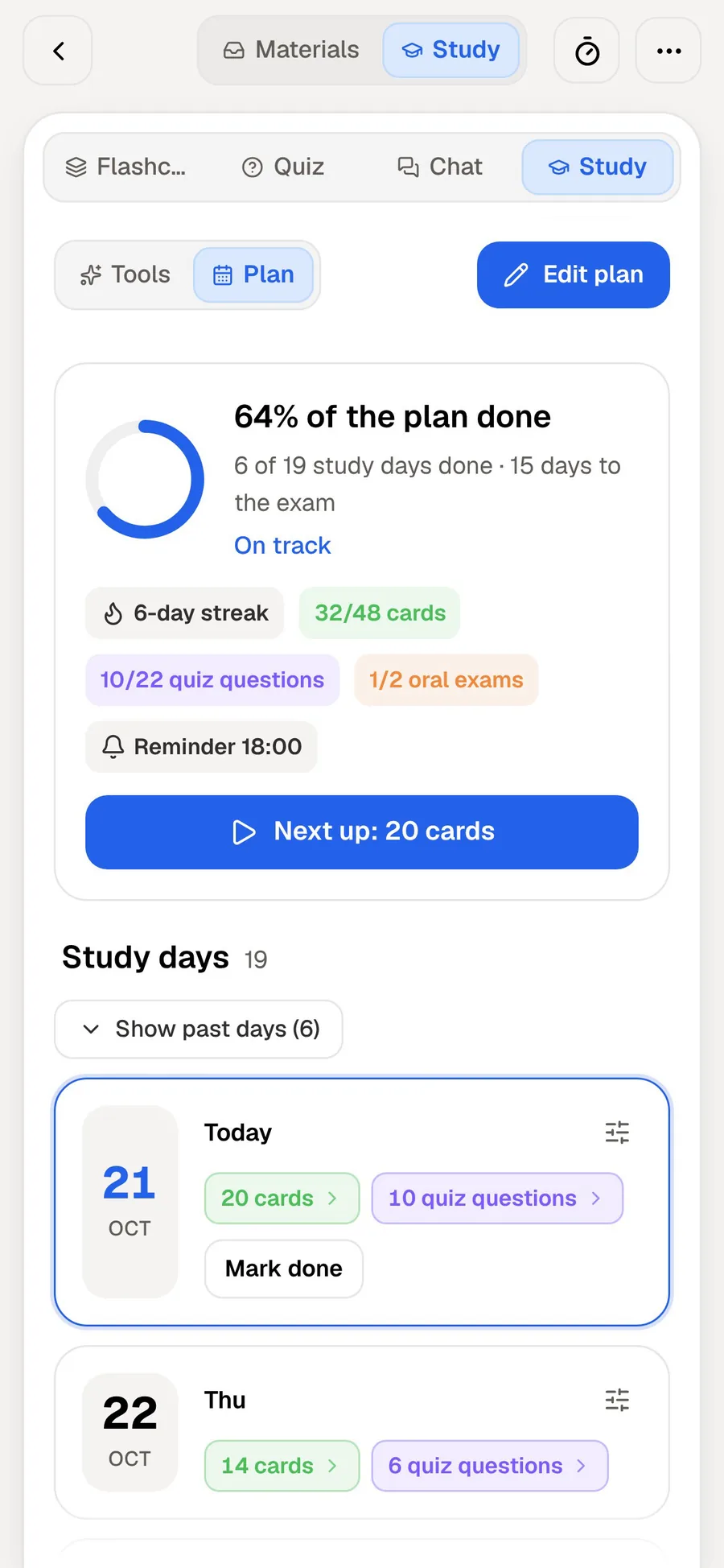
PocketNote has one review flow and makes the timing decision for you. You rate each card Again, Hard, Good or Easy, and it comes back when you are about to forget it. The study plan then ties those reviews to your exam date: it plans what to cover each day, reminds you, and tracks memory, applied and mastery scores so you can see which topics are slipping.
If you like choosing your own drill style each day, Cram's menu is more flexible. If you would rather open the app and be told what to review, PocketNote's scheduler and plan do more of that work.
There is one more practical difference. When a PocketNote card keeps coming back as Again, the lecture it was generated from sits in the same library, so you can reread that section or ask Poki about it instead of simply drilling the card harder.
Beyond the flashcard
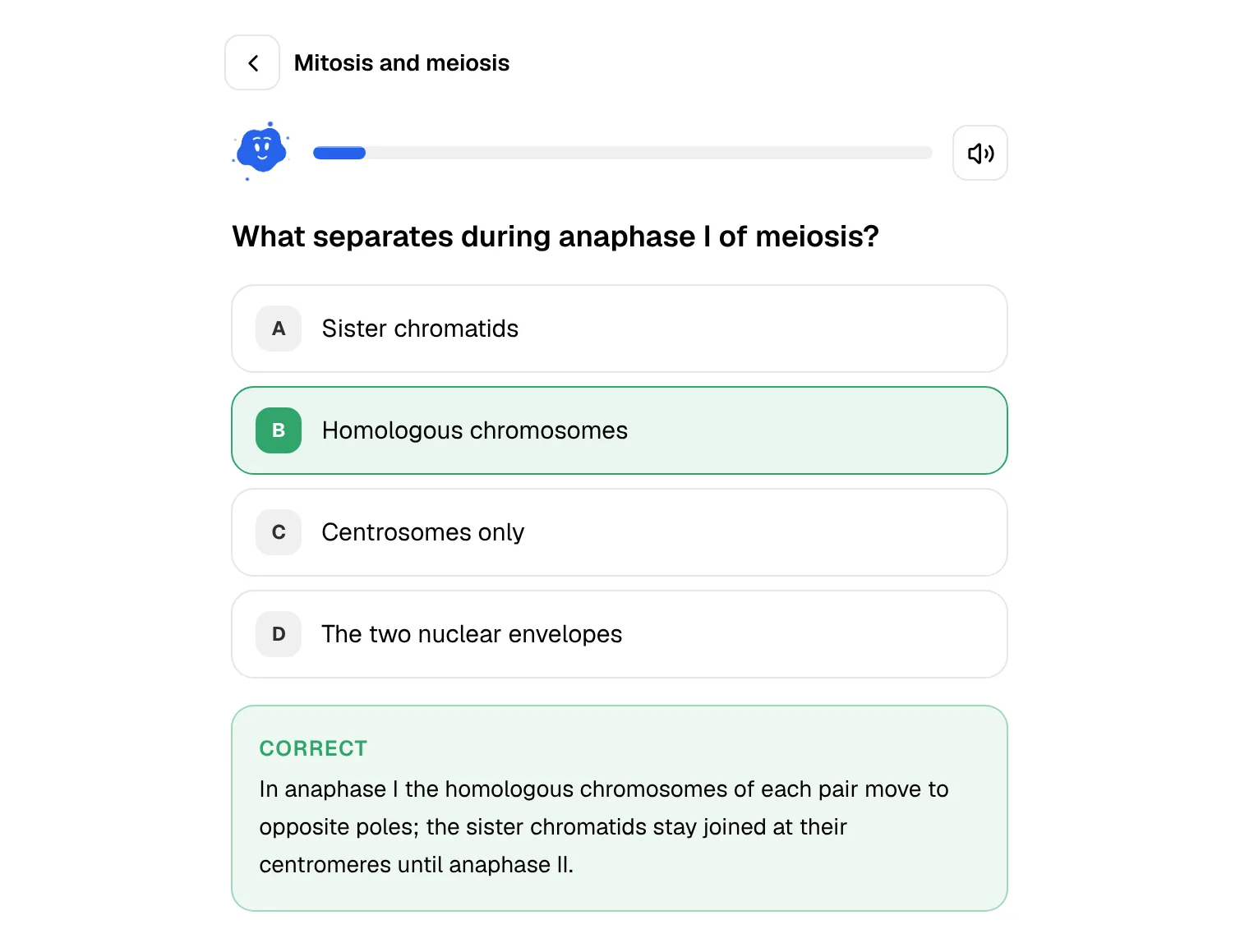
Flashcards are one way to study among several. From the same material, PocketNote also makes quizzes where every answer comes with the reason, including why each wrong option is wrong, plus mind maps, written notes and summaries, slide decks and podcast-style audio reviews with captions that follow the voices.
There is also an oral exam. Prof. Poki asks you questions out loud or in text and follows up until you can explain the idea, which tests the kind of understanding a term-and-definition card can't reach.
Cram's extras are lighter and more playful: games built on your set and read-aloud for listening to cards. Both suit vocabulary well, and for a language list the games may be all the variety you need.
For revising away from a desk, PocketNote's audio review turns the same lecture into a podcast-style episode, and the captions follow the voices so you can read along when a term is unfamiliar.
Which kinds of exams suit each approach
Some exams are mostly recall. A vocabulary test, an anatomy practical where you name structures, a list of drug classes in pharmacology: these reward a large, well-drilled deck, and a typed or borrowed set in Cram can carry you a long way. The quicker you can get the list into cards, the more time is left to review it.
Other exams are mostly explanation. An essay question on the causes of a war, a long-answer question on how the cell cycle is regulated, a seminar presentation: these need you to connect ideas and put them in your own words. Cards help with the facts underneath, but you also need practice at explaining, and that is where explained quizzes, an oral exam and summaries come in.
Most courses mix the two. A reasonable approach is to drill the recall layer with whichever deck is fastest to get, and to use your own lecture material for everything that needs understanding.
Where Cram.com is the better choice
Cram is the better tool in several honest cases, and none of them are niche. If one of these describes your course, start with Cram and add a study app later if you need one.
- A deck already exists for your exact material. For a standard vocabulary list, a textbook chapter many classes use, or a common certification, a good public set gets you studying in minutes.
- You learn by writing the cards yourself. For many students, typing the card is part of learning it. Cram keeps that step quick.
- You want a free app and don't mind ads. The App Store lists Cram as free; the listing notes that it contains advertising.
- You want maths or chemistry notation on the card itself. The iPhone app supports KaTeX formatting on cards.
- You like games for drilling a list. Cram's study games turn a set of terms into short rounds.
Using Cram and PocketNote together
The two don't conflict. A sensible split is Cram for the sets that already exist, such as language vocabulary or a standard list of terms, and PocketNote for the lectures, readings and notes that are specific to your course.
There is no direct importer between them. If you have a deck's content as text, you can paste it into PocketNote as a source and generate quizzes or new cards from it, but your study progress in Cram stays in Cram.
The quickest way to decide is one lecture. Import it into PocketNote, generate the cards, and compare them with the best public deck you can find on Cram for the same topic. Whichever set you'd rather review for the next two weeks is your answer.
The verdict
Which one should you pick?
Pick PocketNote if…
- Your course has its own material: lecture slides, readings and recordings that no public deck covers.
- You don't want to type cards, and would rather review ones generated from your material.
- You want the app to schedule reviews and plan your days up to the exam date.
- You need more than definitions: explained quizzes, an oral exam and answers that cite your sources.
Pick Cram.com if…
- A public set already matches your material, such as a vocabulary list or a standard course.
- You prefer writing every card yourself and want a quick, simple editor.
- You want a free flashcard app and are fine with ads.
- You like switching between study modes and games for drilling a list.
Try it yourself
See it with your own notes
PocketNote is an AI study app that builds study material from your own course. Import PDFs, Word files, audio, YouTube or web links, record a lecture, or write notes with Apple Pencil, and it generates flashcards with spaced repetition, quizzes that explain every answer, mind maps, audio reviews and a study plan built around your exam date.
Poki, the assistant, answers from your files with citations. You can use PocketNote in any browser at pocketnote.app or on iPhone and iPad, and starting costs nothing.
Frequently asked questions
Sources
Keep reading