

Quizlet is where many students first meet flashcards. You search for your course or textbook, find a set someone else made, and start flipping cards within a minute. Learn turns a set into an adaptive session, Test makes a mock exam, Match turns it into a quick matching game, and teachers use it to share sets with a class.
PocketNote has no library of other people's sets. It works from your own course: the lecturer's slides, the assigned reading, a recording of the lecture, your handwritten notes. From those it generates flashcards with spaced repetition, quizzes that explain each answer, an oral exam and a study plan to your exam date.
So the real question is where your cards should come from. This page compares the two on that question, on what Quizlet keeps behind its paid plan, and on the situations where Quizlet's library is the faster route. Quizlet details come from its help centre and feature pages, checked in November 2026.
At a glance
PocketNote vs Quizlet
| Feature | PocketNote | Quizlet |
|---|---|---|
| Where cards come from | Generated from your files, lectures and notes | Your sets, shared sets, AI from notes |
| Shared library | No public library | Large library of user-made sets |
| Spaced repetition | Yes: Again, Hard, Good, Easy | Option in Flashcards: Repeat, Hard, Okay, Easy |
| Adaptive practice | Quizzes with explanations | Learn (limited rounds free; full on Plus) |
| Mock exams | Quizzes from your material | Test (one free per set); Practice Tests on Plus |
| AI from your notes | Built in: files, audio, YouTube, web, handwriting | Study Guides (Plus; limited free access) |
| Record a lecture | Yes: transcript, summary, notes | Record audio into Study Guides |
| Answers cite your sources | Yes | Not advertised |
| Oral exam | Prof. Poki, voice or text | Not advertised |
| Study planning | Exam-date plan, reminders, mastery | Study paths in Learn (Plus) |
| Games | Not a game app | Match |
| Platforms | Web, iPhone, iPad | Web, iOS, Android |
| Price | Free to start; Basic and Plus plans | Free with limits; Quizlet Plus |
Checked against each product's own website and help centre, November 2026. Plans and features change; confirm current details there.
Why Quizlet became the default
Quizlet's library is the reason it is hard to replace. For common courses, textbooks and standardised exams, a set usually exists already, and copying it is quicker than writing one. Sets are simple term-and-definition pairs, so making your own is quick too, and you can bring in a list from a document or spreadsheet by pasting it.
The study modes give one set several uses. Flashcards is plain review, and it now includes a spaced-repetition option where you rate each card Repeat, Hard, Okay or Easy and Quizlet decides when to show it again. Learn builds what Quizlet calls a personalised study path from your goals and how familiar you are with the set, mixing question types. Test generates a mock exam. Match is a quick game for vocabulary.
For a vocabulary quiz on Friday or a standard intro course, that combination is hard to beat, and if your classmates already use it, that matters too.
What's free on Quizlet and what needs Plus
Quizlet's adaptive study modes are mostly paid. Its help centre says Learn is available to Quizlet Plus subscribers, with free users limited to a number of rounds per set, and that non-subscribers can take one free practice test per set in Test.
The AI tools follow the same pattern. Study Guides, formerly called Magic Notes, take your class notes and turn them into an outline, a flashcard set and practice material; Quizlet lists them for Plus subscribers, with limited free access to try them. Practice Tests, which generate questions from your notes or sets with adjustable question types and a timer, are also a Plus feature.
In practice, the free tier is fine for flipping cards in Flashcards mode and the occasional practice test. If Learn is the mode you rely on, budget for Plus or expect to hit the round limit on a set during exam season.
We haven't quoted Quizlet's prices here; check its upgrade page for the current figures. PocketNote is free to start, with paid Basic and Plus plans; see pocketnote.app for current plans.
Your own notes in: Study Guides and PocketNote
Quizlet's Study Guides close part of the gap. You can paste text, upload a PDF, Word document or Google Drive file, take a photo of handwritten notes in the mobile app, or record audio, and get an outline with flashcards attached. If you mostly live in Quizlet and want your own notes in it, this is the feature to try. Its help centre notes that pasted text needs at least 300 characters, so very short notes won't work.
PocketNote is built around that workflow rather than adding it on. Its import covers PDF, Word, Excel, CSV, TXT and Markdown files, MP3, WAV, M4A and OGG audio, YouTube links with their transcripts, web articles, and files from Google Drive, OneDrive or Dropbox. You can search arXiv and SSRN inside the app and save a paper to your library. Everything sits in colour-coded folders, and every study tool works from the same sources.
The other difference is checking. When you ask Poki, PocketNote's assistant, a question, it answers from your material with citations to the source and shows its steps, such as searching your notes or reading a particular item. That matters most when you compare it with shared sets: a card copied from a stranger's set has no source attached, so a wrong definition is hard to spot.

A Tuesday lecture, start to finish in PocketNote
Here is what studying one lecture looks like when the material is yours rather than a shared set. Say it is a second-year biology lecture on meiosis, with 40 slides and a recording.
After class you add the slides as a PDF and the recording as an audio file, or you recorded it in the app and already have a transcript, a summary and notes. Both sit in the course folder. You generate flashcards and do the first review that evening, rating each card Again, Hard, Good or Easy.
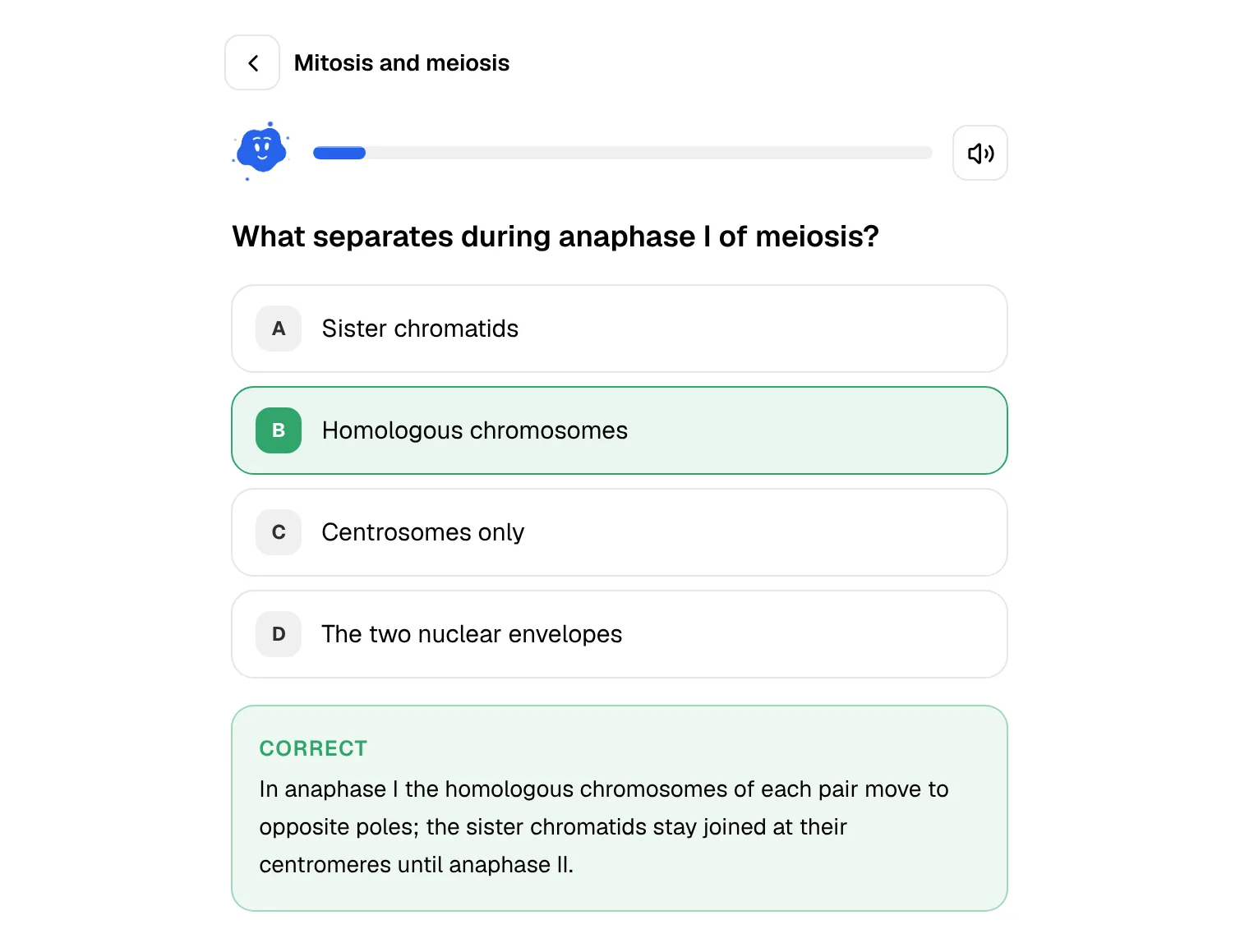
On Thursday you take a quiz on the lecture. Each wrong answer comes with an explanation of why your choice was wrong and why the right one is right, so you fix the misunderstanding instead of memorising a letter. A question about crossing over still confuses you, so you ask Poki, which answers from the lecture with a citation to the source it used.
The following week the cards you found hard come back sooner and the easy ones later. Before the exam, the study plan tells you what to cover each day, and the oral exam has you explain the stages of meiosis out loud until the explanation is complete. The same lecture in Quizlet would mean finding a set that matches your lecturer's slides, building one yourself, or running your notes through Study Guides on Plus.
Learn and Test, or quizzes that explain themselves
Learn is the centrepiece of Quizlet's study modes. Quizlet says it is powered by machine learning and adapts to what you know; you can choose which question types appear and how strictly written answers are graded. Test is the dress rehearsal: a generated mock exam from the set. Learn's Answer Streaks and grading options are well thought out, and if your exam is mostly recall of terms, Learn on a good set is an efficient way to drill.
PocketNote's quizzes work more like a marked practice paper. Every question comes with the reason, for the right answer and for each wrong option, so a miss teaches you something instead of only flagging the card. Because the quiz is generated from your lecture material rather than a shared set, the questions follow your course's emphasis and terminology.
Flashcards run alongside. PocketNote's review uses Again, Hard, Good and Easy and brings each card back when you're about to forget it, much like Quizlet's newer spaced-repetition option.
Beyond the set: explaining it out loud and planning the weeks
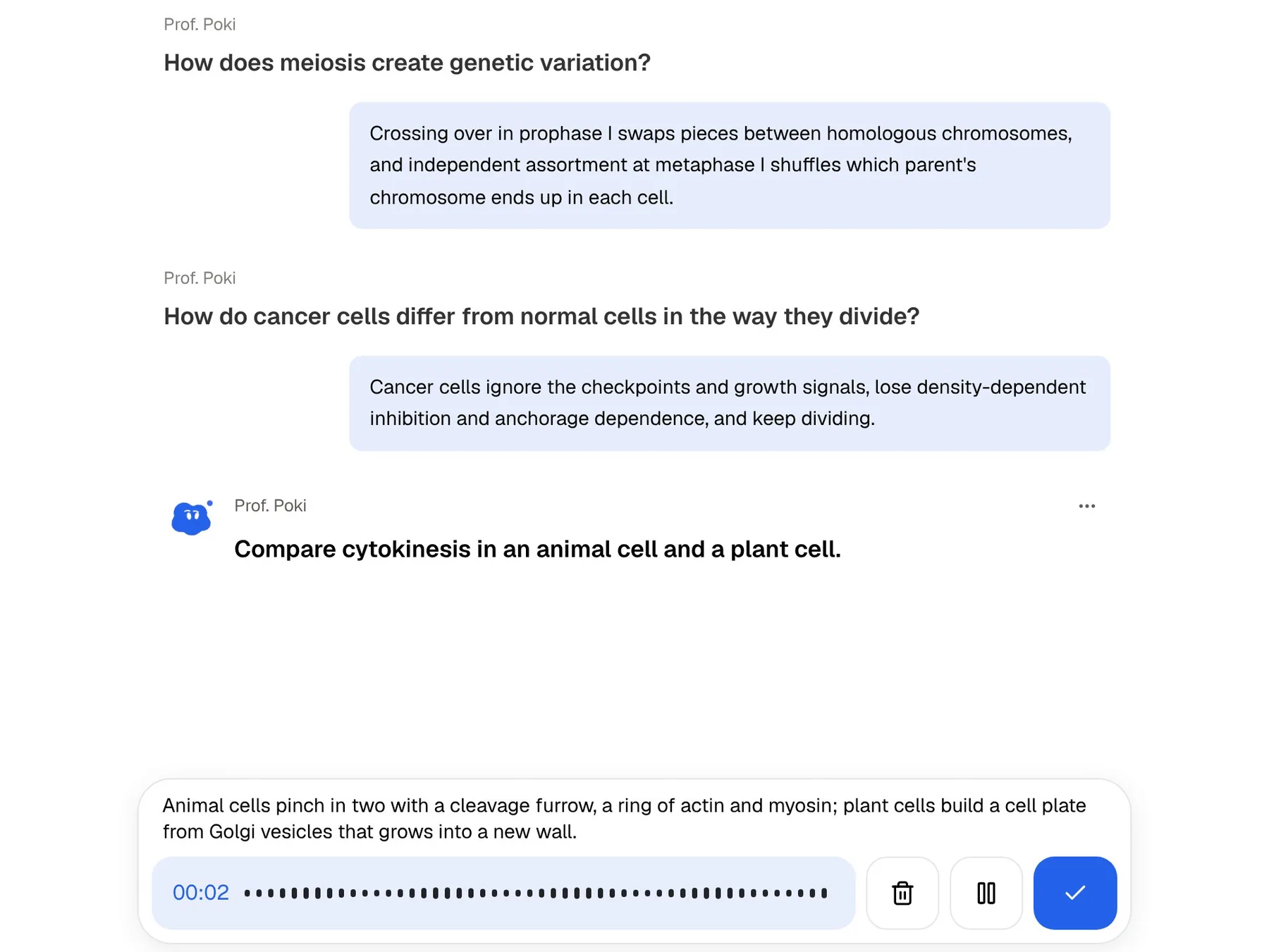
Flashcards test recognition and recall. Exams often ask for more: explain why, compare two processes, apply an idea to a case. PocketNote's oral exam is built for that. Prof. Poki asks a question out loud or in text, you answer in your own words, and it keeps probing until you can explain the idea properly.
The study plan handles the calendar. Set the exam date and PocketNote plans what to cover each day, sends reminders, and tracks your memory, applied and mastery scores across flashcards, quizzes and the oral exam. Quizlet's Learn builds a study path for a set; PocketNote's plan is organised around the exam date itself.
There are other formats from the same sources when you want a change: mind maps, summaries, slide decks and podcast-style audio reviews with captions that follow the voices, which work well on a commute when flashcards don't.
Where Quizlet is the better pick
There are plenty of cases where Quizlet is the faster, better tool, and switching would only cost you time. It is also the more social option: classmates share sets, and copying one you trust takes seconds.
- A set for your exact course already exists and you trust it, for example a standard textbook's vocabulary.
- Your teacher assigns Quizlet, or your class shares sets there.
- You want games: Match keeps short vocabulary drills lively. PocketNote is not a game app.
- You study on Android: Quizlet has an Android app and PocketNote doesn't yet.
- Your material is short lists of terms and definitions, where a generated quiz adds little.
Bringing Quizlet sets into PocketNote
Quizlet lets you export sets you created, though not sets you copied from other users. Its help centre describes doing this on the website: opening the set's menu, choosing Export, picking how terms and definitions are separated, and copying the text. Save that as a TXT or CSV file and PocketNote will import it as source material, ready to generate flashcards or a quiz. If you built your own sets for a course, the export is worth the minute it takes: from the same terms PocketNote can generate a quiz that explains each answer, a mind map and an oral exam, and fold them into your study plan.
Images don't come across, since Quizlet leaves them out of exports, and your study progress stays in Quizlet. For many students the practical setup is both: Quizlet for the shared vocabulary sets a class already uses, and PocketNote for lectures, readings and the run-up to the exam.
The verdict
Which one should you pick?
Pick PocketNote if…
- Your material is your own lectures, PDFs, recordings and handwritten notes, not a standard textbook set.
- You want quizzes that explain every answer and an oral exam that makes you explain ideas.
- You want a study plan to the exam date with reminders and mastery scores.
- You want AI answers cited to your sources so you can check them.
Pick Quizlet if…
- A trusted set for your course already exists, or your class shares sets on Quizlet.
- You like Learn, Test and Match and are happy to pay for Plus to use them fully.
- You mainly drill short vocabulary lists, or you study on Android.
Try it yourself
See it with your own notes
PocketNote is for the part of studying that a shared set can't cover: your lecturer's slides, the readings, the recording of Tuesday's class and the notes you wrote by hand. It turns them into flashcards with Again, Hard, Good and Easy ratings, quizzes that explain each answer, an oral exam with Prof. Poki and a study plan to your exam date.
It is free to start on the web and on iPhone and iPad, so you can try it on one lecture while keeping your Quizlet sets where they are.
Frequently asked questions
Sources
Keep reading