

Gizmo turns flashcards into a game. You import notes, a PDF, a YouTube video or an existing Quizlet or Anki deck, and Gizmo quizzes you on it in Memorise mode, with hearts, coins, XP, leagues and leaderboards wrapped around the questions. Gizmo Live turns a deck into a real-time multiplayer quiz that friends join with a game code.
PocketNote is calmer. It takes the same kind of material, from lecture PDFs to recordings to handwritten notes, and generates flashcards you rate Again, Hard, Good or Easy, quizzes that explain each answer, an oral exam with Prof. Poki, and a study plan counted down to your exam date.
Both use spaced repetition and both generate study material with AI. The difference is how they keep you studying: game mechanics in Gizmo, a plan and a schedule in PocketNote. This comparison draws on Gizmo's help centre and App Store listing as of November 2026.
At a glance
PocketNote vs Gizmo
| Feature | PocketNote | Gizmo |
|---|---|---|
| Study style | Plan and schedule | Game: hearts, coins, XP, leagues |
| Spaced repetition | Yes: Again, Hard, Good, Easy | Yes, in Memorise mode |
| Question types | Flashcards; quizzes with explanations | Multiple choice, typed, matching, true/false, ordering |
| Imports | Files, audio, YouTube, web, cloud drives | PDF, notes, YouTube, PowerPoint, Quizlet, Anki |
| Handwritten notes | Write with Apple Pencil | Scan photos of notes |
| Public decks | No public library | Public flashcard library |
| Multiplayer | Not a game host | Gizmo Live with game codes |
| AI help | Poki, with citations to your files | AI Tutor |
| Oral exam | Prof. Poki, voice or text | Not advertised |
| Exam-date study plan | Yes, with mastery scores | Not advertised |
| Platforms | Web, iPhone, iPad | iOS app; see gizmo.ai for others |
| Paid tier | Basic and Plus | Gizmo Unlimited; coin packs |
Checked against each product's own website, help centre and App Store listing, November 2026. Plans and features change; confirm current details there.
Gizmo's pitch: make studying feel like a game
Gizmo's help centre groups its rewards under Hearts, Coins, XP and Leagues, and its App Store listing describes leaderboards and study games. Gizmo Live adds a race: players join with a code and earn more XP for faster, more accurate answers. For students who are motivated by points or by beating friends, that structure is what gets them opening the app. The App Store listing also mentions team battles and learning with friends. Gizmo Live suits study groups that meet anyway: one deck, one code, a few minutes of competition at the end of a session.
Underneath the game sits a sensible study loop. Memorise mode uses spaced repetition: a card you answer correctly comes back later, and a card you miss comes back sooner, sometimes within the same session with a Forgotten tag. Questions can be multiple choice with AI-written wrong options, typed answers, flashcards only, or a mix that adds matching, true/false and ordering.
Hearts and Gizmo Unlimited
Hearts are the mechanic people notice first. Gizmo's help centre explains that you lose a heart for each wrong answer in Memorise mode, starting from 15. Run out and you wait 10 minutes before you can quiz again, while hearts refill over time. Flashcards-only mode doesn't use hearts, and signing up for Gizmo Unlimited removes the cap. Super Hearts protect you from losing a heart on a wrong answer, but they need to be in your inventory before your normal hearts run out.
If you study in long sessions on the free plan, plan around the limit: switch to flashcards-only mode when hearts run low, or save Memorise mode for shorter bursts.
Some students like the pressure. Others would rather keep practising their mistakes than wait them out, especially the night before an exam, when wrong answers are exactly what they need to see.
Gizmo is free to download with in-app purchases. The US App Store lists Gizmo Unlimited at several price points alongside coin packs, without spelling out the period of each, so we haven't quoted a price; check it in the app. PocketNote is free to start, with paid Basic and Plus plans; see pocketnote.app for current plans.
Memorise mode versus rating yourself
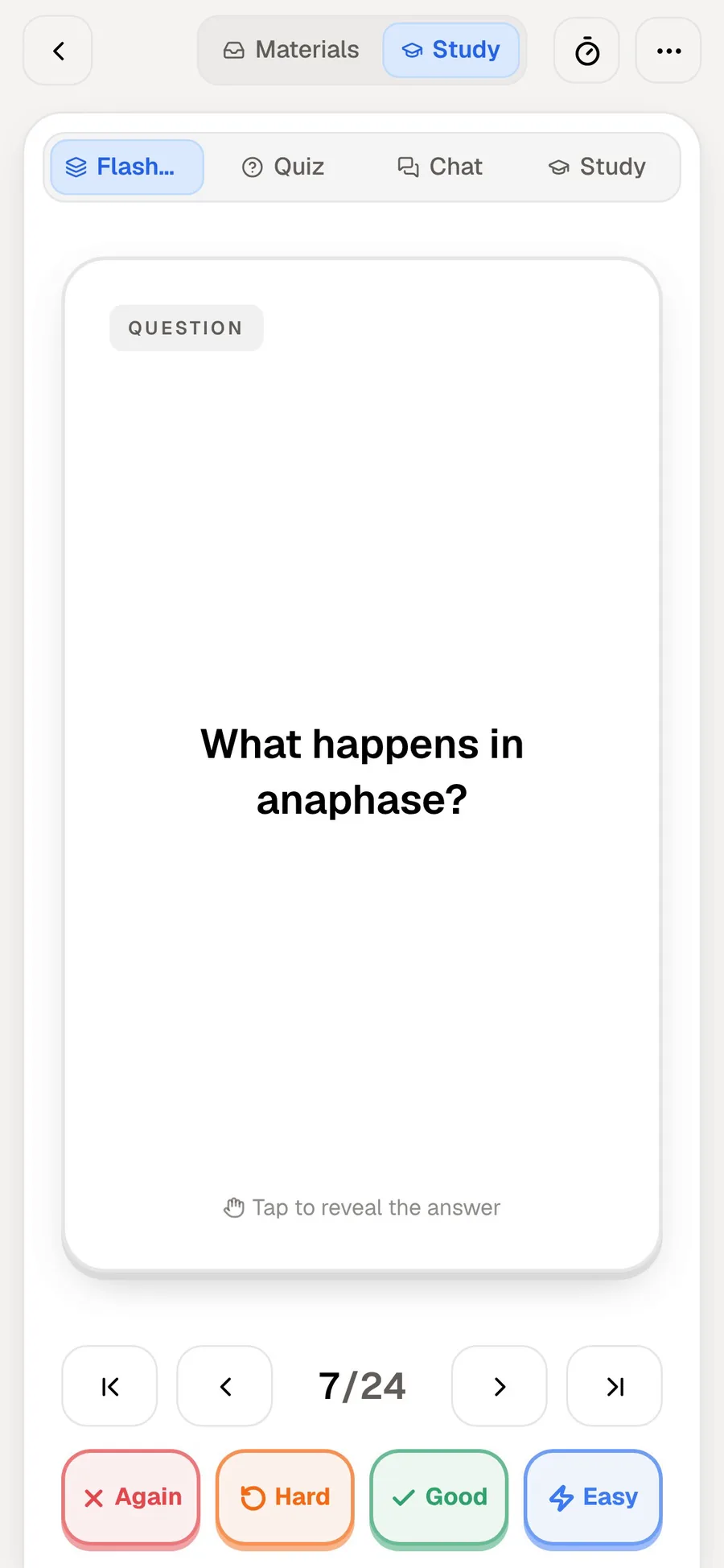
The two review styles differ in who judges your answer. In Gizmo's quiz-style questions, the app checks whether you picked or typed the right answer. In PocketNote's flashcards, you reveal the answer and rate yourself: Again if you missed it, Hard if it was a struggle, Good or Easy if it came readily. Each card comes back when you're about to forget it.
App-checked answers are objective. Self-rating lets you say you got it but only just, which a right-or-wrong check can't capture. PocketNote covers the app-checked side with its quizzes, so you get both kinds of practice from the same material.
Gizmo highlights the key words on each card and tests you on them, so its questions tend to target terms. PocketNote's quizzes are generated from the source material itself and explain each option.
There is a case for each. Typed answers in Gizmo stop you fooling yourself that you knew something; self-rating in PocketNote is quicker per card, so you can get through more cards in the same time. Many students do best with some of both.
What you can feed each app
Gizmo's Magic Import takes PDFs, pasted notes, YouTube links and recorded lessons, and its App Store listing adds PowerPoint plus imports from Quizlet and Anki. You can also scan handwritten notes and photos into flashcards. A library of public flashcards made by other students is there if you would rather not make your own.
PocketNote imports PDF, Word, Excel, CSV, TXT and Markdown files, MP3, WAV, M4A and OGG audio, YouTube links and web articles, and files from Google Drive, OneDrive or Dropbox. You can record a lecture in the app and get a transcript, a summary and notes, or handwrite directly on iPad with Apple Pencil instead of photographing paper. If a course leans on papers, PocketNote can also search arXiv and SSRN inside the app and save one to your library. Photographing paper notes into Gizmo is quick if you already write on paper; writing in PocketNote keeps the page searchable, and the lasso can turn a line of handwriting into text.
PocketNote has no public deck library and doesn't list Quizlet or Anki imports, so Gizmo is the easier move if your decks already live in either of those. Its imports are a quiet strength: a student with sets in Quizlet and decks in Anki can pull both into one app and study them the same way.
One chapter, two evenings
Take one chapter of an economics textbook on supply and demand, as a PDF, plus a 20-minute YouTube explainer your lecturer linked.
In Gizmo, Magic Import turns the PDF and the video into flashcards. You open Memorise mode and answer a mix of multiple-choice and typed questions, earning XP. A few wrong answers cost hearts, and if you run out you take the 10-minute break or switch to flashcards-only mode. Later you challenge a friend in Gizmo Live with the same deck.
In PocketNote, the PDF and the YouTube link go into the course folder, and the video's transcript comes with it. You generate flashcards and review them with Again, Hard, Good and Easy, then take a quiz in which every option is explained, for example why a shift of the demand curve is not the same as a movement along it. When a graph on page 14 confuses you, you ask Poki to circle the relevant part of the page and explain it from the chapter.
Both evenings involve real retrieval practice. Gizmo's feels like a game; PocketNote's feels like working through a marked problem set with a tutor on call.
Tutors, explanations and an oral exam
Gizmo has an AI Tutor that can walk you through a topic step by step, generate notes, or quiz you on your content. Its help centre also has a section on Practice Tests.
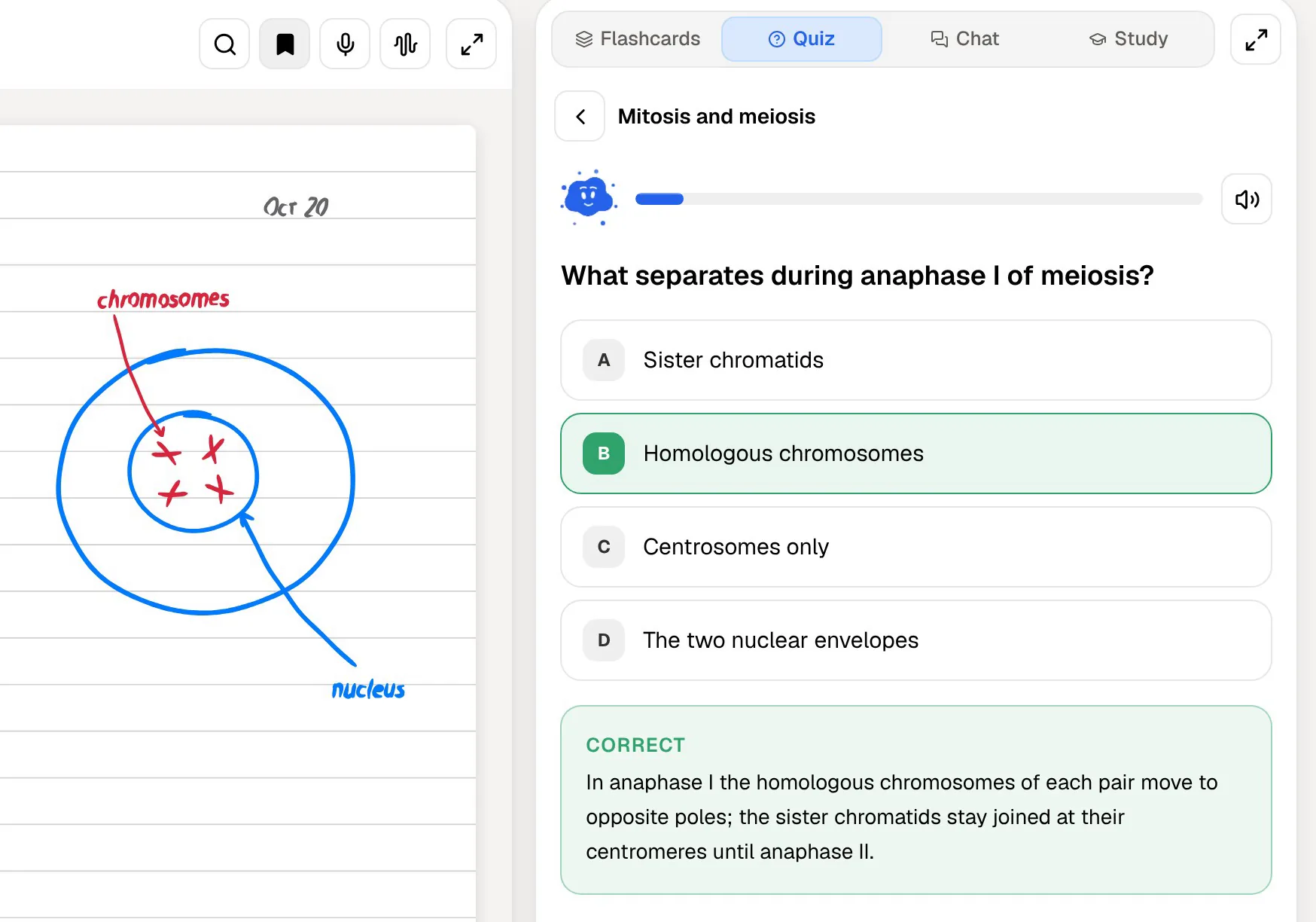
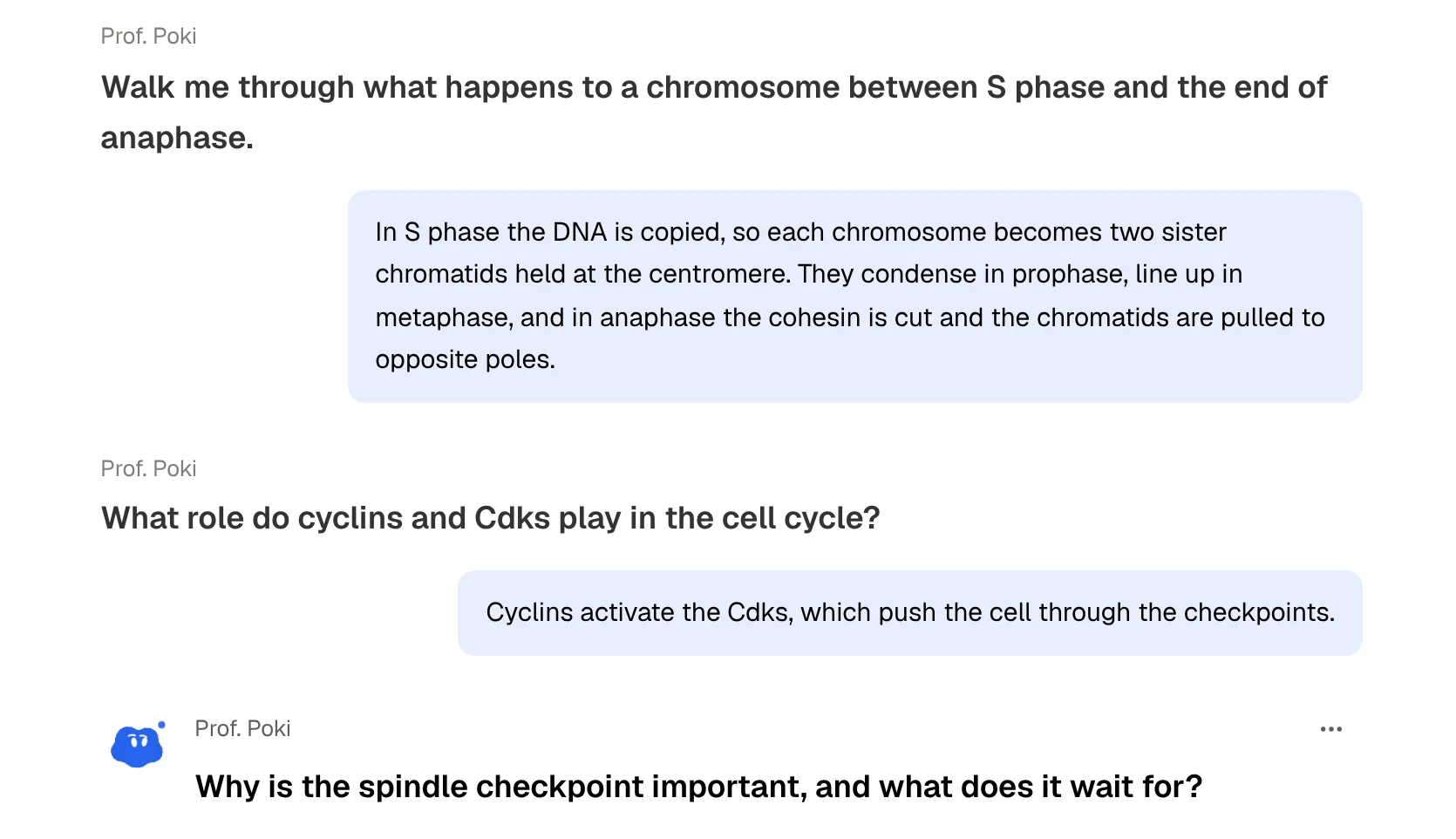
PocketNote's quizzes explain every option: why the right answer is right and why each wrong one is wrong. Its oral exam goes a step further than a quiz. Prof. Poki asks a question out loud or in text, listens to your explanation, and keeps probing until it holds together; if your answer skips a step, expect a follow-up about it. Poki, the assistant, answers questions from your material with citations, so you can see which lecture or page an answer came from. Gizmo's AI Tutor and Poki overlap in spirit. Poki's particular habits are showing its steps, such as searching your notes or reading a particular lecture, and citing its source.
Planning the run-up to an exam
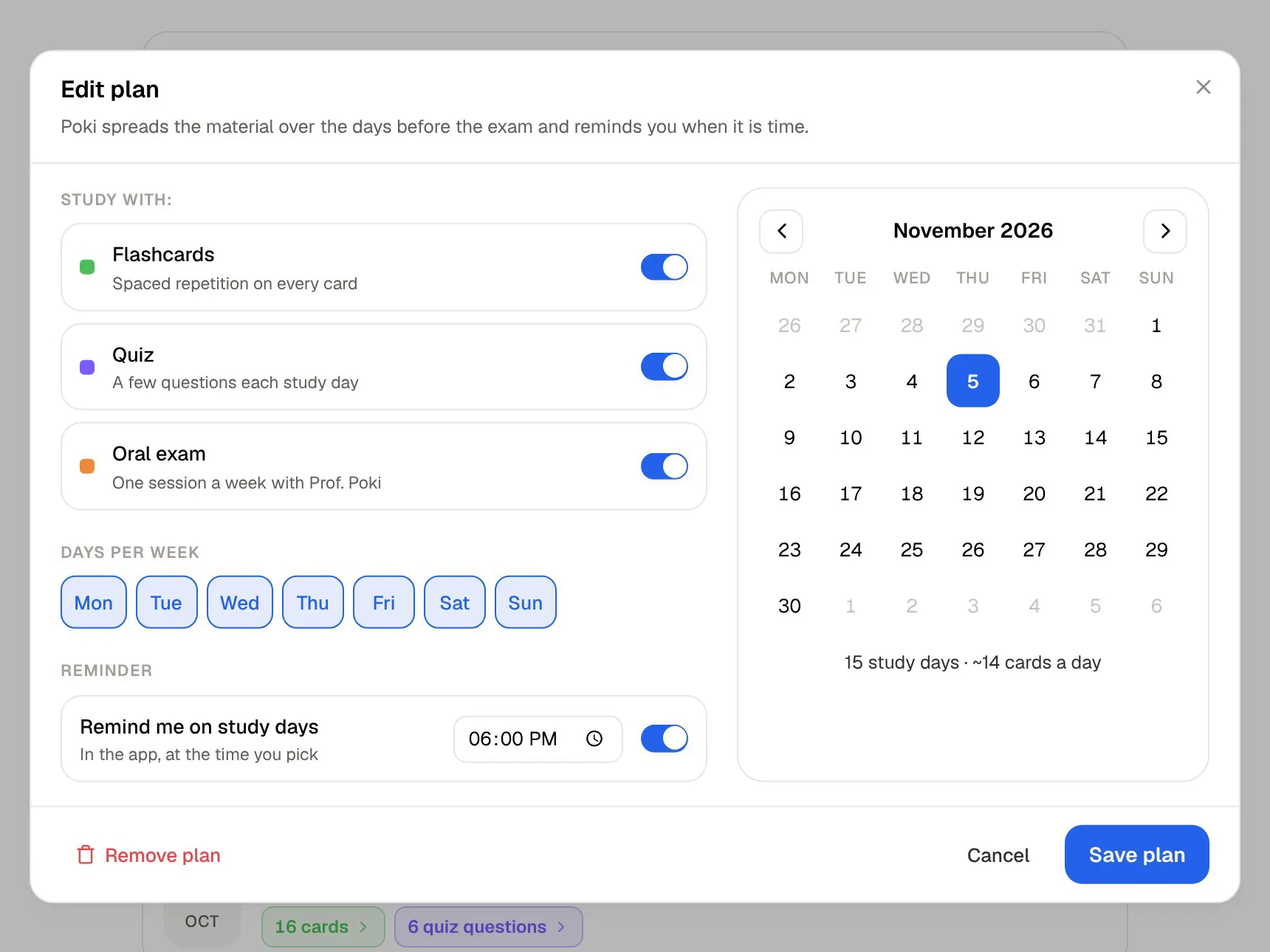
Gizmo's structure is daily: hearts, XP and leagues reward showing up. PocketNote's structure is aimed at a date. Set when the exam is, and the study plan lays out what to cover each day, reminds you, and tracks memory, applied and mastery scores across flashcards, quizzes, the oral exam and the other tools.
A plan turns a vague pile of material into a list for each day, which is easier to start on a tired evening. If you tend to cram, a plan that spreads the work across weeks can help, and spaced repetition works best when reviews are spread out. If you need a reason to open the app at all, Gizmo's game loop may do more for you.
The two kinds of scheduling also work at different scales. The study plan decides what to cover on which day; spaced repetition decides which cards to show you again. PocketNote runs both from the same material.
Where Gizmo is the better choice
Gizmo is a good app for a particular kind of motivation. If you have bounced off calmer study apps before, it may be the one you actually open. It is the right pick when:
- You're motivated by games: XP, leagues, leaderboards and playing friends in Gizmo Live.
- Your decks already live in Quizlet or Anki and you want them in one place quickly.
- You want public flashcards made by other students to start from.
- You prefer app-checked quiz questions to rating yourself.
- You face many small quizzes rather than one big exam, so daily drilling matters more than a long plan.
- You run quick quiz battles with classmates using a game code; PocketNote isn't a classroom game host.
The verdict
Which one should you pick?
Pick PocketNote if…
- You would rather rate cards yourself in a calmer review than play for hearts and XP.
- You want quizzes that explain every option and an oral exam that makes you explain.
- You want a study plan to your exam date with reminders and mastery scores.
- You take notes on iPad with Apple Pencil, or want answers cited to your files.
Pick Gizmo if…
- You stay consistent when there are hearts, XP, leagues and friends involved.
- Your decks are in Quizlet or Anki and you want them imported directly.
- You want public flashcards and multiplayer quizzes with a game code.
Try it yourself
See it with your own notes
PocketNote is built for steady study toward a date rather than a daily score. It turns your lectures, PDFs and handwritten notes into flashcards rated Again, Hard, Good or Easy, quizzes that explain each answer and an oral exam with Prof. Poki, then plans them to your exam.
It is free to start on the web and on iPhone and iPad. If Gizmo's game loop keeps you drilling every day, keep it for that, and try PocketNote when you need to understand a lecture rather than race through it.
Frequently asked questions
Sources
Keep reading