
Gimkit is a live quiz game for classrooms. A teacher builds a set of questions, called a kit, and hosts a game; students join on their own devices and answer questions to win in one of several game modes, such as Capture the Flag, Fishtopia or Farmchain. Its help centre gives modes labels such as Calming, Strategic or Collaborative, so a teacher can match the game to the lesson.
PocketNote is something else: a study app one student uses on their own course material. It doesn't host class games. So this is less a contest between two rivals than a practical question many students run into: Gimkit may be how your class reviews, but revision at home, on your own, needs something else.
This page explains what each tool is for, where Gimkit is clearly the right choice, and how the two fit into the same term. Gimkit details come from its help centre, and PocketNote's from its own feature list, both checked in November 2026.
At a glance
PocketNote vs Gimkit
| Feature | PocketNote | Gimkit |
|---|---|---|
| Who runs it | You, on your own material | A teacher hosts; students join the game |
| Main format | Flashcards, quizzes, oral exam, study plan | Live quiz games in several modes |
| Where questions come from | Generated from your notes, files and lectures | A kit the teacher writes; students can submit via KitCollab |
| Playing alone | Every tool is self-paced | Assignments (Pro) let students play a kit on their own time |
| Spaced repetition | Again / Hard / Good / Easy scheduling | Not described in its help centre |
| Feedback | Reason given for right and wrong options | In-game rewards; reports for the teacher |
| Live multiplayer | Not offered | Yes, the core of the product |
| Class roster and reports | Not offered (not a classroom tool) | Yes, included in free Basic |
| Price | Free to start; Basic and Plus plans | Basic free; Pro $14.99 a month or $59.88 a year |
Checked against Gimkit's help centre and PocketNote's own site, November 2026. Plans and features change; confirm current details with each product.
Two tools for two different jobs
Gimkit's job is to get a room of students answering questions with energy. The teacher controls the kit, the mode and the timing. In Classic mode, correct answers earn in-game money that players spend on upgrades, which turns a review session into a light strategy game.
PocketNote's job is to help one student learn their own material. There is no host, no join code and no leaderboard. You import or record what your course covers, and it generates flashcards, quizzes, summaries and a study plan from it, with an assistant, Poki, that answers questions from your files.
Comparing them side by side is still useful, because students often meet Gimkit in class and then look for a way to carry that practice home. Teachers have a related concern: what students should be doing between class games.
The audiences overlap less than the comparison suggests. Gimkit's free Basic plan needs an educator account, and its help centre is written for teachers: hosting, classes, assignments and group licences. PocketNote is written for the student at a desk with a pile of notes and a test date.
What Gimkit does well
It makes review social. A live game gives everyone a reason to answer, and the range of modes lets a teacher pick something calm before a test or something lively at the end of a unit.
It is cheap to start. Gimkit Basic is free with an educator account and includes featured game modes with as many students as the teacher wants, class rostering and reports. Basic rotates a small set of free modes, about three at a time.
Students can contribute questions. With KitCollab, a teacher lets students, other teachers or both submit questions to a kit, in real time or asynchronously, and approves the ones that go in. Writing a good question for classmates is a useful exercise in itself. Students also earn cosmetic items through gameplay, which gives regular players something to work towards across games.
Pro adds homework. Gimkit Pro opens up every game mode and adds assignments, so a teacher can set a kit for students to play individually on their own time. Pro also allows images and audio in questions.
What a class game leaves out of revision
A Gimkit session is a snapshot. It tests the questions in that kit, on that day, and the questions were chosen by your teacher for the whole class. That works well for shared review, and less well for the specific topics you personally keep forgetting.
Gimkit's help centre doesn't describe spaced repetition, so nothing brings a question you missed back next week unless your teacher reuses the kit. And the game is built around rounds and rewards, which is a different setting from explaining a concept in a written exam answer.
None of that is a flaw in Gimkit. It was built for a classroom, and it's good at that. It just means the work between class games has to happen somewhere else, and that's the part PocketNote is designed for.
There is also the matter of what counts as practice. In a live game a lucky guess earns the same reward as a confident answer, and the game moves straight on to the next question. At home you can slow down: work out why the right answer is right, and check it against your notes.
Revision at home with PocketNote
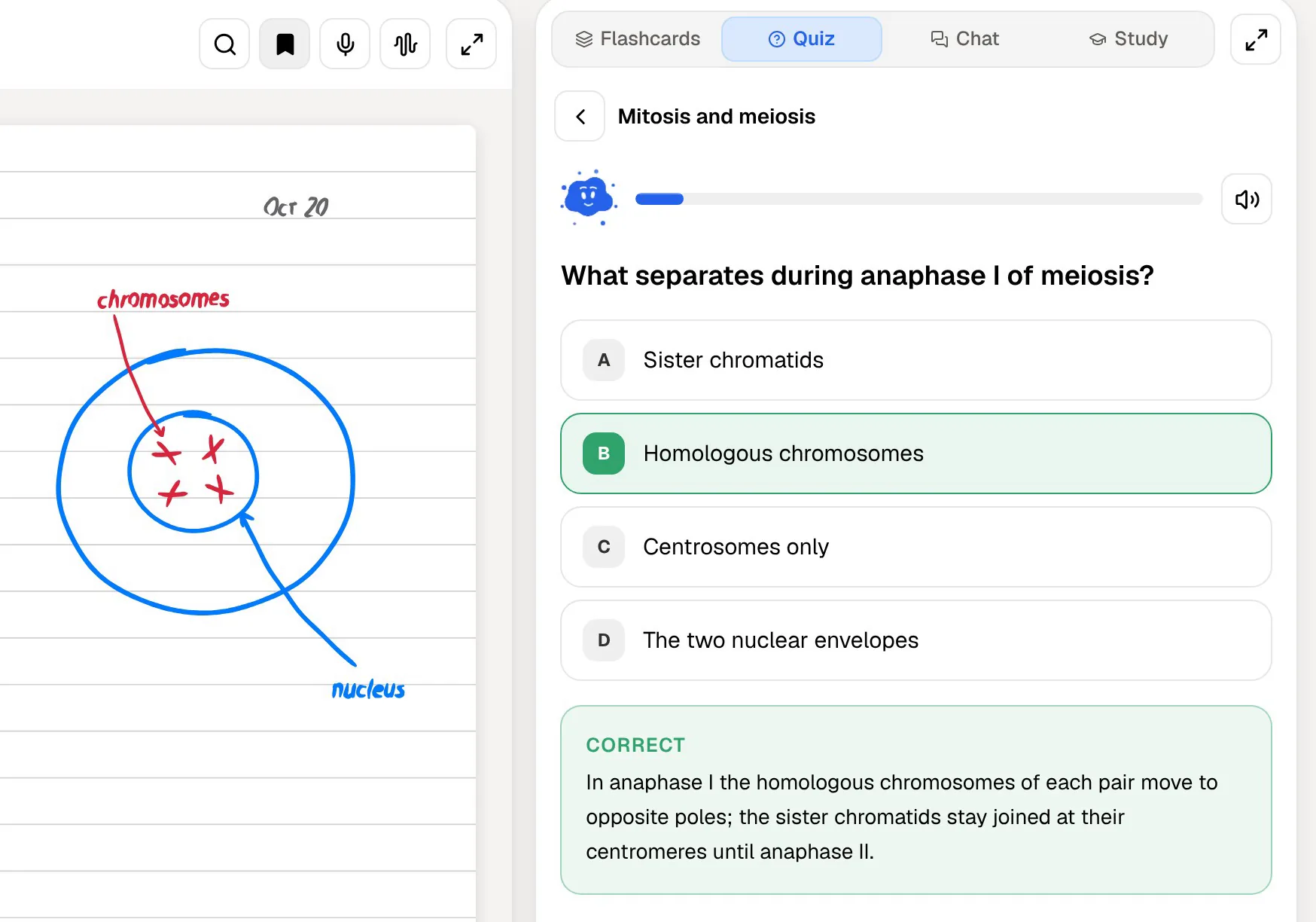
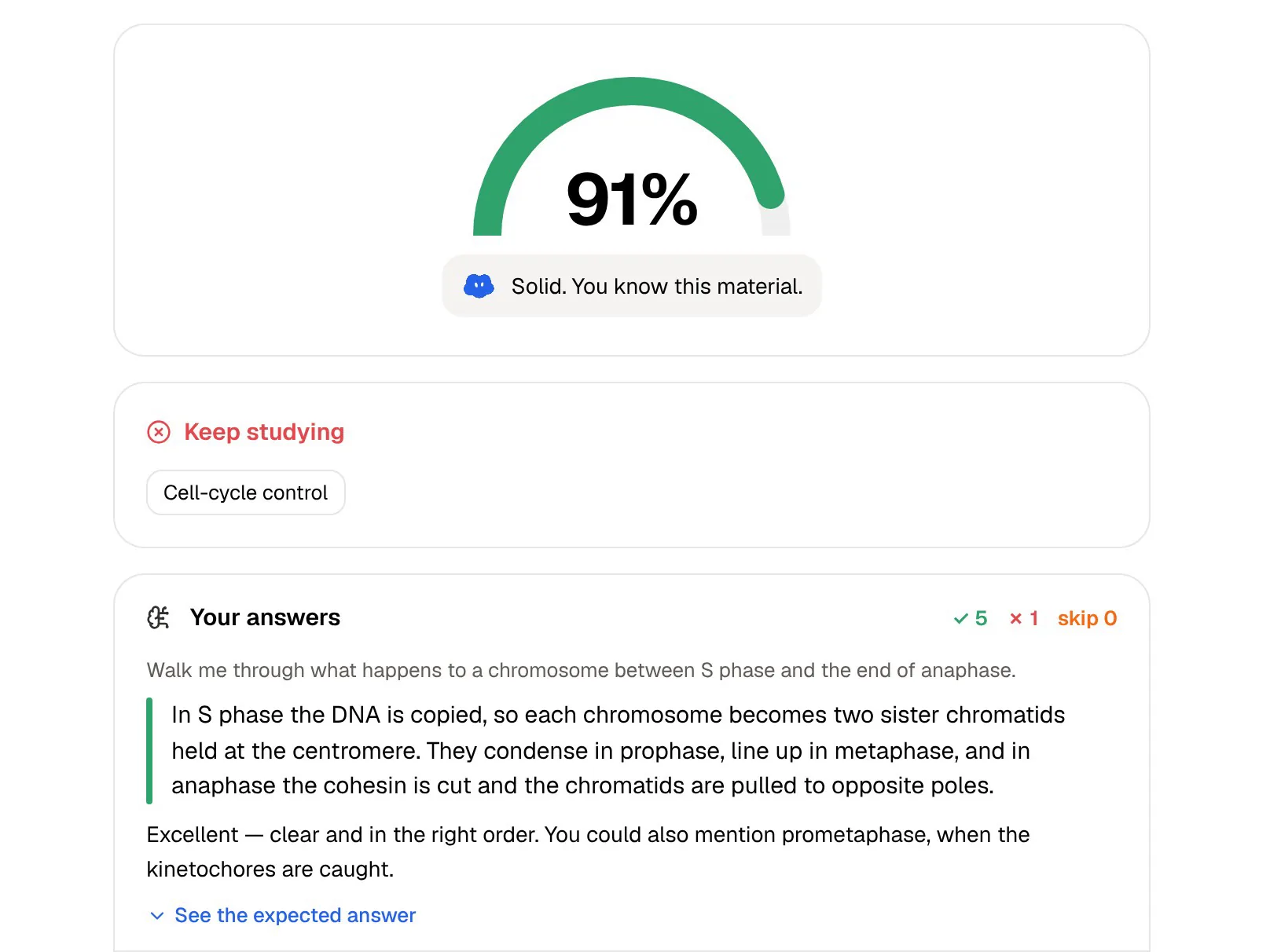
Say your teacher ran a Gimkit on cell division and you scored badly on the meiosis questions. In PocketNote you import the class handout or the textbook chapter as a PDF, or the slides your teacher shared saved as a PDF, and generate a quiz. Each question comes with the reason, including why each wrong option is wrong, so you can see exactly which idea you mixed up.
Then you make flashcards from the same material. You rate each card Again, Hard, Good or Easy, and the ones you miss come back sooner. If you're stuck on something, ask Poki; it answers from the handout and cites where the answer came from, so you're not relying on a guess from the open web. You can also ask Poki to write a short explanation into your notes from the chat, so the fix sits next to the lecture material when you come back to it.
If you learn by talking, the oral exam has Prof. Poki ask you questions out loud or in text and follow up until you can explain the topic in your own words. It is practice at being questioned, much as a teacher might check your understanding one to one.
Audio helps if you revise on the move. PocketNote can turn the same handout into a podcast-style audio review with captions that follow the voices, and into a mind map that lays out how the topics connect. Both come from the same source as your cards, so everything stays tied to the class material.

Scores, rewards and mastery
Gimkit's feedback loop is the game itself: in-game money, upgrades and a leaderboard during the round. Teachers get reports afterwards, which is useful for deciding what to reteach. The report and a study app fit together: the teacher sees which questions the class missed, and each student can take those topics into their own revision.
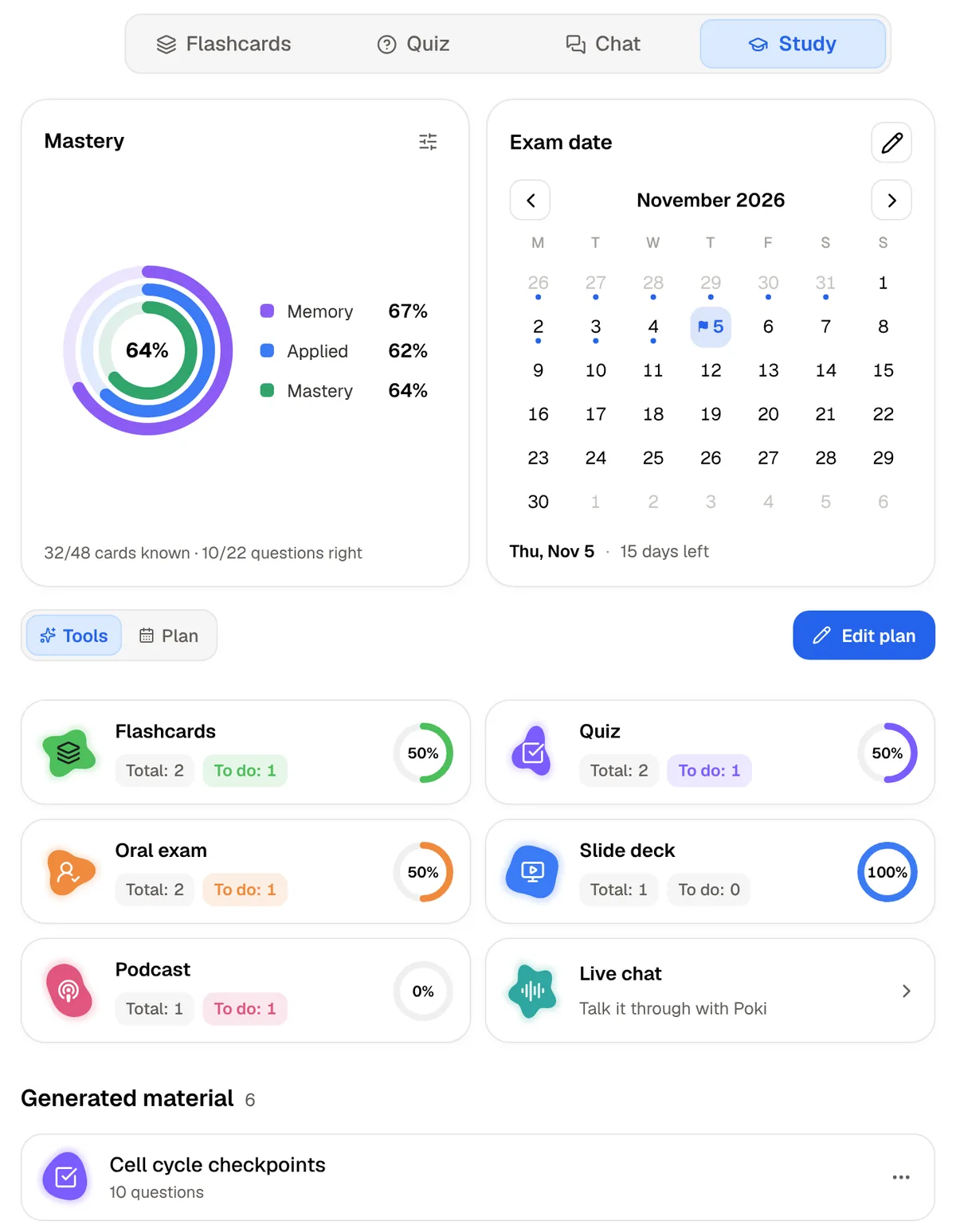
PocketNote's feedback is slower and more personal. The study plan shows a mastery ring split into memory, applied and mastery, and progress for each tool you've used, from flashcards and quizzes to the oral exam. Set your test date and it plans what to cover each day and reminds you.
It isn't exciting the way a live game is. What it does is tell you, specifically, what you still don't know, which is the information you need the week before a test.
Where Gimkit is the better choice
Gimkit is the right tool whenever the goal is a group activity, and in those cases PocketNote isn't a substitute at all.
- You're a teacher running whole-class review, a warm-up or an end-of-unit game. PocketNote is not a classroom game host.
- You want everyone answering at once and a report on the class afterwards.
- Your class needs a reason to engage. The modes and rewards make review feel like play.
- You're setting homework practice on a fixed set of questions; Gimkit Pro assignments do exactly that.
- Your students should write the questions. KitCollab turns question-writing into a class activity.
- You want a calm, short review. Modes carry labels such as Calming, so it is easy to find one that suits a quiet start to a lesson.
Using both in the same term
For a student, the simplest pattern is this: play the class game, notice what you got wrong, and take that topic home. Put the handout, the slides or your own notes into PocketNote and work on that topic until the flashcards stop coming back as Again.
For a teacher, KitCollab is a natural bridge. A student who has worked through the material at home has better questions to submit, and the class game then tests the whole group on the shared material.
Put simply, Gimkit is where a class practises together and PocketNote is where one student studies their own material. Treating them as alternatives misses what each one is for.
A workable routine for a unit test: play the class Gimkit early in the week to see where you stand, spend twenty minutes a day in PocketNote on your weak topics, and use the oral exam the night before to check you can explain the main ideas without notes.
What each one costs
Students don't pay to play Gimkit; the teacher's account decides what is available. Gimkit Basic is free. At the time of writing (November 2026), Gimkit's help centre lists Pro at $14.99 billed monthly or $59.88 billed once a year, and notes that the annual plan works out cheaper if you use Gimkit for four or more months of the year. Group licences for departments and schools are also offered.
PocketNote is free to start. Its paid plans are Basic, which adds live voice, premium models and connectors, and Plus, which adds unlimited notebooks and apps, the longest podcasts and all models. See pocketnote.app for current plans.
For a student, the cheapest setup is a teacher's free Gimkit class plus PocketNote's free start. Neither asks you to pay anything to begin.
The verdict
Which one should you pick?
Pick PocketNote if…
- You're a student revising alone and want study material made from your own handouts, slides and notes.
- You want missed topics to come back on a spaced-repetition schedule until you know them.
- You want to understand why an answer is wrong, not just see the score.
- You have a test date and want a day-by-day plan with reminders.
Pick Gimkit if…
- You're a teacher who wants lively whole-class review with reports afterwards.
- You want students to play a kit as homework using Gimkit Pro assignments.
- You want students to write questions together with KitCollab.
Try it yourself
See it with your own notes
PocketNote is a study app for the hours outside class. Import a handout, a textbook PDF, a YouTube lesson or your own notes, and it turns them into flashcards with spaced repetition, quizzes that explain every answer, an oral exam with Prof. Poki and a study plan built around your test date.
It doesn't replace your teacher's class games; it's what you use afterwards, in a browser at pocketnote.app or on iPhone and iPad. It's free to start.
Frequently asked questions
Sources
Keep reading