
If you are looking for Quizizz, it has a new name. In June 2025 Quizizz rebranded as Wayground. The old quizizz.com address now takes you to wayground.com, and joinmyquiz.com takes students to Wayground's join page. The company said the new name reflects a platform that has grown from a quiz tool into a broader learning platform supported by AI.
Wayground is built for teachers. It runs quizzes as games or as serious tests, along with interactive lessons, videos and auto-graded homework, and its AI generates activities from a document or a topic. Students mostly meet it when a teacher assigns something, though it now also lets students make their own flashcard decks, if their school allows it.
PocketNote is a personal AI study app: you bring your own lectures, PDFs and notes, and Poki, its AI, turns them into flashcards with spaced repetition, quizzes that explain every answer, an oral exam and an exam-date study plan. It doesn't host class quizzes or assign homework. This comparison is about the part that happens without a teacher: studying on your own, as checked in November 2026.
At a glance
PocketNote vs Wayground (Quizizz)
| Feature | PocketNote | Wayground (Quizizz) |
|---|---|---|
| Who sets it up | You, from your own material | Mostly your teacher |
| Class games and assigned homework | Not offered | Yes: game or exam mode, due dates, reports |
| Make flashcards from notes or a PDF | Yes, generated from your files | Yes, on the student dashboard if your school allows it |
| Flashcard review | Spaced repetition: Again, Hard, Good, Easy | I know / I'm learning, with a confidence score |
| Quizzes | Generated, every option explained | Teacher-set, plus quiz versions of flashcard sets |
| Lecture recording | Record, transcribe and summarise | Not advertised |
| Video | YouTube links with transcripts | Teacher videos with built-in questions |
| Planning your revision | Exam-date study plan with reminders | Due dates set by teachers |
| Languages | Study material in 50+ languages | Translation of assessments and slides |
| Price model | Free to start; Basic and Plus plans | Free Basic for teachers; paid Super and school plans |
Checked against each product's own website and help centre, November 2026. Plans and features change; confirm current details there.
Quizizz is now Wayground, and it does more than quizzes
The rebrand was announced in June 2025. For students the practical change was small: a new name and web address, with the old addresses forwarding to the new ones. The site footer still names the company as Quizizz Inc., doing business as Wayground, so if an older guide or a teacher says Quizizz, it means this platform.
What has grown is the scope. Any assessment can run as a competitive game or as a serious exam. Presentations can include quick checks and run live or be sent to students who missed the lesson. Teachers can add questions to their own or online videos, with AI suggesting where to pause and what to ask. Homework is auto-graded with due dates, and the AI tools also generate lesson plans, worksheets and rubrics for teachers.
The June 2025 launch also introduced curriculum alignment, lesson bundles and an AI generation hub that turns a single file into several interactive formats, which tells you who the platform is designed around: the teacher planning a unit.
Accessibility is built in: assessments can be read aloud, shown in a dyslexia-friendly font, translated or shown in a focus mode, and there are integrity tools such as a lockdown mode and tab-switching alerts for tests. Teachers see reports, and schools can compare results across classes and standards.
What students get from Wayground on their own
Most of Wayground is teacher-led, but students have a growing set of self-study tools built around flashcards. After a class session, you can open the Activity tab, find the completed session and turn it into flashcards. In Practice mode you flip each card and mark it "I know" or "I'm learning"; cards you are still learning keep coming back until you know them all, and a confidence score at the end shows how you did, with a button to review the weak cards. Pre-read mode lets you flip through a set before a new topic, and you can try a quiz version of a flashcard set afterwards.
Students can also make their own decks. A Create Flashcards option on the student dashboard lets you type terms and definitions, or upload notes, a study guide or a PDF and have it converted into a deck saved to your account. School admins can switch student creation off, so whether you see it depends on your school.
What Wayground doesn't describe is a review schedule across days and weeks. Practice mode repeats the cards you are learning until you get them; it isn't presented as spaced repetition that brings a card back next week, just before you would forget it.
Where class quizzes stop and exam prep starts
A quiz your teacher sets tests what the teacher chose, at a time the teacher chose. That is valuable, but final exams cover a whole course, and the material you need is spread across lectures, readings, slides and your own notes. Revising well means testing yourself on all of it, focusing on what you keep getting wrong, and spacing that practice out over weeks.
Wayground's student tools help with part of this, especially flashcards on a class's material. They don't advertise recording a lecture, answering your questions from your own course material, or planning your revision around an exam date. That is the gap PocketNote is designed for.
There is also the question of whose material it is. Teacher-made sets cover what the teacher thought worth testing. Your own notes hold what you found hard, the example that made it click and the question you wrote in the margin. It makes sense to study from both.
Self-study in PocketNote, from the same unit
Take a unit on cell division. Put everything in one PocketNote notebook: the slides as a PDF, your teacher's handout as a Word file, the lecture recorded in the app (you get a transcript, a summary and notes), and the YouTube video from the homework, which brings its transcript with it.
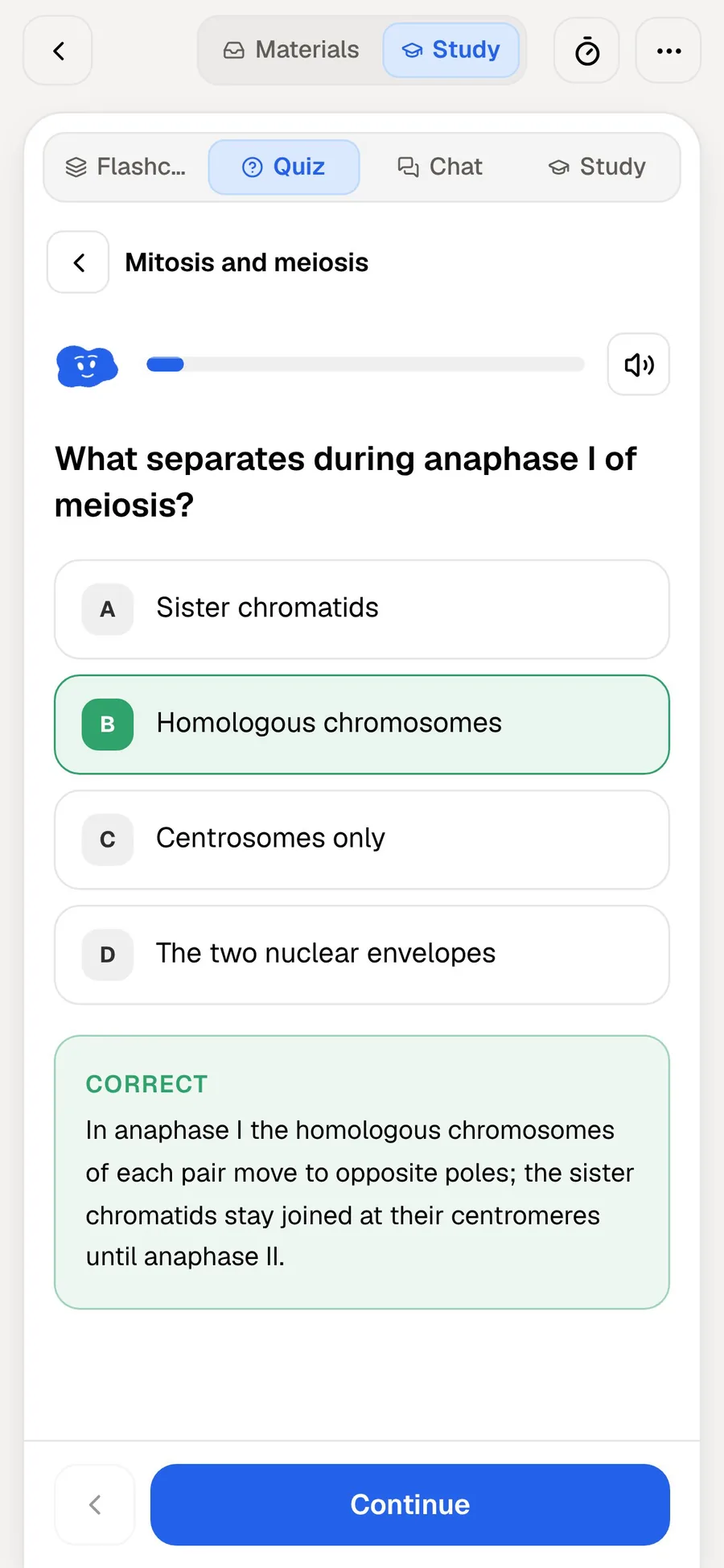
Ask Poki anything about it, such as "what's the difference between mitosis and meiosis? Put it in a table", and it answers from your notes with citations rather than from the open web. Then generate a quiz. Every question comes with an explanation of why the right answer is right and why each wrong option is wrong, so a mistake teaches you something instead of just costing a point.
If you want to see the shape of the unit first, generate a mind map or written notes. For the bus, generate an audio review: a podcast-style episode with captions that follow the voices.
If you take notes by hand on iPad, they can go in too. PocketNote has handwritten notebooks for Apple Pencil with lined, grid and Cornell templates, and tape to hide answers while you test yourself. Poki can read your handwriting when you ask about a page, and the lasso turns a handwritten section into text.

Spaced review vs known and still learning
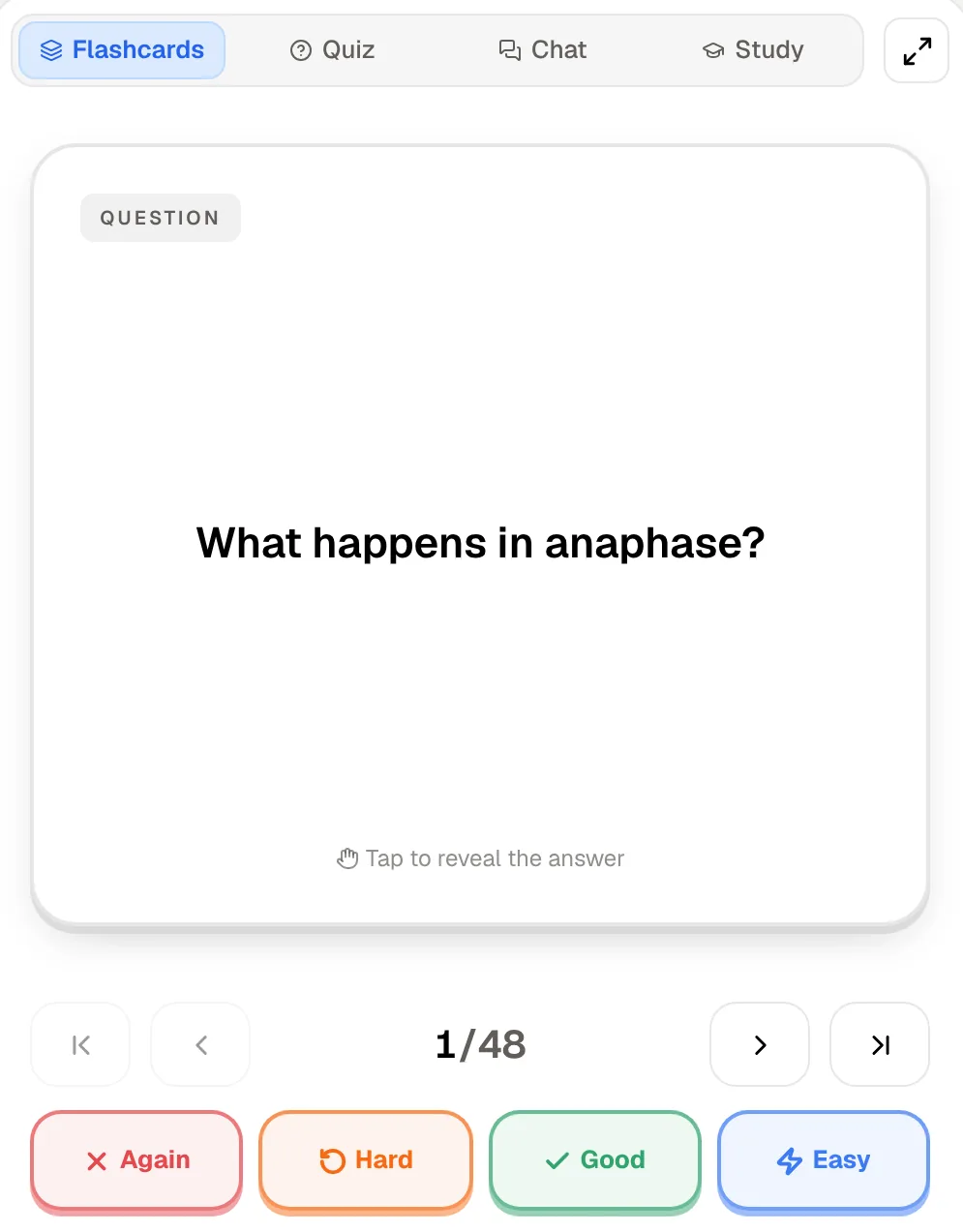
Wayground's practice mode sorts cards into "I know" and "I'm learning" within a session. PocketNote's flashcards use spaced repetition across days: rate each card Again, Hard, Good or Easy, and each comes back at the point you are about to forget it. A card you knew well waits longer; one you missed comes back soon. Spacing reviews out like this is one of the best-established findings about how memory works.
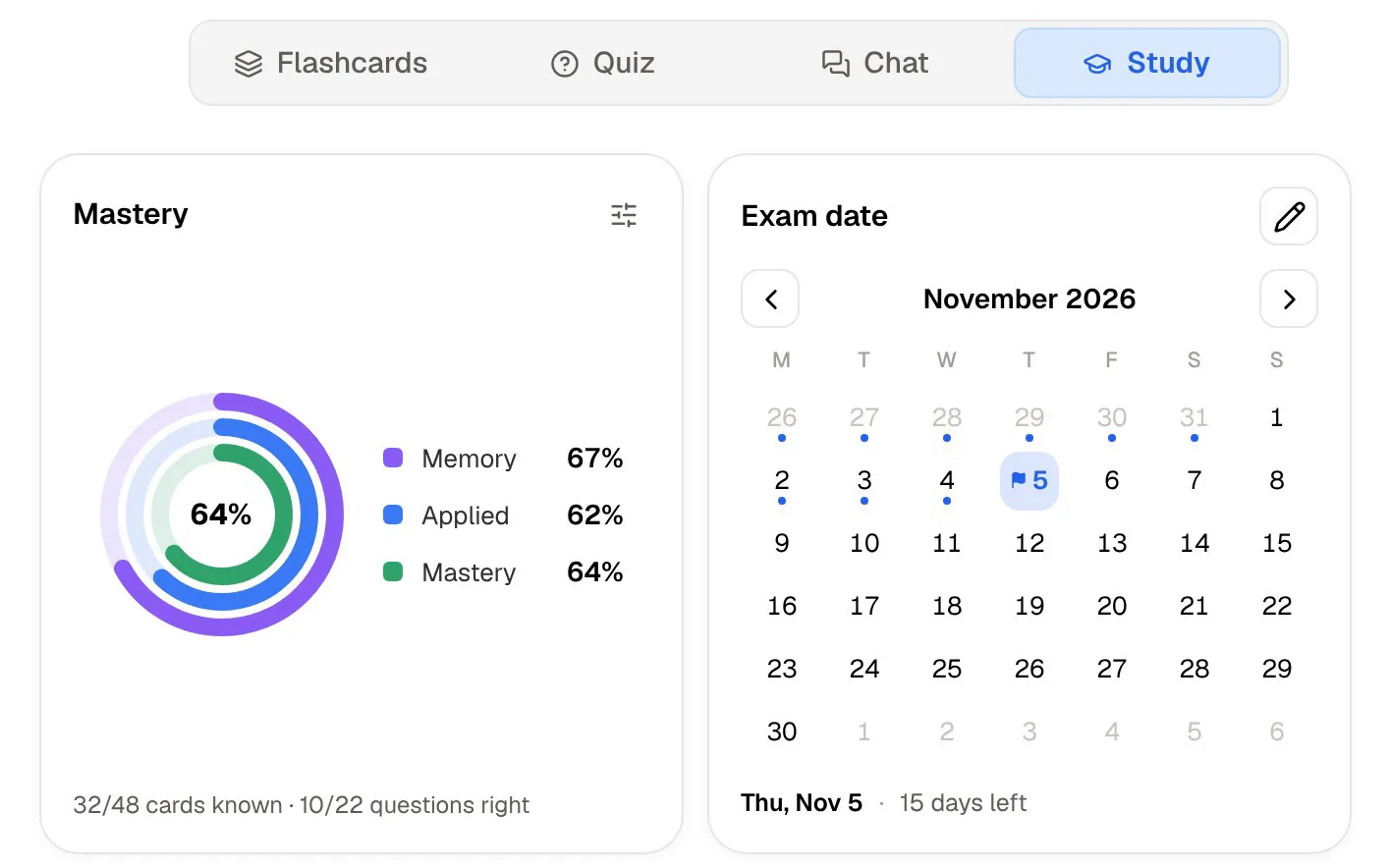
Set an exam date and PocketNote's study plan decides what to cover each day, reminds you, and tracks memory, applied and mastery scores across flashcards, quizzes, the oral exam and the rest. In the oral exam, Prof. Poki asks you questions out loud or in text and keeps probing until you can explain the topic, which is good practice for written answers as well as spoken ones.
In practice this means short daily sessions rather than one long night before the test. The plan tells you what today's session covers, so you don't spend the first ten minutes deciding where to start.
What each costs
Wayground's plans are sold to teachers and schools. Its plans page describes Basic as free for every teacher, forever, with assessments, presentations, flashcards, AI and accommodations included and some limits on question types and storage. A paid individual plan, Super, adds more, and schools and districts request a quote for a site-wide plan. Students take part in what their teachers set up.
Since Wayground's plans page lists no plan for students to buy, and PocketNote is free to start, a student can use both before deciding whether anything is worth paying for.
PocketNote is free to start, with paid Basic and Plus plans; Basic adds live voice, premium AI models and connectors, and Plus adds unlimited notebooks and apps and all models. See pocketnote.app for current plans.
Where Wayground is the better choice
Wayground is the right tool, and PocketNote isn't, when:
- Your teacher runs quizzes, lessons or homework on it. You will use Wayground anyway, and you should.
- You need accessibility features in assessments. Read-aloud, a dyslexia-friendly font and translation are built in.
- You are a teacher. Game and exam modes, interactive videos, auto-grading and reports are built for running a class; PocketNote doesn't host class activities.
- You want to revisit a class session. Turning a completed session into flashcards keeps your practice tied to exactly what was taught.
- You want a quick deck from a handout. If your school allows it, the student Create Flashcards option converts notes or a PDF into a deck.
Using Wayground and PocketNote together
You may not get to choose: if your teacher uses Wayground, you will use it. The useful habit is what you do afterwards. When a Wayground quiz or homework shows you missed something, take that topic into PocketNote with the slides and notes behind it, and let the flashcards and study plan carry it through to the exam.
For quick vocabulary practice on a class's set, Wayground's flashcards are fine. For a whole course, and especially anything with lectures and long readings, PocketNote keeps it in one place with a review schedule and a plan.
One more tip: if your teacher's quiz is based on a handout or slide PDF you have, import those into PocketNote as well, so your flashcards cover the same ground as the class quiz plus whatever your lectures added.
The verdict
Which one should you pick?
Pick PocketNote if…
- You are revising on your own for an exam, across lectures, readings and notes.
- You want flashcards with spaced repetition and a study plan that runs to your exam date.
- You want every quiz answer explained, and an oral exam to practise explaining.
- You want answers to your questions from your own course material, with citations.
Pick Wayground (Quizizz) if…
- Your teacher runs quizzes, lessons or homework on Wayground (formerly Quizizz).
- You want quick flashcard practice on the sets from your class sessions.
- You are a teacher who needs game and exam modes, interactive videos, auto-grading and reports.
Try it yourself
See it with your own notes
PocketNote is a personal AI study app for the web, iPhone and iPad. Import PDFs, Word files, audio, YouTube or web links, record a lecture or write notes by hand, and Poki turns them into flashcards with spaced repetition, quizzes with explanations, an oral exam, mind maps and audio reviews, with an exam-date study plan on top.
It doesn't run class quizzes. It is free to start, and it is where you can take the topics a Wayground quiz showed you haven't nailed yet.
Frequently asked questions
Sources
Keep reading