
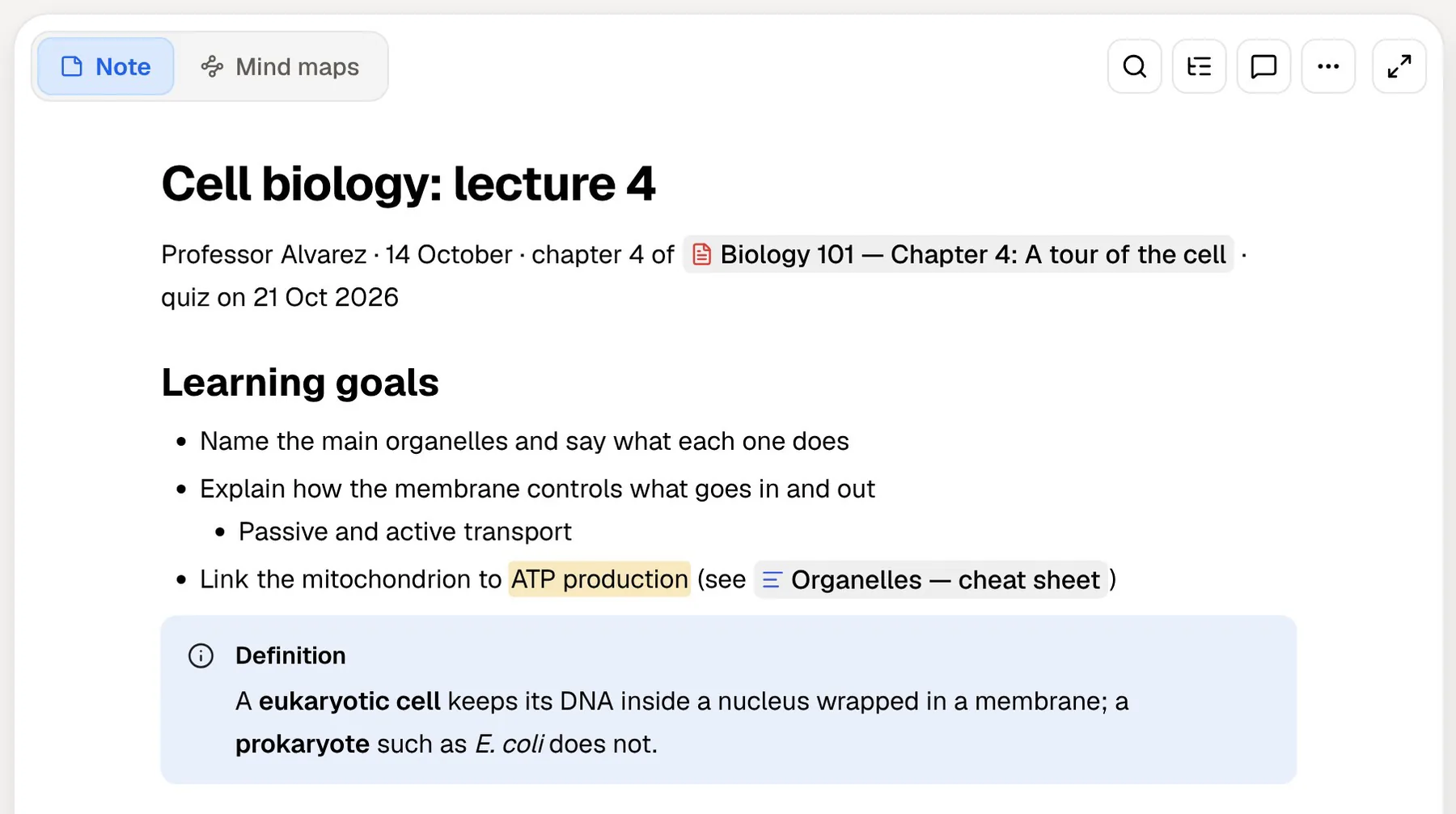
Logseq is a free, open-source outliner that keeps your notes as Markdown or Org-mode files. It describes itself as privacy-first, and it stands out among note apps for one feature students care about: flashcards are built in. Tag any block with #card and it joins your review queue.
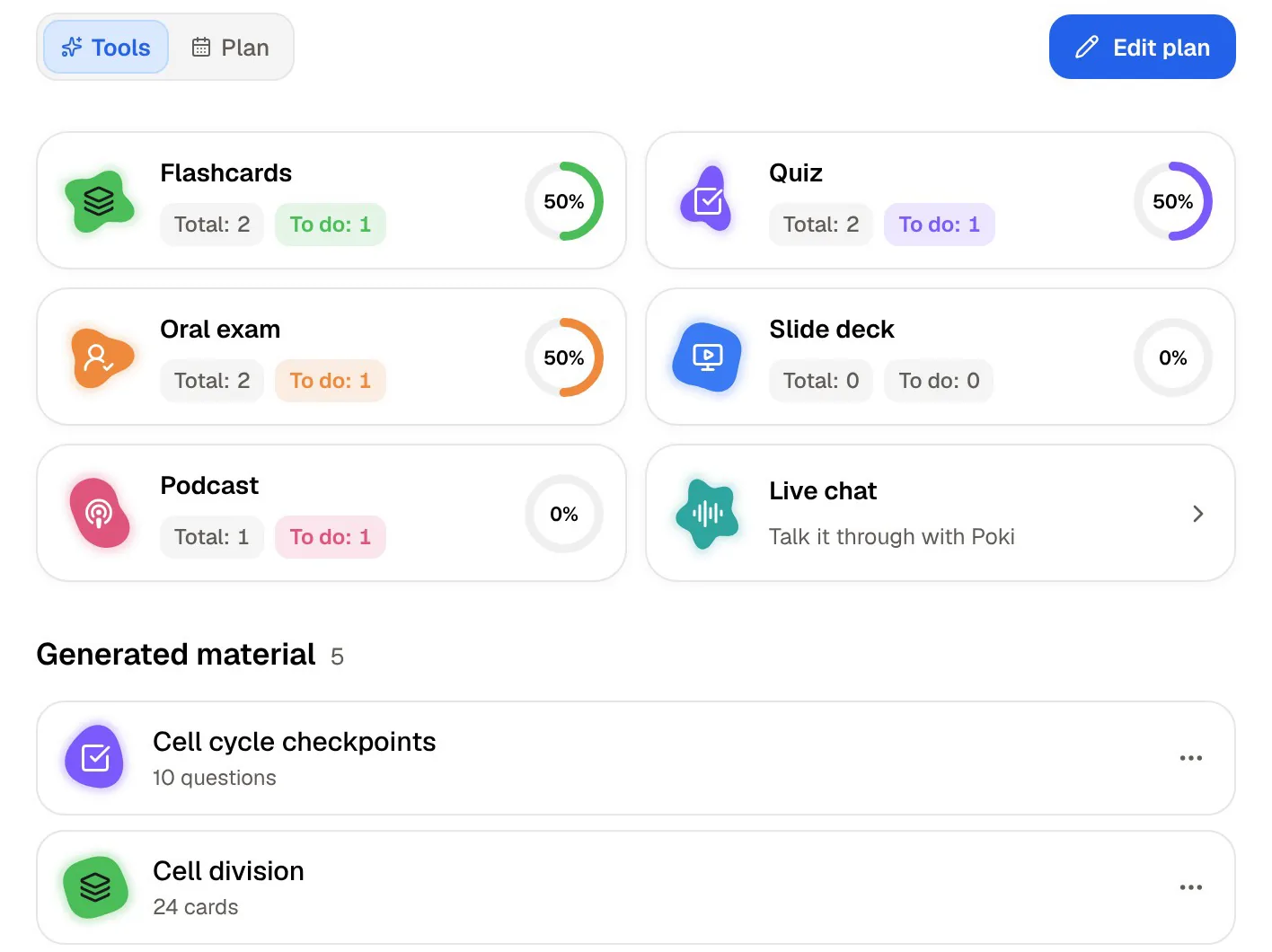
PocketNote is an AI study app that also makes flashcards, from the other end. Instead of you writing each card into your notes, it generates cards (plus quizzes, mind maps, audio reviews and a study plan) from your lecture PDFs, recordings, YouTube lectures and notes. Poki, the app's assistant, answers from the same material and cites it.
So the honest comparison here is about method, not about whether flashcards exist. Below: how cards work in each app, reading and annotating PDFs, what Logseq's newer database version means right now, how to bring Logseq pages into PocketNote, and where Logseq is the better pick.
At a glance
PocketNote vs Logseq
| Feature | PocketNote | Logseq |
|---|---|---|
| Built for | Studying your course material | Outlining and linked knowledge |
| Price | Free to start; paid Basic and Plus | Free and open source |
| Where notes live | Your account, synced across devices | Markdown or Org-mode files on your device |
| Flashcards | Generated from your material | Written by you with #card |
| Quizzes and oral exam | Yes | Not advertised |
| PDF annotation | Highlight, write and draw on the page | Built in |
| Finding papers | arXiv and SSRN search in the app | Zotero integration |
| AI assistant | Poki answers from your sources, cited | Not in the core feature list |
| Visual canvas | Infinite whiteboard; generated mind maps | Whiteboards built on tldraw |
| Sync | Included with your account | Logseq Sync, a paid beta |
| Apps | Web, iPhone, iPad | Desktop (incl. Linux), iOS, Android |
Checked against Logseq's documentation and PocketNote's site, November 2026. Plans and features change; confirm current details there.
What Logseq gets right for students
Logseq's README describes tools for knowledge management, collaboration, PDF annotation and task management, with Markdown and Org-mode files and a growing ecosystem of plugins and themes. Everything is an outline: each line is a block you can link, reference, tag or turn into a task, and a journal page for each day gives you a default place to write.
It also has extras aimed at academic work. A built-in Zotero integration imports items from your Zotero library as Logseq pages, either one at a time or all at once. Whiteboards, built on a fork of tldraw, let you lay out blocks, shapes, drawings and connectors on a canvas. Mobile apps are available, and the desktop app is a free download.
If you like owning plain files and thinking in outlines, it's a very capable free tool. The outline structure also matches how lecture notes tend to come out anyway: a topic, then points, then sub-points.
Ownership is the other draw. Logseq's README stresses privacy, longevity and user control, and because the file-based app stores ordinary Markdown or Org-mode files, your notes remain readable in any text editor whether or not you keep using Logseq.
How flashcards work in Logseq
Logseq's documentation is straightforward. Add #card (or [[card]]) to any block to make it a card, or right-click the bullet and choose Make a Flashcard. The block's children are the answer, and clozes let you hide part of a sentence. You review everything from Flashcards in the left sidebar, or pull a subset onto a page with a /cards query, for example only the cards linked to one course.
Scheduling data is stored on the block itself as properties such as the last interval, the number of repeats, the ease factor and the next review date, and the documentation links to SuperMemo's SM5 algorithm. For a student who writes good questions while taking notes, it's a clean, free workflow with no extra app.
The catch is the same as with any write-your-own system: cards only exist if you make them, and making good ones takes time during a busy term. Readings you didn't get to, or a recorded lecture you never wrote up, produce no cards at all.
There's a quieter benefit, though: writing a card forces you to decide what the important fact is, and generating your own questions is a well-known study technique in its own right. That's a good reason to keep writing cards for your core topics even if you use a generator for the rest.
How flashcards work in PocketNote
PocketNote makes the cards from your material, so the starting point is the source rather than a blank block. Import a lecture PDF, a recording, a YouTube lecture or your own notes and generate a deck; then review by rating each card Again, Hard, Good or Easy, and each comes back when you're about to forget it.
Because the cards come from a source, the source stays next to them. With a video lesson, for example, the timed transcript sits beside the card, so you can check the context of an answer straight away. Your handwritten iPad notes work as sources too.
Cards and other study material can be produced in more than 50 languages, from source material in another language if you like, which helps if you're studying in a second language or reading papers in one.
The time you'd spend writing cards goes into reviewing them instead. You can still keep the cards you wrote yourself in Logseq for the topics you've already covered by hand.

Beyond flashcards: quizzes, oral exams and a plan
Flashcards test whether you recognise and recall an answer. Exams often ask more: apply an idea, compare two processes, or explain a mechanism in your own words. PocketNote has tools aimed at that kind of question, which Logseq doesn't advertise.
Quizzes explain why each option is right or wrong. The oral exam has Prof. Poki ask you questions out loud or in text and follow up until you can explain the concept. The study plan schedules topics up to your exam date, reminds you, and tracks memory, applied and mastery scores, so you can see whether you only remember a topic or can actually use it.
On paid plans, live voice lets you talk to Poki directly, so a revision session can be a spoken back-and-forth instead of another hour at the screen. For the commute, audio reviews turn the same material into a podcast-style episode with captions that follow the voices.
Reading and annotating PDFs
Both apps take PDFs seriously, which matters when half a course's reading arrives as papers and scanned chapters. Logseq has PDF annotation built in, and its Zotero integration brings references from your Zotero library into your graph as pages, which suits students who already manage citations in Zotero.
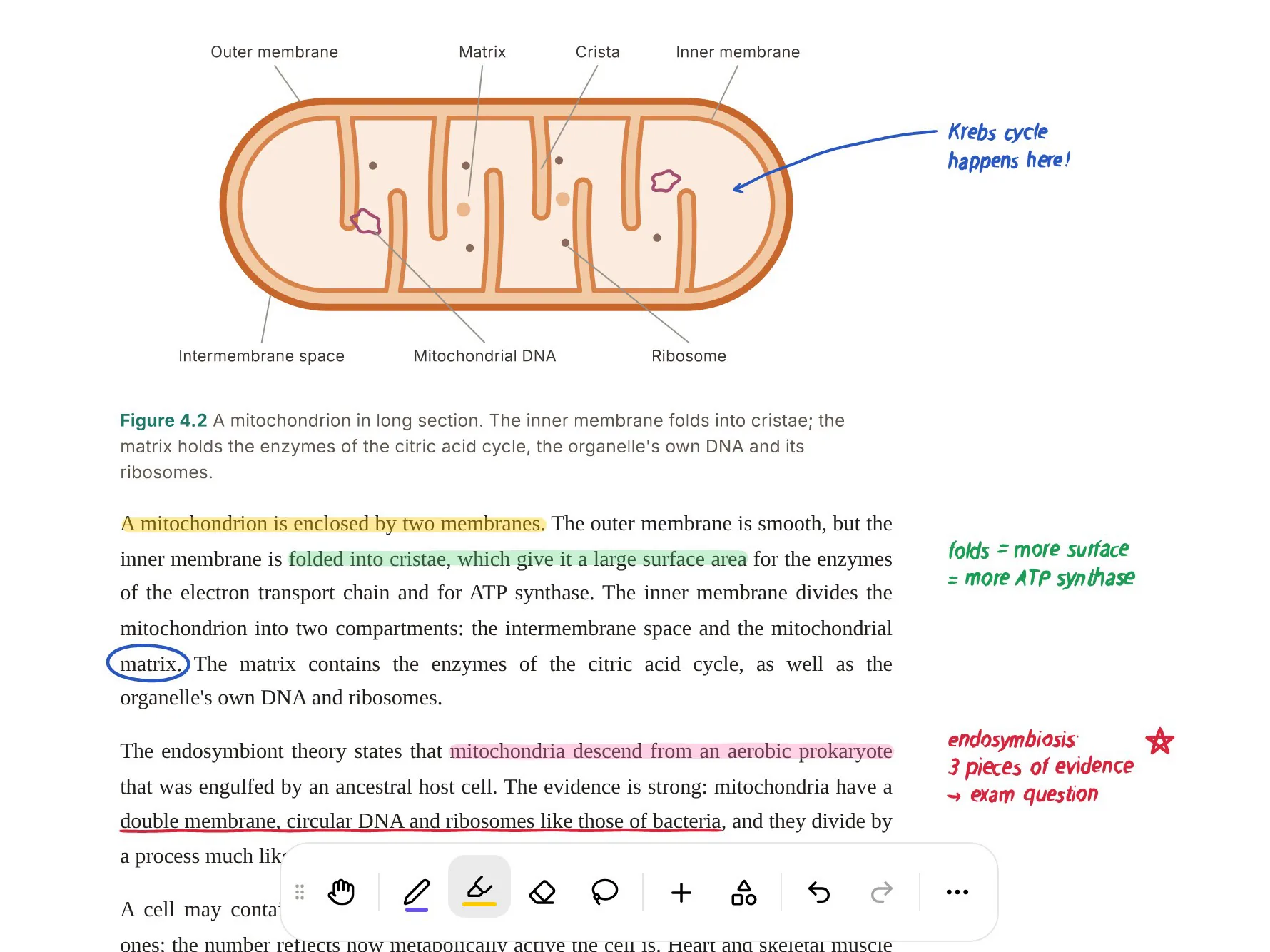
PocketNote lets you highlight, write and draw directly on an imported PDF, with the same pens you use for handwritten notes. Poki can look at the page as you see it, including your highlights and handwriting, and mark it up on request ("circle every enzyme named on this page"), with one-tap undo. You can also find papers on arXiv and SSRN inside the app and save them to your library.
Once a PDF is in PocketNote, it's a source like any other: it can feed flashcards, a quiz, a mind map or an audio review, and Poki can answer questions about it with citations back to the source.
The database version and sync, plainly
Logseq is in the middle of a big transition. Its README says the new database (DB) version, which introduces DB graphs, is in beta, while the DB version's new mobile app (on iOS, with Android coming) and its real-time collaboration sync are in alpha. The project states plainly that data loss is possible, recommends automated or regular backups, and suggests trying it on a dedicated test graph first.
For syncing the established file-based app between devices, Logseq's documentation describes Logseq Sync as a paid beta feature for active Open Collective contributors. It syncs up to 10 graphs between the desktop, Android and iOS apps, with end-to-end encryption.
None of this is a reason to avoid Logseq, but it's worth knowing before you put a semester's notes into it. If you do start on the DB version, follow the project's advice and back up regularly, especially in the weeks before exams. PocketNote syncs your library across the web, iPhone and iPad by account, and notes keep saving offline and sync when you reconnect.
Reasons to stay with Logseq
If you're comfortable writing your own cards and value open files above everything, Logseq covers a lot for free. It's also the more flexible tool for thinking: outlines, references and daily journals are things PocketNote doesn't try to offer.
And it costs nothing. A student who is happy keeping files on their own devices can run their entire note-taking and flashcard routine in Logseq without paying for anything.
- Free and open source, with your notes as Markdown or Org-mode files.
- You write good cards as you go and like keeping them inside your notes.
- Outliner thinking: blocks, references and daily journals suit how you work.
- Zotero users who want references as pages in their graph.
- More platforms: desktop apps including Linux, plus Android; PocketNote is web, iPhone and iPad.
Bringing Logseq pages into PocketNote
Logseq's export options include standard Markdown for a whole graph or a single page, plus HTML, OPML, JSON, EDN and a Roam-compatible JSON. PocketNote imports Markdown directly, so export the pages for one course and import them with the lecture files.
One detail matters for card users: Logseq's docs say block properties aren't included in standard Markdown exports. Your #card scheduling data stays in Logseq, so the review history you've built there isn't carried over, and PocketNote starts its own schedule for the cards it generates.
Material that never made it into Logseq can go straight to PocketNote: lecture recordings and audio files (MP3, WAV, M4A or OGG), YouTube lectures with their transcripts, Word and Excel files, or papers pulled from Google Drive, OneDrive or Dropbox.
Using both is a reasonable end state: Logseq for daily outlines and the cards you write yourself, PocketNote for generating cards and quizzes from the readings and lectures you didn't have time to turn into cards by hand.
The verdict
Which one should you pick?
Pick PocketNote if…
- You want cards generated from lectures, PDFs and videos instead of writing each one.
- You want quizzes, oral exams and a study plan, not only flashcards.
- You want an assistant that answers from your material with citations.
- You want your library synced across the web, iPhone and iPad without setting up sync yourself.
Pick Logseq if…
- You want a free, open-source app with your notes as local files.
- You like writing cards inside your notes as you go.
- You work in outlines and use Zotero.
- You need Linux, Windows or Android.
Try it yourself
See it with your own notes
Trying PocketNote is free on the web, iPhone and iPad. Export one course's pages from Logseq as Markdown, add the lecture PDFs or a recorded lecture, and compare the generated cards and quiz with the ones you wrote yourself. Basic and Plus, the paid plans, add live voice, premium models and connectors; see pocketnote.app for details.
If you already use Logseq, the right answer may well be both. Keep the outline and the cards you wrote yourself where they are, and let PocketNote cover the material you never had time to turn into questions.
Frequently asked questions
Sources
Keep reading