
Obsidian is a note app built on plain Markdown files stored on your own device. Notes link to each other, a graph shows how they connect, and thousands of community plugins add almost anything you can think of, spaced-repetition flashcards included. The app itself is free, and plenty of students spend a contented semester tuning their vault.
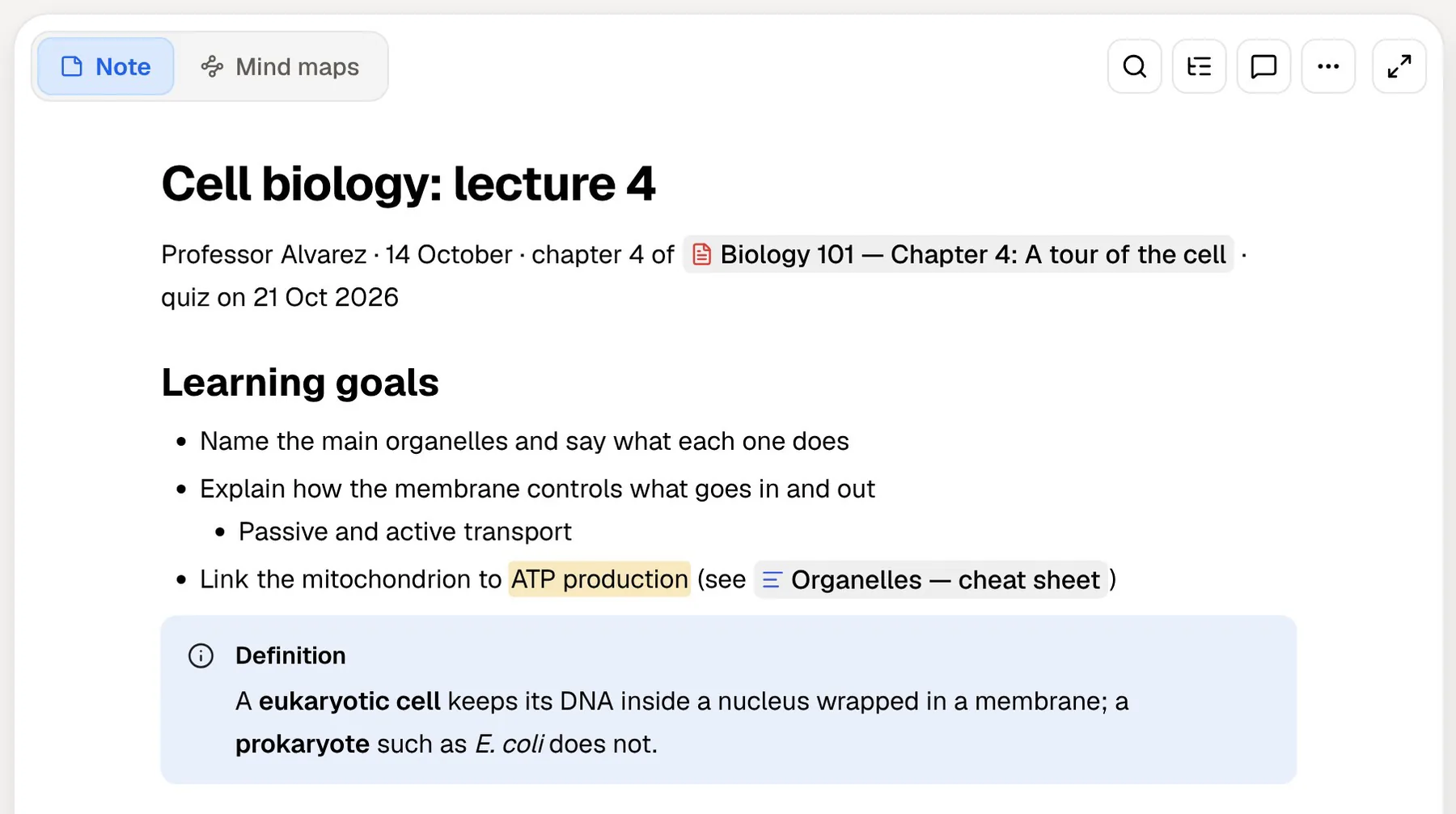
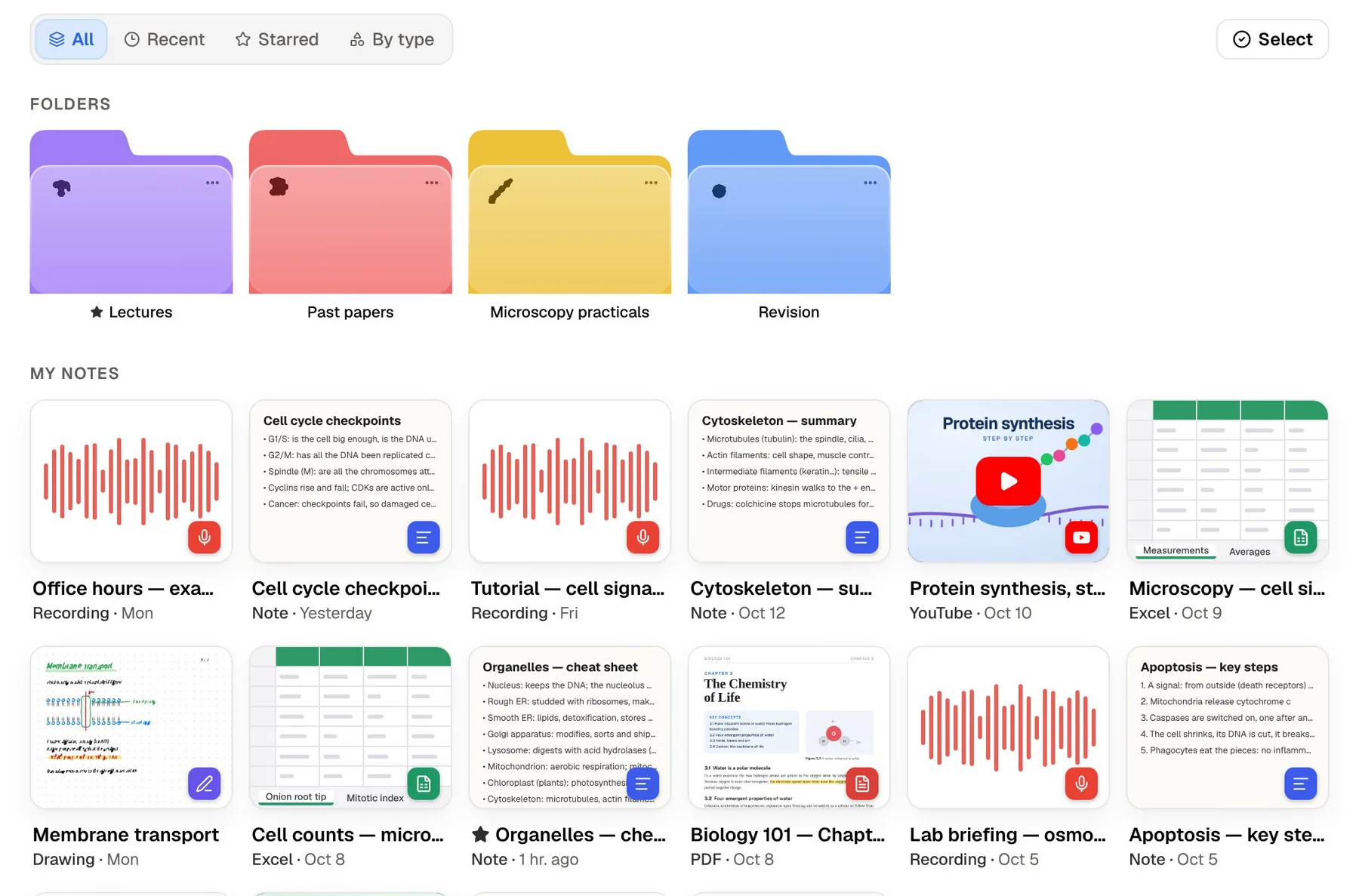
PocketNote is an AI study app that skips the building stage. You import your lecture PDFs, recordings, YouTube lectures and notes (Markdown files from a vault included) and it generates flashcards with spaced repetition, quizzes with explained answers, mind maps and a study plan. Its assistant, Poki, answers questions from your sources and cites them.
So the question isn't which app is better in general. It's whether you want to assemble your study system from parts or use one that's already put together. Below: how flashcards and AI work in each, what Obsidian's paid add-ons cost, how they differ on privacy, and where Obsidian is the clear choice.
At a glance
PocketNote vs Obsidian
| Feature | PocketNote | Obsidian |
|---|---|---|
| Built for | Studying your course material | A personal knowledge base of linked notes |
| Where notes live | Your account, synced across devices | Markdown files on your device |
| Price | Free to start; paid Basic and Plus | Free app; Sync and Publish are paid |
| Flashcards with spaced repetition | Built in, generated from your material | Via community plugins, written by you |
| Quizzes with explanations | Yes | Not a core feature |
| AI assistant | Poki, answers cited to your sources | Via community plugins |
| Course files | PDF, Word, Excel, audio, YouTube, web links | Markdown notes with attachments |
| Record a lecture | Transcript, summary and notes | Audio recorder core plugin |
| Linking | Page mentions in notes | Links, backlinks and graph view |
| Customisation | A fixed set of study tools | Thousands of community plugins and themes |
| Apps | Web, iPhone, iPad | Windows, macOS, Linux, iOS, Android |
Checked against each product's own website, November 2026. Plans and features change; confirm current details there.
Why students love Obsidian
Ownership comes first. Obsidian's homepage says notes are stored locally as plain-text Markdown files in open formats, so you're never locked in, and they open quickly, even offline. Any text editor can read them, now or in ten years, which matters if your notes need to outlast a degree.
Then there's linking. You connect notes with links, build a personal wiki of a course, and see the connections in graph view. The core plugins cover a lot without installing anything: daily notes, templates, a canvas for laying ideas out on an infinite space, Bases for database-style views of your notes, slides made from notes, and an audio recorder that records into a note.
Finally, the price. Obsidian's pricing page says the app is free without limits and needs no sign-up. Paid extras are optional: Sync for end-to-end encrypted syncing between devices, and Publish for putting notes on the web.
The community is part of the appeal. Obsidian's homepage points to thousands of plugins and themes, so you can usually bend the vault to fit a study habit rather than the other way round. If you like tinkering, the vault itself becomes a project you enjoy.
Flashcards: write them yourself, or have them generated
Obsidian has no flashcards among its core plugins. The usual route is the community Spaced Repetition plugin, which its listing describes as reviewing flashcards and notes with spaced repetition. It supports single-line, multi-line, reversed and cloze cards, with images, audio, video and LaTeX, and decks organised by tags or folders. You write each card in your notes using the plugin's syntax, for example a question and answer separated by a double colon, then review on a schedule.
That's a solid setup if you like writing cards, and writing them is good practice in itself. The cost is time. Every card is one you author, and keeping the syntax consistent across a large vault takes discipline. Other community plugins generate cards with AI; the AI Flashcard Generator, for example, uses Google's Gemini, needs your own Gemini API key, and leaves scheduling to a separate plugin.
PocketNote generates the cards from your material: a lecture PDF, a transcript, a handwritten page or a Markdown note from your vault. You review by rating each card Again, Hard, Good or Easy, and each comes back when you're about to forget it.
Cards are only one kind of practice. The same source can become a quiz in which every option is explained, right or wrong, and an oral exam where Prof. Poki questions you, out loud or in text, and follows up until your explanation holds together. In Obsidian, each of those would be another plugin to find, or a habit to build by hand.

AI: plugins and API keys, or an assistant that's built in
Obsidian's list of core plugins doesn't include AI. Community plugins connect a vault to AI models, and that suits students who want to choose exactly which provider sees what. It also means setting up keys, paying the provider directly where needed, and checking that the plugin is maintained.
For a student the practical difference is setup time. A plugin-based AI workflow can be excellent once it's running, but it has to be chosen, configured and kept working, and that tends to happen in the same weeks as the exams it was meant to help with.
PocketNote's assistant, Poki, is part of the app. It answers from your own material with citations to the source rather than the open web, shows its steps as it searches your notes and reads items, and can write into your notes from the chat. It can look at a PDF page as you see it, including your highlights and handwriting, and highlight, underline or circle passages when you ask, with one-tap undo.
You can choose between leading AI models from several providers, with premium models on paid plans. Paid plans also add live voice, so you can talk to Poki out loud, and connectors to services such as Google Drive, Notion and OneDrive.

Graph view and generated mind maps
Obsidian's graph view shows how your notes link to each other. It's useful for spotting that a concept from week 2 connects to five later lectures, and it's a picture of your own linking work: the more carefully you link, the more it shows. Graph view is a core plugin, so it's there from your first note without installing anything.
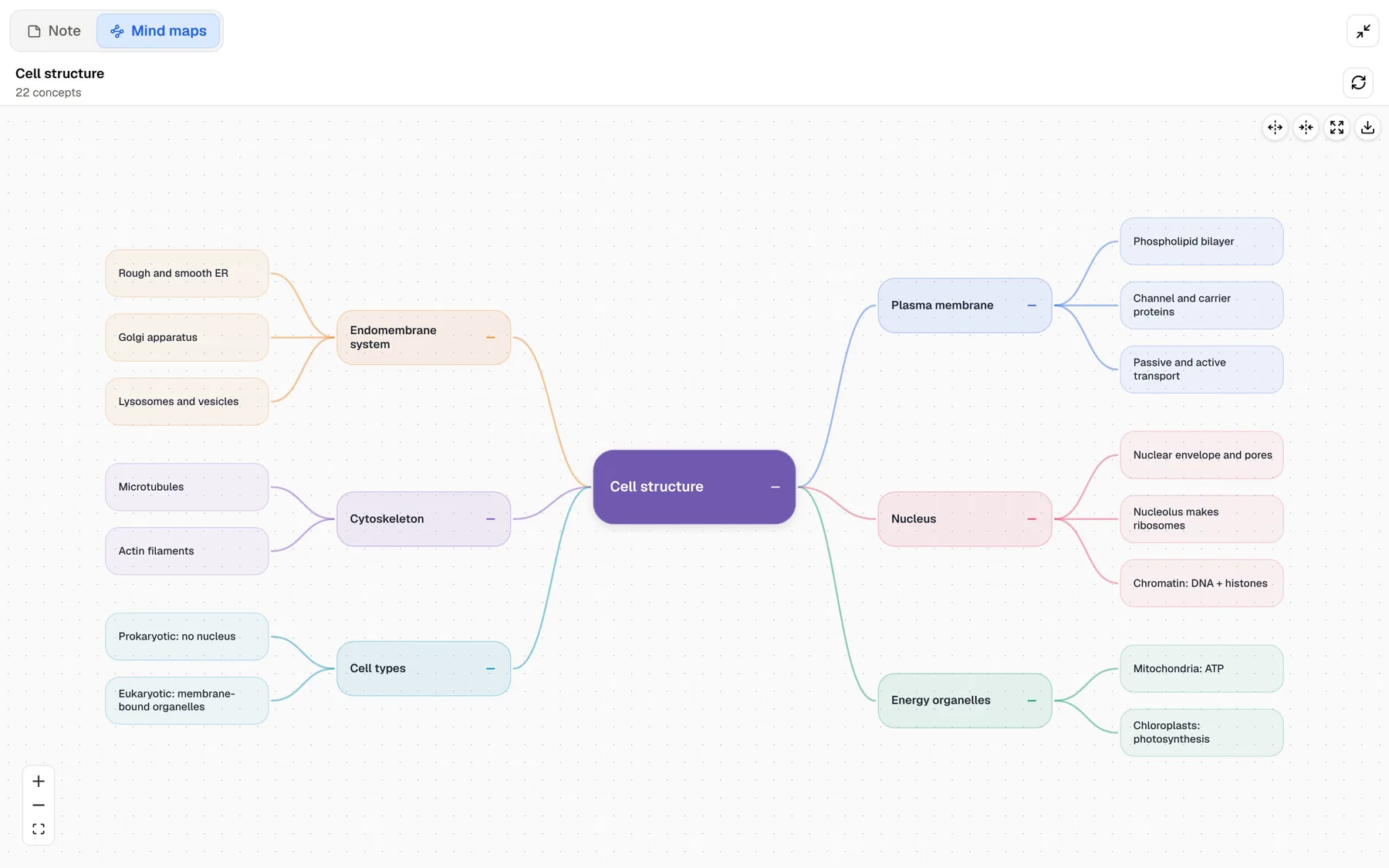
PocketNote's mind maps come from the material itself. Generate one from a lecture and you get colour-coded branches for the main topics and their parts, which is a quick overview before you start on flashcards. It doesn't replace the habit of linking notes. It's a summary you didn't have to draw, from a source you may not have finished reading.
Obsidian's Canvas is the closer comparison for visual thinkers: an infinite space where you arrange notes, images and links by hand. PocketNote's nearest equivalent is the infinite whiteboard in its handwritten notes, where you draw and write freely with Apple Pencil on iPad or in the browser.
PocketNote can also produce summaries, slide decks, data tables, explainer videos and podcast-style audio reviews from the same source, in more than 50 languages.
Privacy and where your notes live
Obsidian is local-first. Notes stay on your device, and Obsidian's homepage says no one else can read them, not even its team. Sync adds end-to-end encryption and keeps a year of version history per note. For students handling sensitive research data, that model is a real advantage.
PocketNote is a cloud app with an account, so your library syncs between the web, iPhone and iPad. Your files are not used to train public AI models, and notes keep saving offline and sync when you're back online. It's a different trade: convenience and built-in AI in exchange for keeping your library with the service.
If your department or a data agreement requires notes to stay on your own machine, that settles it in Obsidian's favour. If not, the choice comes down to whether you value control over your files more than having study tools and an assistant ready to use.
What each costs at the time of writing
Obsidian's own costs are low and optional. PocketNote is free to start, with paid Basic and Plus plans; Plus adds unlimited notebooks and the longest podcasts (see pocketnote.app for current plans). For Obsidian, the pricing page lists the following at the time of writing (November 2026):
- Obsidian app: free, with no sign-up required. A commercial licence ($50 per user per year) exists but isn't required for commercial use.
- Sync: $4 per user per month billed annually, or $5 billed monthly.
- Publish: $8 per site per month billed annually, or $10 billed monthly.
- Students: 40% off Sync and Publish for students, faculty members and nonprofit employees.
Where Obsidian is the clear choice
These are the cases where Obsidian is simply the better fit, and where PocketNote isn't trying to compete. If two or three of them describe you, keep Obsidian as your main notes app.
- You want your notes as files that you own and any editor can open.
- You enjoy building systems: plugins, templates and Bases let you shape the vault exactly as you like.
- A long-term knowledge base: linking ideas across a whole degree or a thesis.
- More platforms: Obsidian runs on Windows, macOS, Linux, iOS and Android; PocketNote is web, iPhone and iPad.
- Privacy-first by design, with optional end-to-end encrypted Sync.
Using a vault and PocketNote together
Because Obsidian notes are Markdown files, they import into PocketNote as they are. A workable rhythm is to write and link in Obsidian during the term, then before an exam import that course's notes and the original lecture PDFs into PocketNote to generate flashcards, quizzes and a study plan.
It also covers what a vault doesn't do well. If you take handwritten notes on an iPad in some classes, write them in PocketNote with Apple Pencil, using lined, grid or Cornell templates, and they'll sit in the same course folder as the Markdown notes you imported. Recorded lectures and YouTube lectures join the same folder with their transcripts.
Your vault stays the long-term record, and PocketNote holds the exam-season study material. Nothing has to move permanently, and you can keep your own plugin flashcards for topics you've already carded by hand while PocketNote covers the readings you never got to.
The verdict
Which one should you pick?
Pick PocketNote if…
- You want flashcards, quizzes and a study plan without writing card syntax or installing plugins.
- You study from PDFs, recordings and YouTube lectures as much as from your own notes.
- You want an AI assistant that cites your sources, with no API keys to manage.
- You handwrite on iPad as well as type.
Pick Obsidian if…
- You want local Markdown files and full control over your data.
- You enjoy customising with plugins and building your own system.
- You need a desktop app, Linux or Android.
- You're building a long-term linked knowledge base, for example for a thesis.
Try it yourself
See it with your own notes
PocketNote is free to start in the browser and on iPhone and iPad. Import a folder of Markdown notes from one course, add the lecture PDFs, and compare the flashcards it generates with the ones you'd have written yourself. Paid Basic and Plus plans add live voice, premium models and connectors; see pocketnote.app for current plans.
If you love your vault, you don't need to leave it. PocketNote works as the exam-prep layer on top of notes you keep wherever you like.
Frequently asked questions
Sources
Keep reading