
Roam Research calls itself a note-taking tool for networked thought. Every note is an outline of blocks; you link pages with double square brackets, reference a single block anywhere you need it, and start each day on a daily notes page that collects whatever you were thinking. The pitch is aimed squarely at people who read for a living, in Roam's own words helping you 'organize your research for the long haul'.
PocketNote, an AI study app, also deals in sources, but from the other direction: you bring papers, lecture PDFs, recordings and notes, or search arXiv and SSRN inside the app, and PocketNote builds flashcards with spaced repetition, quizzes and a study plan from them, while Poki, its assistant, answers questions with citations back to the material.
The comparison matters most for graduate students, thesis writers and anyone with a heavy reading list. This page covers how each handles reading papers, how each helps you remember what you read, Roam's pricing as shown on its plan screen in November 2026, and where Roam Research is the better tool.
At a glance
PocketNote vs Roam Research
| Feature | PocketNote | Roam Research |
|---|---|---|
| Built for | Studying your course material | Networked research notes |
| Note structure | Folders of notes, PDFs and recordings | Linked pages of outlined blocks |
| Daily notes and block references | Not offered | Yes, core features |
| Paper search | arXiv and SSRN inside the app | Not advertised |
| AI | Poki answers from your sources, cited | Semantic search; AI help writing queries |
| Flashcards with spaced repetition | Built in, generated from your material | Via the Memo extension, written by you |
| Quizzes and oral exam | Yes | Not advertised |
| Real-time collaboration | Share a link to a note | Yes |
| Apps | Web, iPhone, iPad | Web, desktop, iOS, Android |
| Price | Free to start; paid Basic and Plus | $15/month or $165/year after a 31-day trial |
| Export | Handwritten notes to PDF; share a link | Markdown, JSON, EDN |
Checked against each product's own website and app, November 2026. Plans and features change; confirm current details there.
What Roam is for
Roam's core idea is that notes are more useful connected than filed. Type a page name in double brackets and the link works in both directions, so every page shows what refers to it. Block references let you reuse a single sentence in several places, and the daily notes page means you never have to decide where a thought belongs before writing it down.
Over months, that builds a web of literature notes, ideas and questions you can move around in the sidebar and see in a graph overview. Roam's site describes real-time collaboration with others, or storing your data locally; local graphs live in your browser's storage on one device, and you can create encrypted graphs, which Roam warns it can't recover if you lose the password.
Roam is extended through Roam Depot, its extension directory, and it has a desktop app plus mobile apps on the App Store and Google Play. For someone writing a thesis over several years, that combination of linking, outlining and extensions is the attraction.
The daily notes habit is especially useful for research. Lab observations, reading notes and half-formed questions all go on today's page, tagged with the projects they belong to. Weeks later, each project page shows every mention as a linked reference, without you having filed anything.
Reading papers in each app
In Roam, reading a paper is a writing task. You make a page for the paper, take literature notes as blocks, link the concepts to existing pages, and over time the paper's ideas join your graph. The thinking is yours, which is the point; Roam stores and connects it.
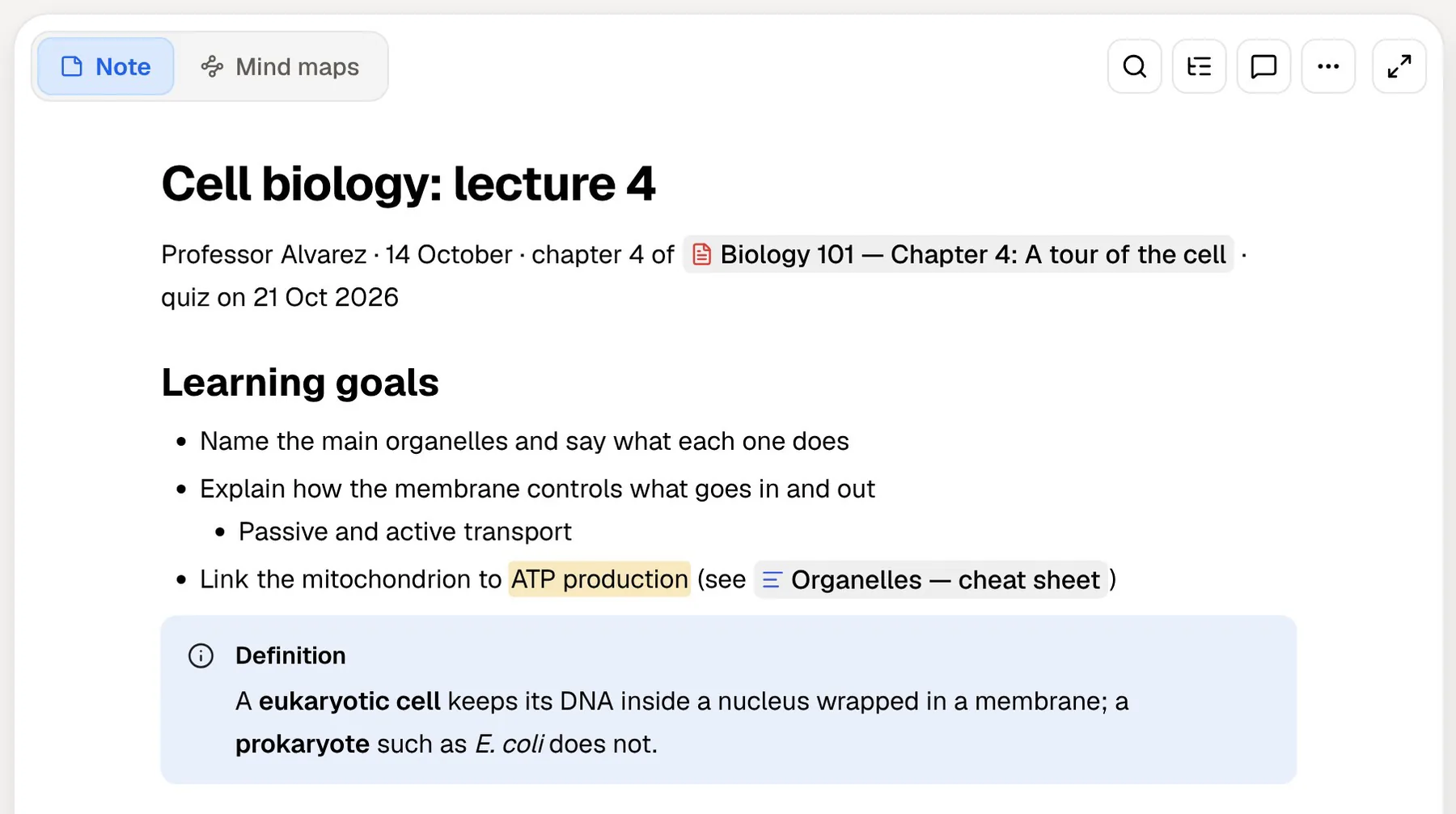
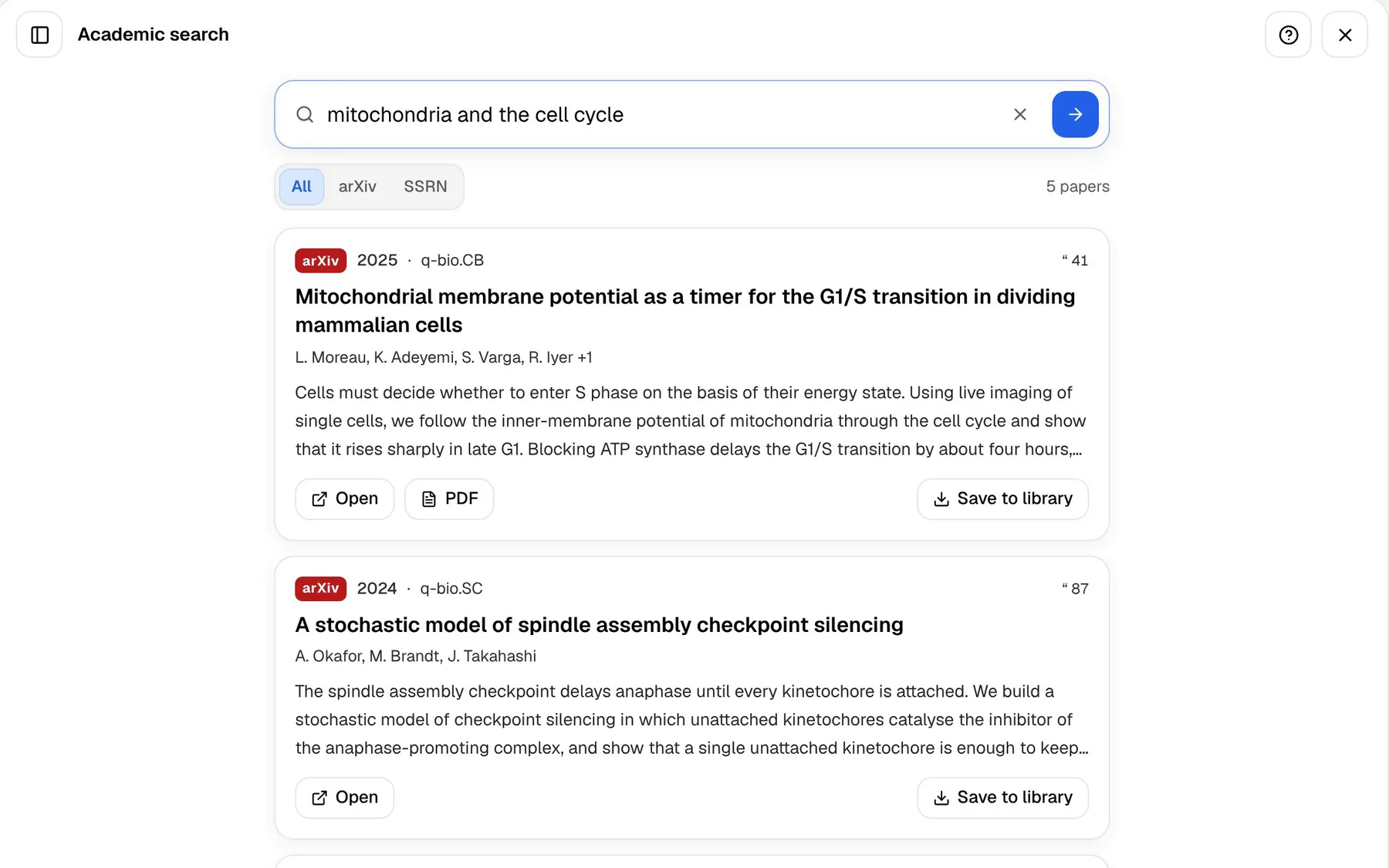
PocketNote starts with the paper itself. Search arXiv or SSRN from inside the app, open a result or its PDF, and save it to your library. The PDF opens in a source viewer where you can highlight, write and draw on the page, and Poki can read the page as you see it, including your highlights and handwriting, or mark passages for you when you ask.
Papers you already have come in the usual ways: upload the PDF, pull it from Google Drive, OneDrive or Dropbox, or paste a web link and let PocketNote extract the article. A recorded seminar or a conference talk on YouTube can sit in the same folder, with its transcript.
Poki can also work on the paper with you. Ask it to highlight the key definitions on page 3, or to underline every result the authors report, and it marks the PDF; one tap undoes its marks. It can write a summary of the paper into one of your notes from the chat, so your own reading notes and the paper stay together.
Finding what you read: queries or questions
Roam's answer to 'where did I read that?' is structure: links, references and the queries you write. The app also has an optional semantic search, which indexes your graph so you can search by meaning, and an AI helper for writing queries. Roam notes that the query helper can't see your graph or the query's results; only your question is sent. Semantic search can be switched off, and Roam says its indexing provider, Voyage AI, doesn't retain your data or train on it.
Roam doesn't advertise AI-generated flashcards, quizzes or study plans. Its tools are about finding and connecting what you've already written, which suits researchers who want the graph to hold their own thinking.
PocketNote's answer is to ask. Poki searches your notes, reads the relevant items, shows those steps as it works, and answers with citations, for example a structured summary of what four papers in your library say about a method. It answers from your own material rather than the open web, so the citations point to sources you chose.
You can pick between leading AI models from several providers, with premium models on paid plans. Your files are not used to train public AI models.

Remembering what you read
Roam doesn't advertise built-in flashcards. A Roam Depot extension called Memo adds spaced repetition; its README says you install it through Roam Depot and that it uses a modified version of the SuperMemo 2 algorithm, similar to Anki's approach. You write the cards from your own blocks.
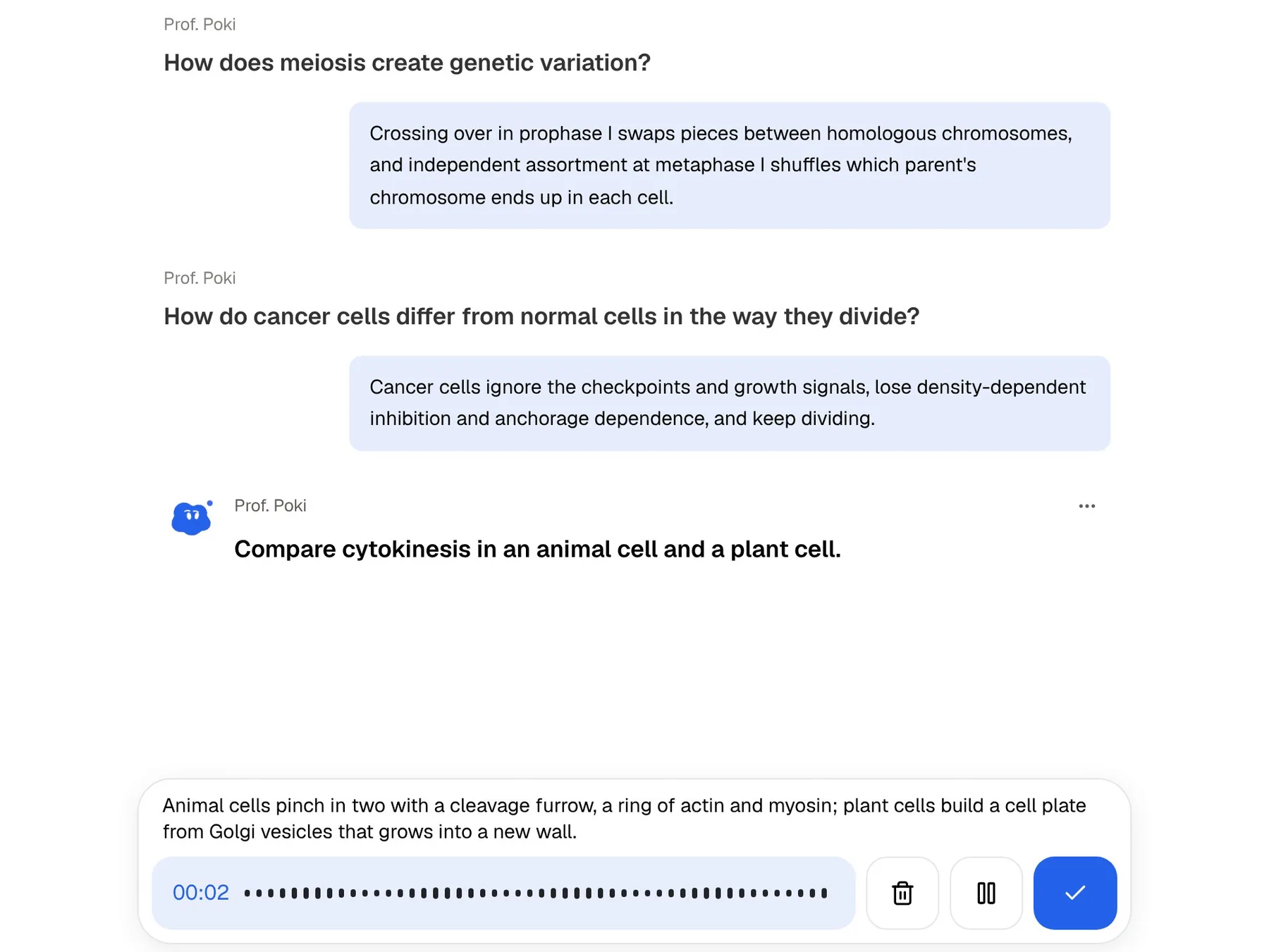
PocketNote generates the cards from the paper, lecture or notes, and schedules them from your Again, Hard, Good or Easy ratings. It also adds quizzes that explain every answer and an oral exam with Prof. Poki, who asks questions out loud or in text and keeps probing until you can explain the idea. That suits qualifying exams and vivas, where you have to explain a method on the spot.
Set the exam or review date and the study plan works out what to cover each day, reminds you, and tracks memory, applied and mastery scores.
Recall matters for researchers too, not only for coursework. A committee question about a method you read two years ago, or a seminar where you need the key numbers from a paper without looking, rewards the same practice as an undergraduate exam.
What Roam costs
Roam has no free plan. At the time of writing (November 2026), the plan screen on Roam's site lists the options below, with a 31-day free trial for anyone who has never had a plan. For a student, the yearly Pro price is the one to compare, and the trial is long enough to test Roam across a full month of reading.
- Pro, monthly: $15 a month.
- Pro, yearly: $165 a year, about $13.75 a month.
- Believer: $500 for five years, which adds first access to new features, community calls with the team and priority support.
Discounts and the PocketNote side
According to Ness Labs' Roam Research FAQ, Roam runs a Scholars Program offering a significant discount to people who are full-time researchers, under 22, or in significant financial distress, with an application form. Eligibility can change, so ask Roam directly before you count on it. If you qualify, it changes the maths considerably for a student budget.
PocketNote is free to start, with paid Basic and Plus plans; see pocketnote.app for current plans. For a student on a budget, that means you can try the study tools on one reading list before paying for anything, and decide later whether live voice or premium models are worth a paid plan.
Where Roam Research is the better choice
If your work is writing a thesis rather than passing exams, Roam's way of thinking may serve you better, and PocketNote won't replace it. PocketNote has no block references, daily notes or graph of your own writing.
Roam also rewards long use in a way a study app doesn't try to. The value of a graph grows with every linked note, and after a few years it becomes a record of how your thinking developed. If that's the goal, the subscription buys something PocketNote doesn't offer.
- Building a long-term research graph: literature notes, ideas and drafts linked over years.
- Block-level thinking: referencing and reusing individual sentences across pages.
- A daily-notes workflow where you write first and organise by linking.
- Real-time collaboration on a shared graph.
- Extensions and platforms: Roam Depot, a desktop app and an Android app; PocketNote is web, iPhone and iPad.
Using Roam and PocketNote side by side
Roam's export menu offers Markdown as well as JSON and EDN. PocketNote imports Markdown, so export the pages for a topic and import them alongside the papers themselves. Roam's JSON export is the one other note apps use for migrations; PocketNote doesn't read it, so stick with Markdown.
If you take your Roam pages across, export the ones that summarise a topic rather than raw daily notes. Roam's export menu also offers a Flat Markdown option next to standard Markdown; try both on one page and import whichever reads better.
A practical split is to think and write in Roam, and study in PocketNote. Keep your literature notes and drafts in your graph. When you need to know a body of material for an exam, a viva or a committee meeting, bring the papers and your Roam pages into PocketNote and let it build the flashcards and the plan.
The verdict
Which one should you pick?
Pick PocketNote if…
- You need to know a reading list for an exam, not just keep notes on it.
- You want paper search, PDF annotation and cited answers in one place.
- You want flashcards and quizzes generated from papers, without writing cards.
- You'd rather start free than commit to a subscription.
Pick Roam Research if…
- You're building a long-term graph of research notes and ideas.
- You think in outlines, block references and daily notes.
- You collaborate on a shared graph in real time.
- You want a desktop or Android app.
Try it yourself
See it with your own notes
PocketNote costs nothing to start, on the web, iPhone or iPad. Search arXiv or SSRN for one paper on your reading list, save it, and try the flashcards, quiz and cited answers on it. Live voice, premium models and connectors come with the paid Basic and Plus plans; pocketnote.app lists what each includes.
If Roam is where your research thinking lives, keep it there. PocketNote is for the moments when you have to recall and explain what you've read.
Frequently asked questions
Sources
Keep reading