
Bear is a Markdown note app for Mac, iPhone and iPad with a reputation for being pleasant to write in. Notes mix text, photos, tables and to-dos, tags organise everything without folders, and you can sketch with Apple Pencil right inside a note. It's the app people choose when they want writing to feel calm and uncluttered.
PocketNote is an AI study app for the web, iPhone and iPad. Its focus isn't the writing experience but what happens to course material afterwards: flashcards with spaced repetition, quizzes that explain each answer, an oral exam with Prof. Poki, audio reviews and a study plan, all generated from your lecture PDFs, recordings, YouTube lectures and notes.
If you already love Bear, you probably don't want to give it up, and you may not need to. This comparison covers what Bear Pro adds and costs, where each app fits in a week of study, how to get Bear notes into PocketNote, and the situations where Bear is the better choice.
At a glance
PocketNote vs Bear
| Feature | PocketNote | Bear |
|---|---|---|
| Built for | Studying your course material | Writing notes in Markdown |
| Apps | Web, iPhone, iPad | Mac, iPhone, iPad; Bear Web in public beta |
| Price | Free to start; paid Basic and Plus | Free; Pro $2.99/month or $29.99/year |
| Organisation | Colour-coded folders, stars, search | Tags with icons, pinnable |
| Sync between devices | Included with your account | iCloud sync with Pro |
| Handwriting | Full pages with Apple Pencil, templates, Note Replay | Inline sketches with Apple Pencil or finger |
| AI | Poki answers from your sources, cited | Not advertised |
| Flashcards with spaced repetition | Yes: Again / Hard / Good / Easy | Not advertised |
| Quizzes and oral exam | Yes | Not advertised |
| Record a lecture | Transcript, summary and notes | Not advertised |
| Student discount | See pocketnote.app | 30% off the first year of yearly Pro |
Checked against each product's own website, November 2026. Plans and features change; confirm current details there.
What makes Bear a pleasure to write in
Bear's editor uses simple Markdown that formats as you type, so headings, lists and emphasis don't interrupt your train of thought. Tags do the job folders do elsewhere: add one to any note, pin the important ones, and give them one of more than 250 icons. For essays, reading notes and journalling, it stays out of the way and lets the text lead.
It also handles the things students need around the writing. To-do lists and tables live inside notes, sketches drawn with Apple Pencil or a finger sit inline and stay editable, and Pro adds search for text inside photos and PDFs, either within one note or across all of them.
Bear is deliberately focused. Its homepage doesn't advertise AI features, and its FAQ says the team has no current plans for Android or Windows apps. A web app, Bear Web, is in public beta and is designed to complement the native apps rather than replace them.
Privacy is part of the pitch too. Bear's homepage says your notes sit between you and iCloud, that the company can't see them, and that Bear supports Apple's Advanced Data Protection. For journals and personal writing, that matters as much as the editor.
Bear Pro, and what a student pays
At the time of writing (November 2026), Bear's FAQ lists Pro at $2.99 a month or $29.99 a year, both with a 7-day free trial, bought through the App Store or Mac App Store.
Bear's school discount program, which Bear says is open to all students and scholars who apply, offers 30% off the first year of a yearly Pro subscription. You apply by contacting Bear's support, ideally from your school email address, with your name, school and role; without a school email, you attach proof such as a student ID.
For a student, sync is probably the Pro feature that matters most: without it, notes written on your iPad in class won't appear on your Mac when you sit down to write the essay. PocketNote is free to start, with paid Basic and Plus plans; see pocketnote.app for current plans.
The free version is fine for trying Bear out, but the features most students need are in Pro. Bear's FAQ lists Pro as including:
- iCloud sync of all your notes and tag icons across your devices.
- Text search inside PDFs and images.
- More export options, including PDF, HTML, DOCX and JPG.
- Over two dozen themes.
- Encryption for individual notes, plus the option to lock Bear.
Writing notes versus being quizzed on them
A good writing app makes it easier to produce notes. It doesn't make it easier to remember them. Bear doesn't advertise flashcards, quizzes or spaced repetition, and that's consistent with what it's for. Rewriting and polishing notes feels productive, but it isn't the same as practising recall, which is what an exam asks of you.
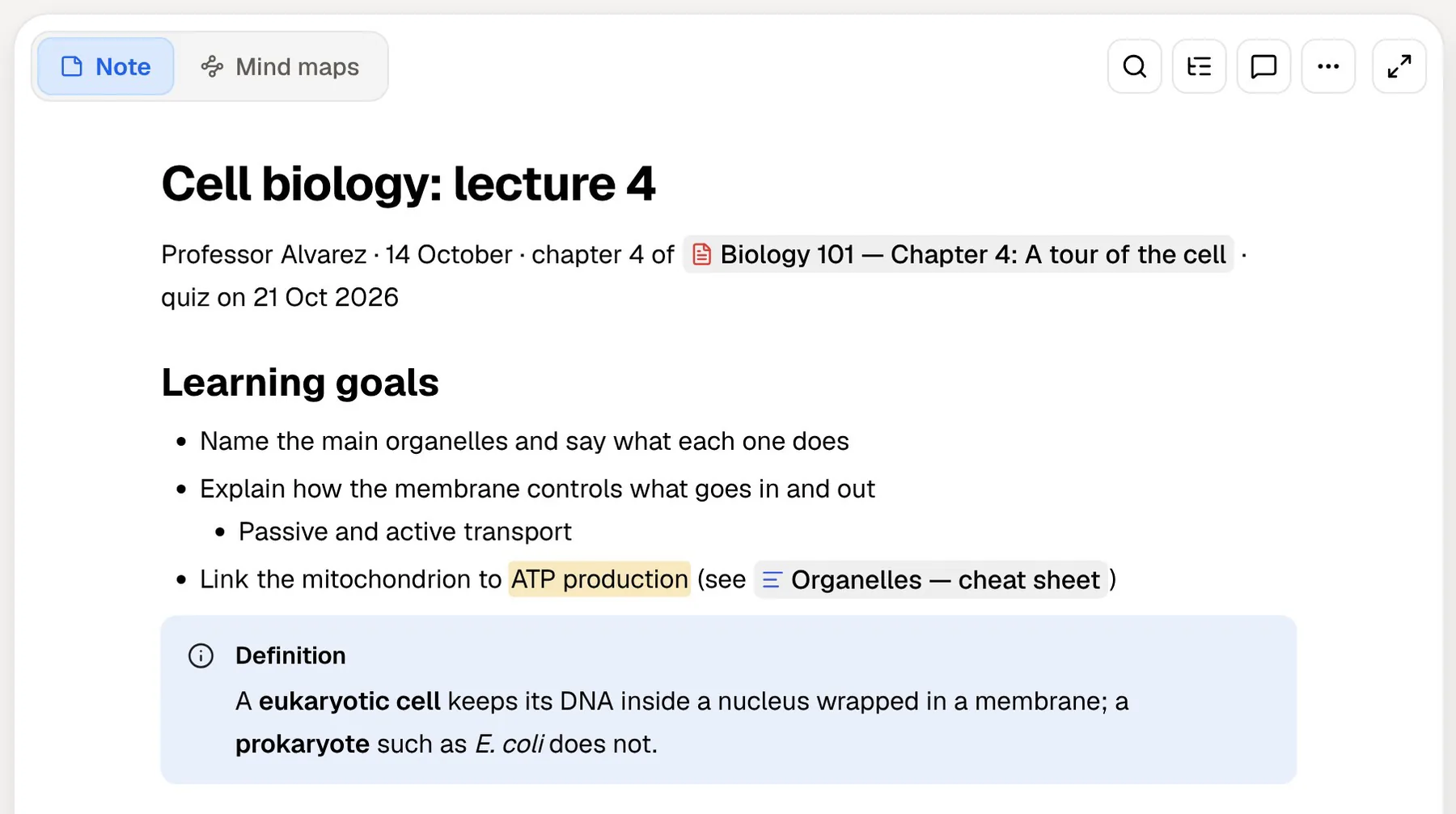
Revision needs a tool that asks you questions and pays attention to your answers. In PocketNote, a set of Bear notes plus the lecture slides becomes flashcards you rate Again, Hard, Good or Easy, a quiz in which every option is explained, and an oral exam where Prof. Poki asks you to explain an idea out loud or in text and keeps following up until you can.
The oral exam is a good fit for Bear users in particular. If you write well, you may already be good at explaining ideas on the page. Explaining them on the spot, without your notes, is a different skill, and it's the one many exams and tutorials actually test.
PocketNote's own notes, typed and handwritten
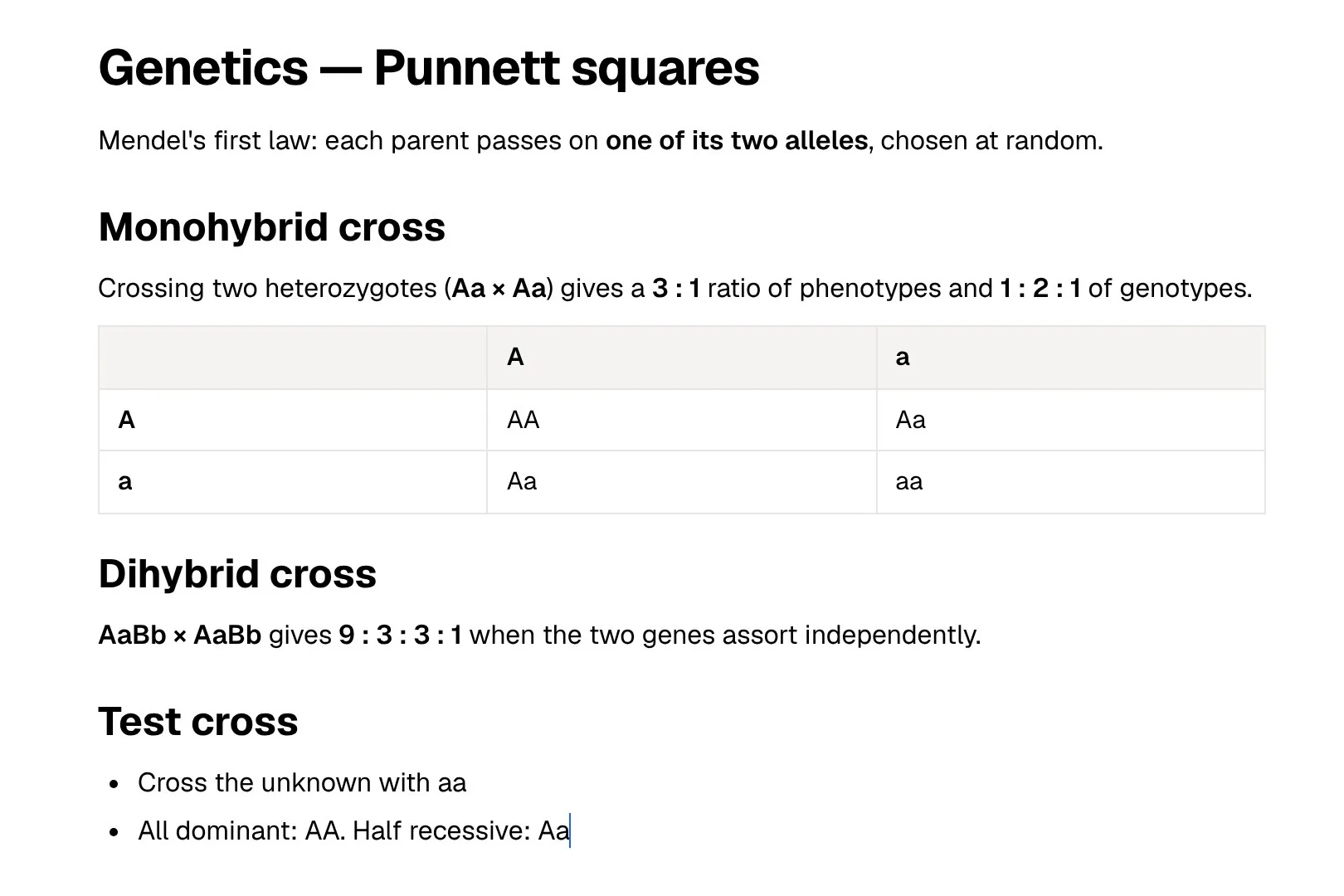
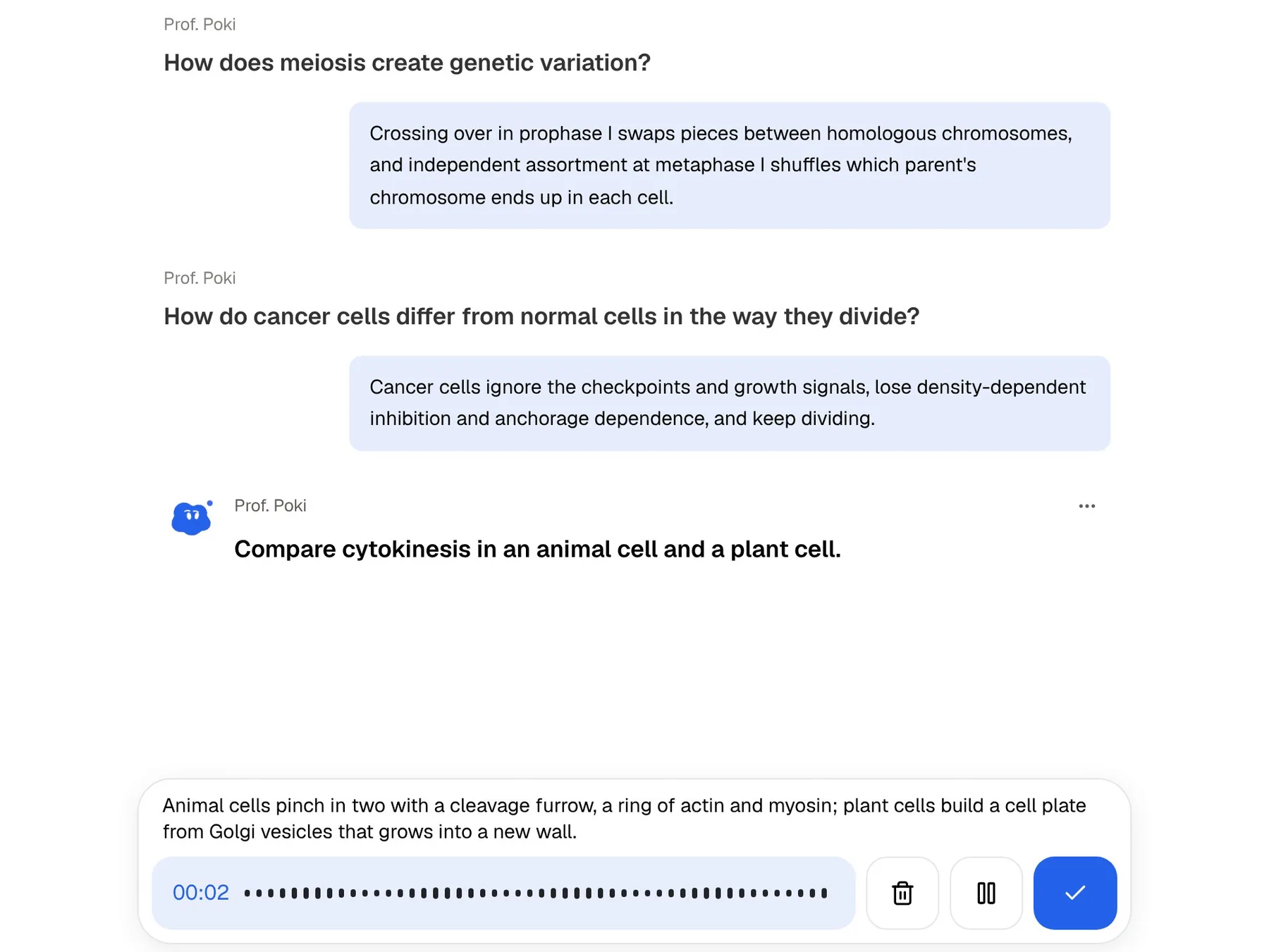
PocketNote isn't only somewhere to import notes. Its block editor for typed notes handles headings, lists, checklists, tables, toggles, callouts, code, LaTeX maths, images, colours, comments, page mentions, find and replace, and an outline. You can ask Poki inside a note, and Poki can write into your notes from the chat. Notes keep saving offline and sync when you're back online, and you can share a link to a note with a study partner.
It isn't trying to be Bear, though. Bear's tags are more flexible than PocketNote's colour-coded folders, and Bear's focus on calm, distraction-free writing is its own thing. If you mostly write prose, you'll likely prefer writing it in Bear.
Handwriting is where PocketNote goes further. Bear's sketches are drawings inside a note. PocketNote's handwritten notes on iPad are full pages, with lined, grid and Cornell templates, pens and inks including fountain pen and watercolour, a lasso that turns handwriting into text, tape to hide answers while you test yourself, and Note Replay, which plays back your strokes in time with audio recorded as you wrote.
An assistant that reads your course
Bear leaves the thinking to you, and for writing that's a deliberate strength. Studying for an exam is different: you often need an explanation of something you wrote down without fully understanding, or a check on how two lectures fit together.
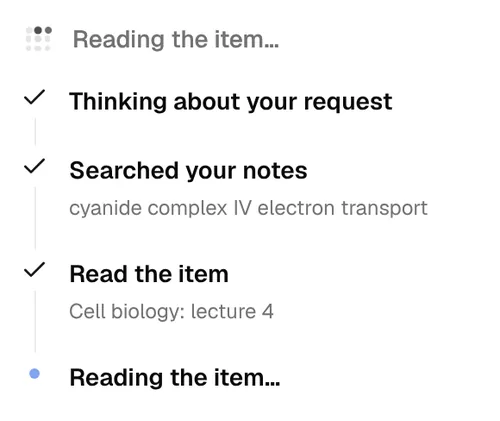
Poki answers from your own material, with citations to the source rather than the open web, and shows its steps as it works: thinking about the request, searching your notes, reading the relevant item. It can look at a PDF page as you see it, including your own highlights and handwriting, and highlight, underline or circle passages when you ask, with one-tap undo.
Poki runs on leading AI models from several providers, and paid plans add premium ones. Your files are not used to train public AI models.
If you'd rather keep AI away from your writing entirely, the split works in your favour: Bear stays exactly as it is, and PocketNote only ever sees the notes you choose to export into it.
When Bear is the better fit
Bear is the better app whenever writing is the main job. If your course is assessed through essays and you take notes mostly to think, a study app adds less than a good writing environment does.
It is also simpler to understand: one app, one subscription and a short, clear feature list. For a student who wants a tool that does one thing well, that clarity is a feature.
- Essays and long-form notes: Bear's editor is built for comfortable writing.
- Tag-based organisation that's more flexible than folders.
- Native on the Mac: Bear is a Mac app, while PocketNote's Mac option is its web app.
- Low, simple pricing for syncing across Apple devices.
- No AI in the way: Bear's homepage doesn't advertise AI features, which some writers prefer.
Moving Bear notes into PocketNote
Bear exports notes in several formats, including Markdown, plain text, PDF, HTML and DOCX, with some formats reserved for Pro. PocketNote imports Markdown, TXT, PDF and Word files directly, so most Bear notes come across with their text and structure intact.
Filter by a course's tag first, export those notes, and import them alongside the lecture PDFs. If you're on Pro, Bear's search inside PDFs and images helps you find the right handout before you export it. If a note depends on images or sketches, export it as a PDF so the page keeps them. Then generate flashcards and a quiz from the whole set, or ask Poki a question across all of it.
Imported notes stay editable in PocketNote's own editor, so you can tidy a heading or add a callout before generating anything. Your Bear originals are untouched, and you can export again whenever the notes change.
A week with both apps
A pattern that fits a Bear habit well is to write in Bear and study in PocketNote. Lecture notes, essay drafts and reading notes stay in Bear, where you enjoy writing them. At the end of the week, export that week's notes for each course into PocketNote and go through the cards it makes.
On the bus, play the audio review instead of rereading. When the exam date is set, let PocketNote's study plan decide what to cover each day and track your memory, applied and mastery scores, while Bear stays the place where the actual writing happens.
For a seminar or a presentation rather than an exam, the same exported notes can become a mind map or a slide deck in PocketNote. It's a quick way to check that you can present the argument in outline before you write it up properly in Bear.
The verdict
Which one should you pick?
Pick PocketNote if…
- You want flashcards, quizzes and an oral exam made from your notes and lecture files.
- You want to work from any computer through the web, not only on Apple devices.
- You handwrite full pages on iPad and want them in your study tools.
- You want an AI assistant that answers from your own material.
Pick Bear if…
- Writing is the main job: essays, reading notes, journals.
- You like Markdown and tags and use only Apple devices.
- You prefer a notes app without AI features.
Try it yourself
See it with your own notes
To try it, start free on the web, iPhone or iPad. Export one course's notes from Bear as Markdown, import them with the lecture slides, and see the flashcards, quiz and study plan it builds. Paid Basic and Plus plans add live voice with Poki, premium models and connectors; see pocketnote.app for current plans.
You don't really have to choose. Keep writing in Bear, and use PocketNote for the part of the semester when the notes have to stick.
Frequently asked questions
Sources
Keep reading