
Studocu is a library first. Students upload their lecture notes, summaries, practice material and past work, and other students search it by university and course. Its app now wraps that library in AI tools: a lecture recorder, quizzes generated from any document, and an AI helper (called Ask AI, and more recently Ace) that answers questions and solves problems from a photo.
PocketNote works from the other direction. It has no shared library of other people's documents. You bring your own course material (the lecturer's slides, your recordings, your readings and your own notes) and it turns that into flashcards on a spaced-repetition schedule, explained quizzes, oral exams and a plan for the exam.
The honest comparison is less about features than about what you are trying to do. Studocu is useful when you want to see how someone else understood a course. PocketNote is useful when you need to understand and remember your own version of it. This post covers both, plus the access model and the academic-integrity questions worth thinking about, based on Studocu's app listings and site in November 2026.
At a glance
PocketNote vs Studocu
| Feature | PocketNote | Studocu |
|---|---|---|
| Core idea | Study tools from your own material | Library of student-uploaded documents |
| Find notes for your course | No shared document library | Yes, by university and course |
| Lecture recording | Yes, with transcript, summary and notes | Yes, with transcript, summary and quiz |
| AI quizzes | Yes, every option explained | Yes, with feedback and explanations |
| Flashcards with spaced repetition | Yes, rate Again/Hard/Good/Easy | Not advertised |
| Photo homework help | Not a photo solver | Ask AI (Ace): snap a photo |
| AI answers drawn from | Your own files, with citations | AI plus notes on Studocu |
| Handwriting and PDF annotation | Yes | Not advertised |
| Exam-date study plan | Yes, with reminders and mastery scores | Not advertised |
| Paid access | Basic and Plus plans | Premium (quarterly or yearly), or earn it by uploading |
| Platforms | Web, iPhone, iPad | Web, iOS, Android |
Checked against each product's own website and Studocu's App Store and Google Play listings, November 2026. Plans and features change; confirm current details there.
What Studocu does well
The library is Studocu's main draw. Its app listings describe more than 50 million study resources: lecture notes, practice materials, course summaries, essays and tutorial work, which you can filter by your university and your exact course. When you are behind on a module, finding a summary written by someone who took the same course last year can show you what the lecturer emphasized and how the topics fit together.
The AI tools now sit on top of that library. You can turn any document you find into a quiz with one tap, with feedback and explanations, and keep the quizzes in a Practice tab. The lecture recorder transcribes classes, organizes the transcripts by course, and writes AI summaries with key points, topic notes, exam call-outs and action items. Ask AI (now called Ace in the App Store listing) answers study questions, works as a math solver from a photo, and draws on student notes to inform its answers.
It is also a social tool. You can share notes with friends, and the library grows because students contribute. For courses with many students and stable content year to year, that crowd can be genuinely helpful. Studocu runs on the web and in iOS and Android apps, and the app syncs notes, quizzes and recordings across devices.
Someone else's summary versus your own
A shared summary has a hidden cost: the thinking that produced it was someone else's. Deciding what matters, connecting ideas and putting them in your own words is where much of the learning happens, and reading a finished summary skips that work. Testing yourself, the other well-established way to learn, needs practice material and a review routine, which a finished summary does not give you.
There is also a fit problem. A summary from a previous year may follow a different syllabus, a different lecturer or a different textbook edition, and its author may have misunderstood something. Studocu shows you previews and lets you judge, but nothing guarantees that a document matches what your exam will ask.
None of this makes the library useless. It makes it a reference, best used to check your own understanding or to see a different explanation, rather than the main thing you study from.
Academic integrity and sharing course material
Two questions are worth asking before you use any note-sharing site, and they apply to uploading as much as to downloading. First, check what your institution allows. Rules on sharing lecture slides, past assignments and graded work differ between universities and between courses, and some lecturers do not permit their materials to be redistributed. Your course handbook or syllabus usually says.
Second, think about how you use what you find. Reading another student's notes to understand a topic is different from submitting work based on theirs. Most academic-integrity policies draw the line at presenting someone else's work as your own, so keep shared material for understanding and practice, and write anything you hand in yourself.
PocketNote avoids most of these questions by design, because it works only with material you bring, but the same rule holds there: AI-generated notes and answers are for studying, and your graded work should follow your course's rules on AI use.
The PocketNote version of exam prep
Here is the same course, prepared from your own material. You import the lecturer's slides as PDFs, your reading list as PDF or Word files, and any recorded lectures as audio, or you record them in the app. You can pull files straight from Google Drive, OneDrive or Dropbox, and paste YouTube or web links. Everything sits in color-coded folders for each module.
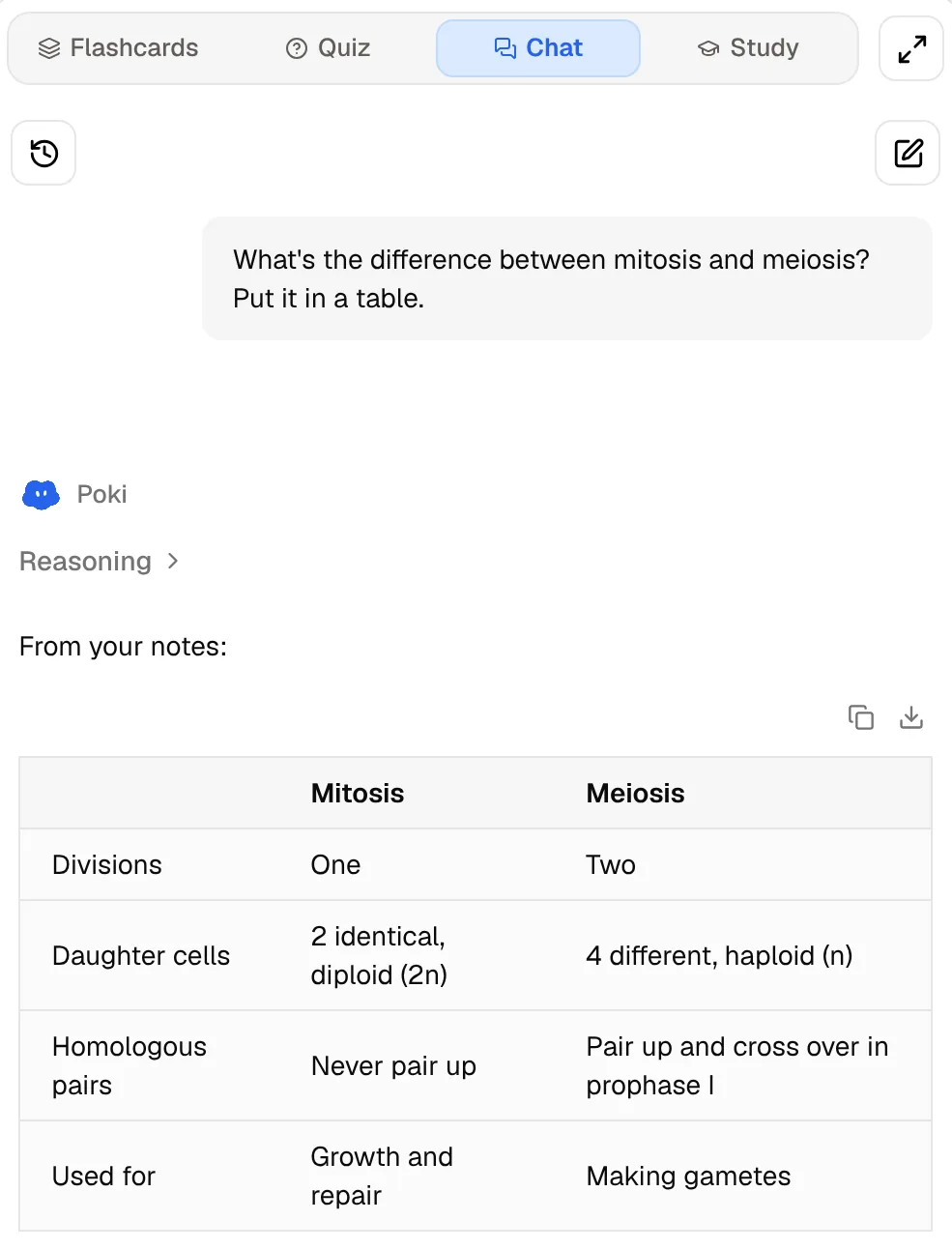
Then you ask questions of that material. Poki answers from your own sources and cites them, so you can open the slide or the paragraph it relied on. Ask for a comparison of mitosis and meiosis in a table and it builds one from your notes, not from the open web.
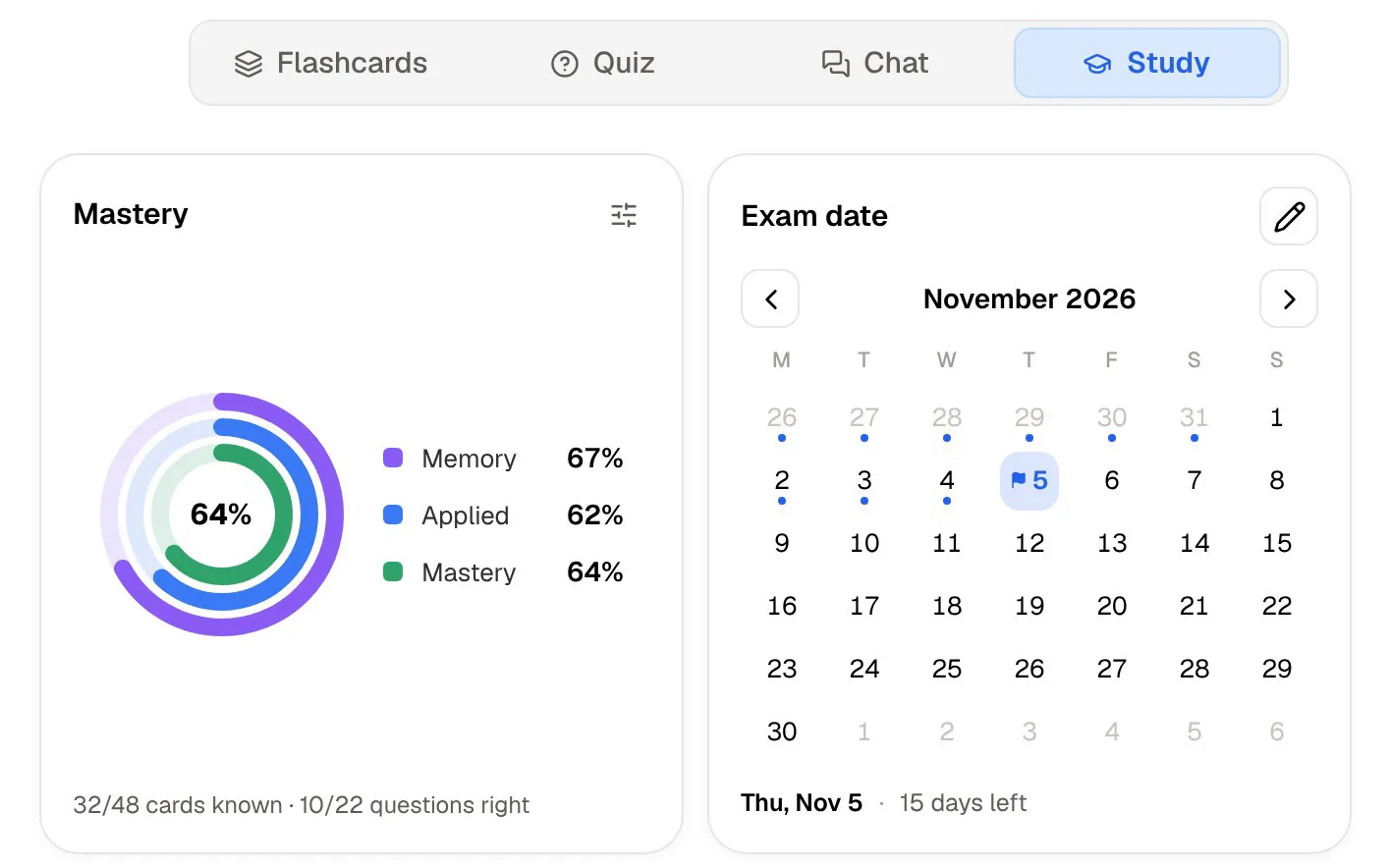
From the same sources you generate flashcards, quizzes, mind maps, written notes and audio reviews. A study plan takes your exam date and spreads the work across the days you have left, with reminders and memory, applied and mastery scores, so revision is planned rather than crammed.
AI answers: from the crowd or from your sources
Studocu says its AI combines advanced models with millions of real student notes. That is a reasonable design for a homework helper: the answer can draw on how many students explained the same topic. The trade-off is that you do not always know which notes shaped the answer, or whether they match your course.
Poki takes the narrower route. It answers from the material you added and cites it, so the answer reflects your lecturer's slides and your reading list. It is not a general web-research chatbot, and it is not built to solve homework from a photo. When your question is about your course, that narrowness is the point.
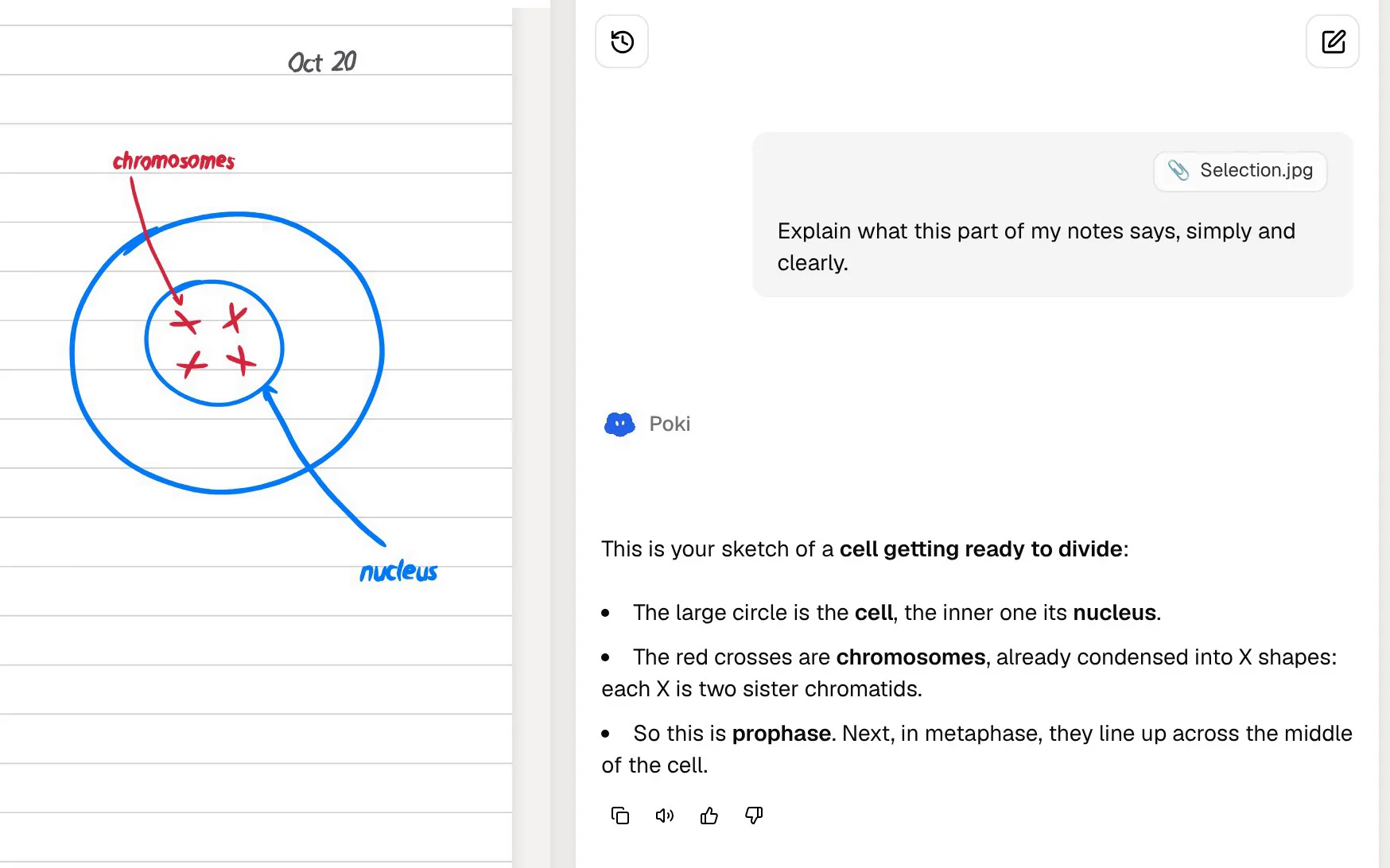
Math shows the difference most clearly. Studocu's Ask AI can solve a problem from a photo. PocketNote cannot, and does not try to. What it offers instead is a place to work: typed notes support LaTeX for equations, and on an iPad you can write a derivation by hand, select it with the lasso and ask Poki about a step you are unsure of, or turn the handwriting into text.
Access and price
Studocu lets you browse and preview documents, and full access comes with Premium, which includes complete documents and downloads. Its App Store listing shows Premium in quarterly and yearly subscriptions, and its help centre says you can also earn Premium days by uploading your own study documents, once they are accepted. When we checked in November 2026, its Premium page also offered a free Premium trial. Prices vary by country, so check in the app.
PocketNote is free to start. Its paid plans are Basic (live voice, premium AI models and connectors) and Plus (unlimited notebooks and apps, the longest podcasts and all models). See pocketnote.app for current prices. There is nothing to upload in return, because there is no shared library.
If you plan to earn Premium by uploading, remember that what you upload becomes part of a library other students read. The integrity questions above apply to what you share as much as to what you download, so upload only notes you wrote and are allowed to share.
Where Studocu is the better choice
Studocu is the better pick when the thing you need is other people's material.
- You want to see how a course was taught before. Course-specific notes and summaries from past students can show what a module covers.
- You need practice material you do not have. Shared practice questions and tutorial work fill gaps when your course provides little.
- You want a quick answer to a homework question from a photo. Ask AI (Ace) and its math solver are built for that; PocketNote is not a photo solver.
- You use Android. Studocu has an Android app; PocketNote runs on the web, iPhone and iPad.
- You like contributing. Uploading your notes helps other students and can earn you Premium time.
Using both, carefully
A sensible split is to use Studocu as a reference and PocketNote as the place you study. Look up a course summary when a topic will not click, then go back to your own lecture slides in PocketNote, ask Poki about the part you misunderstood, and add it to your flashcards.
If you download a Studocu document you are allowed to use, you can import the PDF into PocketNote and generate practice from it alongside your own material. Keep it labelled as someone else's notes, and when it disagrees with your lecturer's slides, trust the slides.
Both apps record lectures, so pick one recorder per class rather than ending up with two half-checked transcripts. Studocu's recorder sorts transcripts by course and turns a recording into a quiz. PocketNote's gives you a transcript, summary and notes that feed the same flashcard schedule as the rest of your material, so if your reviews live in PocketNote, record there.
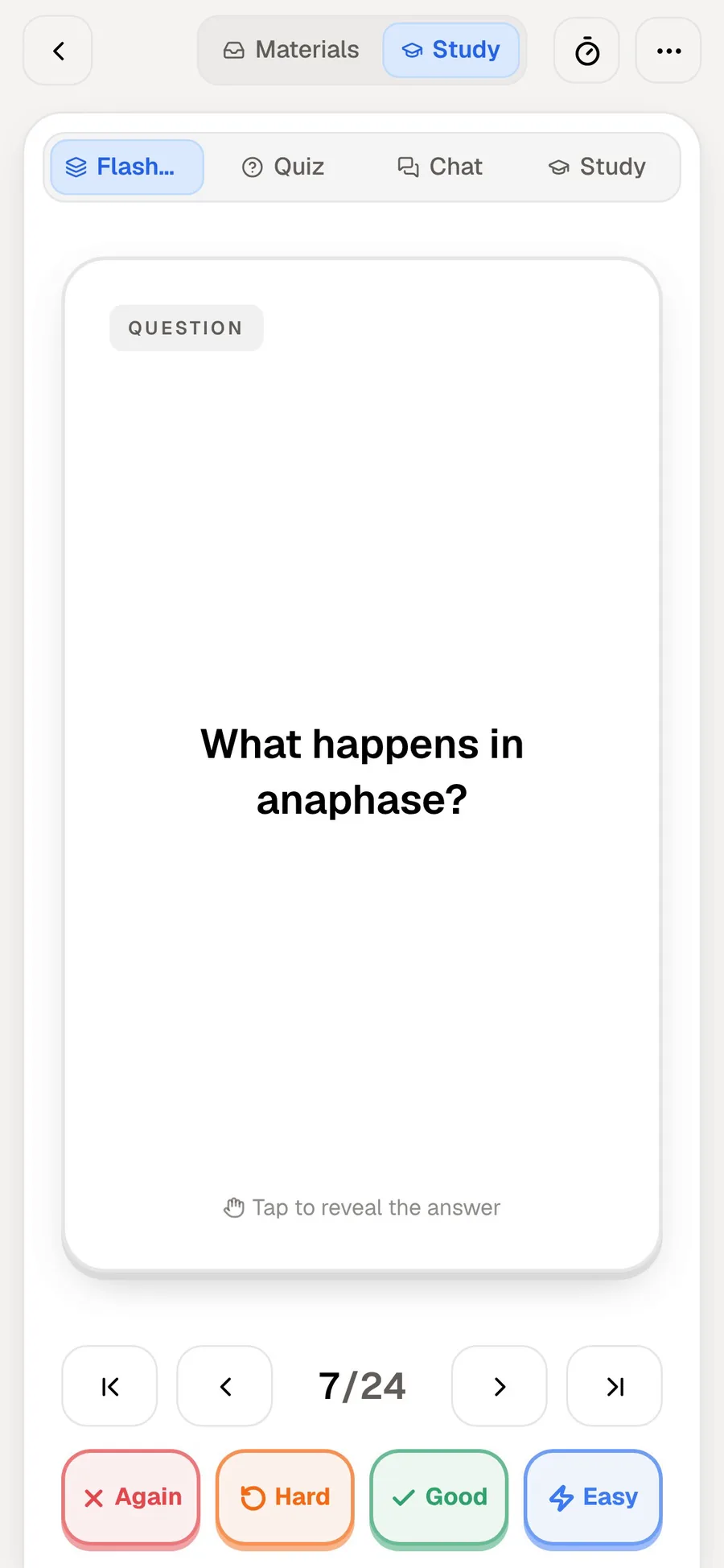
That schedule is the part a library cannot provide. Each PocketNote flashcard comes back based on how you rated it (Again, Hard, Good or Easy), so the cards you keep missing return sooner and the ones you know step back, whatever the original source was.
The verdict
Which one should you pick?
Pick PocketNote if…
- You want to study from your own course material: the lecturer's slides, your recordings and your notes.
- You want flashcards with spaced repetition, explained quizzes, an oral exam and a plan for your exam date.
- You want AI answers that cite your sources, not a mix of other students' notes.
- You take handwritten notes on an iPad or annotate lecture PDFs.
Pick Studocu if…
- You want to find other students' notes and summaries for your exact course.
- You want quick homework help from a photo, including a math solver.
- You use Android, or you want to earn access by sharing your own notes.
Try it yourself
See it with your own notes
PocketNote is an AI study app for the web, iPhone and iPad. It works from the material you bring (PDFs, Word files, recordings, YouTube and web links, handwritten or typed notes) and turns it into flashcards with spaced repetition, quizzes that explain every answer, oral exams, audio reviews and a study plan built around your exam date. Poki answers from your own sources, with citations.
It is a good companion to a reference library rather than a replacement for one. Try it on one module's slides and see whether more of it sticks when the practice comes from your own course. It is free to start.
Frequently asked questions
Sources
Keep reading