
StudySmarter is a revision app for school and university students. You name a subject or upload your notes, and it builds flashcards, a summary, mock exams and a revision plan that counts down to your exam date. Its own FAQ says university students are its biggest group, with GCSE and A-Level students, apprentices and people revising for professional exams also using it. On the US App Store the same app currently appears as Vaia, published by StudySmarter GmbH.
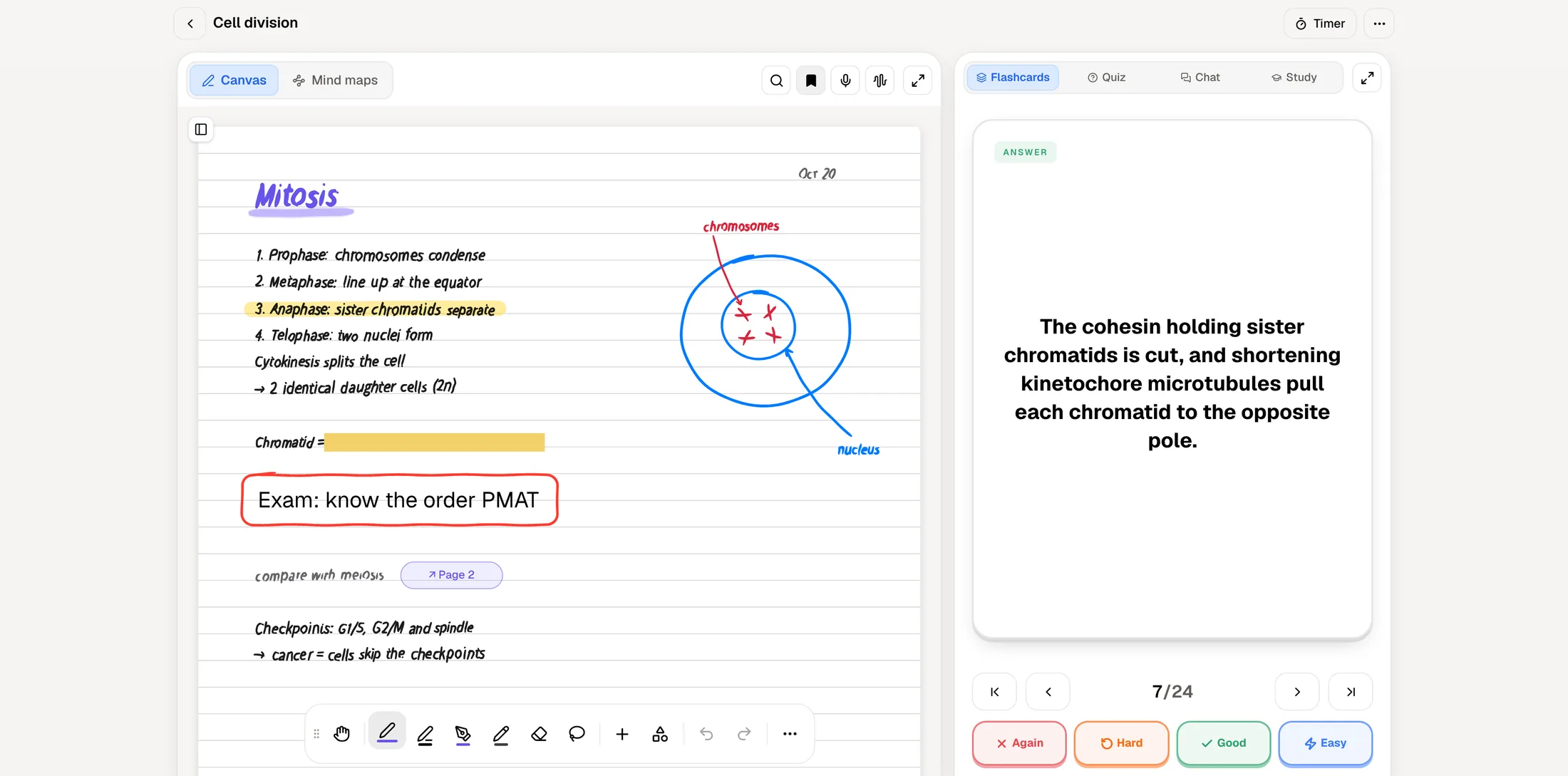
PocketNote covers a lot of the same ground. Both turn uploaded material into flashcards and quizzes, both plan your revision around an exam date, and both can turn a topic into something you listen to. The differences sit around that shared core: StudySmarter adds a large shared library and a homework scanner, while PocketNote adds a lecture recorder, handwritten notes, PDF annotation and an assistant that cites the source of each answer.
Below is a feature-by-feature comparison built from each product's own pages in November 2026, followed by an honest account of when StudySmarter is the better pick.
At a glance
PocketNote vs StudySmarter
| Feature | PocketNote | StudySmarter |
|---|---|---|
| Main job | Study app built on your own course material | Revision app with AI study sets and a shared library |
| Flashcards from your files | Yes: PDFs, Word, audio, YouTube, web links | Yes: PDFs, slides, Word, photos, web and YouTube links |
| Card review | Spaced repetition: Again / Hard / Good / Easy | Rate how well you knew it; shaky topics return sooner |
| Exam-date plan | Daily plan, reminders, mastery scores | Daily reminders; recalculates if you miss a session |
| Practice tests | Quizzes with every option explained; oral exam | Timed mock exams built from your study set |
| Shared library | No public deck library | Millions of shared study sets and explanations |
| Lecture recording | Yes, with transcript, summary and notes | Not advertised |
| Handwriting | Write with Apple Pencil; annotate PDFs | Upload photos of handwritten notes |
| AI over your material | Poki answers with citations to your sources | AI tutor answers about your notes |
| Audio | Podcast-style audio reviews with captions | AI podcasts of a topic |
| Platforms | Web, iPhone, iPad | Web, iOS, Android |
| Price | Free to start; Basic and Plus plans | Free plan; Premium £79.99 a year (UK site) |
Checked against each product's own website, November 2026. Plans and features change; confirm current details there.
What StudySmarter does well
The free plan covers a lot. According to StudySmarter's site, it already includes study sets built from any subject or from your notes, flashcards, summaries, a revision plan, its Fluid Learn Mode and mock exams. That may be all you need.
It also has a lot of content you didn't have to make. StudySmarter hosts what it describes as millions of shared study sets and explanations, and every topic gets a plain-English explanation page. If you study a common GCSE, A-Level or first-year university syllabus, there is a fair chance someone has already built a set close to yours.
Finally, it goes wherever a student goes. The web app, the iPhone app and the Android app sync the same study sets, and the Premium plan adds offline study. It can also start from nothing: type a subject name and the AI builds a study set from scratch, which helps when your own notes are thin.
It is also built for sharing. You can share a study set with your course mates, and the free plan includes the content other students have published. For a class revising the same specification, that shared pool is a real advantage, and PocketNote has no public library like it.
The overlap: revision plans, cards and audio
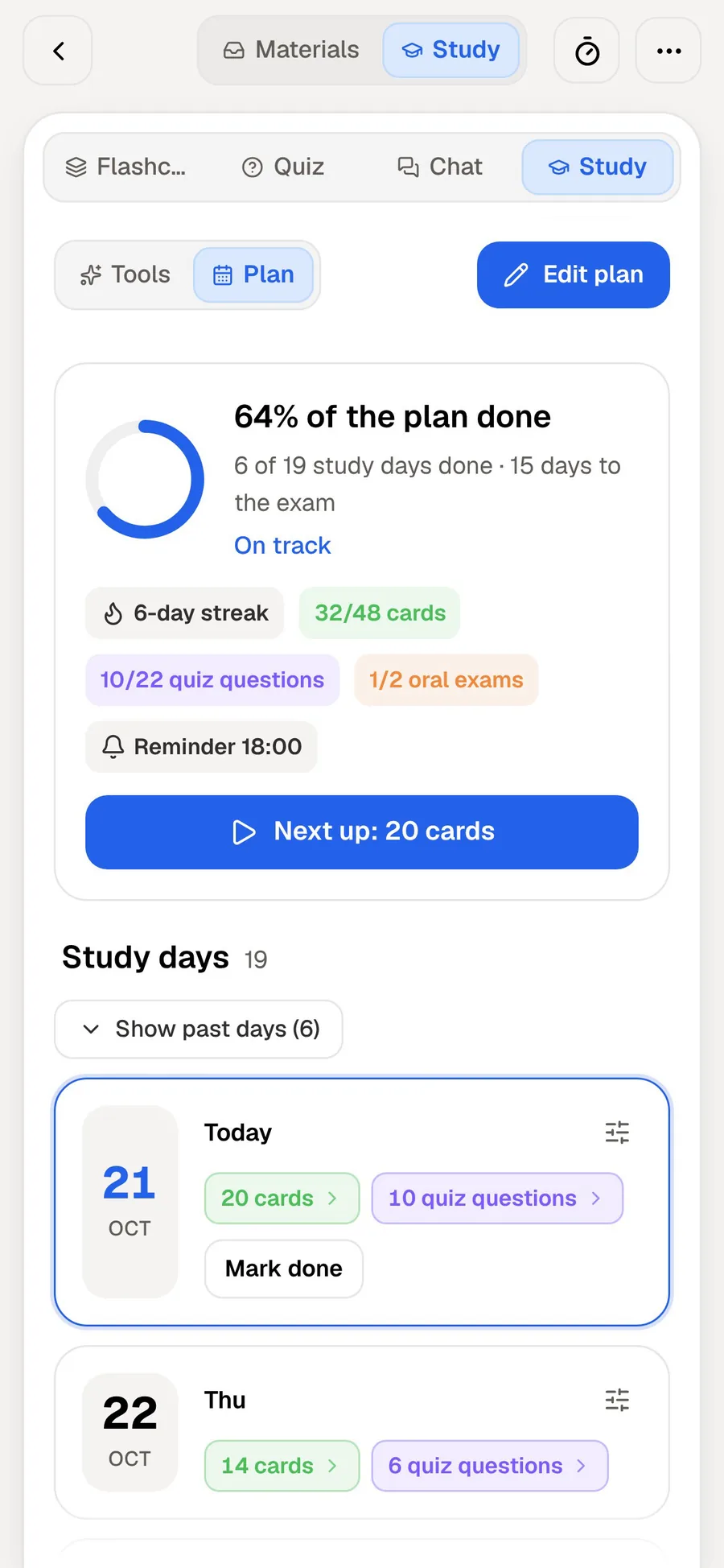
Strip away the branding and the two apps share a backbone. In StudySmarter you give your exam date, it spreads chapters across the days you have left and sends a daily reminder, and if you miss a session the plan recalculates. PocketNote's study plan also starts from the exam date: it plans what to cover each day, reminds you, and tracks memory, applied and mastery scores.
Flashcard review works on the same principle in both. StudySmarter asks how well you knew each answer and brings shaky topics back sooner than solid ones. PocketNote asks you to rate each card Again, Hard, Good or Easy and schedules it to return when you are about to forget it.
Both also make audio. StudySmarter offers AI podcasts of a topic; PocketNote makes a podcast-style audio review of your material with captions that follow the voices. If these three features are all you need, either app will do the job, and the decision comes down to the sections below.
Where they split: what you can feed each one
StudySmarter accepts PDFs, slides, Word documents, website and YouTube links, and photos of handwritten notes or textbook pages. That covers most of what a teacher hands out.
PocketNote's list is shaped around a university course. Besides PDF, Word, Excel, CSV, TXT and Markdown files and YouTube and web links, it takes audio files (MP3, WAV, M4A, OGG), records a lecture in the app and returns a transcript, a summary and notes, and imports from Google Drive, OneDrive or Dropbox. It can also search arXiv and SSRN for academic papers and save one straight to your library.
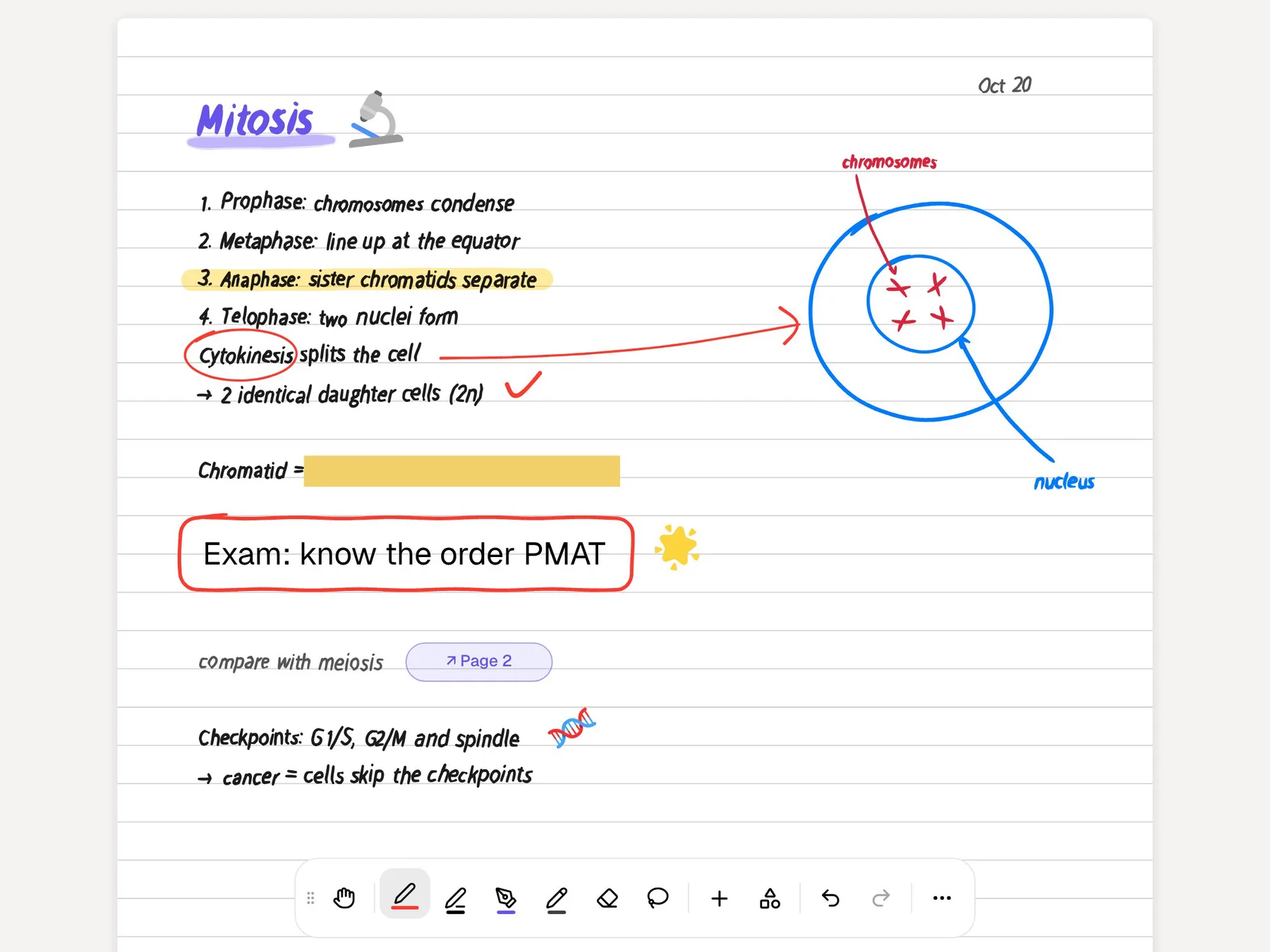
The bigger difference is handwriting. StudySmarter reads a photo of your handwritten page. PocketNote lets you write the page in the first place, on iPad with Apple Pencil, then make flashcards from it, and it lets you highlight and write directly on a PDF. If you take notes by hand in lectures, that is likely to be the deciding feature.
Organisation differs as well. StudySmarter sorts a study set into chapters with due dates. PocketNote keeps everything in colour-coded folders, with starred and recent items and search across your library, including search through your handwriting, so a term of lectures, readings and notes stays in one place.
Answers you can trace back to the page
Both apps have an AI you can ask about your material. StudySmarter's AI tutor explains anything from your notes you're unsure about, and its FAQ says that when you add your own materials it builds from them, so it stays close to what your lecturer said.
PocketNote's assistant, Poki, goes further on traceability. It answers from your own files with citations to the source, and shows its steps as it works: searched your notes, read the item, started a quiz. On a PDF it can see the page as you see it, including your own highlights and handwriting, and it can highlight, underline or circle the passage it is talking about. You can undo its marks in one tap.
For a student who has to back up an answer in an essay or a lab report, being able to check the cited source matters more than a fluent explanation. If you mostly want a friendly explanation of a topic, both will give you one.
Here is what that looks like in practice. Ask Poki for the difference between mitosis and meiosis as a table and it builds the table from your own notes, marked as coming from them. Ask it to highlight the key definitions on page 3 of the lecture PDF and the highlights appear on the page itself.

Testing yourself: mock exams and an oral exam
StudySmarter's strongest exam feature is the mock exam. It builds a timed test from your own study set, scores it and shows where the gaps are, which is close to the experience of sitting a written paper.
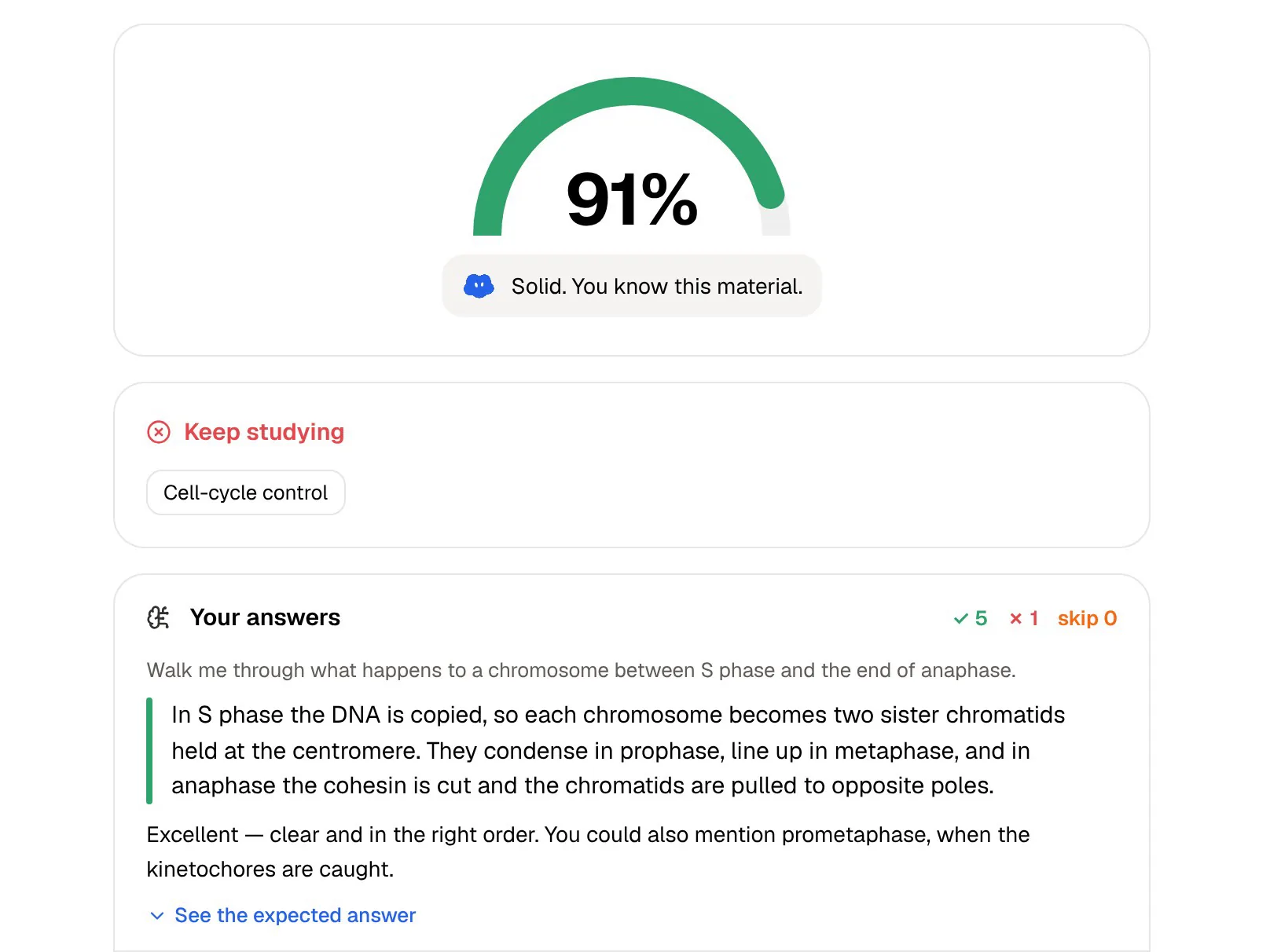
PocketNote's quizzes explain every answer, including why each wrong option is wrong, so a missed question still teaches you something. It also has an oral exam: Prof. Poki asks questions out loud or in text and keeps probing until you can explain the idea in your own words. That suits viva-style assessments, language orals and any subject where explaining a process is the test.
If your exams are timed written papers, StudySmarter's mock exams are a direct rehearsal. If you need to explain things out loud, or want to know why you were wrong, PocketNote covers that better.
PocketNote's study plan also counts the oral exam alongside flashcards and quizzes when it shows your progress, so you can see whether you have practised explaining a topic as well as recognising the right answer.
Pricing, side by side
StudySmarter's free plan includes study sets, flashcards, summaries, revision plans, Fluid Learn Mode, mock exams and the shared library. At the time of writing (November 2026), its UK site lists Premium at £6.67 a month, billed annually at £79.99, with monthly and lifetime options also offered. Premium adds its most advanced AI, unlimited Homework Helper uploads and AI Assistant use, CSV export of flashcards, and ad-free offline studying.
PocketNote is free to start. Its paid plans are Basic, which adds live voice, premium AI models and connectors, and Plus, which adds unlimited notebooks and apps, the longest podcasts and all models. See pocketnote.app for current plans and prices.
Prices in app stores can differ from web prices and from country to country, so check the figure shown in your own store before you subscribe to either.
Where StudySmarter is the better choice
StudySmarter is the stronger pick in a few clear situations, and it's worth being plain about them.
- You use an Android phone. StudySmarter has an Android app. PocketNote has no Android app yet and runs in the browser instead.
- You want ready-made material. Shared study sets and explanation pages save time on common school and first-year syllabuses. PocketNote has no public library of other students' decks.
- You want help with homework problems. The Homework Helper scanner works from a photo of a problem. Poki is strongest on your own course material.
- You revise offline on the move. StudySmarter Premium advertises ad-free offline studying across its apps.
- You have no notes yet. StudySmarter can build a set from a subject name alone; PocketNote is built around material you bring.
Moving from StudySmarter to PocketNote
Your original files move without fuss. PDFs, Word documents and YouTube links go straight into PocketNote. PocketNote's import list covers PDF, Word, Excel, CSV, TXT, Markdown and audio, so save PowerPoint slides as PDF before importing them.
Flashcards are the harder part. StudySmarter Premium can export your flashcards as a CSV, and PocketNote accepts CSV files as a source, so the content of your cards can come across as material to study from and to build new cards from. There is no direct importer, so your review history and revision plan stay in StudySmarter; set your exam date in PocketNote and let it build a new plan.
Keeping both for a while is a reasonable approach: StudySmarter's explanation pages for topics they never had notes on, and PocketNote for the lectures they recorded and the notes they wrote.
The verdict
Which one should you pick?
Pick PocketNote if…
- You take notes by hand on an iPad and want flashcards made from those exact pages.
- You record lectures and want a transcript, summary and notes from the recording.
- You want to check sources: Poki cites your files and can mark the passage on your PDF.
- You're assessed out loud and want an oral exam that keeps asking follow-up questions.
- Your work lives in other apps: paid plans connect Poki to Google Drive, Notion and Outlook.
Pick StudySmarter if…
- You're on Android or want offline study across phone and laptop with Premium.
- You want ready-made sets and explanations for a common school or first-year syllabus.
- You sit timed written papers and want mock exams built from your study set.
- You need homework help from a photo-based scanner.
Try it yourself
See it with your own notes
PocketNote is an AI study app for the material your course actually gives you. Import lecture PDFs, record the lecture itself, or write notes with Apple Pencil, and it turns them into flashcards with spaced repetition, explained quizzes, an oral exam, audio reviews and a study plan that counts down to your exam. Poki, its assistant, answers from your files and shows you where each answer came from.
It runs in the browser at pocketnote.app and on iPhone and iPad, with your library synced between them, and it's free to start.
Frequently asked questions
Sources
Keep reading