
Quizgecko is, first of all, an AI quiz generator. Upload a PDF, paste text, or give it a web page or a public YouTube video, and it writes practice questions in formats such as multiple choice, true or false, short answer, fill in the blank and matching. Its apps for iPhone and Android add flashcards with spaced repetition, study notes, AI podcasts and an AI tutor, and its website also offers sharing and embedding for teachers and businesses.
PocketNote does the same core thing, generating quizzes and flashcards from your material, inside a wider study app: lecture recording, handwritten and typed notes, an assistant that cites your files, an oral exam and a study plan built around your exam date.
If you mainly want practice questions, the two are close. This comparison focuses on what's different and says plainly where Quizgecko is the better tool. Quizgecko details come from its website, help pages and app store listings, checked in November 2026.
At a glance
PocketNote vs Quizgecko
| Feature | PocketNote | Quizgecko |
|---|---|---|
| Best known for | Studying your own course material | Generating quizzes from any text or file |
| Inputs | PDF, Word, Excel, CSV, TXT, Markdown, audio, YouTube, web links | PDFs, documents, slides, text, web pages, YouTube, scans |
| Quizzes | Every option explained, right and wrong | Six question formats; answer explanations |
| Flashcards | Spaced repetition: Again / Hard / Good / Easy | Spaced repetition (SM-2-based, per its site) |
| Audio | Podcast-style audio reviews with captions | AI-generated podcasts |
| Lecture recording | Yes, with transcript, summary and notes | Not advertised |
| Your own notes | Block editor, Apple Pencil handwriting, PDF annotation | AI study notes from your upload |
| Staying on track | Study plan to an exam date, with mastery scores | Streaks and a daily-habit calendar (app) |
| Sharing with a class | Share a link to a note | Share or embed courses; class results |
| Platforms | Web, iPhone, iPad | Web, iOS, Android |
| Price | Free to start; Basic and Plus plans | Limited free plan; Premium and Ultra subscriptions |
Checked against Quizgecko's site and app listings and PocketNote's own site, November 2026. Plans and features change; confirm current details with each product.
What Quizgecko does well
Question variety is its strength. Quizgecko's PDF-to-quiz page lists six formats: multiple choice, select all that apply, true or false, short answer, fill in the blank and matching, and there is a Mixed option. If your exam uses a particular format, practising in that format is useful, and Quizgecko lets you choose it.
It takes in a wide range of sources. PDFs up to 100 MB, pasted text, public web pages and YouTube videos with spoken content all work, and the mobile app can scan pages. Its own pages warn that AI can make mistakes and ask you to check generated questions against the source, which is good advice for every tool on this page.
It reaches beyond students. A course can be shared with a class so you can see their results, or embedded on a website, and Quizgecko markets the same engine to businesses for training. Its flashcards can be exported to Anki, and the Android app's listing mentions importing from Quizlet.
The app is under active development. Its October 2026 redesign added folders within folders, a separate AI tutor chat, diagrams in study notes and a redesigned streak calendar, aimed at building a daily study habit.
Where the two overlap
On the study side, the overlap is large. Both generate flashcards from your upload and schedule them with spaced repetition. Quizgecko says its schedule is SM-2-based; PocketNote asks you to rate each card Again, Hard, Good or Easy so it returns when you are about to forget it.
Both make audio from your material: Quizgecko's AI podcasts, and PocketNote's podcast-style audio reviews with captions that follow the voices. Both offer an AI you can ask about the material, and both produce written notes from a document.
Even the chat features are similar in spirit. Quizgecko's site says a conversation with its AI tutor can be turned into a quiz, a flashcard deck or an audio summary. Poki can start a quiz as one of its steps, and it can write into your notes from the chat, so a useful answer ends up next to the material it explains.
With that much in common, the decision rests on three things: the feedback you want from a quiz, the kind of material you start with, and how much planning you want the app to do for you.
Feedback that explains the wrong answers
A quiz is most useful in the minute after you get a question wrong. Quizgecko gives answer explanations and a review of your mistakes, and its AI tutor chat is there for follow-up questions.
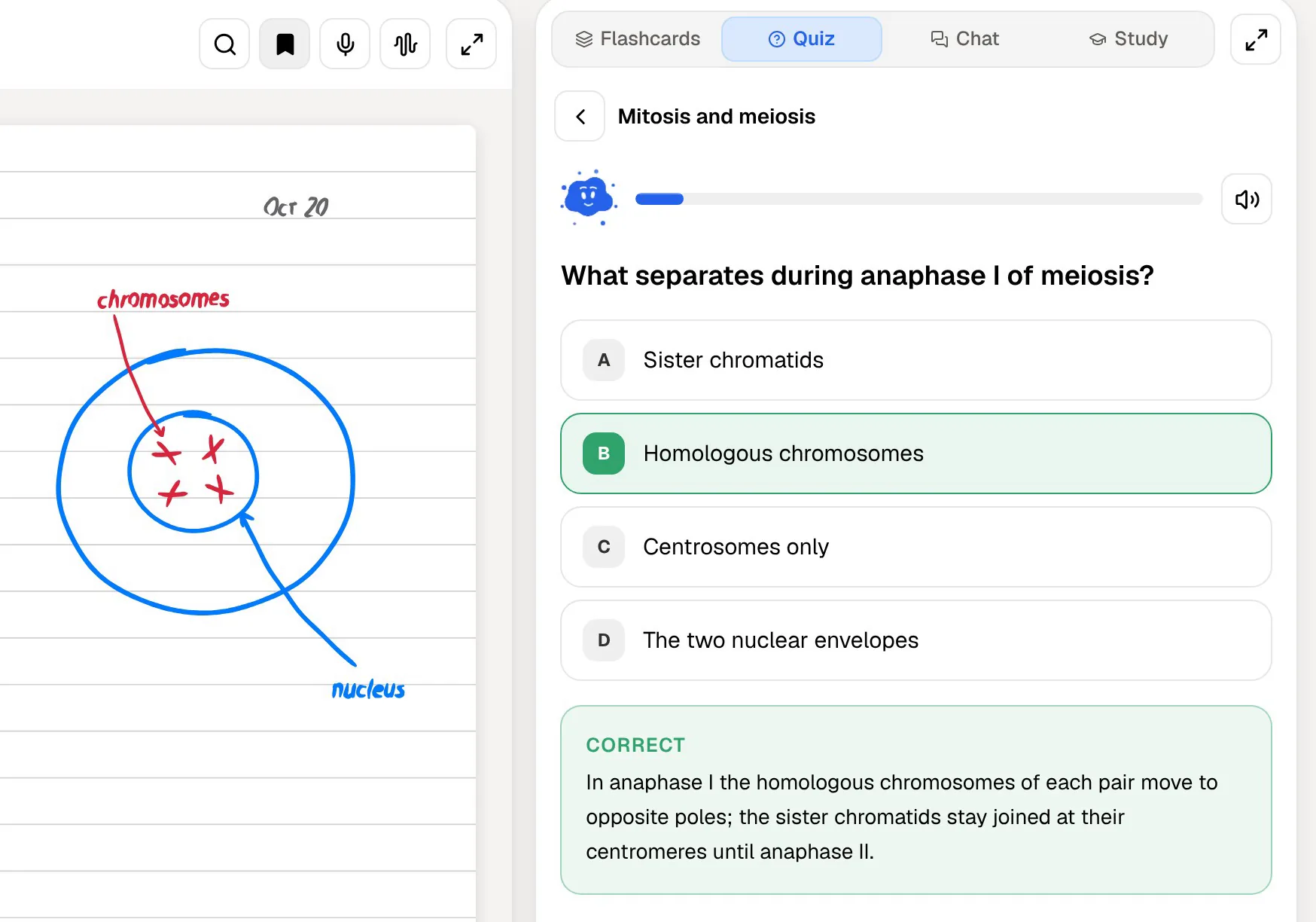
PocketNote builds the explanation into every question. Each answer comes with the reason, for the right option and for each wrong one, so you learn why the tempting option was wrong as well as which one was correct. That matters most in subjects where the wrong options are plausible, such as biology mechanisms or legal tests. If you want to go further, Poki answers from your material and cites the source, and it shows its steps as it works, such as searching your notes and reading a specific item.
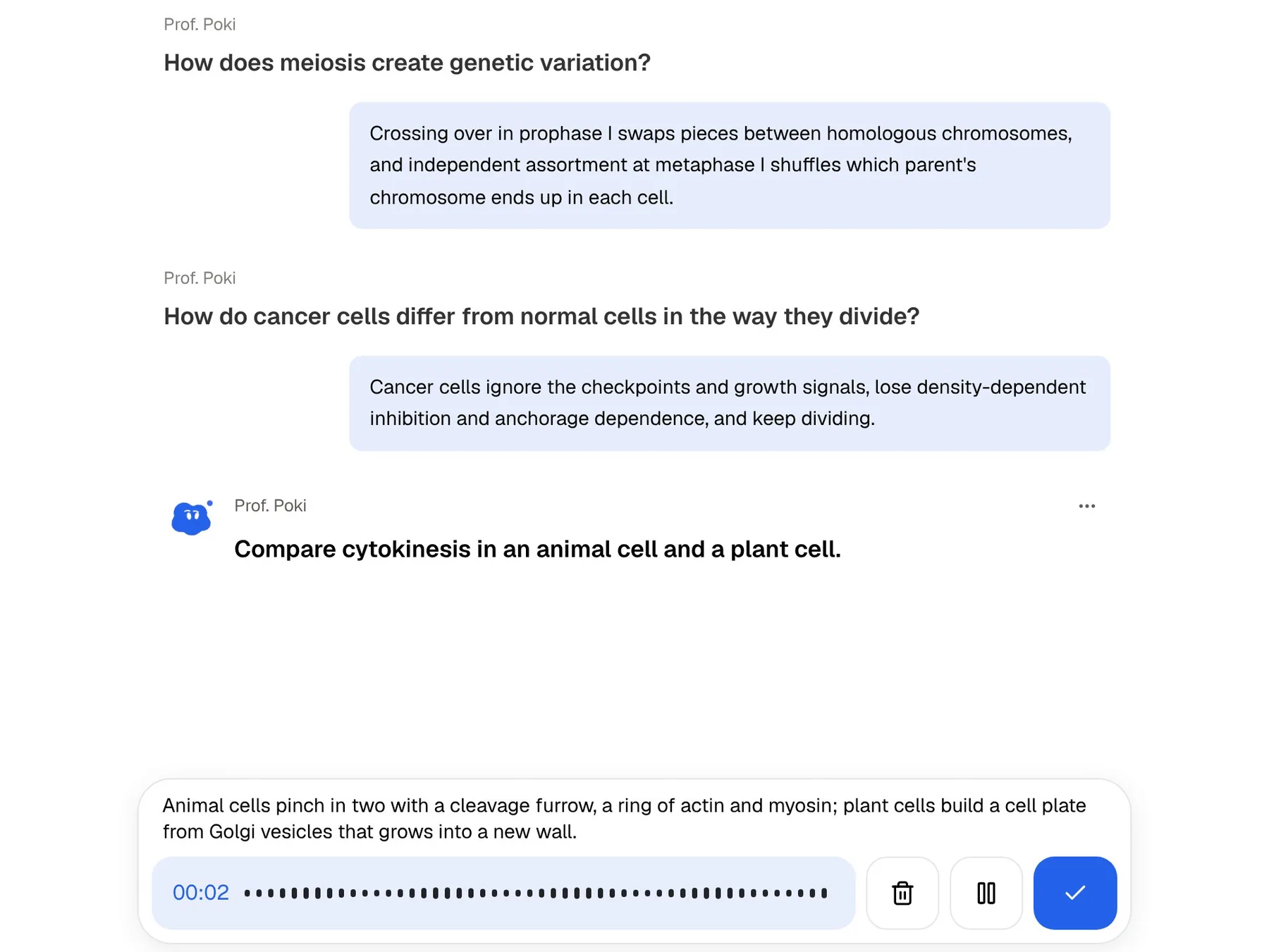
Then there is the oral exam, which doesn't appear in Quizgecko's listings. Prof. Poki asks you a question out loud or in text, reads your answer and keeps probing until you can explain the idea. For any exam with written or spoken answers, that is practice a quiz alone doesn't give.
Explanations also help on questions you got right by guessing. Reading why the other options are wrong turns a lucky pick into something you actually know, and it is easy to skip that step when an app only shows a tick.
Starting from a lecture, not a document
Quizgecko works from material that already exists as text, a file, a web page or a video. PocketNote can also start from what happens in the room. You record the lecture in the app and get a transcript, a summary and notes, then generate a quiz or flashcards from the recording. If your course is built on live lectures, that is where most of your material starts.
Handwriting is the other gap. If you take notes with Apple Pencil, PocketNote keeps them as notes you can search, turns them into flashcards, and can record audio while you write with Note Replay, so playback shows the strokes you were writing at that moment. Quizgecko's app can scan pages to bring them in, which is a different job from taking notes in the app.
PocketNote also annotates PDFs directly. You can highlight, write and draw on the page, and Poki can look at the page as you see it, including your highlights and handwriting, and mark passages itself when you ask.
For video lectures the two are level: both take a YouTube link. PocketNote brings the transcript in with it, and Quizgecko asks that the video has spoken content and is publicly viewable.

After the quiz: planning to an exam date
Quizgecko's latest app design leans on habit: a streak calendar, organised folders and a daily routine. That suits steady practice without a fixed deadline.
PocketNote's study plan works backwards from the exam date. It plans what to cover each day, reminds you, and tracks memory, applied and mastery scores as you work.
If you have a single exam six weeks away, a habit streak may be enough. If you have several exams in one fortnight, a plan that divides the days between subjects does more of the thinking for you.
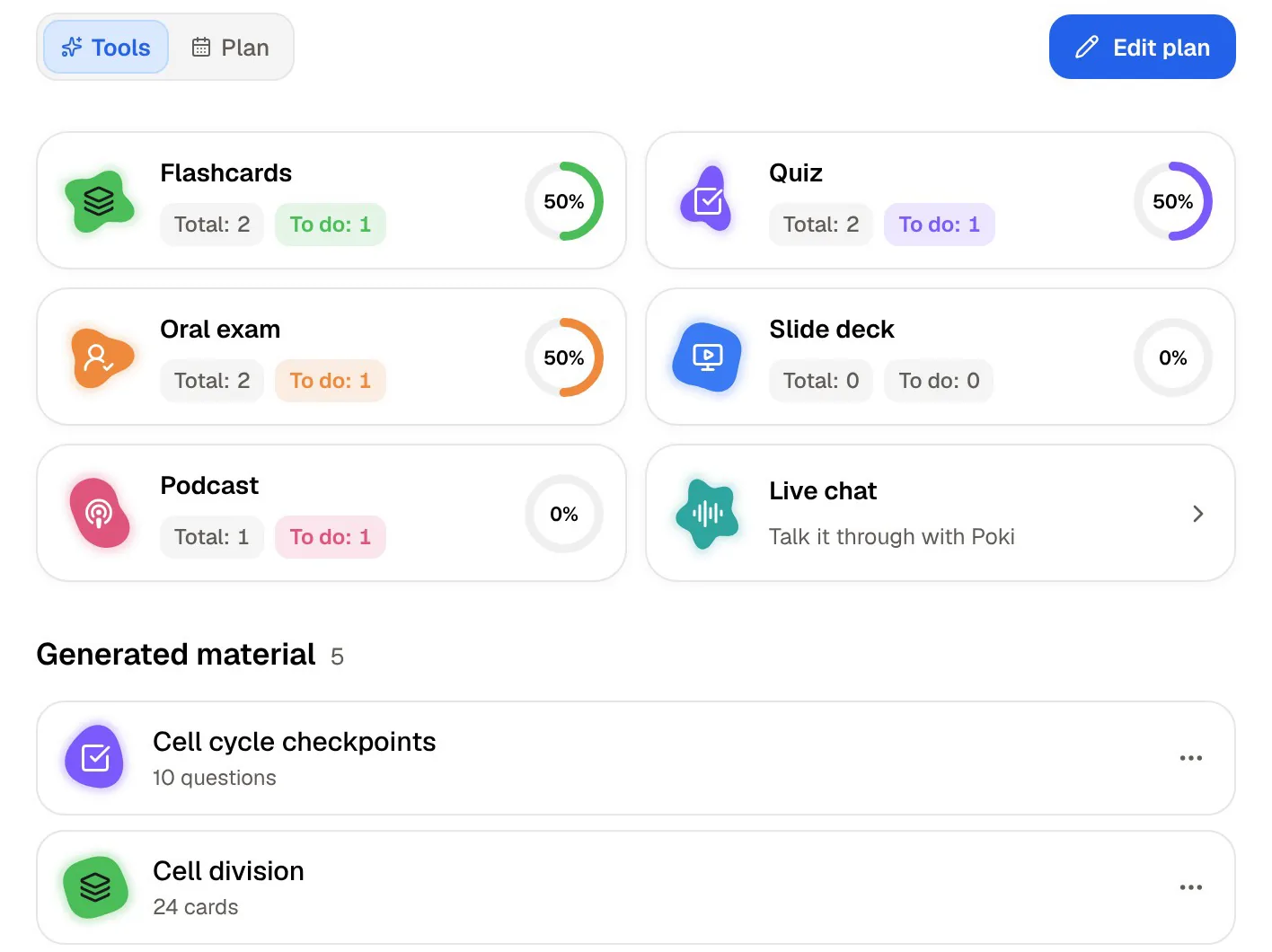
The plan also covers more than quizzes. It tracks flashcards, the oral exam, slide decks, podcasts and live chat as separate tools, so you can see if you have been leaning on one kind of practice and avoiding another.
Where Quizgecko is the better choice
Quizgecko is the better pick for several kinds of user, and some of them aren't students at all. If your work involves writing questions for other people, it is built for that in a way PocketNote isn't.
- You need specific question formats, such as matching, fill in the blank or select all that apply.
- You're a teacher or trainer who wants to share a quiz with a class, see results, or embed it on a website. PocketNote is a personal study app, not a quiz-distribution tool.
- You use Anki and want generated flashcards exported into it.
- You're on Android. Quizgecko has an Android app; PocketNote doesn't yet and runs in the browser instead.
- You're starting from Quizlet sets, which the Android app lists as an import option.
- You want a quiz on a topic, not a file. The App Store listing says Quizgecko can build a set from a topic you choose.
Plans and prices
Quizgecko has a limited free plan for trying it with your own material, and paid Premium and Ultra subscriptions sold in its apps. Its App Store listing shows several price points for each, so check the current figures on its site or in your app store before you subscribe.
PocketNote is free to start. Basic adds live voice, premium models and connectors; Plus adds unlimited notebooks and apps, the longest podcasts and all models. See pocketnote.app for current plans.
Both free tiers are enough for a fair test. Take one chapter you know well and generate a quiz in each. Read the explanation for a question you got wrong, check one answer against the page it came from, and see how each app brings that topic back over the following days. That will tell you more than any feature table.
Using Quizgecko and PocketNote together
There's no need to pick one for every course. A workable split is Quizgecko when you want practice in a specific format, or when you are making a quiz for someone else, and PocketNote for the courses where you record lectures, write notes and need a plan to the exam.
Moving material between them is simple because both start from your files. The same lecture PDF works in either. There is no importer between the two apps, so generated quizzes and decks stay where you made them, and you would regenerate them from the source in the other app.
If you are moving from Quizgecko to PocketNote, keep your original PDFs, documents and links; they are what PocketNote needs. Save slides as PDF first, since PocketNote's import list covers PDF, Word, Excel, CSV, TXT, Markdown and audio.
The verdict
Which one should you pick?
Pick PocketNote if…
- You want every quiz answer explained, including why each wrong option is wrong.
- Your material starts as lectures or handwriting, not only as documents.
- You want an oral exam and live voice practice with Poki.
- You have exam dates and want a plan that divides the days for you.
- You want answers with citations to your own files.
Pick Quizgecko if…
- You need named question formats such as matching, fill in the blank or select all that apply.
- You teach or train others and want to share or embed quizzes and see results.
- You use Anki or Android, or want to bring in Quizlet sets.
Try it yourself
See it with your own notes
PocketNote is an AI study app for your own course material. Import PDFs, Word or Excel files, audio, YouTube or web links, record a lecture or write notes with Apple Pencil, and it generates quizzes that explain every answer, flashcards with spaced repetition, mind maps, audio reviews, an oral exam and a study plan to your exam date.
Poki answers from your files with citations. You can try it free at pocketnote.app or on iPhone and iPad.
Frequently asked questions
Sources
Keep reading