

Turbolearn is now Turbo AI. The company shortened its name, moved to a new domain, and says everything else stays the same: your account and data, the mobile apps and the pricing. Old Turbolearn links redirect automatically. Most students still search for Turbolearn, so this page uses both names.
Turbo AI is an AI notetaker first. It listens to your lecture and writes the notes, then lets you review with flashcards, quizzes, podcasts and a chat that answers from your uploaded material, and it also works from PDFs, videos and your own notes. PocketNote does much of that, then adds handwriting with Apple Pencil, PDF annotation, spaced-repetition scheduling, an oral exam and a study plan built around your exam date.
Below is a direct comparison based on Turbo AI's own site and App Store listing as of November 2026, with a plain section on where Turbo AI is the better pick.
At a glance
PocketNote vs Turbo AI (Turbolearn)
| Feature | PocketNote | Turbo AI (Turbolearn) |
|---|---|---|
| Lecture recording | Yes: transcript, summary, notes | Yes: the AI notetaker writes the notes |
| Other inputs | PDF, Word, Excel, CSV, TXT, Markdown, audio, YouTube, web links | Documents, PDFs, slides, websites, videos, text |
| Editing notes | Block editor with tables, callouts, LaTeX | Google Docs-style editor |
| Live collaboration | Share a link to a note; no real-time co-editing | Edit docs and share content live |
| Handwriting | Apple Pencil notes with Note Replay | Not advertised |
| STEM formatting | LaTeX maths in typed notes | Maths, chemistry, physics diagrams and code |
| Flashcards | Spaced repetition: Again / Hard / Good / Easy | Yes; scheduling not described in its listing |
| Quizzes | Every option explained | Quizzes and endless practice questions |
| Exam-date planning | Study plan with reminders and mastery scores | Not advertised |
| Ready-made content | No public library | Premade AP study guides and books |
| Platforms | Web, iPhone, iPad | Web, iOS, Android |
| Price | Free to start; Basic and Plus plans | Free tier; paid unlimited plans |
Checked against Turbo AI's and PocketNote's own sites and app listings, November 2026. Plans and features change; confirm current details with each product.
Turbolearn is now Turbo AI
The rename is cosmetic. Turbo AI's rebrand page says the name is shorter and the domain has changed, while your account, your data, the mobile apps and the pricing stay as they were. Bookmarks to the old site keep working because the old links redirect.
The App Store listing now reads Turbo AI, formerly Turbolearn, and the company behind it is still Turbolearn LLC. If you used Turbolearn before the rename, you are using the same product today under a different name.
That matters for searching. Reviews and guides written before the rename still say Turbolearn, so if you are reading older comparisons, they are describing the app now called Turbo AI.
What Turbo AI does well
The lecture-to-notes flow is its centre. You record in class, the AI writes organised notes, and afterwards you choose how to review: flashcards, quizzes, podcasts or a chat that answers from your materials. For students who struggle to listen and write at the same time, that one step takes a lot of pressure off.
The notes are easy to work with afterwards. Turbo AI gives you a full Google Docs-style editor, and its FAQ says it handles maths formulas, chemical equations, physics diagrams and code snippets, which matters for engineering, pre-med and science courses.
It is also social. You can study with friends, edit docs and share content live, and there is a library of premade AP study guides and books to start from. The apps run on the web, iPhone, iPad and Android, with your notes synced between them, and the free tier includes note generation, flashcards and quizzes.
The flow is deliberately simple: drop in a file or a recording, generate study materials, then pick an activity. There is little to set up, which suits students who want the note-taking handled and not much else to think about.
Recording the same lecture in both
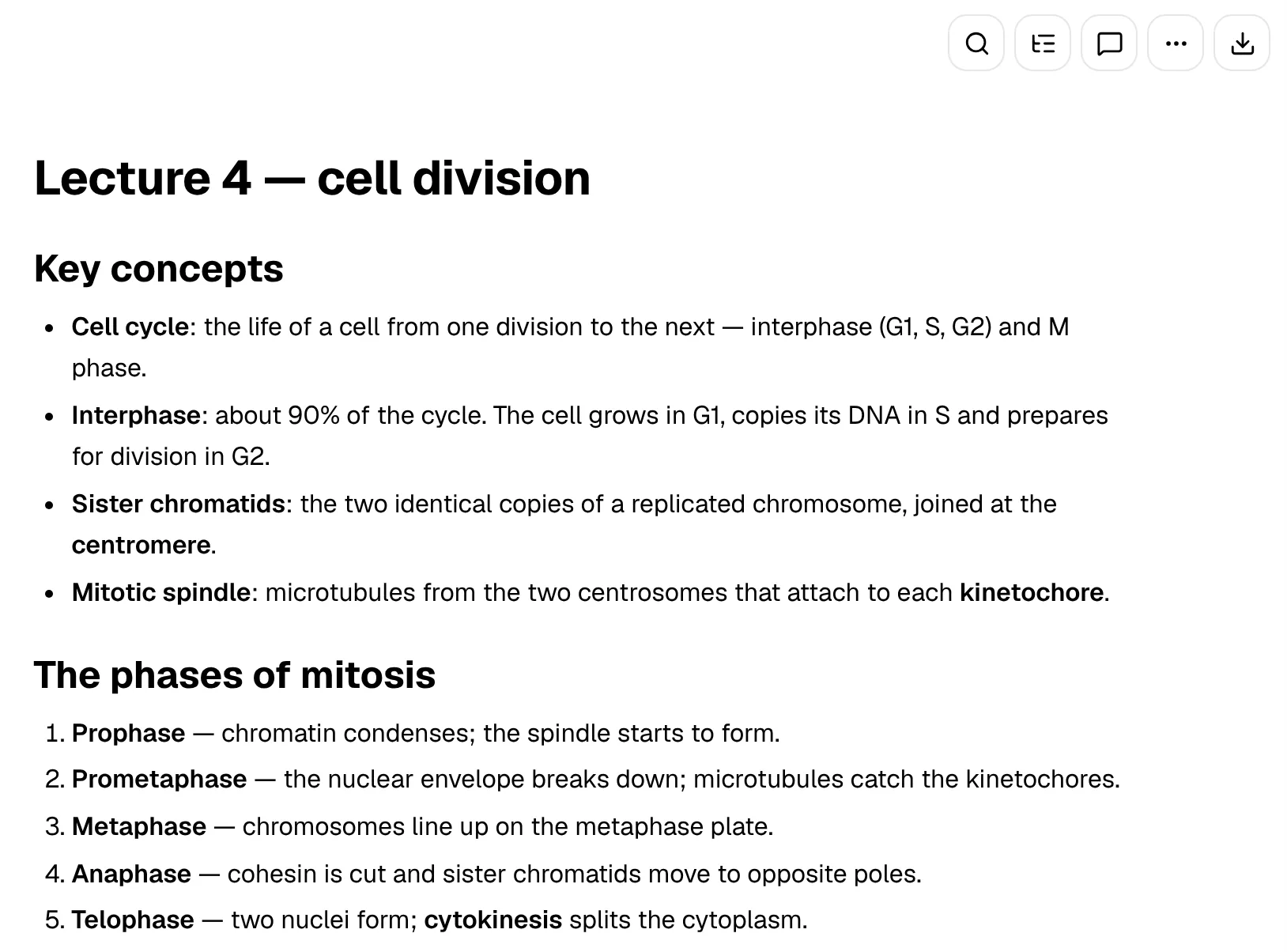
Both apps start the same way: press record in class and let the AI do the writing. In Turbo AI the result is a set of notes you can open in its editor and turn into review activities. Both sync across devices, so a recording made on your phone is waiting on your laptop later.
In PocketNote you get the recording itself, a transcript and a summary on separate tabs, and AI-written notes you can edit like any other note. From there you generate flashcards, a quiz, a mind map, slides or a podcast-style audio review from the same lecture, and ask Poki questions about it. Poki answers from the recording and your other material, with citations to the source.
If the lecture was posted on YouTube, both can work from that instead. In PocketNote the transcript comes with the YouTube link, so you can skip recording entirely when the video is available.
Whichever you use, sit where the microphone can hear the lecturer, and skim the first set of AI notes against your own memory of the class. Generated notes can merge two points or drop an aside that turns out to matter on the exam.
Writing by hand while the lecture records
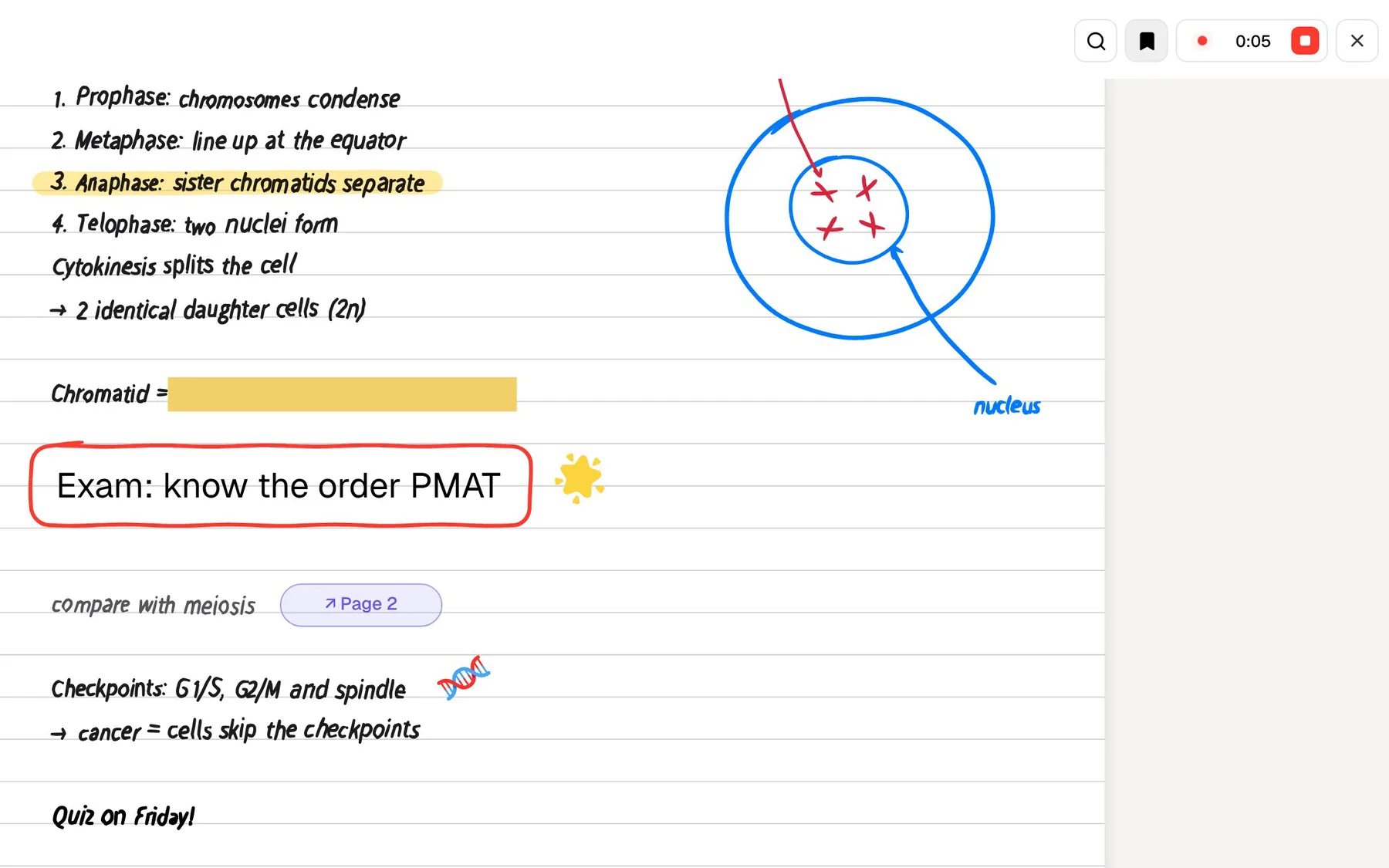
This is the clearest difference. Turbo AI's notes are typed into its Google Docs-style editor. PocketNote also lets you write by hand on iPad with Apple Pencil, with pens, highlighters, shape snapping, page templates such as lined, grid and Cornell, and an infinite whiteboard for diagrams.
Note Replay ties the two together. It records audio while you write, and when you play it back, it shows the strokes you were writing at that moment. If a sketch from the lecture makes no sense a week later, you can hear what the lecturer was saying while you drew it.
A lasso can turn handwriting into text, recolour a selection or send it to Poki with a question. Tape hides answers on the page for self-testing, and search reaches into your handwriting, so handwritten notes stay as useful as typed ones. Hundreds of stickers, presentation mode and export to PDF round it out when notes need to be shown or shared.
From notes to remembering them
Good notes are the start of studying, not the end, and the weeks between the lecture and the exam are where most of the work happens. Turbo AI offers flashcards and endless practice questions until a topic clicks. Its App Store listing and homepage don't mention spaced repetition, so if review scheduling matters to you, check how its flashcards behave in the app.
PocketNote's flashcards use spaced repetition: rate each card Again, Hard, Good or Easy, and it comes back when you are about to forget it. Its quizzes explain every answer, including why each wrong option is wrong, and its oral exam has Prof. Poki ask you questions out loud or in text and keep probing until you can explain the idea.
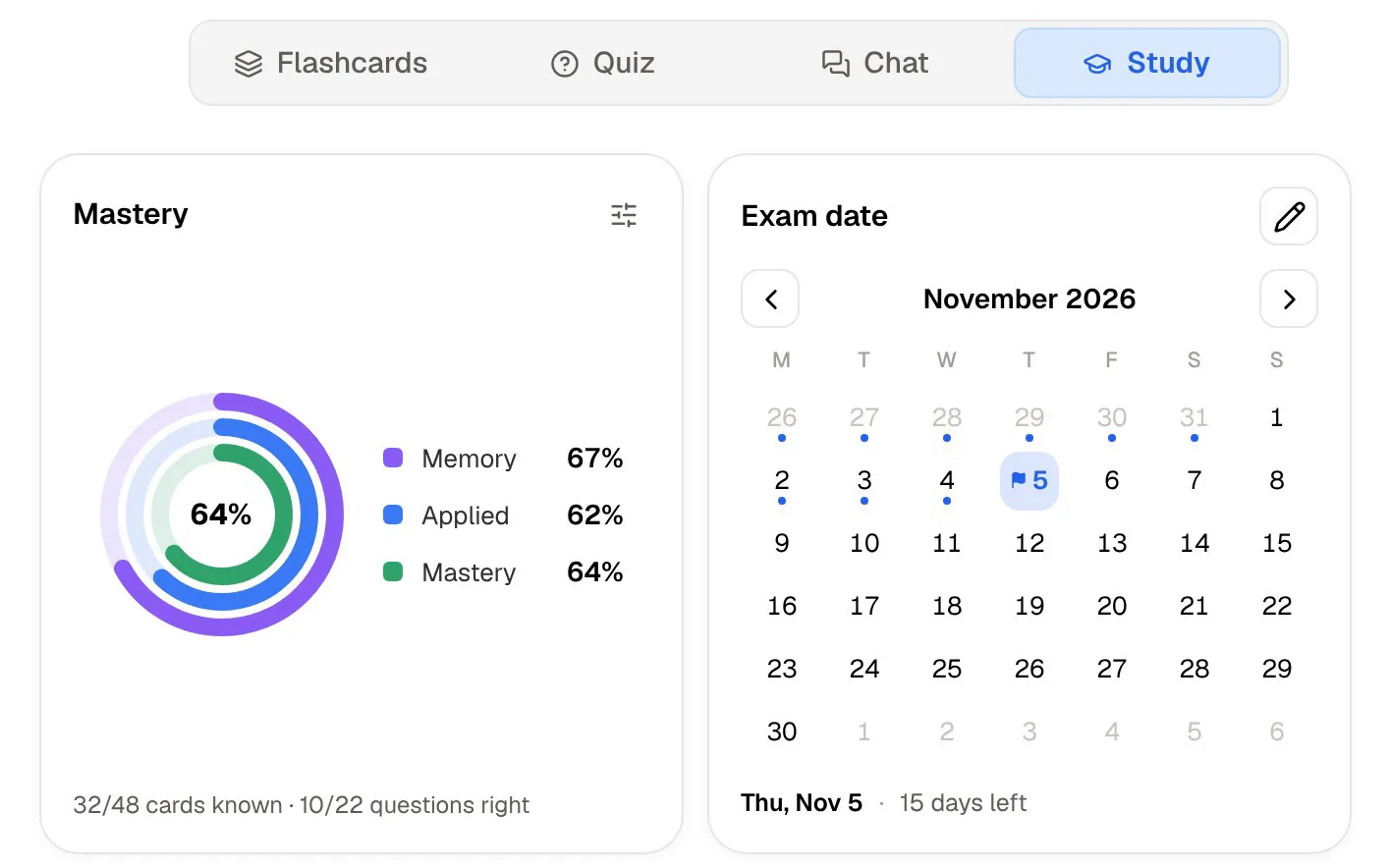
Then there is the study plan. Set the exam date, and PocketNote plans what to cover each day, reminds you, and tracks memory, applied and mastery scores. For a course with a cumulative final, that is the difference between a folder of good notes and a schedule for getting through them.
Audio gives you another way in. PocketNote makes a podcast-style episode about your material with captions that follow the voices, and Turbo AI also makes podcasts from your material, so both cover revision on a walk or a commute.
Where Turbo AI is the better choice
Turbo AI has clear advantages for some students, and they are worth weighing honestly. If several of these describe you, it is probably the better fit.
- You study with classmates. Turbo AI lets you edit docs and share content live. PocketNote lets you share a link to a note, but it has no real-time co-editing.
- You're taking AP courses. The library of premade AP study guides and books gives you material before you've recorded anything.
- You're on Android. Turbo AI has apps on Google Play and the App Store. PocketNote has no Android app yet and runs in the browser instead.
- You want typed notes and nothing else. If you never write by hand and just want a clean record of each lecture in a familiar editor, Turbo AI's flow is simple.
- Your notes are full of formulas. Turbo AI says it handles maths, chemical equations, physics diagrams and code, and preserves their formatting.
- You want the free tier to cover the basics. Note generation, flashcards and quizzes are all in Turbo AI's free tier.
Asking questions and using other tools
Both apps have an AI chat that answers from your uploaded material. Poki adds a few things on top: it shows its steps as it works, it can write into your notes from the chat, and on a PDF it can see your highlights and handwriting and mark passages itself when you ask.
On paid plans, Poki can also use connectors for Google Drive, Notion and Outlook, among others, so it can, for example, add a summary to a Notion page you name. You can choose between leading AI models from several providers, with premium models on paid plans, and talk to Poki out loud with live voice.
For research-heavy courses, PocketNote can search arXiv and SSRN for academic papers and save one to your library, so a reading list and your lecture notes sit side by side. Study material comes out in 50+ languages, including from material in another language, which helps when the lectures are in one language and your reading in another.
Plans and switching
Turbo AI's FAQ describes a free tier that includes note generation, flashcards and quizzes, with an upgrade for unlimited features and more advanced AI. Its App Store listing shows several paid options, billed weekly, monthly or yearly; check current prices in the app before you subscribe.
PocketNote is free to start. Basic adds live voice, premium models and connectors; Plus adds unlimited notebooks and apps, the longest podcasts and all models. See pocketnote.app for current plans.
If you switch, keep your original files. Lecture audio as MP3, WAV, M4A or OGG, PDFs, Word documents and YouTube links all import into PocketNote; save slides as PDF first. Notes and decks generated in Turbo AI would be regenerated in PocketNote from the same sources.
Turbo AI says your account and notes keep working exactly as before the rename, so nothing forces a quick decision. Try PocketNote on next week's lectures and compare the two before you move a whole course.
The verdict
Which one should you pick?
Pick PocketNote if…
- You write by hand on iPad and want Note Replay to tie your strokes to the lecture audio.
- You want flashcards on a schedule and a study plan up to the exam date.
- You want an oral exam and quizzes that explain every option.
- You want cited answers, PDF annotation and connectors to Notion, Google Drive or Outlook.
Pick Turbo AI (Turbolearn) if…
- You study with friends and want live collaboration on notes.
- You're on Android or taking AP courses with premade guides.
- You want a simple record-and-type flow in a Google Docs-style editor.
Try it yourself
See it with your own notes
PocketNote records your lectures too, and then keeps going until the exam. You get a transcript, a summary and notes, handwritten notes with Note Replay on iPad, flashcards with spaced repetition, quizzes that explain every answer, an oral exam and a study plan built around your exam date. Poki answers from your material with citations.
You can start for free at pocketnote.app or in the iPhone and iPad app.
Frequently asked questions
Sources
Keep reading