
Amplenote is a notes app with a to-do list and a calendar built into it. You write in notes, tasks live inside those notes, and Amplenote orders them and lets you schedule them on a calendar. It suits planners: people who want ideas, tasks and the day's schedule in one place, without three apps to keep in sync.
Amplenote even has an answer for students who need to memorise. Its help centre recommends a spaced-repetition routine built from recurring tasks, with the answer hidden in a footnote. PocketNote takes a different route: it generates flashcards from your lecture material and schedules each card based on how well you knew it.
That difference, a system you set up yourself against one generated for you, runs through this whole comparison. Here is how the two handle notes, review, planning, AI and price, and where Amplenote is the better pick.
At a glance
PocketNote vs Amplenote
| Feature | PocketNote | Amplenote |
|---|---|---|
| Built for | Studying your course material | Notes, tasks and a calendar together |
| Spaced repetition | Built-in flashcards, rated Again/Hard/Good/Easy | DIY with recurring tasks (per its help centre) |
| Who writes the cards | Generated from your sources | You, by hand |
| Quizzes with explained answers | Yes | Not advertised |
| Task list and calendar | Study plan to an exam date | Yes, with two-way calendar sync (Pro) |
| AI | Poki, answers from your material with citations | Ample Agent Pro plugin (separate, or with Founder) |
| Backlinks and graph | Page mentions in notes | Backlinks; Graph View on Pro |
| Client-side encryption | Not offered | Vault Notes (Unlimited plan) |
| Record a lecture | Yes, with transcript, summary and notes | Not advertised |
| Apps | Web, iPhone, iPad | Web, desktop, iOS, Android |
| Price | Free to start; Basic and Plus | Free Personal; Pro from $5.84/mo billed yearly |
Checked against Amplenote's plans page and help centre and PocketNote, November 2026. Prices are Amplenote's annual-billing figures, plus tax; confirm on its site.
What Amplenote is good at
Amplenote's core idea is that notes and tasks belong together. You capture quickly in Jots mode, a stripped-back writing space meant for first drafts and daily scratch notes, then polish in Notes mode with a formatting toolbar, tags and links. Any line can become a task with a start date, a repeat rule or an urgent and important flag, and Task Score orders your task list. Bidirectional links connect related notes, and Pro adds a graph view of those connections.
The calendar is where it pays off for busy students. Tasks can be scheduled on a calendar view, and on Pro Amplenote syncs both ways with a Google or Outlook calendar, so seminar times and assignment work sit in one place. Amplenote's App Store listing says note contents are encrypted at rest on its servers, and Vault Notes on the Unlimited plan add encryption with a key Amplenote's servers never receive.
Rich Footnotes are its signature feature. A footnote can hold text, images, code or a link, tucked behind a marker in the line, which keeps notes short while the detail stays one click away. That feature turns out to matter for the study trick below.
How Amplenote suggests doing spaced repetition
Amplenote's help article on spaced-repetition learning describes a specific method. You write the question as a task and set it to repeat when the task is complete, with an interval such as two days. You put the answer in a Rich Footnote so it stays hidden until you click. When you answer the question, you complete the task and it reappears after the interval. When you have learned it, you delete the task or move it to a note of finished material.
For a biology module, a card might be a task that reads "Name the four phases of mitosis in order", set to repeat two days after you complete it, with "prophase, metaphase, anaphase, telophase" in the footnote. Multiply that by every definition and process in a lecture, and you have a working review system that you built yourself.
It works, and it has real advantages: the questions live inside the notes they came from, and they show up in the same task list you already use for everything else. It also has limits worth knowing before you build a term's revision on it.
You write every question and answer by hand. The interval is the one you set, so a question you found easy and one you struggled with come back on the same schedule unless you edit each task. And with dozens of questions per lecture, your task list fills with study prompts sitting between real to-dos such as submitting a lab report.
What PocketNote's flashcards do differently
PocketNote builds the cards for you. Import the lecture PDF, a reading or a recording, generate flashcards, and review them. You rate each card Again, Hard, Good or Easy, and each card comes back when you are about to forget it, so a card you rated Again returns sooner than one you rated Easy. You don't set intervals by hand.
Reviews happen in a flashcard session rather than in your to-do list, so a deck of 48 cards on cell division doesn't crowd out your actual tasks. The same material can also become a quiz in which every option, right or wrong, comes with an explanation, and an oral exam in which Prof. Poki asks you to explain a topic out loud or in text and keeps probing until you can.
Your own notes can be a source too. Typed notes, handwritten notes on iPad and annotated PDFs all count, so the cards can come from what you wrote as well as what the lecturer handed out.

Planning: a calendar of tasks or a plan to an exam date
Amplenote is a capable planner for a whole term. Every assignment can be a task with a deadline, Task Score keeps the important ones near the top, and the calendar shows what fits in your week. Its help centre covers planning a day, a week, a month or a quarter, task digest emails for upcoming deadlines, and meeting notes attached to calendar events.
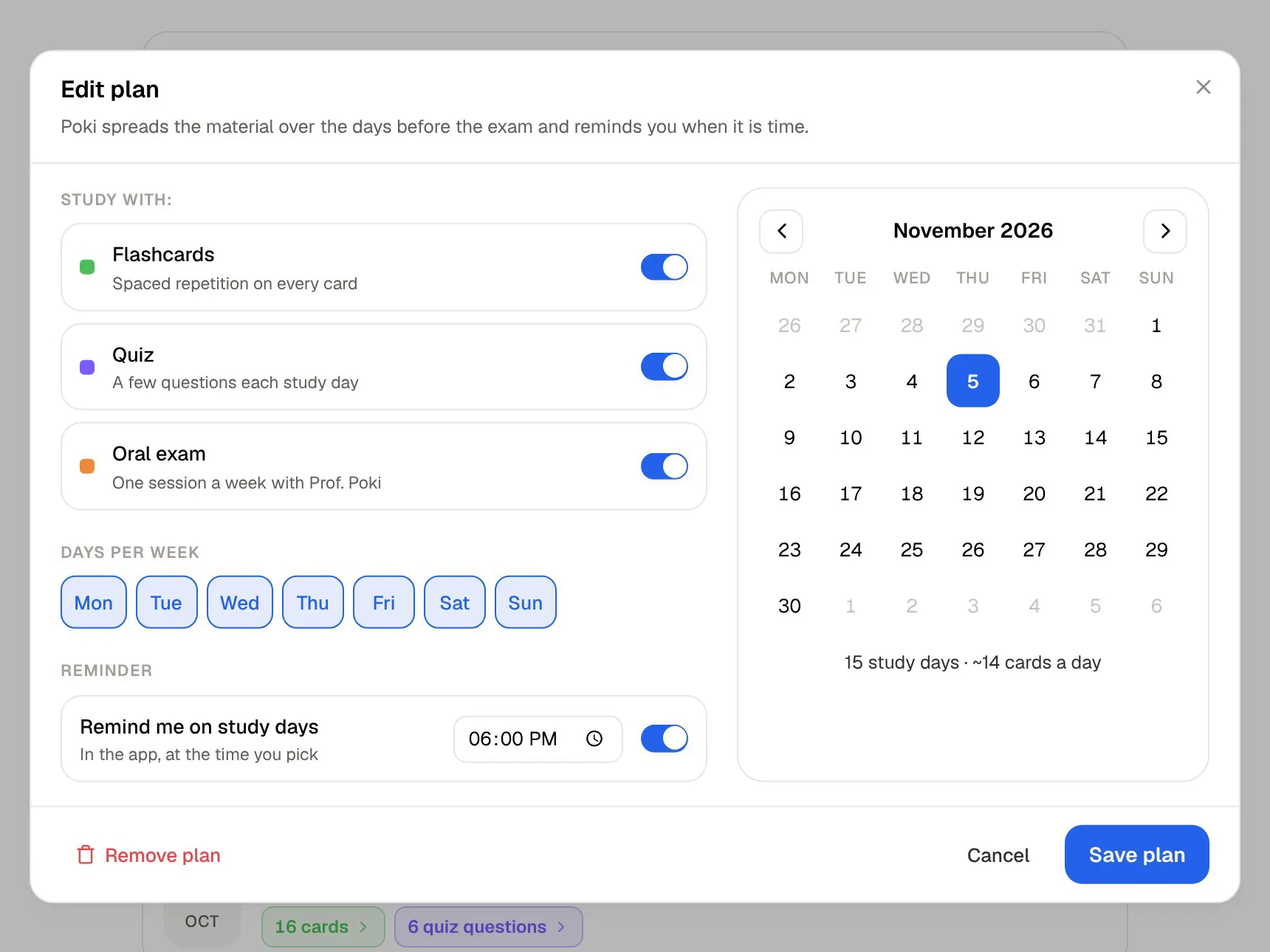
PocketNote's study plan is narrower on purpose. You set an exam date and PocketNote plans what to cover each day, reminds you, and tracks mastery with memory, applied and mastery scores as you work through flashcards, quizzes, oral exams and other tools. It won't remind you to renew a library book; it plans revision for one exam and shows how far along you are, tool by tool.
If you already run your life in Amplenote, there is no need to give that up. Use Amplenote for the term and PocketNote's plan for each exam.
AI on each side
Amplenote's AI comes through Ample Agent Pro, a plugin sold separately and included with the Founder plan. Its guide describes a Task Router that suggests which note a new task belongs in, a Task Agent that takes a first pass at a to-do by running web searches and drawing on related notes in your account, and features that run on your own API keys from OpenAI, Anthropic, Gemini or Grok. Lighter features are included up to a quota. It is aimed at getting work done: planning, research and tasks.
Poki is aimed at learning. It answers from your own course material with citations rather than from the open web, and it shows its steps as it searches your notes and reads an item. It can look at a PDF page as you see it, including your own highlights and handwriting, and can highlight, underline or circle passages on that PDF when you ask. You can choose between leading AI models from several providers, with premium models on paid plans, and your files are not used to train public AI models.
In practice, Ample Agent is the one to ask for help breaking a project into tasks or researching a question on the web, and Poki is the one to ask what your lecture said about checkpoint proteins, with a citation to the source. Both are useful; they answer different kinds of question.

Where Amplenote is the better choice
Pick Amplenote if your main problem is getting things done rather than memorising. It suits a student who juggles coursework, a part-time job and a society, and who wants deadlines, notes and the calendar to talk to each other. Its export policy is generous too: Amplenote lists robust exporting as its first core value, and you can download all your notes as Markdown in a ZIP from the web or desktop app.
It is also the better fit if you want client-side encryption for sensitive notes (Vault Notes), want to publish notes as web pages (both on the Unlimited plan), or need an Android app, which Amplenote has and PocketNote doesn't. And if you would rather build your own review system from tasks and footnotes, Amplenote gives you the parts and plenty of control over them.
Prices at the time of writing
At the time of writing (November 2026), Amplenote's plans page lists a free Personal plan with notes, tasks and the calendar, file uploads up to 5 MB and a licence for non-commercial use. Paid plans are Pro at $5.84 a month, Unlimited at $10.00 a month and Founder at $20.00 a month, each plus tax and billed annually. Every account starts with a two-week trial of Pro features, and Ample Agent Pro is a separate purchase unless you are on Founder.
PocketNote has a free tier to start on. Its Basic plan adds live voice with Poki, premium models and connectors, and Plus adds unlimited notebooks and apps, the longest podcasts and every model. Current prices are on pocketnote.app.
Moving notes from Amplenote into PocketNote
Amplenote's export runs from the web or desktop app, not from mobile: open Account settings, choose Import & Export, then Start Export. You get a ZIP file with each note as a Markdown file and your uploaded images, and you can download it from the export history. Single notes can also be exported to PDF.
PocketNote imports Markdown and PDF, so you can bring one course's notes across and generate cards from them alongside the lecture slides. Your tasks, schedules and calendar stay in Amplenote, which is where they belong; PocketNote only needs the content of the notes to build flashcards and quizzes.
The verdict
Which one should you pick?
Pick PocketNote if…
- You want flashcards generated from your lectures and scheduled by your ratings, instead of writing recurring tasks by hand.
- You want quizzes that explain every answer and an oral exam that checks you can explain a topic.
- You want Poki to answer from your lectures with citations rather than run tasks for you.
- You need a study plan for an exam date, not another task list.
Pick Amplenote if…
- You want notes, tasks and a calendar in one app, with Task Score and two-way calendar sync.
- You like building your own systems, including a task-based review routine with Rich Footnotes.
- You want client-side encryption for some notes, or to publish notes as web pages.
- You need an Android or desktop app.
Try it yourself
See it with your own notes
PocketNote is an AI study app built around the material you study from. Import lecture PDFs, Word files, audio, YouTube and web links, record lectures in the app, or write your own typed and handwritten notes. Poki answers from those sources with citations, and the same material becomes flashcards with spaced repetition, quizzes, oral exams, mind maps and audio reviews.
It works in the browser at pocketnote.app and on iPhone and iPad, with a free tier to begin. If Amplenote runs your days, PocketNote can run your revision.
Frequently asked questions
Sources
Keep reading