
Coda is a doc that behaves like an app. You write on a page, drop in a table, link it to other tables, add buttons and automations, and end up with a working tool: an assignment tracker, a society roster, a hub for a group project. In July 2026 Coda was renamed Superhuman Docs, after its parent company, formerly Grammarly, took the Superhuman name. The coda.io site still loads, so this page uses the Coda name throughout.
PocketNote is built for a different part of the semester: the weeks before an exam. You bring the lecture slides, readings and recordings, and it turns them into flashcards with spaced repetition, quizzes that explain every answer and a day-by-day study plan, with an assistant called Poki that answers from your own files.
The two apps barely overlap, so the useful question is which job you need done. Below: what each does well, where each stops, what a student pays for each, and a setup that uses both in the same term.
At a glance
PocketNote vs Coda
| Feature | PocketNote | Coda |
|---|---|---|
| Built for | Studying your own course material | Team docs, tables and trackers |
| Linked tables, formulas, automations | Not offered (tables inside notes only) | Yes, the core of the product |
| Real-time co-editing | Not offered; share a link to a note | Yes, built in |
| AI assistant | Poki, answers from your files with citations | Coda AI: chat, drafting, summaries, AI columns |
| Flashcards with spaced repetition | Yes, rated Again/Hard/Good/Easy | Not advertised |
| Quizzes with explained answers | Yes, generated from your sources | Not advertised |
| Record a lecture | Yes, with transcript, summary and notes | Not advertised |
| Planning | Study plan built around an exam date | Trackers you design, plus templates |
| Integrations | Connectors such as Google Drive, Notion, Outlook (paid) | Hundreds of Packs |
| Apps | Web, iPhone, iPad | Web, iOS, Android |
| Student pricing | Free to start; Basic and Plus plans | Free Pro plan for students (one Doc Maker) |
Checked against each product's own website, November 2026. Coda now sells under the Superhuman Docs name; confirm current plans on its site.
What Coda, now Superhuman Docs, does well
A quick note on the name first. Grammarly bought Coda in 2024 and renamed itself Superhuman in October 2025, and in July 2026 Coda became Superhuman Docs. The coda.io homepage now carries a "Coda is now Superhuman Docs" notice, Coda's App Store listing carries the new name, and sign-up and pricing go through Superhuman's site. The product is the same kind of tool on both sites.
Coda's strength is structure you build yourself. A table in Coda is closer to a small database than to a grid in a note: rows can link to other tables, the same data can appear in several views, and formulas, buttons and automations act on it. Packs connect a doc to outside tools such as calendars, Slack and Jira, and Coda's homepage counts more than 600 of them.
Coda's own student page shows what students build with it: a daily assignment dashboard sorted by due date, priority or difficulty, trackers for classes, grades and after-school activities, and shared docs for clubs and group projects. Templates such as Assignment Tracker and Simple Student Planner get you started.
Coda AI adds a chat, an assistant that drafts and summarises text and generates tables, and an AI column that works through a table row by row. Collaboration is the other big strength, and the billing model helps: Coda charges for Doc Makers, the people who create docs, while editors and viewers are free.
- Linked tables and views that keep one copy of the data and show it many ways.
- Formulas, buttons and automations for building tools without code.
- Packs for pulling calendars and other apps into a doc.
- Free editors, which suits a group project where one person sets things up.
Where a Coda doc stops short for exam prep
Coda's student page talks about deadlines, planners and group work. It doesn't mention flashcards, quizzes or spaced repetition, and neither does the product page on Superhuman's site. You could build a flashcard table with a next-review column and a formula for intervals. That is a project in itself, and every card still has to be written by hand.
The second gap is the material. Coda is strongest when the information starts life in Coda. Lecture slides arrive as PDFs, readings as PDFs and web pages, lectures as recordings or YouTube videos. Coda AI can summarise text you put into a doc, but turning a 40-slide deck and a 50-minute recording into something you can practise with is not what it was designed for.
None of this is a flaw. Coda is a workspace for running things, and the reviewing part of studying is a different job.
The same course in PocketNote, from slides to a quiz
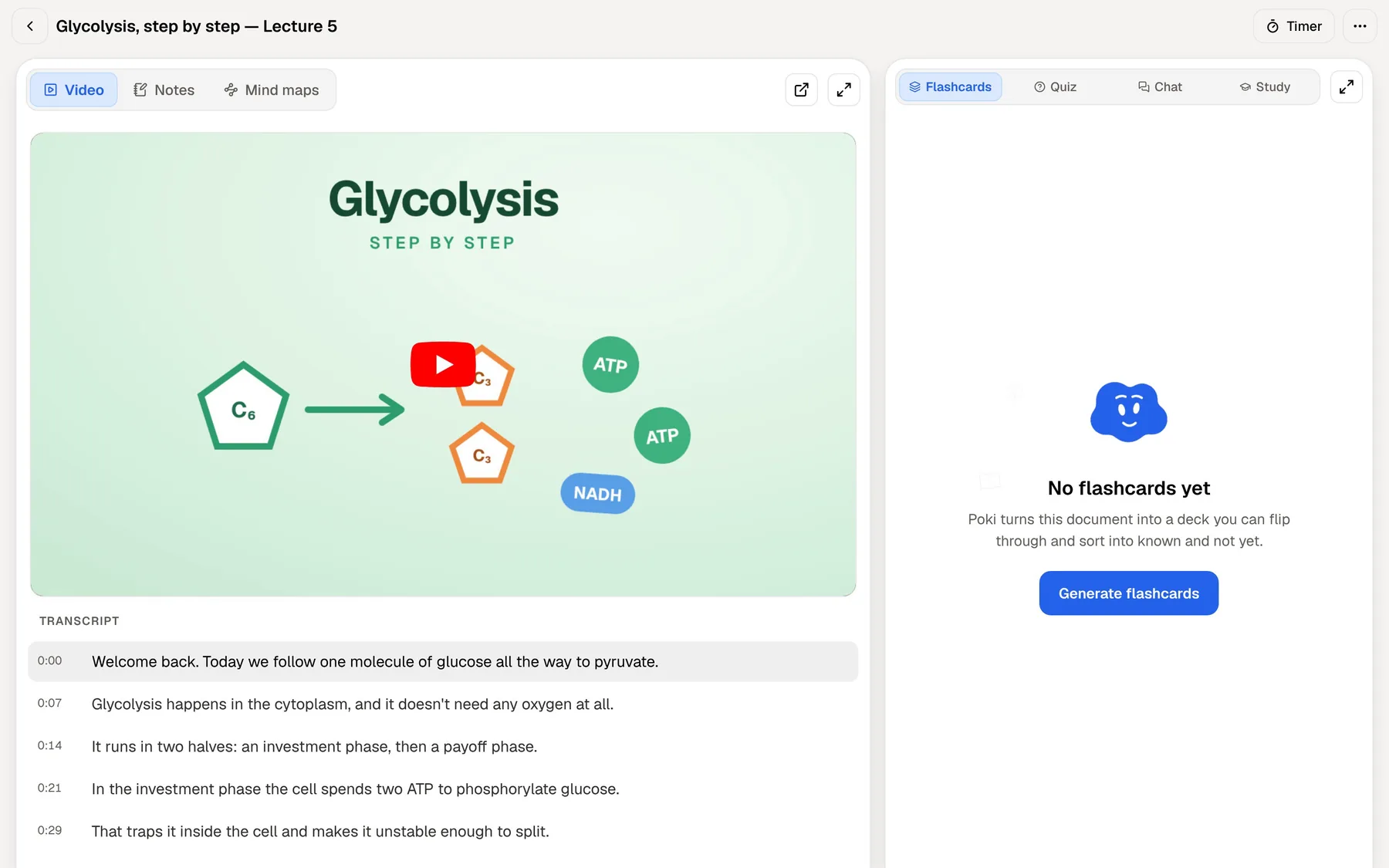
Here is one week of a biology module in PocketNote. You import the lecture PDF and the reading, paste the YouTube link your lecturer shared (the transcript comes with it), and record the next lecture in the app, which gives you a transcript, a summary and notes.
Then you ask Poki about the parts you didn't follow. It answers from your files and cites the source it used, rather than drawing on the open web, and it shows its steps as it works: searched your notes, read the item. From the same sources you can generate flashcards, a quiz in which every option comes with the reason it is right or wrong, a mind map, or a podcast-style audio review for the bus.
The flashcards use spaced repetition. You rate each card Again, Hard, Good or Easy, and it comes back when you are about to forget it. That review loop is the part you would otherwise have to build by hand in a doc.
Coda AI and Poki do different work
Both apps have an AI assistant, and they point it at different things. Coda AI works on what is already in your doc. It drafts text, summarises a long page, builds a table from a description, and its AI column applies a prompt to every row of a table at once. On Superhuman's site, the same assistant is described as building trackers, dashboards and project plans from a plain-language request.
Poki works on your course material and on studying it. It answers from your sources with citations, can look at a PDF page as you see it, including your own highlights and handwriting, and can highlight, underline or circle passages on the PDF when you ask, such as the key definitions on page 3. It can write into your notes from the chat, and on paid plans you can talk to it out loud and hear the answer.
So Coda AI is the better fit for organising and drafting, and Poki for learning what is in your sources. A student who uses both will rarely ask them the same question.

Coda's tracker against PocketNote's study plan
This is where the two apps look most alike, and where they differ most. A Coda assignment tracker is a table you design, with columns for course, due date, priority and status. It is flexible, it can hold every deadline in your degree, and it does exactly what you set it up to do.
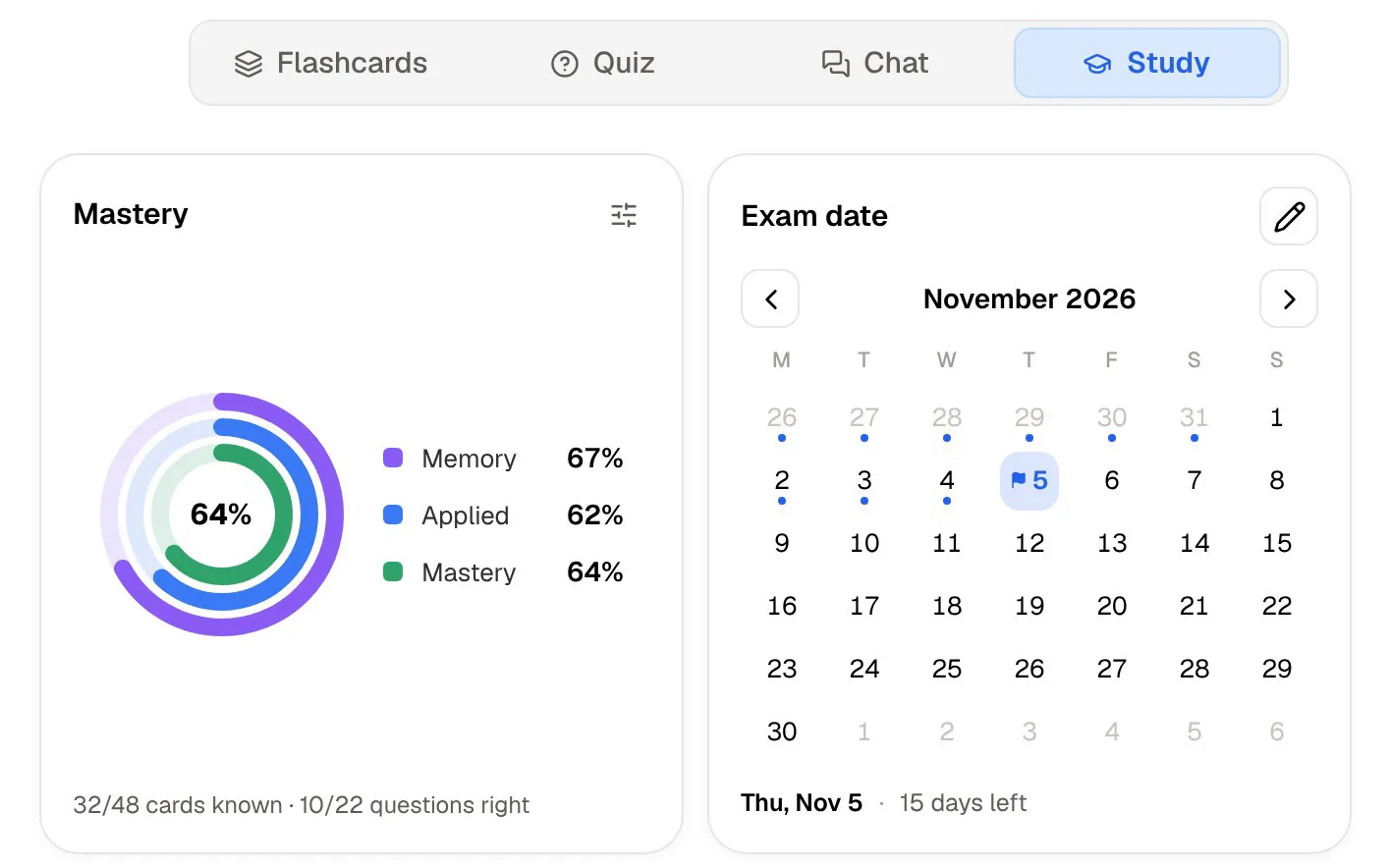
PocketNote's study plan starts from one date. You set the exam day, and PocketNote plans what to cover each day, reminds you, and tracks mastery through memory, applied and mastery scores as you work through flashcards, quizzes and oral exams. It won't track society meetings or your group's tasks; its job is to show how ready you are for one exam.
You may well want both: a Coda doc for the whole term's deadlines, and a PocketNote plan for each exam once revision starts.
Where Coda is the better choice
Pick Coda when the work is shared and structured. A group project with five people, a society that tracks members and events, a lab group logging experiments: these need real-time editing, linked tables and automations, and PocketNote doesn't offer them. PocketNote is not a team wiki or a project manager. It has no shared databases or kanban boards, and sharing means sending a link to a single note.
Coda also wins if you like building your own systems. If designing the right planner is part of how you stay organised, Coda gives you formulas, buttons and Packs to do it, and a template gallery to start from. And if you need an Android app, Coda has one; PocketNote runs on the web and on iPhone and iPad.
What students pay for each
Coda is free to start. Paid plans are billed per Doc Maker, while editors and viewers are free. For students, the headline is the education offer on Coda's student page: students can have the Pro plan with one Doc Maker free for as long as they are in school, and there is 80% off Pro or Team workspaces for groups that need more than one Doc Maker. Since the rename, plan prices are listed on Superhuman's site, so check there for current figures.
PocketNote is also free to start. The paid plans are Basic, which adds live voice conversations with Poki, premium AI models and connectors, and Plus, which adds unlimited notebooks and apps, the longest podcasts and all models. See pocketnote.app for current plans.
The two prices pay for different things. Coda's paid plans pay for building and sharing more docs; PocketNote's pay mostly for AI features. If you qualify for Coda's free student Pro plan, the cheapest setup is Coda Pro at no cost plus PocketNote's free tier, upgrading only if you find you want live voice or premium models before exams.
Running both in one semester
The two apps don't compete for the same hours. A setup that works: keep the term in Coda (assignment tracker, group-project doc, society planner) and keep each course's material in PocketNote, where it becomes cards, quizzes and a study plan when an exam gets close.
If some course notes already live in Coda, export the page as a PDF and import the PDF into PocketNote; a Coda table downloaded as CSV can be imported too. Buttons and automations stay behind in Coda. The text and the table contents are what PocketNote needs to build study material.
Going the other way is just as simple. When your mastery scores in PocketNote's study plan are lower than you would like, add the topics you still need to cover as rows in your Coda tracker, so you can see revision next to coursework deadlines. Nothing syncs automatically between the two apps, so a short weekly check of both keeps them in step.
The verdict
Which one should you pick?
Pick PocketNote if…
- You have exams coming and want flashcards with spaced repetition and quizzes made from your own slides, readings and recordings.
- You want an assistant that answers from your course files with citations, not from the open web.
- You record lectures and want a transcript, a summary and notes from each one.
- You would rather set an exam date and get a daily study plan than build a tracker by hand.
Pick Coda if…
- You run group projects, clubs or societies that need real-time co-editing and linked tables.
- You enjoy building your own tools with formulas, buttons, automations and Packs.
- You qualify for the free Pro plan for students and most of your collaborators can be free editors.
- You need an Android app.
Try it yourself
See it with your own notes
PocketNote is an AI study app for the material you already have. Import PDFs, Word and Excel files, audio, YouTube and web links, or record a lecture in the app, and Poki answers from those sources with citations. The same material becomes flashcards, quizzes, an oral exam with Prof. Poki, mind maps and audio reviews.
It works in any browser at pocketnote.app and on iPhone and iPad, and it is free to start. If Coda runs your term, PocketNote can sit beside it as the place where revision happens.
Frequently asked questions
Sources
Keep reading