
If you searched for AnkiPro, the first thing to know is that the app has a new name. Its developer announced "We are now Noji", saying the product stays the same and users don't need to do anything. The old ankipro.net address now redirects to noji.io, the App Store listing that used to be Anki Pro is now Noji, and some in-app purchases are still labelled AnkiPro Premium. The Noji site's copyright line names Vedas Apps Ltd.
The second thing: AnkiPro, and now Noji, is not the official Anki. Anki is the free, open-source program with AnkiWeb, AnkiDroid and the paid AnkiMobile app. Noji is a separate commercial app with a similar spaced-repetition approach; its own comparison page says both use the SM-2 algorithm.
This page compares Noji with PocketNote, an AI study app that generates flashcards, quizzes, an oral exam and a study plan from your own course material. If you were actually looking for the official Anki, our Anki vs PocketNote comparison covers that one.
At a glance
PocketNote vs Noji (AnkiPro)
| Feature | PocketNote | Noji (AnkiPro) |
|---|---|---|
| What it is | AI study app | Flashcard app, formerly AnkiPro |
| Where cards come from | Generated from your material | Your cards, pre-made decks, AI from PDFs |
| Pre-made decks | No public library | Deck library, strong on languages |
| Anki deck import | Not among its import formats | .apkg and .colpkg, with progress (web) |
| Scheduler | Again, Hard, Good, Easy | SM-2 based, adjustable settings |
| AI from files | PDF, Word, Excel, audio, YouTube, web | PDF to flashcards |
| Lecture recording | Yes: transcript, summary, notes | Not advertised |
| Quizzes with explanations | Yes | Not advertised |
| Oral exam | Prof. Poki, voice or text | Not advertised |
| Exam-date study plan | Yes, with mastery scores | Not advertised |
| Platforms | Web, iPhone, iPad | iOS, Android, web |
| Price | Free to start; Basic and Plus plans | Free version; Premium in-app |
Checked against each product's own website, help centre and App Store listing, November 2026. Plans and features change; confirm current details there.
AnkiPro, Noji and the official Anki: who's who
Three names get mixed up here. Anki is the open-source flashcard program: its desktop app, AnkiDroid for Android and AnkiWeb sync are free, and AnkiMobile is its paid app for iPhone and iPad. AnkiPro was a different company's flashcard app with a similar name. That app is now called Noji, and the Noji website presents itself and Anki as separate products, with a page comparing the two. At the time of writing (November 2026), the US App Store lists AnkiMobile at $24.99 as a one-time purchase with sync included; if you want the official Anki on an iPhone, that is the app to look for.
This matters for practical reasons. Anki's shared decks, add-ons and community help are built around the official program. Noji can import Anki deck files, but it is its own app with its own account, pricing and features. If a guide or forum post talks about Anki settings, it is talking about the official program, not Noji, and advice about Anki's add-ons won't apply to Noji at all.
What Noji does well
Noji is a mobile-first flashcard app with a web version, and recent release notes add public profile pages, more detailed card statistics and deck import from folders. For a language learner, a ready-made deck plus presets and Premium's pronunciation audio is a quick start.
Its strengths are the pieces many Anki users ask for:
- A pre-made deck library, with a strong focus on languages, plus the option to create and share decks with friends and study with classmates and teachers.
- Anki deck import: it accepts .apkg and .colpkg files through the web interface, and can bring your Anki progress along if you include it when exporting from Anki.
- Quizlet and CSV import, also through the web.
- Presets for different subjects, such as studying languages or medical material, plus learning-algorithm settings for custom review steps, easy bonus, interval modifier and a daily card limit.
- AI card generation, including flashcards made from PDF files as question-and-answer cards, fill-in-the-blank cards or both.
Noji's free version and Premium
Noji has a free version with what it calls the essential features. Premium adds unlimited daily learning, custom spaced-repetition presets, pictures and rich editing on cards, and automatic pronunciation audio.
We haven't quoted a Premium price. At the time of writing (November 2026), the US App Store listing shows a long list of in-app purchase options at different prices and billing periods, including items still named AnkiPro, so check the price shown inside the app before you subscribe. Because unlimited daily learning is a Premium feature, also check how far the free version takes you on a normal study day before relying on it in exam season.
PocketNote is free to start, with paid Basic (live voice, premium models, connectors) and Plus (unlimited notebooks and apps, the longest podcasts, all models). See pocketnote.app for current plans.
Generated cards: Noji's PDF tool and PocketNote's sources
Noji's AI turns PDF files into cards and shows them one by one as they are generated, and AI templates let you adjust the prompt it uses, for people who know the card style they want. It is a handy way to get a deck from a handout.
Say you have a 12-page handout on the French Revolution. In Noji you upload the PDF, choose question-and-answer or fill-in-the-blank cards, and watch them appear, then study the deck with your preset. In PocketNote you import the same handout, generate flashcards and a quiz, ask Poki to highlight the key dates on page 3, and later sit an oral exam on the causes of the Revolution. Generated cards are a starting point in either app; read through the first batch, since a PDF's headings and captions don't always make good questions.
PocketNote is built around that step for every kind of course material. Besides PDFs it imports Word, Excel, CSV, TXT and Markdown files, MP3, WAV, M4A and OGG audio, YouTube links with their transcripts and web articles, and files from Google Drive, OneDrive or Dropbox. You can record a lecture in the app or write notes by hand on iPad, and generate cards from either.
Poki, PocketNote's assistant, answers questions about the same material with citations to the source, so when a generated card looks off you can ask where it came from and read the passage.

Scheduling and review
Noji's comparison page says it uses the SM-2 spaced-repetition algorithm, with presets that set it up for a subject. Its release notes describe learning-algorithm settings for people who want to adjust review steps, the easy bonus and the interval modifier, and they don't mention FSRS. Noji's presets, such as one for studying languages and one for medical material, mean you don't need to know what an interval modifier is to get a sensible setup. If you used FSRS in Anki before importing, expect Noji's SM-2-based intervals to differ from what you are used to.
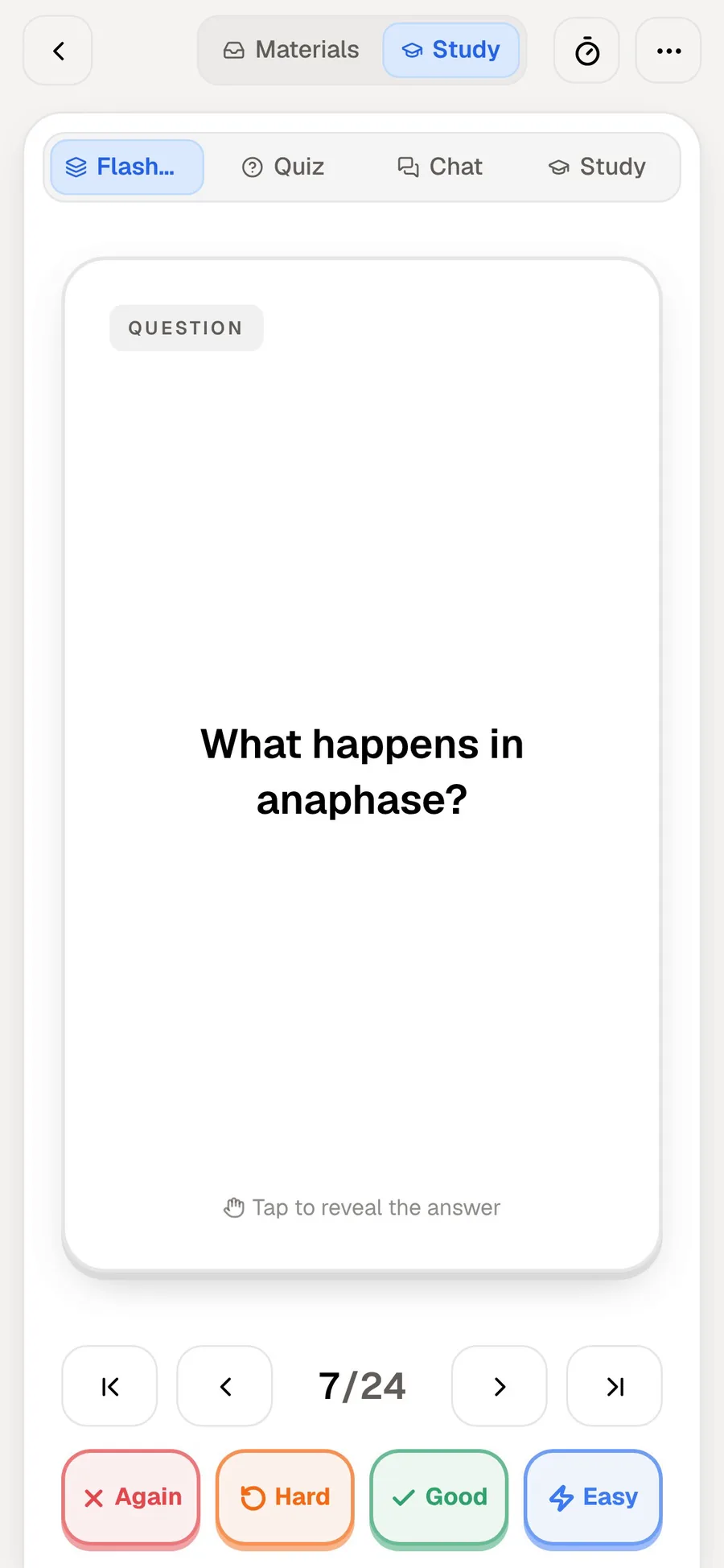
PocketNote's review uses Again, Hard, Good and Easy and brings each card back when you're about to forget it. It doesn't expose interval settings the way Noji or Anki do; the schedule runs without tuning. If adjusting the easy bonus or interval modifier is important to you, Noji gives you those controls. For most students the defaults are fine in either app; the settings matter when you review hundreds of cards a day and want to manage the load, which is where Noji's daily card limit helps.
Past the flashcards
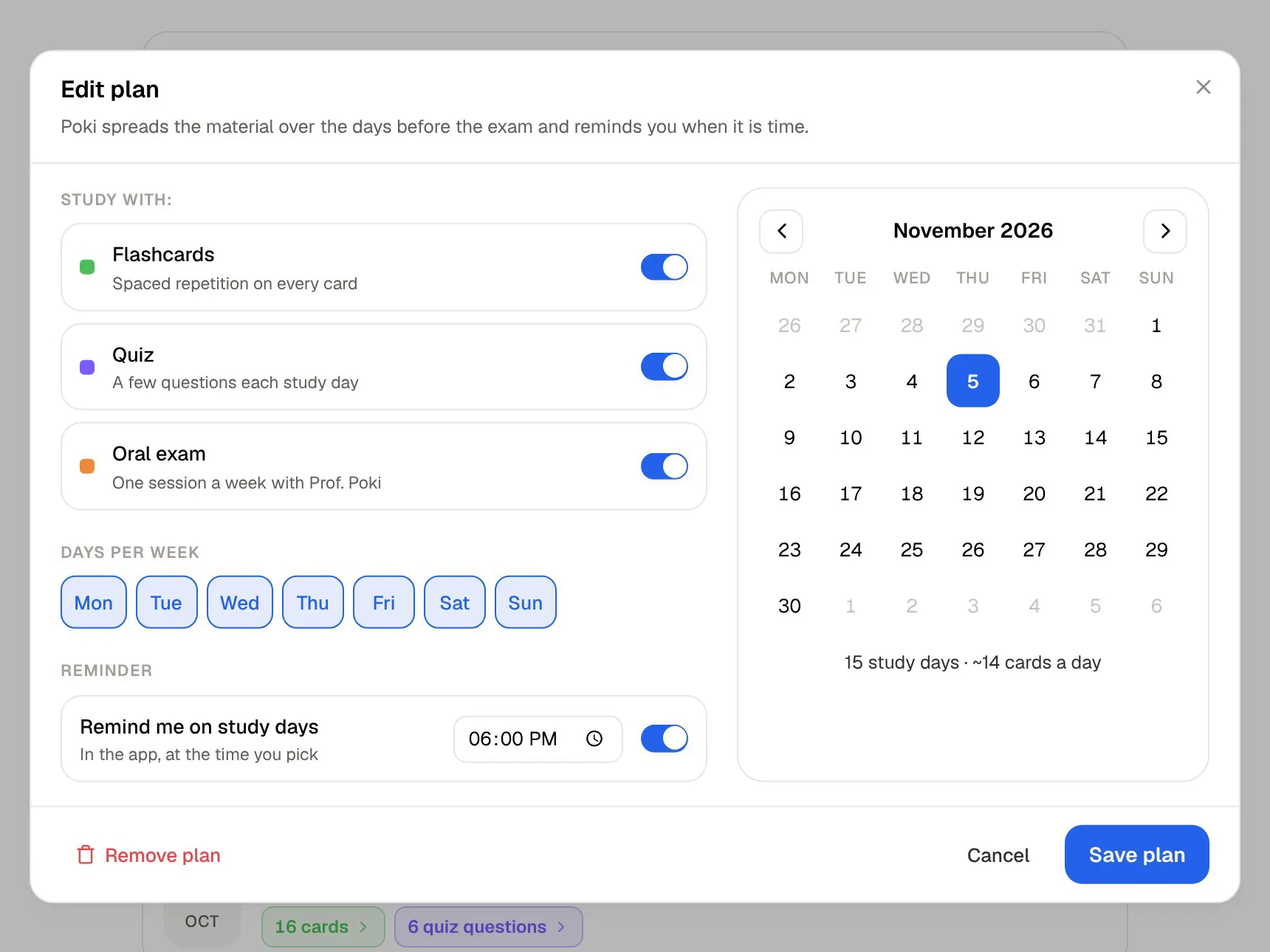
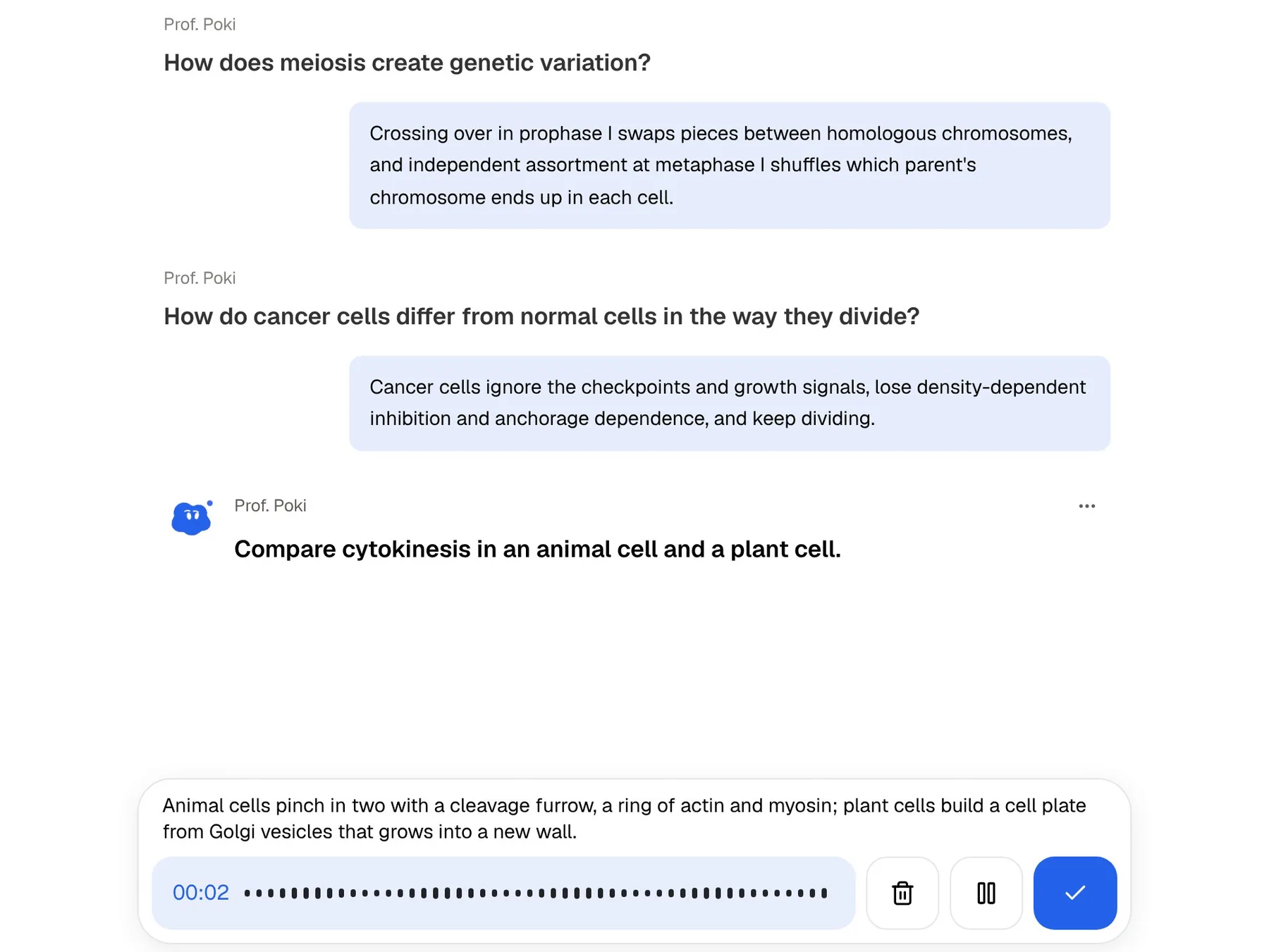
Noji is a flashcard app through and through. PocketNote treats flashcards as one tool among several made from the same material. Quizzes explain every answer, right and wrong. The oral exam has Prof. Poki ask questions out loud or in text and keep probing until you can explain the idea. The study plan works back from your exam date, plans each day, reminds you and tracks memory, applied and mastery scores. There are also mind maps for structure, summaries for a first read, slide decks, and podcast-style audio reviews for revising on the move.
The oral exam has no flashcard equivalent. It asks follow-up questions based on what you said, so you find out whether you can explain a process or only recognise its name.
For vocabulary, flashcards may be all you need. A language learner using Noji can still bring the parts of a course that aren't vocabulary, such as grammar handouts or set texts, into PocketNote. For a biology or economics course where exams ask you to explain and apply ideas, the extra formats cover what flashcards don't.
When Noji is the better choice
Noji, the former AnkiPro, suits several kinds of student better than PocketNote does, and none of these are small things. A good pre-made language deck can save weeks of card writing.
- You're learning a language and want a pre-made deck to start from, with pronunciation audio.
- You have Anki decks and want a different mobile app that can import them with progress.
- You study on Android, where Noji has an app and PocketNote doesn't yet.
- You study with friends or a teacher who share decks with you.
- You prefer a phone-first app with presets over a desktop program with many settings.
- You only need flashcards and want presets rather than a study system.
Switching: what carries over
Noji imports Anki packages, Quizlet sets and CSV files on its website, which also makes it a reasonable stop if you are leaving Quizlet and want a deck library without much AI. PocketNote imports CSV, TXT and other file formats as source material, so a vocabulary list exported as CSV can become a PocketNote deck and quiz. Review history doesn't move between Noji and PocketNote in either direction, so a new deck starts a new schedule. If a deck came from a PDF in the first place, import that PDF into PocketNote directly; it will generate fresh flashcards plus quizzes from the original material. Since review progress is what you lose when moving any deck, time a switch for the start of a term rather than the week before an exam.
If you are deciding between the official Anki and Noji, that is a separate question, and it mostly comes down to whether you want Anki's free desktop and Android apps and add-ons or Noji's presets and deck library.
The verdict
Which one should you pick?
Pick PocketNote if…
- Your material is lectures, PDFs and handwritten notes rather than a pre-made deck.
- You want quizzes with explanations, an oral exam and an exam-date plan as well as flashcards.
- You want answers cited to your sources when a card looks wrong.
- You study on iPhone, iPad or the web and want to start free.
Pick Noji (AnkiPro) if…
- You want a pre-made deck library, especially for languages.
- You want to import Anki decks with progress into a mobile-first app.
- You study on Android, or share decks with friends and teachers.
Try it yourself
See it with your own notes
PocketNote isn't another flashcard app with a deck store. It is a study app that turns your own lectures, PDFs and handwriting into flashcards rated Again, Hard, Good or Easy, quizzes that explain each answer, an oral exam with Prof. Poki and a plan to your exam date.
It is free to start on the web and on iPhone and iPad. If Noji's language decks are working for you, keep them, and use PocketNote for courses where the material is your own.
Frequently asked questions
Sources
Keep reading