

DeepSeek is a general-purpose AI chatbot made by Hangzhou DeepSeek Artificial Intelligence, an AI company based in China. Its official app and web chat are free, it can switch to a deeper reasoning mode for harder problems, it can search the web, and the company publishes its model weights openly. For a student on no budget, that makes it a capable place to ask for an explanation or work through a problem.
PocketNote is a different kind of tool. It is an AI study app: you add your course material, such as lecture recordings, PDFs, slides, YouTube lessons and your own notes, and its AI, Poki, answers from that material with citations. The same sources become flashcards with spaced repetition, quizzes, an oral exam and a study plan.
So the honest comparison is between a free generalist and a specialist built around your syllabus. This page covers what DeepSeek does well, where a general chatbot leaves gaps for revision, what its privacy policy says in plain terms, and how students can sensibly use both.
At a glance
PocketNote vs DeepSeek
| Feature | PocketNote | DeepSeek |
|---|---|---|
| What it is | AI study app built on your material | General-purpose AI chatbot |
| Answers come from | Your files, lectures and notes, cited | Its model, plus optional web search |
| Price | Free to start; paid Basic and Plus | Free web chat and app |
| AI models | Leading models from several providers | DeepSeek's own, with open weights |
| Extra modes | Live voice with Poki (paid plans) | Deeper reasoning; web search |
| Add your material | PDF, Word, Excel, audio, YouTube, links | Photo and file uploads in chat |
| Mark up your PDF | Highlight, underline, circle on request | Not advertised |
| Flashcards with spaced repetition | Yes: Again / Hard / Good / Easy | Not advertised |
| Quizzes and oral exams | Built in, with explanations | Questions on request in chat |
| Study plan to an exam date | Yes, with reminders and mastery scores | Not advertised |
| Lecture recording | Transcript, summary, notes | Not advertised |
| Your content and training | Files not used to train public AI models | May be used; policy gives an opt-out |
Checked against each product's own website and DeepSeek's privacy policy, November 2026. Features change; confirm current details there.
What DeepSeek does well
DeepSeek is a capable generalist, and it is free to use through its official app and web chat. Like other leading chatbots, it can explain a concept several ways, work through a maths or physics problem step by step, draft and edit text, and help with code. Its site shows a DeepThink option for slower, deeper reasoning and a Search option for answers that draw on the web, and the app's release notes mention photo and file uploads.
The company also releases its models openly. Its release note of 17 October 2026, for an updated model, says it is live on the website, app and API, and links to the weights on Hugging Face and ModelScope. For computer science students, that openness is interesting in its own right: you can study, run or build on the models, not only chat with them.
If you need a free assistant for open-ended questions, practice problems or programming help, DeepSeek is a serious option and costs nothing to try. For maths and science it works best as a tutor rather than an answer key: ask it to show each step, then attempt the next problem yourself before checking.
Where a general chatbot leaves gaps for revision
The first gap is the source of the answer. A general chatbot answers from what its model learned in training, plus the web if you turn search on. That is fine for general knowledge, but your exam is set on your course: your lecturer's definitions, notation, examples and emphasis. A correct answer in a different notation can still cost you marks, and any chatbot can occasionally state something wrong with confidence. If your lecturer teaches a process in a particular order or with a particular mnemonic, a general chatbot will not know that unless you paste it in.
The second gap is that a chat is not a study system. You can ask DeepSeek to write practice questions, and it will. But DeepSeek does not advertise flashcards with spaced repetition, a quiz history that tracks what you keep missing, or a plan that schedules review up to your exam date. Each session starts from what you remember to ask.
The third is that your material lives elsewhere. You can upload a file to a chat, but the lecture recording, the slides, the reading list and last week's notes are not all in one place that the AI knows about.
How Poki answers differently
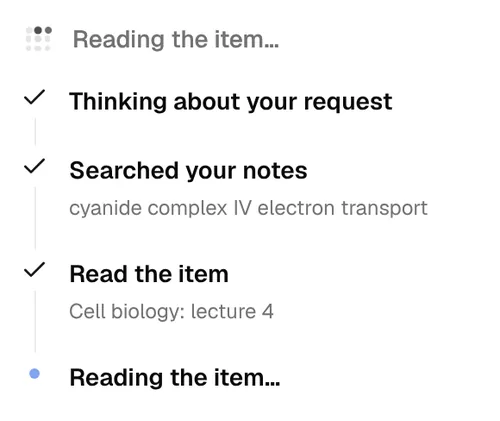
Poki, PocketNote's AI, starts from your material. Ask it a question and it searches your notes, reads the relevant lecture or PDF, and answers with citations to the source, so you can open the passage it relied on and check it. It shows those steps as it works, which makes it easy to see when an answer came from your week 4 lecture rather than general knowledge.
It can also work on the page with you. Poki can look at a PDF page as you see it, including your own highlights and handwriting, and when you ask it will highlight, underline or circle passages, such as the key definitions on page 3. You can undo its marks in one tap. It can write into your notes from the chat, and you can choose between leading AI models from several providers, with premium models on paid plans.
PocketNote is not a general web-research chatbot, and Poki is strongest on what you have given it. That is a deliberate trade: narrower than DeepSeek, but closer to what you will be examined on.
Turning a good answer into something you remember
Understanding an explanation is the first step; being able to reproduce it in an exam a month later is the goal. Retrieval practice and spacing, testing yourself and repeating that over days, are among the best-supported techniques in learning research, and they are what PocketNote is built to make routine.
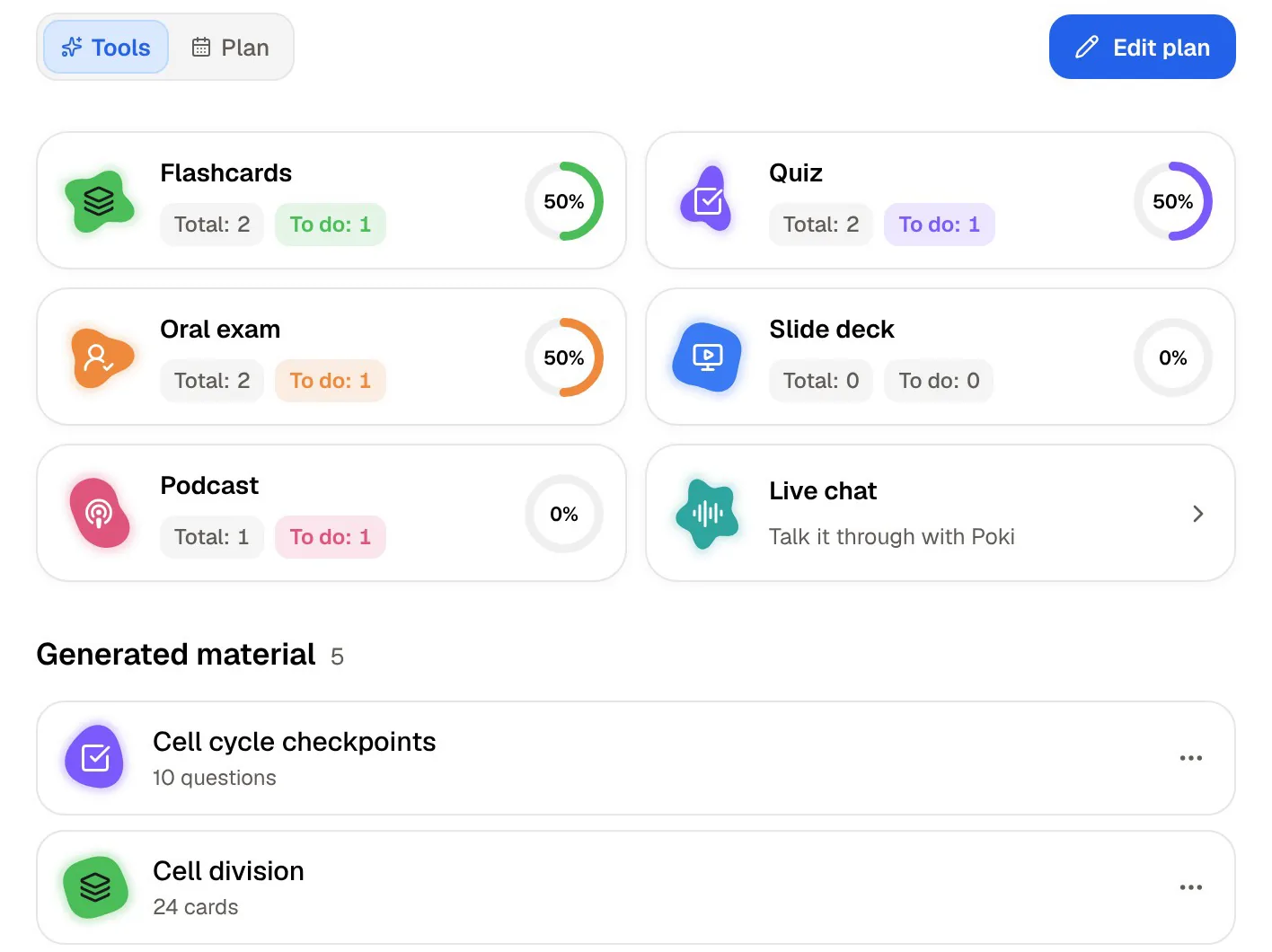
From the same material Poki answers from, PocketNote generates flashcards that you rate Again, Hard, Good or Easy, so each card returns when you are about to forget it. Quizzes explain why the right answer is right and why each wrong option is wrong. Prof. Poki's oral exam asks you to explain a topic out loud or in text and keeps following up until you can.
A study plan ties it together: set the exam date, and PocketNote plans what to cover each day, reminds you, and tracks memory, applied and mastery scores. There are also mind maps, summaries, slide decks and podcast-style audio reviews for different ways of going over the same content.
Research beyond your own notes
When you need information you do not have yet, DeepSeek's web search is the more general tool. It can pull in current sources on almost any topic, and for broad background reading that is useful.
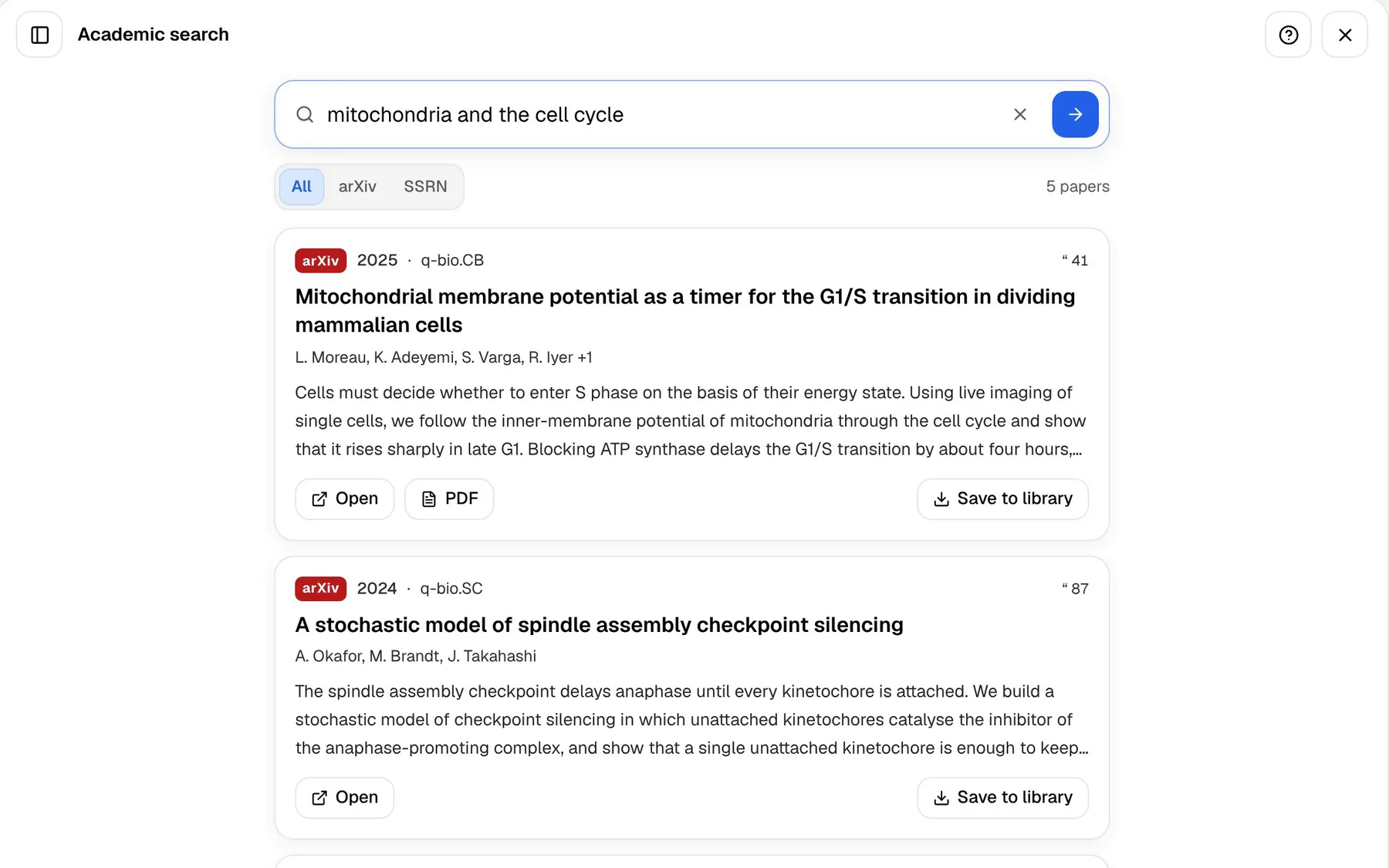
PocketNote approaches outside material by bringing it into your library first. Paste a web link and the article is extracted; paste a YouTube link and the transcript comes with it. For academic work, you can search papers on arXiv and SSRN inside the app and save one to your library, where Poki can cite it and the study tools can use it.
The difference is what happens after you find something. In a chatbot, a good source is a link in a conversation. In PocketNote it becomes part of the material you study from. On paid plans, connectors also let Poki use context from Google Drive, Notion and Outlook, which is where a lot of your own material may already sit.
What DeepSeek's privacy policy says
Students reasonably ask where their uploads go, so here is what DeepSeek's own privacy policy says, last updated on 10 February 2026. It states that DeepSeek directly collects, processes and stores personal data in the People's Republic of China. It lists training and improving its technology among the uses of data, including what you type in, and it lists a right to opt out of your personal data being used to train its models.
PocketNote states that your files are not used to train public AI models.
Neither point is a reason for alarm on its own. They are facts to weigh against what you plan to upload: a public textbook chapter is different from unpublished research data or a classmate's notes. Read each service's policy, and check whether your university has guidance on which AI tools to use for coursework.
When DeepSeek is the better tool
Pick DeepSeek if you want a free, capable general chatbot. For questions outside your course, explanations from several angles, brainstorming, writing help or coding, it does a lot at no cost, and its deeper reasoning mode is useful on multi-step problems.
Pick DeepSeek if you need web search across current sources on a topic you have not studied yet. Poki is strongest on your own material, and PocketNote is not built to be a general web-research assistant.
And pick DeepSeek if the models themselves interest you. Open weights on Hugging Face and an API make it a practical choice for computer science projects, experiments and coursework that involves building with a language model.
Using DeepSeek and PocketNote together
Plenty of students will use both. A sensible pattern is to go to a general chatbot when you are stuck on a concept and want it explained from scratch, then come back to your course material to check the explanation against how your lecturer framed it. In PocketNote you can ask Poki the same question and compare its cited answer with the one you got elsewhere.
If an explanation helps, keep it. Paste it into a PocketNote typed note in the right folder, and it becomes material for flashcards and quizzes alongside your lectures and readings. Check it against your notes first, since anything you memorise should match what you will be marked on.
Whatever tools you use, follow your course's rules on AI. Using a chatbot to understand material is different from submitting its text as your own, and universities draw that line in different places. A simple rule of thumb for the rest:
- Ask DeepSeek when you need breadth: a concept from scratch, a different angle, a coding question.
- Ask Poki when you need your course: what the lecturer said, what is on the slides, what the reading argues.
- Study in PocketNote when you need to remember it: flashcards, quizzes, the oral exam and the study plan.
The verdict
Which one should you pick?
Pick PocketNote if…
- Pick PocketNote if you want answers that come from your own lectures, slides and readings, with citations you can check.
- You want flashcards with spaced repetition, explained quizzes, an oral exam and a study plan built from your course.
- You record lectures or study from PDFs and want Poki to work on the page with you.
- You want a study tool that states your files are not used to train public AI models.
Pick DeepSeek if…
- Pick DeepSeek if you want a free, capable general chatbot for explanations, problem solving, writing and code.
- You need web search on topics beyond your course material.
- You want open model weights or an API for a computer science project.
Try it yourself
See it with your own notes
PocketNote is a study app for the web, iPhone and iPad, built around your own course material. Upload PDFs and Word files, record a lecture, paste a YouTube or web link, or search arXiv and SSRN, and Poki answers from that material with citations, choosing from leading AI models. The same sources become flashcards with spaced repetition, quizzes with explanations, oral exams, mind maps and podcast-style audio reviews.
It is free to start. Use a general chatbot when you need breadth; use PocketNote when you need to learn what your course actually covers.
Frequently asked questions
Sources
Keep reading