

Perplexity is an answer engine. Ask a question and it searches the web, writes an answer and shows the sources it used, with ten times as many citations per answer on Pro. It has grown well beyond search: file uploads, Projects that hold up to 10,000 files, a Research mode for longer investigations, a choice of AI models from several providers, its own Comet browser, and Learn Mode, which turns search into a tutor and can make flashcards and quizzes from your courses and notes.
PocketNote starts from the other end. Its default source isn't the web but your own course material, and Poki answers from your notes, with citations to the lecture or PDF it used. Around that it builds study tools: spaced-repetition flashcards, quizzes that explain every option, an oral exam, a study plan, audio reviews, lecture recording and handwritten notes.
Both cite their sources. What they cite is the difference, and it matters more for exams than it first appears. Here is the comparison as of November 2026, and where Perplexity is the right choice.
At a glance
PocketNote vs Perplexity
| Feature | PocketNote | Perplexity |
|---|---|---|
| Built for | Studying your course material | Answering questions from the web |
| Default source | Your library | The web; you can switch it off |
| Citations | To your files | To web sources; 10x more on Pro |
| Workspaces | Colour-coded folders and notebooks | Projects: up to 10,000 files |
| File uploads | PDF, Word, Excel, CSV, TXT, Markdown, audio | Text, PDF, images, audio, video; 40 MB each |
| Learning mode | Study tools built from your files | Learn Mode for verified students |
| Flashcards | Spaced repetition: Again / Hard / Good / Easy | In Learn Mode |
| Quizzes | Every option explained | Multiple choice and free response, with feedback |
| Oral exam and study plan | Yes, both | Not advertised |
| Lectures and handwriting | Record in the app; handwrite on iPad | Transcribes uploaded audio and video |
| AI models | Several providers | Several providers on Pro |
| Student pricing | Free to start; see pocketnote.app | Education Pro discount, verified students |
Checked against each product's own website and help centre, November 2026. Plans and features change; confirm current details there.
What Perplexity does well
Perplexity's habit of showing its sources is its main strength. Its web answers list the pages they drew on, so you can click through and check, and Pro raises the number of citations per answer tenfold. Research mode handles longer questions, and Pro adds more uploads, advanced models from several providers, and the ability to create files and apps.
Projects are its workspaces. According to its help centre, a Project keeps searches, files, instructions and connected tools together; it holds up to 10,000 files and 5 GB, takes custom instructions of up to 8,000 characters that apply to every query in it, and lets you add web links and domains to prioritise. Projects are private by default, and verified students and educators can invite far more contributors than the standard five.
File uploads cover text, code and PDFs, images, and audio and video, which Perplexity transcribes. The limit is 40 MB per file on every plan, with a rolling weekly upload allowance that is higher on paid plans. Memory lets it carry context between sessions. It also connects to other apps: its upload article mentions files attached from connected apps such as Google Drive, which count toward the same allowance.
Learn Mode, read closely
Learn Mode is Perplexity's study feature, and its help article describes it as search optimised for active learning. Instead of handing over the answer, it asks guiding questions and offers hints, adjusts its explanations to your level after a few quick questions, and includes mini-quizzes with feedback. It can also create study material from your courses and notes: interactive free-response exercises, flashcards and multiple-choice quizzes.
There is a catch on access. The article says the mode is available to all users, but also that, at the moment, the toggle is only available to verified students, who verify through SheerID by choosing the Education plan on the upgrade screen. Perplexity also offers Education Pro, a discounted version of Pro for verified students and educators that includes Learn Mode.
The help article describes Learn Mode's flashcards as study material rather than a review schedule. It doesn't describe spaced repetition, a study plan to an exam date or a spoken oral exam, which are the parts PocketNote is built around.
For a student who already uses Perplexity every day, Learn Mode is a sensible first step toward studying with it rather than just searching. It is strongest on understanding: working through a concept with hints instead of reading a finished answer. Remembering the concept in three weeks' time, under exam conditions, is a separate problem.
Cited to the web, or cited to your lecture
A citation tells you where an answer came from. On Perplexity, by default, that is a web page: often a good one, sometimes a university or publisher site, sometimes a blog. For understanding a topic, that range is useful.
For an exam it creates a quieter problem. Your lecturer taught a particular model, used particular terms and set particular readings, and the marking follows them. An answer cited to a well-written web page can still use a definition your course doesn't, or a framework from a different textbook.
None of this is a fault in Perplexity's sources, and the fix is simple if you use it: check any definition you plan to learn against your own slides. The point is that the check is a separate step, and in exam season separate steps tend to get skipped.
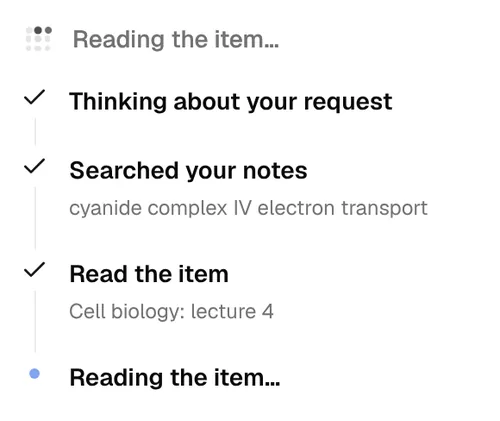
Perplexity's help article on uploads adds a practical point: short files can be analysed in their entirety, while for longer files it extracts the most important parts. PocketNote is built to answer from the material in your library, and it shows its steps as it goes: searched your notes, read the item "Cell biology: lecture 4", then the answer, labelled as coming from your notes.
Revising a topic in PocketNote
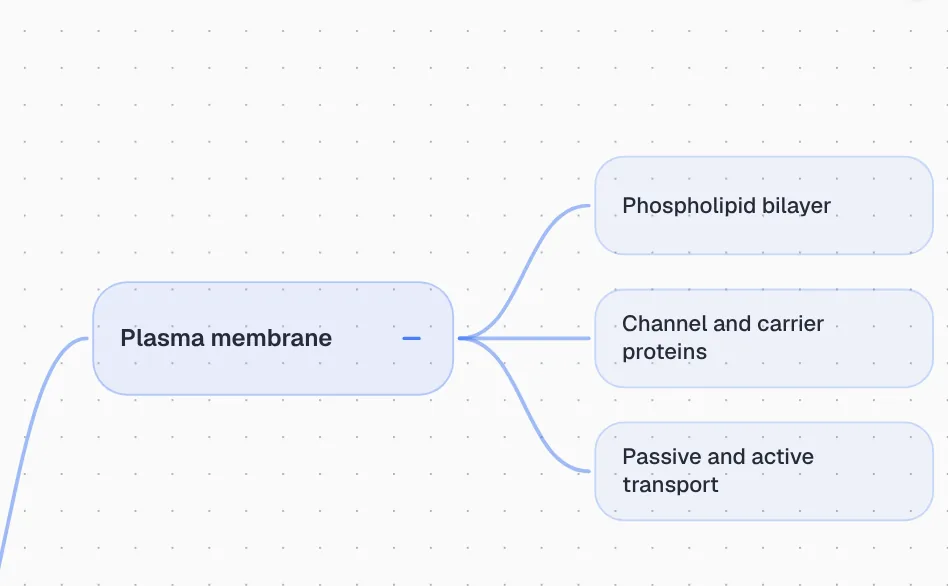
Take mitosis versus meiosis, a reliable exam question in first-year biology. Ask Poki to compare them in a table and the answer comes from your lecture notes and slides, with the source marked. Ask for a mind map of the cell and you get branches built from your notes, down to the plasma membrane's channel and carrier proteins.
Then test yourself. A quiz gives the reason behind every answer. Flashcards come back on a spaced schedule from your Again, Hard, Good or Easy ratings. The oral exam has Prof. Poki ask you to explain, out loud or in text, and probe the parts you skip. Set the exam date and the study plan spreads the work across the days you have, with reminders and memory, applied and mastery scores for each topic.
All of it uses your course's terms, because all of it comes from your course's material.
For days away from the desk, a podcast-style audio review covers the same topic in a short episode, with captions that follow the voices. Written notes and summaries from the lecture open in the block editor, where you can add your own examples and ask Poki inside the note.
Talking it through
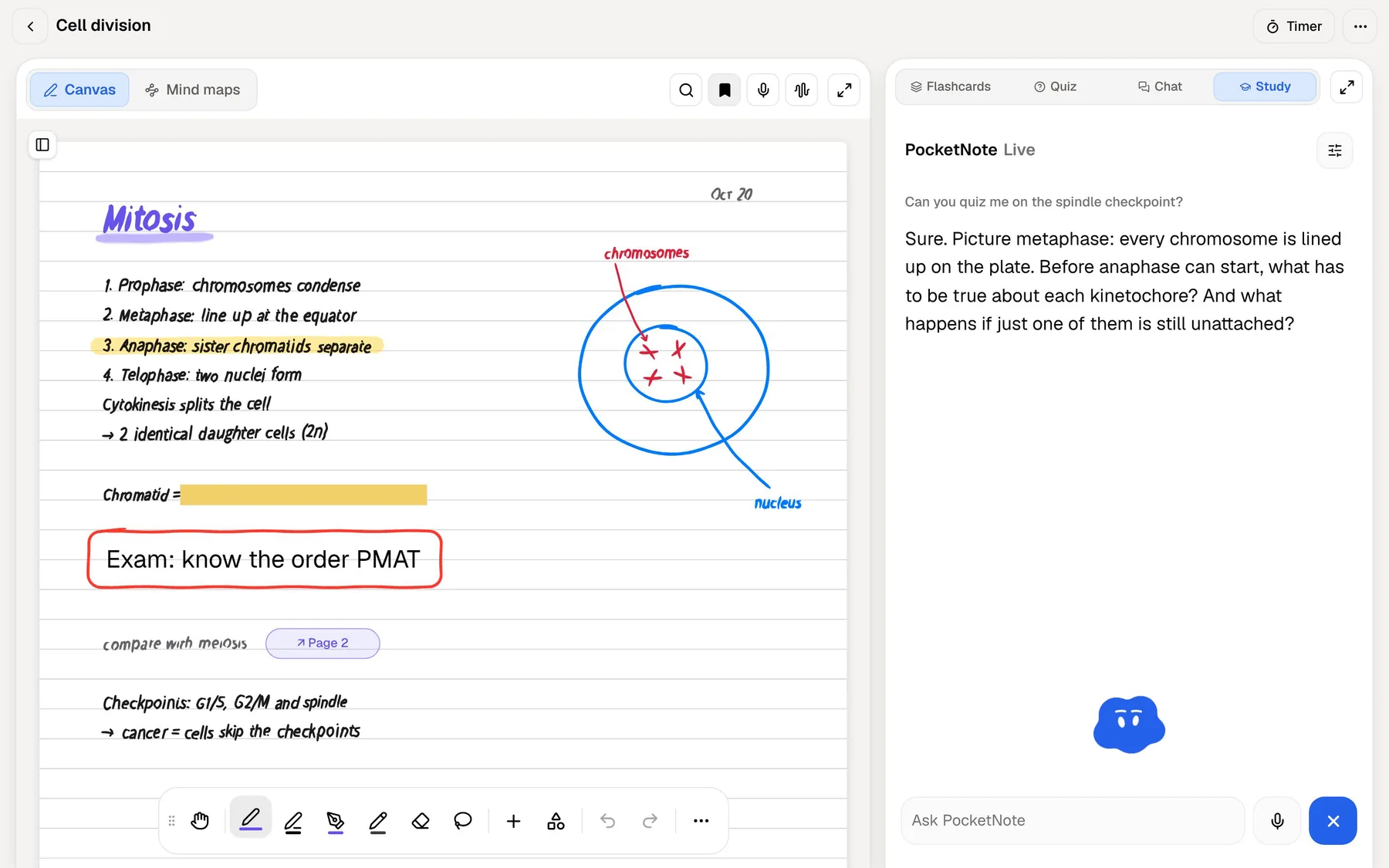
Saying an answer out loud is a harder test than recognising it on a screen, and it shows quickly where an explanation falls apart. PocketNote's live voice, on paid plans, lets you talk to Poki about your material and hear the answer. Ask it to quiz you on the spindle checkpoint and it asks the next question out loud, while the transcript of the conversation builds up on screen.
For a full rehearsal, the oral exam turns that into a structured session: Prof. Poki keeps asking follow-up questions until your explanation is complete. You can answer out loud or type, which helps in a library where speaking isn't an option.
Where Perplexity is the better choice
PocketNote isn't built for open-web research. Poki is strongest on your own material, and for open-web questions Perplexity is the better tool. These are the jobs we would hand to it.
- Questions beyond your course. Current events, background reading and topics your material doesn't cover.
- Finding sources. Its web citations give you a starting list of pages to read and evaluate.
- Big collections. A Project holding up to 10,000 files is larger than most students need, and useful for long research projects.
- Video files. It transcribes the spoken content of uploaded video such as MP4 and MOV; PocketNote takes audio files and YouTube links but doesn't list video uploads.
- A discounted plan with Learn Mode. Verified students and educators can get Education Pro.
Plans
Perplexity has a free plan, Pro, Max and enterprise plans, plus Education Pro for verified students and educators at a discount. Its help articles describe what each includes but don't state prices, and the pricing page didn't display them when we checked in November 2026, so look at the upgrade screen in the app for current figures in your currency.
If you are a verified student who already pays for Perplexity, Education Pro is the first thing to check, since it costs less than Pro and includes Learn Mode.
PocketNote is free to start. The Basic plan adds live voice, premium models and connectors, and Plus adds unlimited notebooks and apps, the longest podcasts and every model. See pocketnote.app for current plans.
Using Perplexity and PocketNote together
Use Perplexity for discovery and PocketNote for the course. When Perplexity turns up a useful article, paste its web link into PocketNote and the article is extracted into your library, next to the lecture it relates to. YouTube links come with their transcripts.
From then on, Poki answers from that article and your other material with citations, and the cards, quizzes and audio reviews include it. Your library stays a record of what you chose to study, rather than everything you searched for.
A routine that works for an essay-and-exam module:
- Background: use Perplexity to get oriented on an unfamiliar topic and find a few good sources.
- Keep the good ones: paste their links into the module's PocketNote folder so they sit with the lectures.
- Learn: generate flashcards and a quiz from the folder, and review the cards as they come due.
- Rehearse: before the exam, run the oral exam on each topic and follow the study plan's daily list.
The verdict
Which one should you pick?
Pick PocketNote if…
- You want answers from your own course material, cited to the lecture or PDF they came from.
- You want spaced-repetition flashcards, explained quizzes, an oral exam and a study plan to your exam date.
- You record lectures, write notes by hand or annotate PDFs.
- You want to rehearse explanations out loud with live voice.
Pick Perplexity if…
- You need answers from the web with sources you can click through and check.
- You research topics beyond your course or follow current events.
- You are a verified student who wants Learn Mode through Education Pro.
Try it yourself
See it with your own notes
PocketNote answers from what you study, not the open web. Import PDFs, Word and Excel files, audio, YouTube and web links, or record a lecture, and Poki cites the exact source. The same material becomes flashcards with spaced repetition, explained quizzes, an oral exam, mind maps and audio reviews, on the web and on iPhone and iPad.
It is free to start. Keep Perplexity for the web, and bring what you find there into PocketNote to learn it.
Frequently asked questions
Sources
Keep reading