
If a disability adviser or your university handed you a note-taking app called Glean, it now has a different name. Glean, the lecture note-taking app made by Sonocent, has been renamed Genio Notes, and university support pages now describe it as Genio (formerly Glean). It is not related to Glean the enterprise search company, which is a separate business.
Genio Notes is built around one idea: record the lecture, and take short, time-stamped notes, labels and slide annotations against the audio, so you can find and replay any moment later. PocketNote is an AI study app that also records lectures, but it puts its weight on what comes after: flashcards with spaced repetition, quizzes with explanations, an oral exam and an audio review, all from your own material.
This page compares the two as they stand in November 2026, using Genio's own pages for its features and prices. If your copy of Glean came through an accommodation plan, the section on using both is worth reading before you change anything.
At a glance
PocketNote vs Genio Notes (formerly Glean)
| Feature | PocketNote | Genio Notes (formerly Glean) |
|---|---|---|
| What it is | AI study app | Lecture note-taking app with audio |
| Record a lecture | Yes: transcript, summary, notes | Yes, with time-stamped labels and notes |
| Lecture slides | Import the PDF and annotate it | Import before or after class |
| Handwriting | Apple Pencil on iPad; drawing in browser | Scribble, added to typed notes |
| Notes linked to audio | Note Replay: strokes replay with audio | Notes and labels stamped to the recording |
| Transcript | Yes, with a summary and notes | Yes, with speakers and timestamps |
| AI summary | Summary and notes from the recording | AI Outline linked to moments |
| Quizzes | Yes, every answer explained | Quiz Me: AI multiple choice |
| Flashcards with spaced repetition | Yes: Again / Hard / Good / Easy | Not advertised |
| Apps | Web, iPhone, iPad | Web, iOS, Android, Chrome extension |
| How students get it | Free to start; paid plans | Often via university; individual plans |
| Individual price | See pocketnote.app | From £12 a month; 30-day trial |
Checked against each product's own website, November 2026. Plans and features change; confirm current details there.
Glean is now Genio Notes: what changed
The product formerly called Glean is now Genio Notes, part of a small set of tools under the Genio name that also includes Genio Present for rehearsing presentations. University disability and accessibility pages use the name Genio (formerly Glean), and the app is published by Sonocent, the company behind it.
One practical change is worth knowing if you still have the old mobile app. Its App Store listing, now titled Legacy App, Genio Notes, says it will be retired on 30 November 2026 and that recording has moved to the new Genio Notes app, where you sign in with the same account. If you still record with the old app, move to the new one before that date.
So when you search for Glean reviews or a Glean alternative, the product you are comparing is Genio Notes. Everything below refers to it by its current name.
How Genio Notes works during a lecture
Genio Notes treats the recording as the backbone of your notes. You record a class in person or online, and while it runs you add short labels and text notes that are time-stamped to the audio. You can import the lecturer's slides before or after class and annotate them, and Scribble lets you handwrite an equation or diagram and drop it into your typed notes.
After class, its features page lists transcription with speaker identification and timestamps, an AI Outline that summarises the recording with links back to specific moments, and Collections that group recordings by module or lecturer. Search runs across your recordings. There are also study notes in formats such as bullet points and Cornell, a task list, a focus timer and a reading view.
The approach suits students who find it hard to listen and write at the same time. Instead of trying to capture everything, you mark the moments that matter and come back to them. Genio also describes itself as accessible by design and offers onboarding support and a short note-taking course, The Confident Notetaker's Masterclass.
A few capture tools deal with real lecture conditions. Five audio filters reduce background noise, OCR pulls editable text out of images you upload, such as a photo of a handout, and a Chrome extension opens a side panel so you can take notes next to slides or a video. Video capture and playback is in beta for institution-wide customers.
How students get Genio Notes
You may not need to buy Genio Notes yourself. Genio sells packages to universities, including one for students with accommodations and one that covers every student at an institution, and its site has an eligibility check to see whether you can get it free through your institution or a government programme.
If you are paying yourself, Genio's individual pricing page lists Genio Notes from £12 a month at the time of writing (November 2026), with multi-year licences that it says save up to 20%. There is a 30-day free trial that does not ask for payment details. Live Captions, which show a live transcript while you record, are not available on individual plans, and the page lists Quiz Me on annual plans.
PocketNote is free to start, with paid Basic and Plus plans; see pocketnote.app for current plans and prices.
Notes that stay linked to the audio, PocketNote's way
PocketNote covers the same need from two directions. The first is recording: tap Record when the lecture starts, and when you stop you get the audio, a transcript, a summary and written notes in one item. If you recorded elsewhere, you can import MP3, WAV, M4A or OGG files instead.
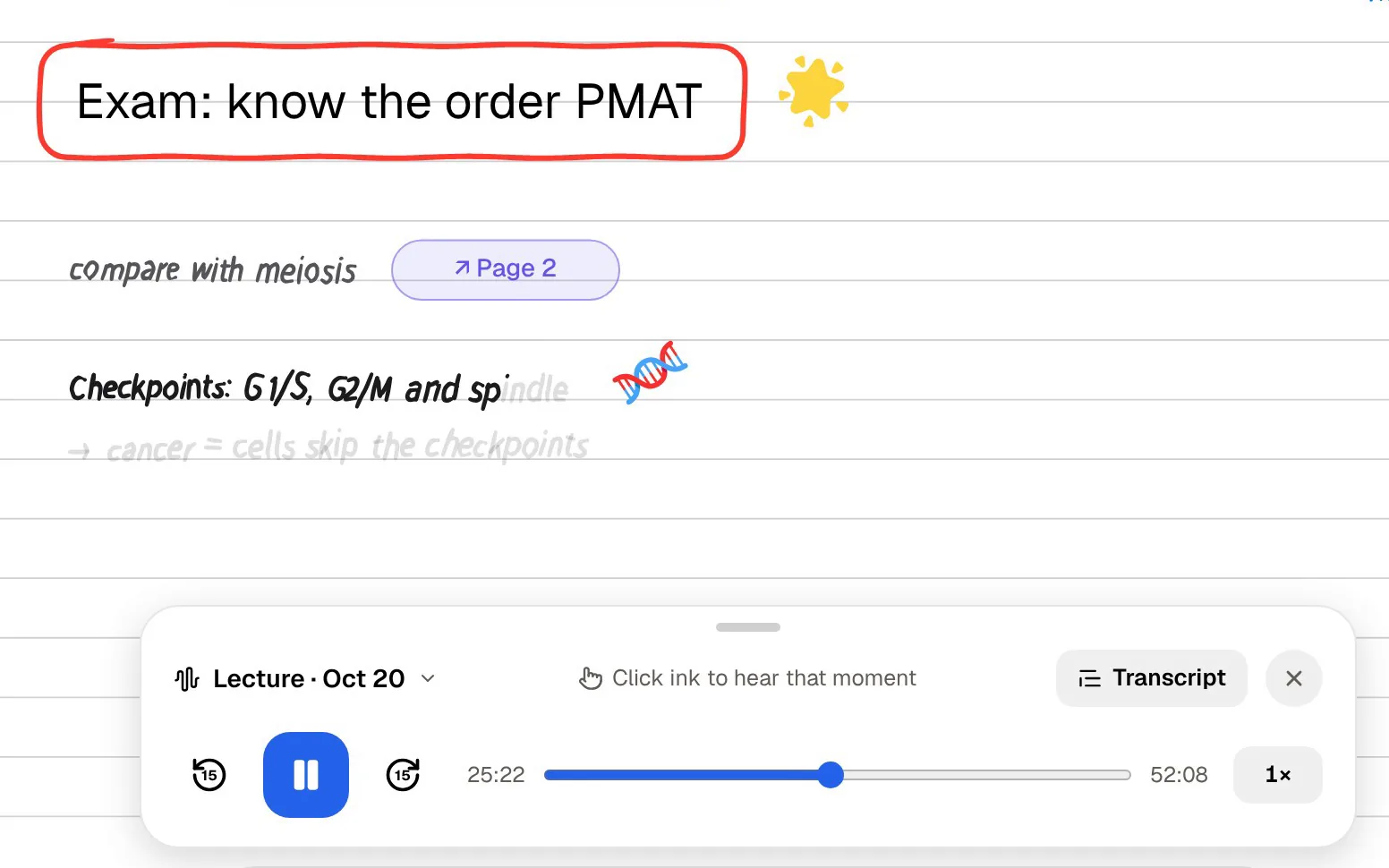
The second is Note Replay. If you take handwritten notes on an iPad with Apple Pencil, you can record audio while you write. Playing it back shows the strokes you were writing at each moment, so each line appears as the lecturer was saying it, which is close in spirit to Genio's time-stamped labels.
Slides are handled as PDFs. Import the lecture deck, highlight, write and draw directly on the page, and keep your margin notes next to the content they refer to. Poki, PocketNote's AI, can then read that page as you see it, including your highlights and handwriting, and answer a question about it.
If you type rather than write, PocketNote's block editor handles headings, lists, checklists, tables, toggles, callouts, LaTeX maths and an outline, and you can ask Poki a question from inside the note. Notes keep saving offline and sync when you are back online, which matters in lecture halls with weak Wi-Fi.

Quiz Me compared with PocketNote's study tools
Genio's Quiz Me generates AI multiple-choice questions from a recording or from a whole Collection. It is a useful check on whether you followed a lecture, and it sits inside the same app as your notes.
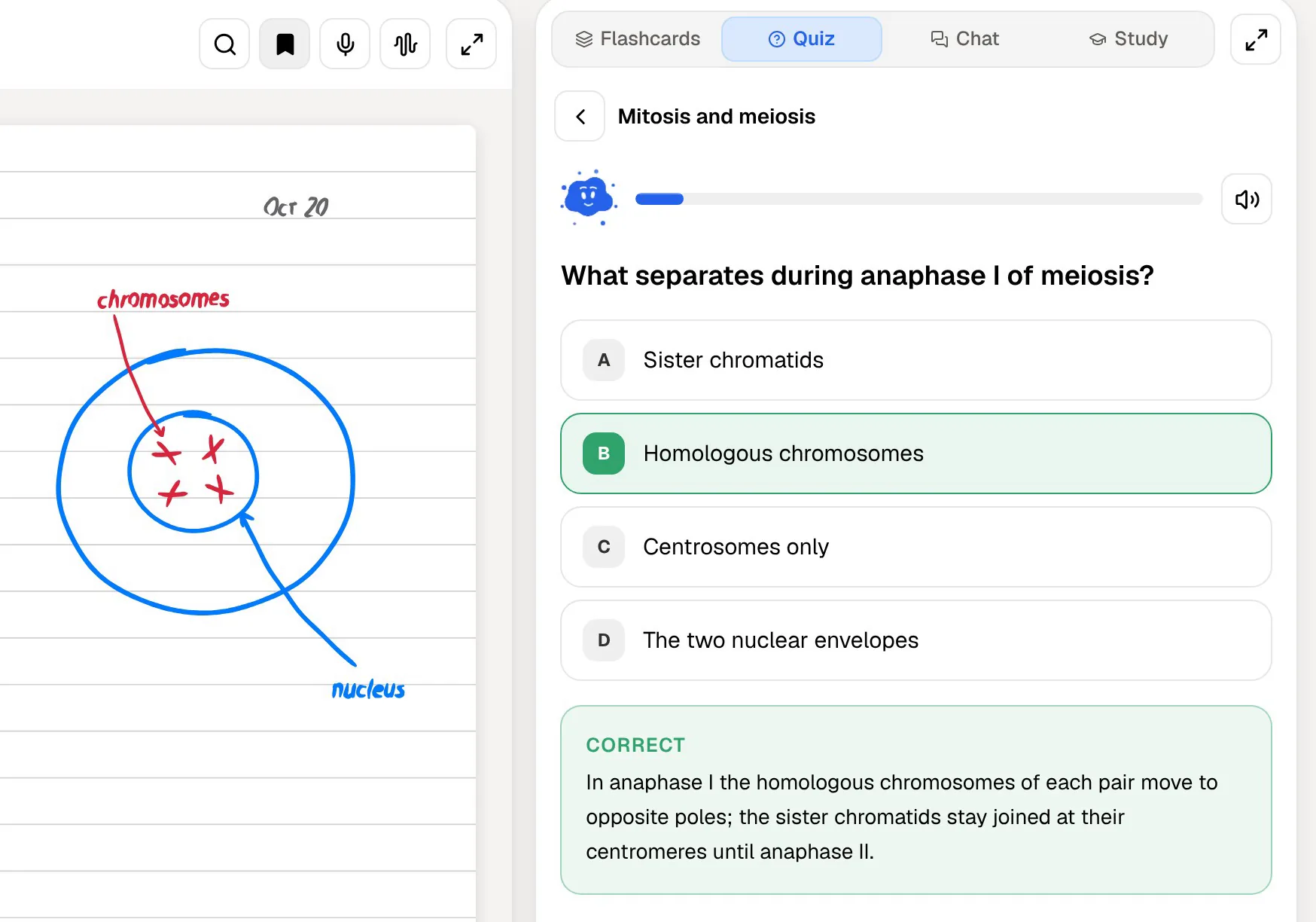
PocketNote has more study formats, built from all the material you add, not only recordings. Flashcards use spaced repetition: rate each card Again, Hard, Good or Easy and it comes back when you are about to forget it. Quizzes explain the right answer and why the other options are wrong. Prof. Poki runs an oral exam, out loud or in text, and keeps asking follow-up questions until you can explain the idea in your own words.
There are also formats for different moods. A podcast-style audio review turns a lecture into an episode with captions that follow the voices, and a mind map shows how the topics of a module connect. Retrieval practice, being asked to recall something rather than reread it, is one of the better-established ideas in learning research, and these tools are different ways of doing it.
All of them draw on everything you add, not only the recording: the slides as a PDF, a reading as a Word file, a YouTube lecture your tutor linked, or your own handwritten notes. That matters when an exam question combines the lecture with the reading.
Planning the weeks before an exam
Genio Notes includes tasks, so you can set yourself a reading or a recording to review, and a focus timer for short study sessions. That suits students who like to manage their own revision list.
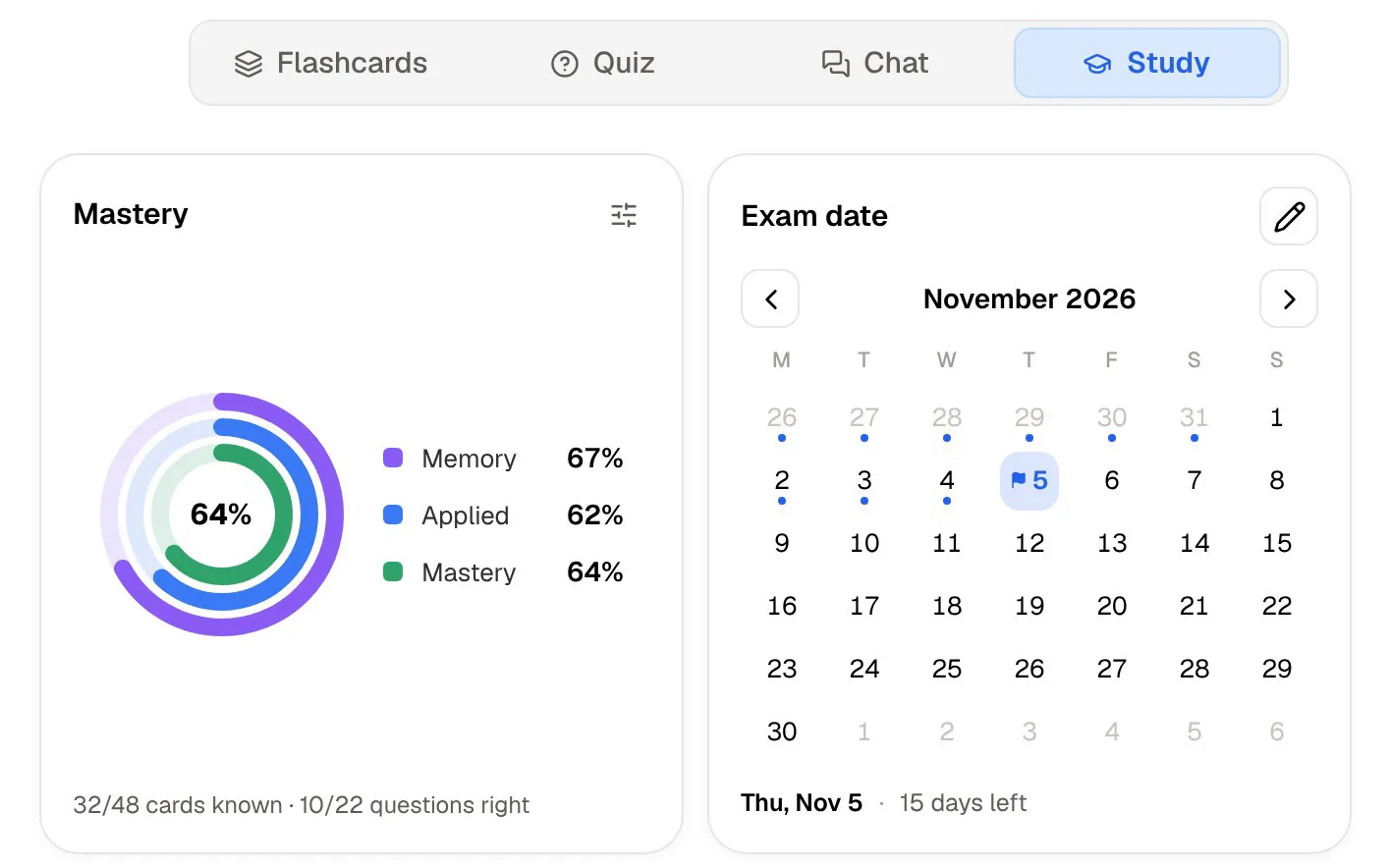
PocketNote's study plan works back from the exam. Enter the date, and it plans what to cover each day across your material, sends reminders, and tracks three scores: memory, applied and mastery. Progress shows per tool, so you can see whether the flashcards are done but the quiz is not. A study timer with ambient sounds is there for the sessions themselves.
When Genio Notes is the better fit
Pick Genio Notes if your university or disability service provides it. A tool that is free to you, supported by your institution and set up as part of an accommodation plan has real advantages, including onboarding help and, on institutional plans, Live Captions during lectures.
Pick Genio Notes if its method suits you: marking moments with labels instead of writing everything down, with the audio as a safety net. Speaker identification in transcripts, Shared Collections, offline use and single sign-on with your university account are also part of its design.
Pick Genio Notes if you need an Android app or work mostly in Chrome alongside slides and videos, where its extension gives you a side panel for notes. PocketNote runs on iPhone, iPad and in any browser, with no Android app yet, and its handwriting tools, while broad, are newer than some long-established note apps.
Moving from Glean, or using both
If Genio Notes is part of an accommodation plan, there is no need to replace it. Keep it for capture during lectures, especially if Live Captions are part of your support, and talk to your disability adviser before changing any tool that is written into that plan.
To study the same lectures in PocketNote, bring the content across. Genio's features page says transcripts can be printed or saved as a PDF, and PocketNote imports PDF files. Import the original lecture slides too, since they are your own files, and generate flashcards, quizzes and an audio review from the set. Poki's answers then cite the transcript and the slides.
Genio's labels, Collections and AI Outline links stay in Genio; the text of the lecture and your slides are what move. For most revision, that is enough to work from.
The verdict
Which one should you pick?
Pick PocketNote if…
- Pick PocketNote if you want a lecture turned into flashcards with spaced repetition, explained quizzes, an oral exam and an audio review.
- You take handwritten notes on an iPad and want them linked to the audio with Note Replay.
- You want an AI that answers from your lectures, slides and readings with citations, and a study plan built around the exam date.
- You are paying for a study app yourself and want to start free.
Pick Genio Notes (formerly Glean) if…
- Pick Genio Notes if your university or disability service provides it, especially with Live Captions on an institutional plan.
- You like marking moments with time-stamped labels and relying on the recording, rather than writing full notes.
- You need an Android app, a Chrome side panel, speaker identification or shared Collections.
Try it yourself
See it with your own notes
PocketNote is an AI study app you can use in a browser or on iPhone and iPad. Record a lecture or import its audio, add slides and readings, write by hand or type, and Poki answers from your material with citations. The same sources become flashcards with spaced repetition, quizzes with explanations, oral exams, mind maps and audio reviews, and a study plan spreads the work to your exam date.
There is a free plan to start with, and your files are not used to train public AI models. It can sit next to Genio Notes rather than replace it: capture in the tool your support plan gives you, and revise in the one that quizzes you.
Frequently asked questions
Sources
Keep reading