
Plaud makes AI voice recorders: small devices you clip on, wear or stick to the back of your phone, paired with an app that transcribes what they capture, labels the speakers and writes a summary from a template. They are designed for people in back-to-back meetings and calls, and Plaud also offers students a discount on its devices.
PocketNote is an AI study app. It records lectures on the iPhone or iPad you already own, and gives you a transcript, a summary and notes. Its focus is what happens next: flashcards with spaced repetition, quizzes with explanations, an oral exam, an audio review and a study plan, all from your own course material.
So the comparison is partly hardware against software, and partly a recording tool against a study tool. This page covers what Plaud devices and plans cost as listed on its site in November 2026, what its summaries do and do not do for revision, and how the two can work together if you already own one.
At a glance
PocketNote vs Plaud
| Feature | PocketNote | Plaud |
|---|---|---|
| What it is | AI study app: web, iPhone, iPad | AI recorder devices plus an app |
| Hardware | The phone, iPad or browser you have | A Plaud device, e.g. Plaud Note at $159 |
| Record a lecture | In the app: transcript, summary, notes | On a Plaud device, then the app |
| Phone calls | Not offered | Call mode on Plaud Note |
| Import audio files | MP3, WAV, M4A, OGG | Yes, in the app and on the web |
| Languages | Study material in 50+ languages | 112 transcription languages |
| Summaries | Summary and notes for each recording | 10,000+ summary templates |
| Ask questions | Poki across all your material, cited | Ask Plaud across your recordings |
| Flashcards with spaced repetition | Yes: Again / Hard / Good / Easy | Not advertised |
| Quizzes and oral exams | Yes | Not advertised |
| Free tier | Free to start | Starter: 300 transcription min a month |
| Student discount | See pocketnote.app | 10% off devices for verified students |
Checked against each product's own website, November 2026. Plans and features change; confirm current details there.
What Plaud makes
Plaud's range covers several shapes of recorder. Its homepage lists the Plaud Note, a card-shaped recorder that attaches to a phone, the Plaud Note Pro, and two wearables, the NotePin and NotePin S, plus Plaud One earbuds on pre-order at the time of writing. Each pairs with the Plaud app. The NotePin models are small wearables aimed at hands-free capture, while the Plaud Note is pitched at people in back-to-back meetings who also record calls.
The Plaud Note's product page gives the headline specs: phone-call and in-person recording modes, up to 30 hours of continuous recording, 60 days on standby, and up to 64 GB of audio stored on the device. Transcription covers 112 languages, with speaker labels.
The software side is called Plaud Intelligence. It summarises recordings using more than 10,000 templates, produces visual summaries, and has Ask Plaud, which lets you search and question all your recordings in plain language. Plaud's help centre also describes importing audio files into the Plaud app and Plaud Web, so the software is not limited to recordings from its own hardware.
Why a dedicated recorder appeals to some students
The case for a device is practical. Your phone stays in your bag on silent, its battery is untouched at the end of a long day, and recording does not depend on an app staying open. A recorder with 30 hours of continuous recording covers a week of lectures on one charge.
It also suits students who do more than attend lectures: research interviews, placement meetings, a part-time job with calls to log. Plaud's phone-call mode and its large template library are built for that mix.
There are trade-offs. A device is one more thing to charge, carry and keep track of, and a recording on it has to reach the Plaud app before it is transcribed. A lecture recorded on your phone in a study app skips that step, which matters if you want to review it on the bus home.
Whatever you record with, check your university's policy first. Many institutions have rules about recording lectures, and some require the lecturer's permission or an accessibility arrangement. That applies to an app on your phone exactly as much as to a device.
The full cost: a device plus a plan
Plaud's costs come in two parts. The Plaud Note is listed at $159 on Plaud's US store at the time of writing (November 2026), and other models are priced differently. Every device includes the free Starter plan with 300 transcription minutes a month. That is five hours of audio, which a timetable with several recorded lectures a week uses up well before the month ends.
For more, Plaud's plan page lists Pro at $17.99 a month, or $8.33 a month billed annually, with 1,200 minutes a month, and Unlimited at $29.99 a month, or $20 a month billed annually, with up to 24 hours of transcription a day. Plaud's eligible-discount page offers verified students 10% off full-priced devices, through partners such as ID.me and Student Beans.
PocketNote has no hardware cost because it uses your iPhone, iPad or browser. It is free to start; Basic adds live voice with Poki, premium AI models and connectors, and Plus adds unlimited notebooks and apps, the longest podcasts and all models. See pocketnote.app for current prices.
What a Plaud summary does for revision
A Plaud summary is a structured digest of a recording, shaped by a template. For a meeting that is exactly right: decisions, actions, who said what. For a lecture it gives you a readable overview, which is useful the same evening when the content is fresh.
Revision asks for more than an overview. Weeks later you need to recall the content, not recognise it, and you need to come back to it on a schedule. Plaud does not advertise flashcards, quizzes or spaced repetition; its tools are built for capture, summary and search, and Ask Plaud is a way to find things in your recordings rather than to test yourself on them.
A simple check shows the difference. A week after a lecture, close the summary and try to explain its main idea from memory. Rereading a summary feels like knowing it; recalling it without the page tells you whether you do, and that kind of practice is what study tools are designed to make routine.
That is not a criticism of Plaud. It is a description of a different product, and it is the gap PocketNote is designed to fill.
A Plaud recording, studied in PocketNote
If you already own a Plaud, you do not need to choose. Plaud's plans list multiple export formats, and PocketNote imports audio as MP3, WAV, M4A or OGG, so export the lecture's audio in one of those formats and bring it across with Import audio on PocketNote's home screen, or record directly in PocketNote on days you leave the device at home.
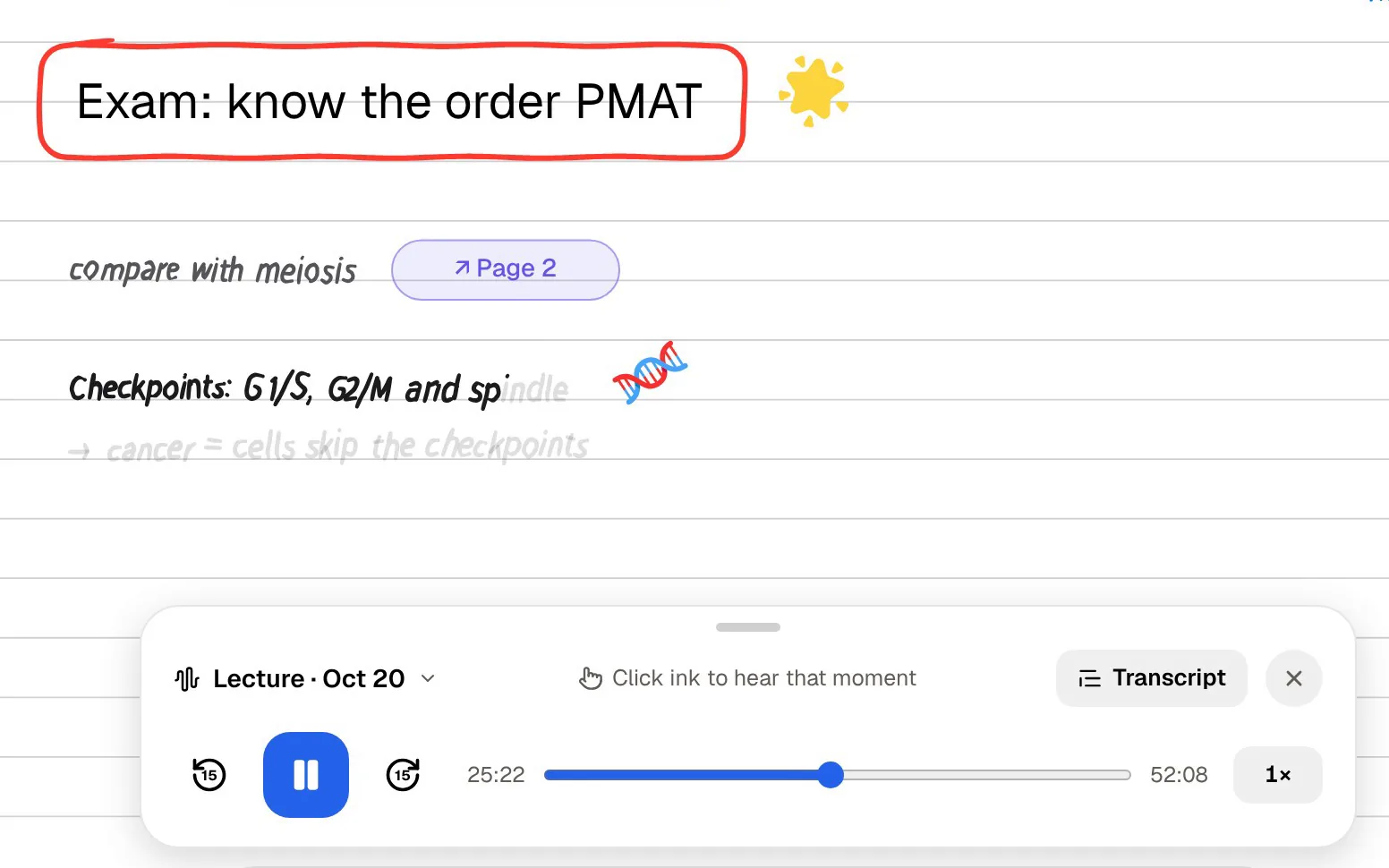
In PocketNote a recorded lecture becomes one item: the audio, a transcript, a summary and written notes you can edit. Add the lecture slides as a PDF and the week's readings, and Poki, PocketNote's AI, answers questions across all of them with citations to the source. It shows its steps as it works, so you can see which lecture it read.
If you take handwritten notes on an iPad, there is another way to tie notes to audio that needs no extra device. PocketNote's Note Replay records audio while you write with Apple Pencil, and playing it back shows the strokes you were writing at each moment.
If your exam includes a presentation or you revise visually, PocketNote can also generate a slide deck from the same material, alongside mind maps, data tables, written summaries and explainer videos.

The study tools a recorder does not give you
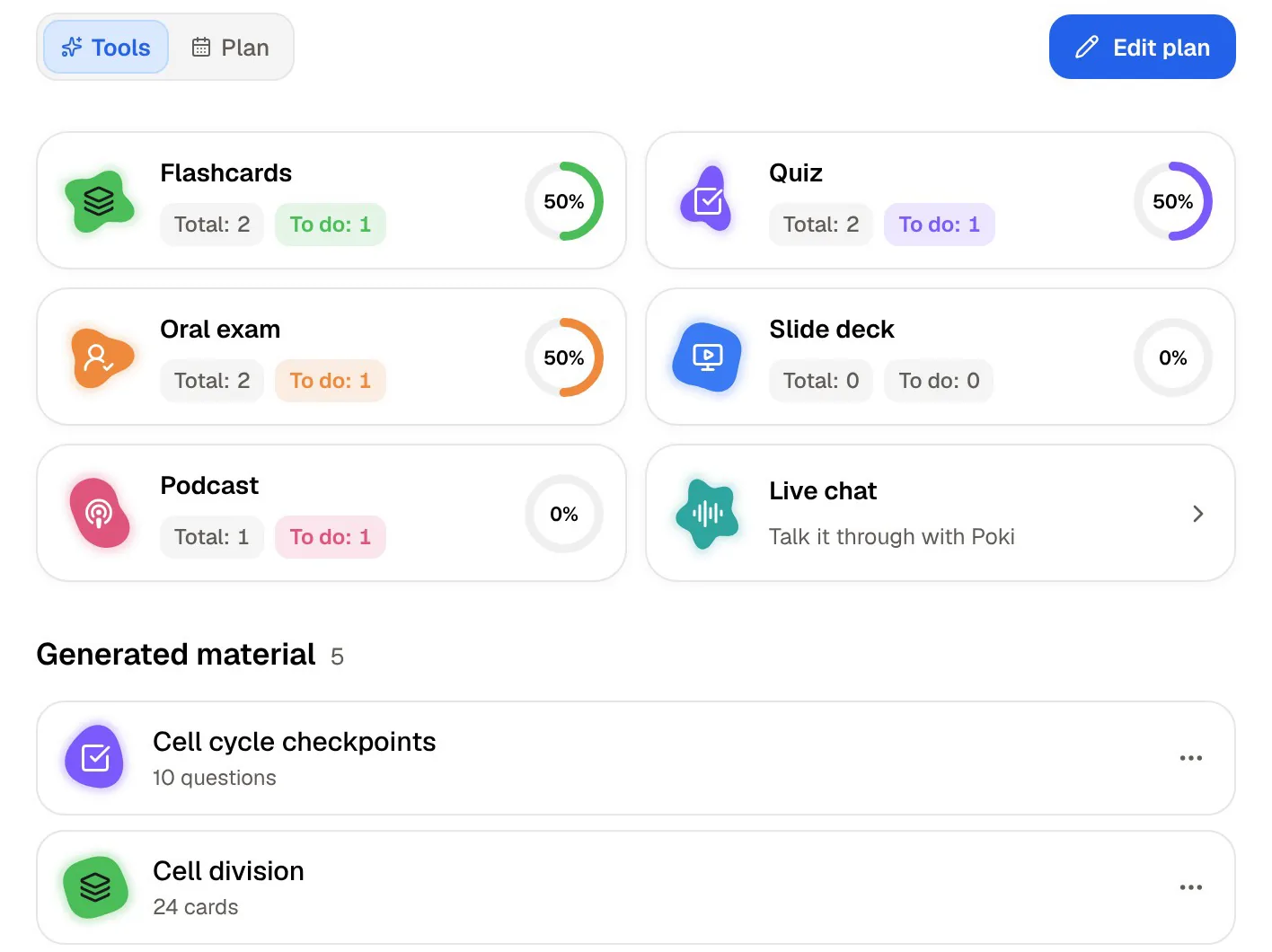
This is where the two products diverge most. From one lecture, or a notebook of them, PocketNote generates the formats that help you remember material rather than store it.
- Flashcards with spaced repetition: rate each card Again, Hard, Good or Easy, and it comes back when you are about to forget it.
- Quizzes: every option, right or wrong, comes with the reason.
- Oral exam: Prof. Poki asks questions out loud or in text and keeps probing until you can explain the idea.
- Audio review: a podcast-style episode about your material, with captions that follow the voices.
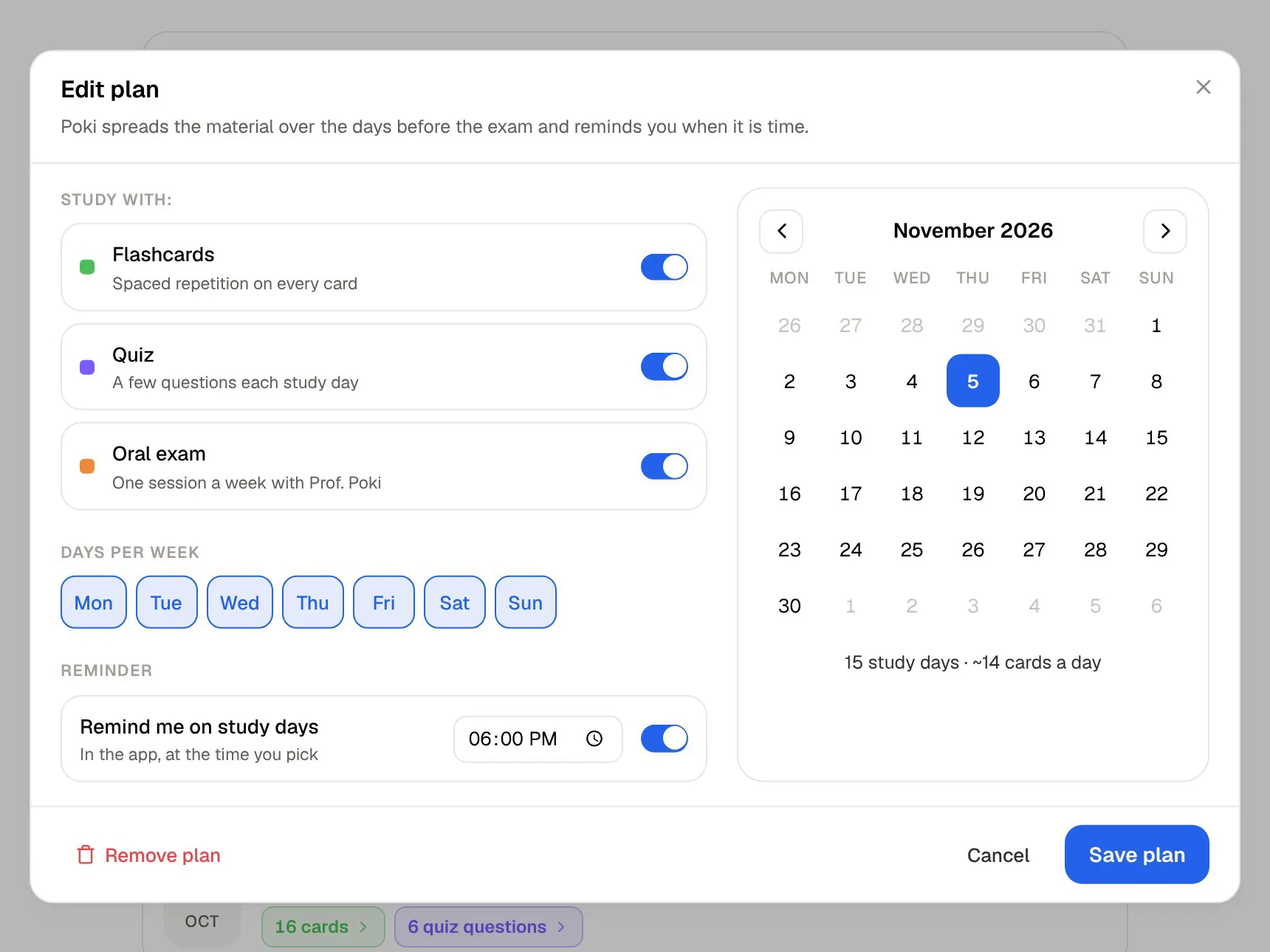
- Study plan: set the exam date and PocketNote plans what to cover each day, reminds you, and tracks memory, applied and mastery scores.
When a Plaud makes more sense
Pick Plaud if you want a dedicated recorder. Long battery life, on-device storage and a phone that stays free are real advantages if you record many hours a week.
Pick Plaud if you record phone calls or a mix of meetings, interviews and lectures, in many languages. Call mode, speaker labels, 112 transcription languages and a large template library are built for that. PocketNote is a study app and is not designed for calls or meeting minutes. If you live, work or research in a different language from the one you study in, that breadth of transcription is a genuine advantage.
And pick Plaud if a searchable archive of everything you have recorded is the goal in itself. Being able to ask questions across months of recordings is a different and useful thing from a study tool, and it is what Plaud's software is built around.
Plaud and PocketNote side by side in a semester
A sensible split for a Plaud owner: let the device capture lectures, meetings and interviews, keep Plaud's summaries for quick catch-ups, and move the lectures you will be examined on into PocketNote along with the slides and readings. The study plan then decides what to review each day until the exam.
What carries over is the audio itself. Plaud's speaker labels, templates and Ask Plaud history stay in Plaud. In PocketNote the lecture sits beside your slides, readings and notes, so the flashcards, quizzes and Poki's answers can draw on the whole module rather than one recording at a time.
If you do not own a recorder and mainly need to learn from lectures, start with PocketNote on the phone or iPad you have. If you later find you want a dedicated device, any recorder that saves MP3, WAV, M4A or OGG audio can feed it.
The verdict
Which one should you pick?
Pick PocketNote if…
- Pick PocketNote if you want to learn from lectures, not just keep them: flashcards, quizzes, an oral exam and audio reviews.
- You would rather use the iPhone or iPad you already own than buy a device.
- You want an AI that answers across lectures, slides and readings with citations, and a study plan to the exam date.
- You already have recordings from another device and want to turn them into revision.
Pick Plaud if…
- Pick Plaud if you want a dedicated, long-battery recorder that keeps your phone free.
- You record calls, meetings and interviews as well as lectures, in many languages, with speaker labels and templates.
- A searchable archive of everything you record is the main goal.
Try it yourself
See it with your own notes
PocketNote works on the iPhone, iPad or browser you already have. Record a lecture, import audio from any recorder, add PDFs, Word files, YouTube and web links, and Poki answers from that material with citations. The same sources become flashcards with spaced repetition, quizzes with explanations, oral exams, mind maps, slide decks and podcast-style audio reviews.
No hardware is needed, it is free to start, and your files are not used to train public AI models. It works on its own or after a Plaud: the device records, PocketNote turns the lecture into revision.
Frequently asked questions
Sources
Keep reading