

Notta is an AI transcription and translation service. Its homepage says it supports 58 languages for transcription and translation, it can transcribe two languages at once, and it can translate a meeting live or lay the translation beside the original. That makes it a natural fit for international students and anyone whose classes switch between languages.
PocketNote is an AI study app. It also takes in lectures, either recorded in the app or brought in as an audio file or a YouTube link, but its output is study material: notes, flashcards with spaced repetition, quizzes with explanations, mind maps and audio reviews. It can produce that material in more than 50 languages, including from a source in a different language.
Both deal in language, then, but they solve different problems. Notta gives you a faithful record of what was said, translated if you need it. PocketNote gives you something to revise from. This comparison uses Notta's own pages as of November 2026 and says where each one is the right tool.
At a glance
PocketNote vs Notta
| Feature | PocketNote | Notta |
|---|---|---|
| Main job | Turning course material into study tools | Transcribing and translating speech |
| Record a lecture | In the app: transcript, summary, notes | Phone, web and desktop apps |
| Joins online meetings | Record in the app or import the audio | Yes, by bot, or bot-free on desktop |
| Languages | Study material in 50+ languages | 58 for transcription and translation |
| Translation | Study material in another language | Live and side-by-side bilingual |
| YouTube links | Yes, the transcript comes with it | Yes, transcribed |
| Files you can upload | PDF, Word, Excel, CSV, TXT, Markdown, audio | Audio and video files to transcribe |
| AI chat | Poki: cited answers from your material | Notta Brain across your meetings |
| Flashcards with spaced repetition | Yes: Again / Hard / Good / Easy | Not advertised |
| Quizzes | Yes, every answer explained | Not advertised |
| Free plan | Free to start | 120 min a month, 3 min per conversation |
| Student pricing | See pocketnote.app | Education discount on Pro |
Checked against each product's own website, November 2026. Plans and features change; confirm current details there.
What Notta is built to do
Notta's strength is breadth of language. Its homepage lists 58 languages for transcription and translation, and two features that matter in bilingual settings: real-time translation during a meeting, and bilingual transcription that handles two languages at once with the translation shown next to the original.
The capture side is broad too. There are apps for iOS and Android, a web app, a Chrome extension that records from a browser tab, and a desktop recorder for Mac and Windows that works without a bot joining the call. For online meetings you can also send a bot into Zoom, Google Meet, Microsoft Teams or Webex. Notta even sells a small hardware recorder, Notta Memo, that sticks to the back of a phone.
After a recording, Notta's features page says its AI identifies the different speakers, which you can rename, and its AI Notes produce a summary with action items. Notta Brain, formerly called AI Chat, searches across your meetings and can generate deliverables such as slides and infographics. You can also upload audio and video files, or paste a YouTube link, and get them transcribed.
Translation and studying in your language are different jobs
If your lecturer teaches in a language you are still learning, a translated transcript is genuinely useful. You can read what was said in your stronger language and check a term you missed. That is Notta's home ground, and it does it with live translation and side-by-side bilingual transcripts.
A translation is still a transcript, though. It is long, it follows the order the lecturer spoke in, and it does not test you. PocketNote approaches language from the other end: it produces study material in more than 50 languages, including from a source in a different language. A lecture given in English can become a summary, flashcards and a quiz in whichever language you revise best in.
So the honest split is this. If you need to know exactly what was said, word for word, Notta's translation tools are the closer fit. If you need to learn what was taught, in the language you think in, PocketNote is built for that step.
Technical vocabulary is where the difference shows most. In a translated transcript, a key term appears once, in the middle of a long paragraph, in whatever wording the translation chose. In a flashcard deck the term gets its own card, with the definition from your own lecture on the back, and it keeps coming back on a schedule until you know it.
The free plans, read closely
Notta's pricing page lists the free plan at 120 transcription minutes a month, with each conversation capped at 3 minutes, 50 file uploads a month and 10 AI summaries a month at the time of writing (November 2026). Transcript translation is not listed for the free plan, though every plan gets a small number of free bilingual and real-time translation uses each month.
The 3-minute cap per conversation is the detail that matters for lectures. It is enough to try the transcription quality on a short clip, not to record a class. Pro raises the limit to 5 hours per recording and 1,800 minutes a month, with 100 file uploads and 100 AI summaries.
PocketNote is free to start, and its plan details are on pocketnote.app. Whichever you try, test it on a real lecture from your own course, with your lecturer's accent and your subject's vocabulary, before you commit a semester to it.
From a YouTube lecture to a quiz in PocketNote
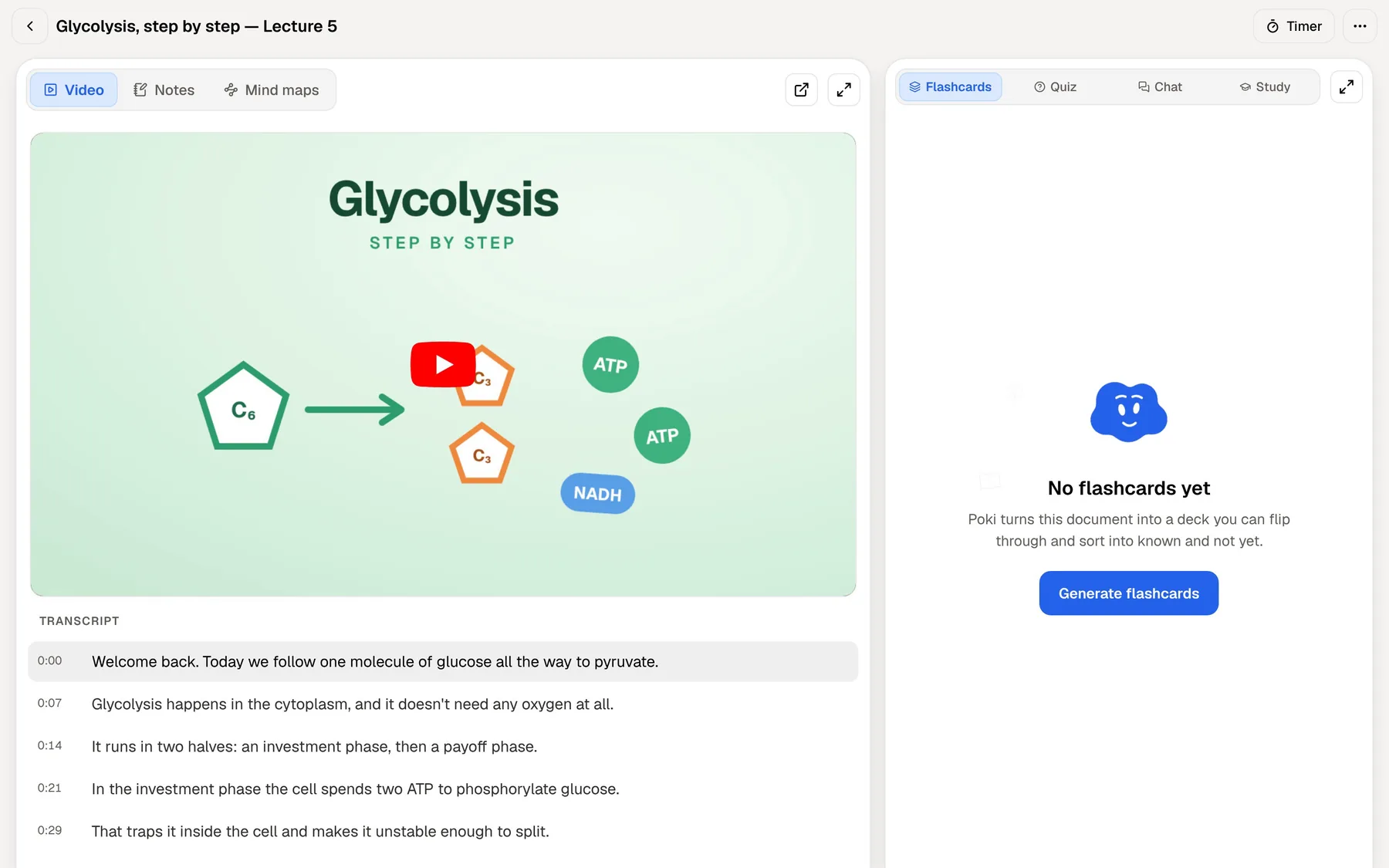
Both apps accept a YouTube link, so it makes a fair side-by-side test. Paste a lecture link into Notta and you get a transcript that you can summarise and ask Notta Brain about, within your plan's limits. Paste the same link into PocketNote and the transcript comes in with the video, timed to the playback, as the first step rather than the result.
From there you generate what you need from the lesson. Flashcards appear beside the video, a quiz checks whether you followed the argument, and a mind map lays out how the ideas connect. Each quiz answer, right or wrong, comes with the reason, which is often where the learning happens.
The same flow works for everything else in the course. Add the lecture slides as a PDF, a reading as a Word file, or an article by pasting its web link, and the study tools draw on all of it together.
For listening and speaking practice there are two more options. PocketNote can turn the lesson into a podcast-style audio review with captions that follow the voices, and Prof. Poki can run an oral exam out loud or in text, asking follow-up questions until you can explain the idea. For students working in a second language, explaining a concept aloud is useful practice for seminars and oral assessments.
Notta Brain and Poki answer different questions
Notta Brain is a chat over your recordings. It is designed to pull insights out of meetings and turn them into deliverables, which suits someone who records many conversations and needs to find what was decided. For a student, it can find the moment a lecturer explained a concept, as long as that concept was spoken in a recording.
Poki, PocketNote's AI, answers from all the material in your library: recorded lectures, PDFs, slides, YouTube transcripts, web articles and your own typed or handwritten notes. Its answers carry citations to the source, and it shows its steps as it works, such as searching your notes or reading a specific item.
Poki can also act on what it finds. It can write into your notes from the chat, start a quiz, or, on a PDF, highlight, underline or circle the passages you ask about, which you can undo in one tap.

Notta and PocketNote prices at the time of writing
Notta's pricing page lists Pro at $8.17 a month billed annually, a total of $97.99 a year, and Business at $16.67 a month billed annually, at the time of writing (November 2026). Extra translation is sold as add-ons on paid plans. The page also shows an education discount on Pro for students and educators who sign up with an educational email, displayed as 50% off.
Compare like with like if translation matters to you. Beyond the free monthly uses, translation is a paid add-on: at the time of writing, monolingual translation is $6 a month and bilingual transcription and translation $9 a month, both billed annually. A student who needs regular translation should price Pro plus the add-on, not Pro alone.
PocketNote is free to start, with two paid plans. Basic adds live voice conversations with Poki, premium AI models and connectors. Plus adds unlimited notebooks and apps, the longest podcasts and all models. See pocketnote.app for current plans and prices.
When Notta is the right pick
Pick Notta if translation itself is the goal. Live translation during a class, a bilingual transcript with both languages side by side, and coverage of 58 languages are specific, useful features, and PocketNote's language support is aimed at study material rather than translated transcripts.
Pick Notta if you record a lot of meetings as well as lectures: group projects on Zoom or Teams, interviews for a dissertation, a part-time job. Its meeting bot, bot-free desktop recorder, speaker identification and integrations with calendars, Slack and Notion are built for that life. Custom vocabulary, so it spells your subject's terms correctly, is another practical touch.
Pick Notta if you need Android, Windows or Mac apps, or a hardware recorder. PocketNote runs on iPhone, iPad and in any browser, with no Android app yet.
Keeping Notta and adding PocketNote
If Notta is already how you capture and translate lectures, there is no need to give it up. Notta's features page says you can export recordings and transcripts in several file types. PocketNote imports transcripts saved as TXT, Word or PDF, and audio in MP3, WAV, M4A or OGG.
A workable routine looks like this: record and translate in Notta during the week, then move the lectures you will be examined on into PocketNote with the slides and readings. Generate flashcards in the language you revise in, take a quiz, and let the study plan spread the review across the days before the exam.
What stays behind is Notta's own layer: speaker names, the bilingual view and Notta Brain's history. What travels is the content of the lecture, which is what the flashcards need.

The verdict
Which one should you pick?
Pick PocketNote if…
- Pick PocketNote if you want lectures, slides and readings turned into flashcards, quizzes, mind maps and audio reviews.
- You want study material in your strongest language, even when the lecture or reading is in another one.
- You want an AI that answers from your whole course, with citations, not only from recordings.
- You want spaced repetition and a study plan built around your exam date.
Pick Notta if…
- Pick Notta if you need live or side-by-side translation of what was said, across a wide set of languages.
- You record meetings and interviews as well as lectures, and want a bot or a bot-free desktop recorder.
- You need Android, Mac or Windows apps, speaker labels, or custom vocabulary for technical terms.
Try it yourself
See it with your own notes
PocketNote turns course material into study material, on the web, iPhone and iPad. Record a lecture, import audio, paste a YouTube or web link, or upload PDFs and Word files, and Poki answers from that material with citations. The same sources become flashcards with spaced repetition, quizzes with explanations, an oral exam with Prof. Poki, mind maps and podcast-style audio reviews, in more than 50 languages.
You can start free, and PocketNote does not use your files to train public AI models. If Notta handles your transcripts and translation, PocketNote can be where those lectures turn into revision.
Frequently asked questions
Sources
Keep reading