
Google Keep is a note app for small things. A checklist, a reminder to email your tutor, a photo of the whiteboard, a voice memo on the bus: you add it in seconds, give it a colour or a label, and it syncs to your phone, laptop and watch. It's free, and it fits in with the rest of your Google account.
PocketNote is built for a different moment, when a pile of course material needs to become something you can be tested on. It imports lecture PDFs, Word files, recordings, YouTube lectures and web articles, takes your typed and handwritten notes, and produces flashcards with spaced repetition, quizzes with explanations and a study plan for the exam date. Its assistant, Poki, answers questions from those sources with citations.
Comparing them is a little like comparing a sticky-note pad with a revision guide. Both are useful, and neither replaces the other. This page covers what Google Keep does well, where it stops for studying, how to get Keep notes into PocketNote, and when Keep on its own is enough.
At a glance
PocketNote vs Google Keep
| Feature | PocketNote | Google Keep |
|---|---|---|
| Built for | Studying your course material | Quick notes, lists and reminders |
| Price | Free to start; paid Basic and Plus | Free with a Google account |
| Apps | Web, iPhone, iPad | Android, iPhone, iPad, web, smartwatches |
| What you can add | PDF, Word, Excel, CSV, TXT, Markdown, audio, YouTube, web links | Notes, lists, images, drawings, voice memos |
| Voice | Lecture recording with transcript; live voice on paid plans | Voice memos, transcribed automatically |
| Reminders and planning | Study plan with daily reminders | Reminders by time or place |
| Collaboration | Share a link to a note | Real-time co-editing |
| AI assistant | Poki answers from your sources, cited | Not featured on Keep's product page |
| Flashcards with spaced repetition | Yes: Again / Hard / Good / Easy | Not advertised |
| Quizzes with explanations | Yes | Not advertised |
| Moving notes on | Handwritten notes to PDF; share a link | Export a note to Google Docs |
Checked against each product's own website and app store listing, November 2026. Plans and features change; confirm current details there.
What Google Keep is built for
Keep's product page pitches speed and organisation for short notes: colour codes, labels, pins and filters to find things, reminders for deadlines, and real-time collaboration so several people can edit a note at once. Everything syncs across your devices, and you can keep editing offline.
It has some clever capture features. Its App Store listing says you can record a voice memo and have it transcribed automatically. Google's own tips describe Grab Image Text, which pulls the text out of a photo of a whiteboard or handout, and searching handwritten memos by what you wrote. Typing a #hashtag in a note creates or applies a label, and reminders can be set for a time or a place.
When a note outgrows Keep, you can export it to Google Docs and keep working on it there. Google's tips also describe a Keep sidebar inside Docs, so you can drag notes straight into a document you're writing. For a student, that combination covers a surprising amount of daily life: group-chat decisions, a list of readings, the room number for Thursday's seminar.
Where Keep stops for studying
Keep is designed around short notes, lists and reminders. Its product page doesn't pitch it for long documents, and neither the page nor the app listing mentions flashcards, quizzes or spaced repetition. A term of lecture notes kept in Keep can turn into a long wall of coloured cards that you scroll through rather than study from.
Course files are the other gap. Keep holds notes, lists, photos, drawings and voice memos. Lecture PDFs, slide decks and readings usually live somewhere else, typically Google Drive, so your notes and the material they're about end up in two places.
Search shows the difference. Keep's search finds the note that contains a word. Before an exam you usually need something else: an explanation of how two ideas connect, or a check on whether you can recall a definition without looking. That takes a tool that reads the whole course and asks you questions about it.
None of this is a flaw. Keep does its job well. It just isn't the job of getting ready for an exam.
One lecture, from Keep to a quiz
Say you photographed the whiteboard in Keep, grabbed the text from the photo, and jotted a few lines during the lecture. The slides are a PDF in Google Drive.
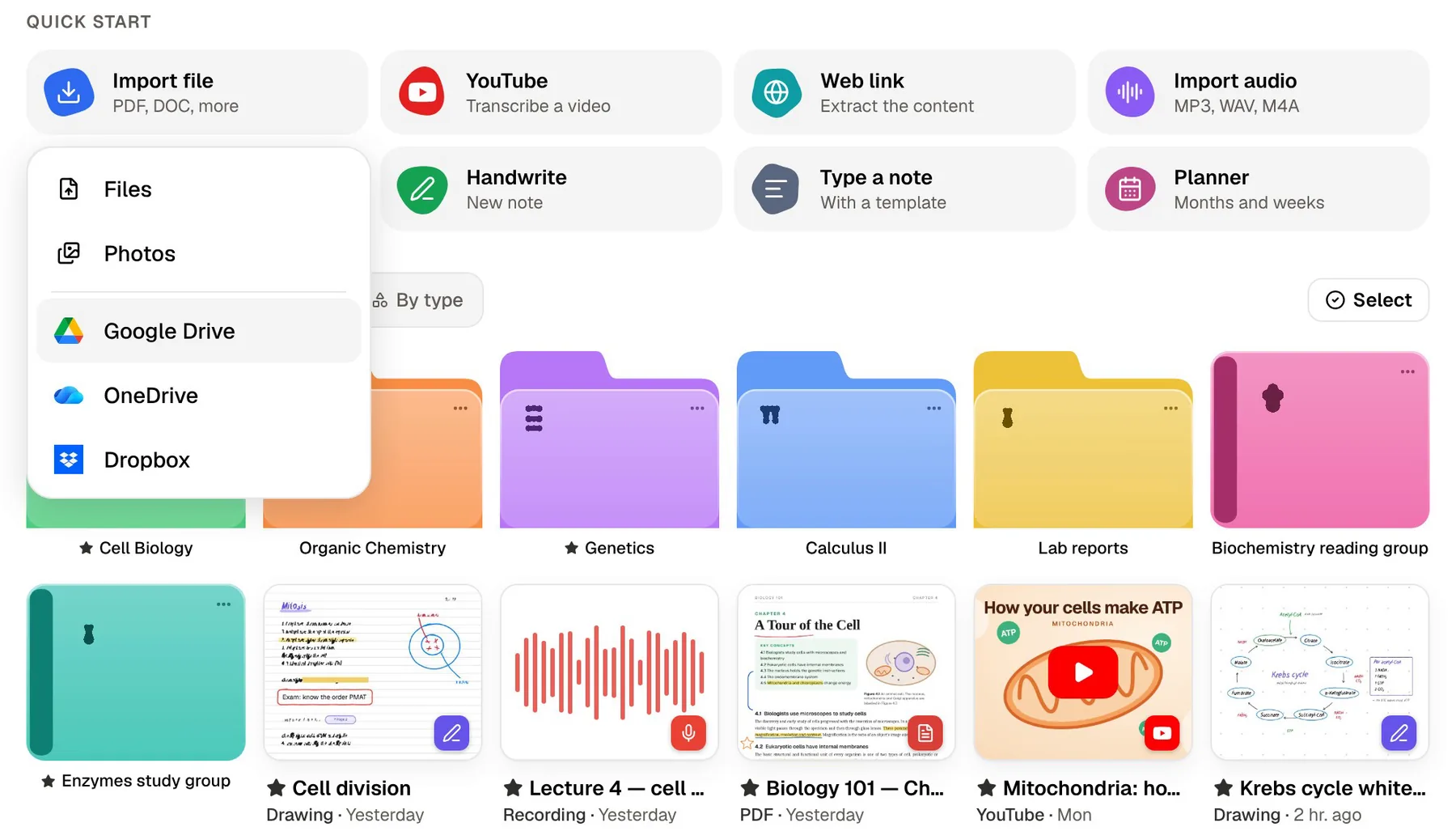
In PocketNote you import the slides straight from Google Drive and add your Keep notes, either by copying them to Google Docs and downloading a Word file, or by pasting the text with the Paste Text option. If the lecture was recorded or posted on YouTube, add that too: a YouTube link brings its transcript, and an audio file or an in-app recording gets a transcript, a summary and notes.
From those sources PocketNote builds the study set: flashcards, a quiz with the reasoning behind every answer, a mind map and a summary. Poki answers questions from the slides and your notes and cites where each answer came from, so you can check it against the source.
Poki can also look at a slide or PDF page as you see it, including anything you've highlighted or written on it, and highlight, underline or circle passages when you ask ("circle every term I need to define"). If you don't like its marks, one tap undoes them.
Reminders versus a study plan
Keep reminders are good at one thing: telling you something at the right time or place, on whichever device you have with you. 'Revise chapter 4 on Thursday' works perfectly as a reminder. It just has no idea whether you know chapter 4.
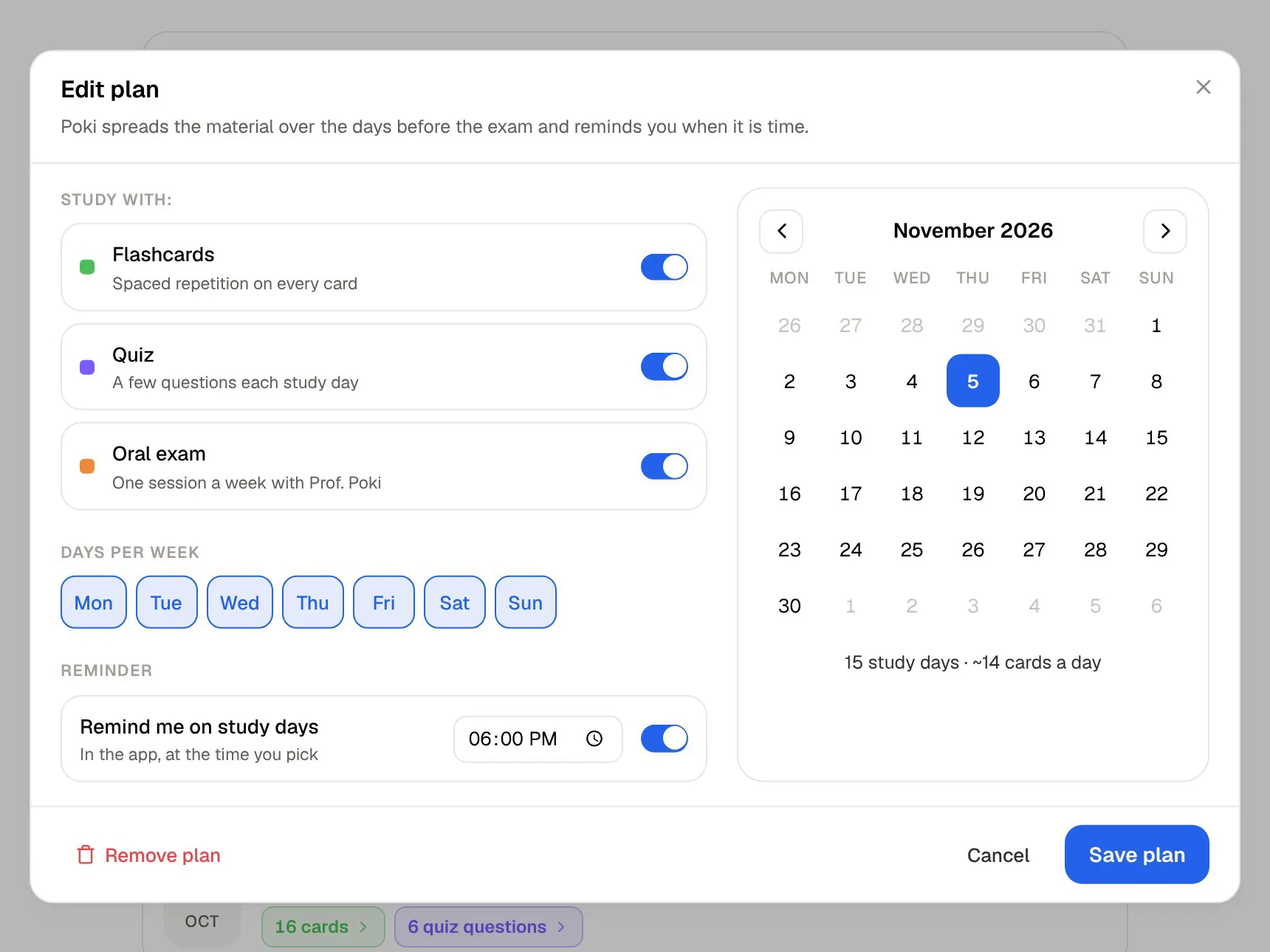
PocketNote's study plan starts from the exam date. It plans what to cover each day, reminds you, and tracks mastery with memory, applied and mastery scores, so the plan reflects how your reviews are actually going. The progress view shows how far you've got with each tool, from flashcards and quizzes to the oral exam and the podcast.
If you like Keep's reminders, keep using them for deadlines and errands. Let the study plan decide what to revise on a given day. When you sit down to do it, PocketNote's study timer with ambient sounds keeps the session on track.
When a note needs to be longer than a sticky note
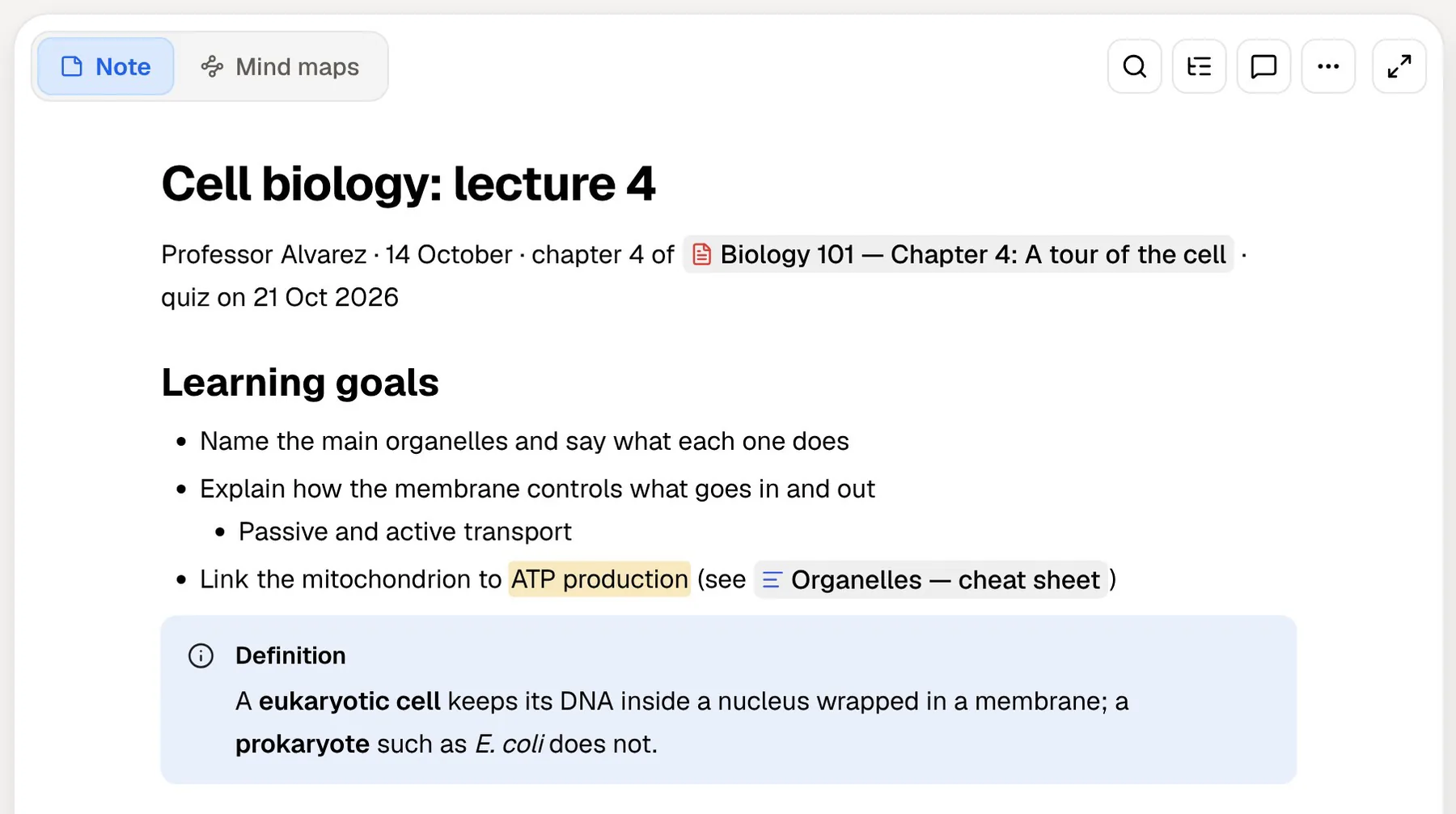
Some lectures need proper notes, not jottings. PocketNote's block editor handles headings, lists, checklists, tables, toggles, callouts, code and LaTeX maths, with images, colours, comments, page mentions, find and replace and an outline. You can start from a blank page or a template, and ask Poki questions inside the note while you write.
If you'd rather write by hand, PocketNote on iPad works with Apple Pencil, with lined, grid and Cornell page templates, a lasso that turns handwriting into text, and tape to hide answers for self-testing. In the browser you can draw too. Note Replay records audio while you write and plays the strokes back in time with it.
Whatever you write is a source like the slides. Poki can answer from it, cite it, and build flashcards and quizzes from it, and your notes keep saving offline and sync when you're back online.
Voice notes and voice revision
Keep's voice memos are for capture: say a thought, get it transcribed. That's ideal for an idea on the walk home, and the transcribed text can travel: paste a memo into PocketNote with the rest of the week's notes and it becomes part of what you're quizzed on.
PocketNote uses voice for revision. Audio reviews turn your material into a podcast-style episode with captions that follow the voices. On paid plans, live voice lets you talk to Poki out loud: ask it to quiz you on a topic and answer back without looking at a screen.
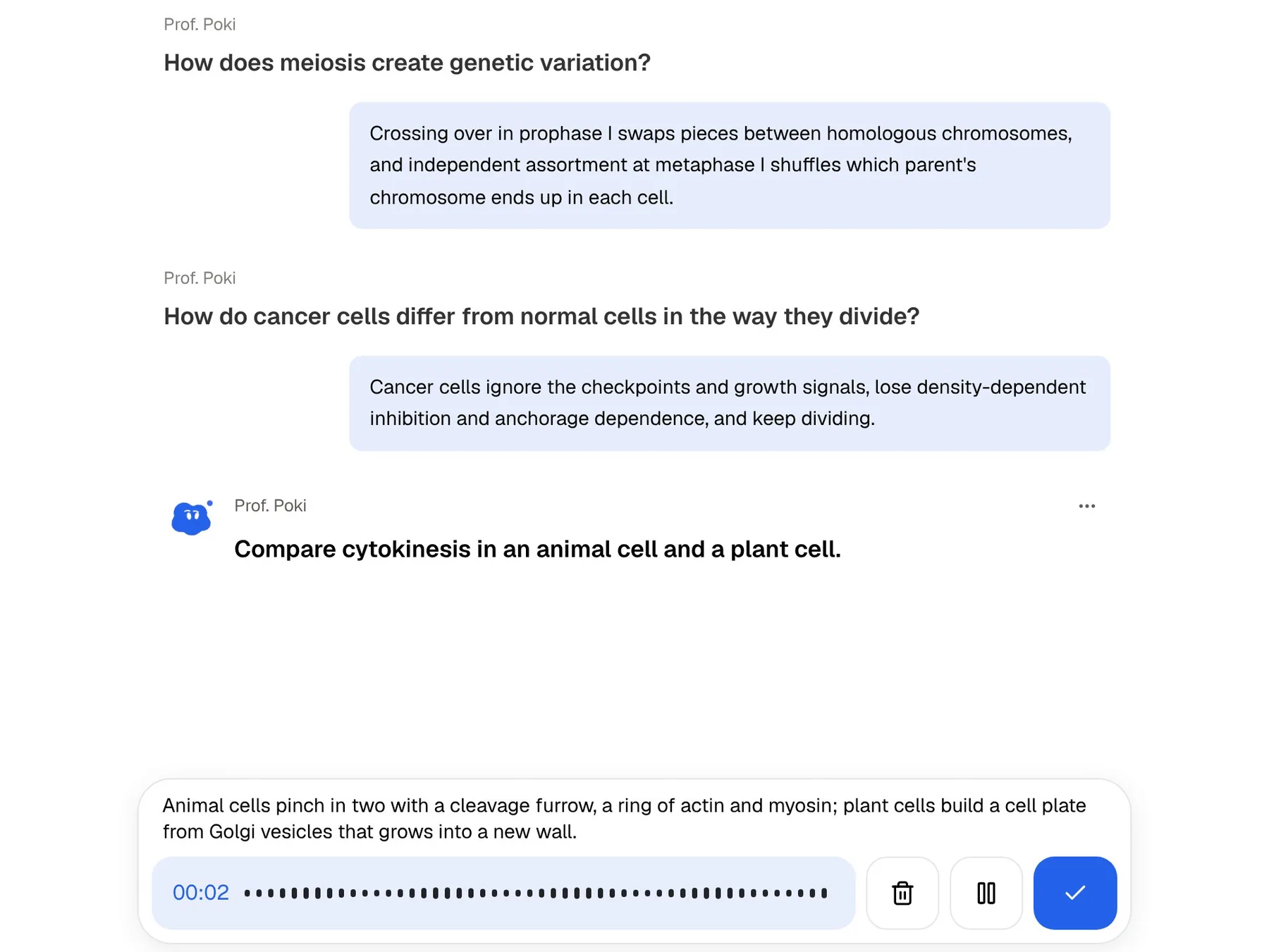
The oral exam takes this further. Prof. Poki asks questions out loud or in text and keeps probing until you can explain the idea, which is close to how a tutorial or a viva tests you. It's harder than flashcards in a useful way, because recognising an answer and explaining it are different skills, and exams that ask you to explain will find the gap.
Jobs Google Keep does better
If you mainly need a fast notepad that's always in your pocket, Keep is the better app, and there's no reason to replace it.
It's also the right call for courses where there's little to memorise. A studio module, a lab write-up or a dissertation term runs on lists, ideas and reminders, which is Keep's territory.
- Quick capture and lists: it's built for two-line notes and checklists, not documents.
- Reminders by time or place, synced like everything else in Keep.
- Shared lists that several people edit in real time, like a flat's shopping list or a group's to-do list.
- Android and watches: Keep runs on phones, computers and smartwatches; PocketNote has no Android app yet and runs on the web, iPhone and iPad.
- Free with your Google account, with no plans to compare.
Keeping both without doubling the work
The two fit together because they cover different hours of the day, and neither asks you to give up the other. Use Keep for capture during the week: quick lecture jottings, photos of the board, reminders. Once a week, or when a unit ends, move what matters into PocketNote along with the slides, and let it build the cards and the plan.
A weekly hand-off works better than a pre-exam rush. Twenty minutes on a Sunday moving the week's notes and slides into each course folder means the flashcards build up gradually, and the study plan has the whole course to work with when you set the exam date.
To move a Keep note, open it and export it to Google Docs, then download the Doc as a Word file (.docx) and import it into PocketNote, or simply paste the text. For a whiteboard photo, use Keep's Grab Image Text first and bring the text across, since the words are what the flashcards need.
PocketNote can then turn short jottings and the slides into a full set of written notes, which you can edit like any other note, ask Poki about, or turn into flashcards.
The verdict
Which one should you pick?
Pick PocketNote if…
- You need to study a course, not just jot things down.
- Your lecture PDFs live in Google Drive and you want flashcards and quizzes made from them.
- You want a study plan that tracks what you know, not only reminders.
- You'd like to revise out loud, with an oral exam or live voice.
Pick Google Keep if…
- You want the quickest way to capture short notes, lists and reminders.
- You use Android or a smartwatch.
- You share live lists with friends, housemates or a project group.
Try it yourself
See it with your own notes
There's no cost to trying PocketNote on the web, iPhone or iPad. Pull one week's slides from Google Drive, paste in your Keep notes, and see what the flashcards and quiz look like. Paid Basic and Plus plans add live voice, premium models and connectors such as Google Drive and Google Calendar for Poki; see pocketnote.app for current plans.
Keep stays useful the whole time. It's the notepad; PocketNote is where the notepad's contents get learned.
Frequently asked questions
Sources
Keep reading