
Heptabase is a note app built openly for learning. Its homepage headline is "Master anything you learn", and it describes itself as a visual knowledge base for students, researchers and lifelong learners. You read and annotate PDFs, turn what you find into cards, and arrange those cards on whiteboards until the shape of a subject is visible. Its AI explains your sources with citations, and on the Premium plan an AI Tutor runs structured learning sessions.
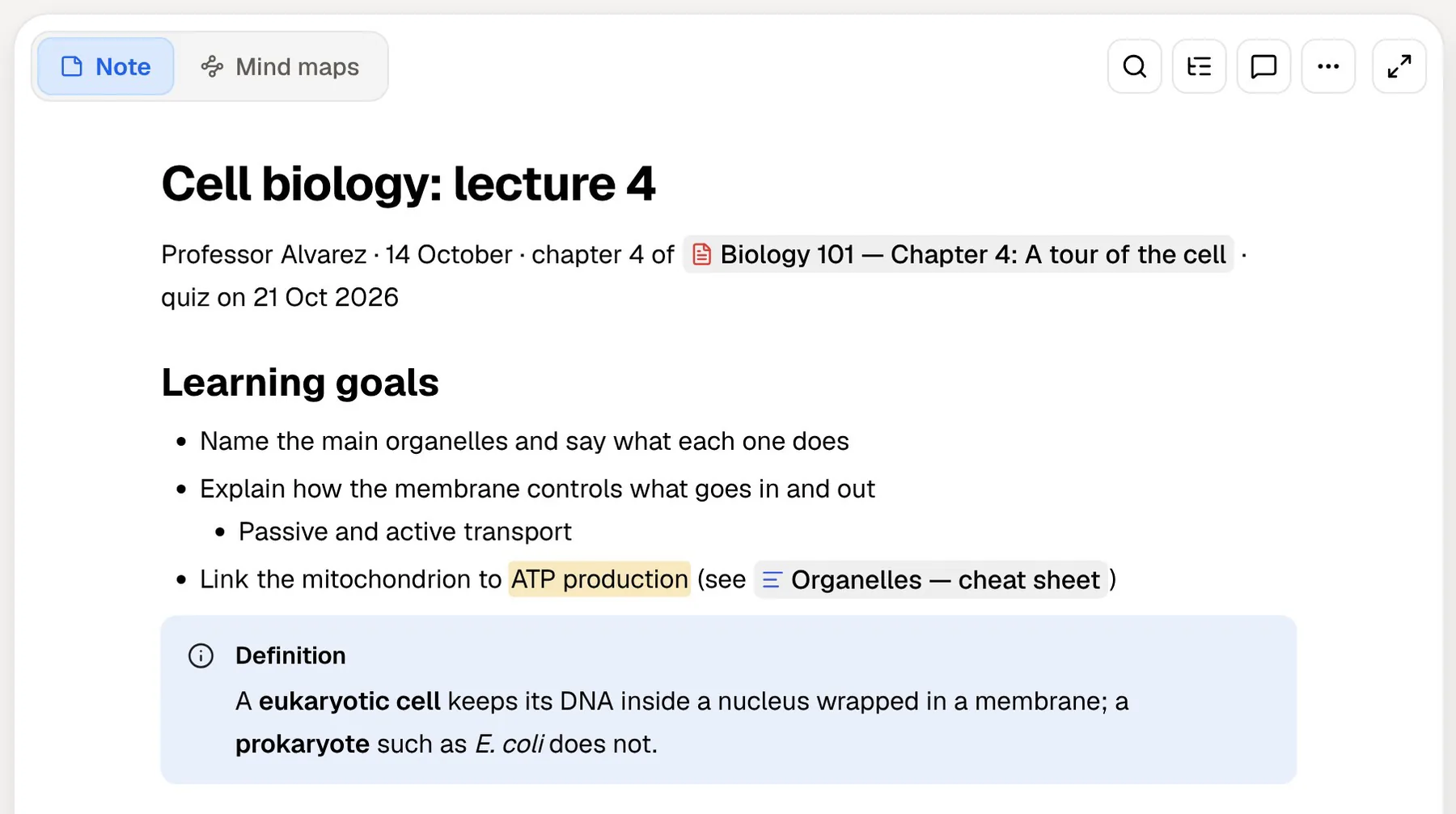
PocketNote is aimed at the same people from another angle. You bring lecture recordings, slides, PDFs and notes, and it generates flashcards with spaced repetition, quizzes that explain every answer, an oral exam and a study plan built around your exam date. Poki, its assistant, answers questions from that material and cites where each point came from.
So this is less a notes app against a study app than two study tools with different instincts. Heptabase helps you understand a subject by arranging it; PocketNote helps you remember it by testing you on it. This page sets out where each is stronger, what each costs, and how they fit together.
At a glance
PocketNote vs Heptabase
| Feature | PocketNote | Heptabase |
|---|---|---|
| Built for | Studying your own course material | Students, researchers and lifelong learners |
| Main workspace | Course folders; notebooks with sources, chat and study tools | Whiteboards of cards |
| PDFs | Annotate by hand; Poki can mark pages | Highlights and annotation |
| YouTube | Paste a link; transcript included | YouTube transcripts |
| AI answers | Poki, with citations to your material | AI chat with citations to your sources |
| Guided learning | Oral exam with Prof. Poki; quizzes with explanations | AI Tutor sessions (Premium) |
| Flashcards with spaced repetition | Built in | Not advertised |
| Exam planning | Study plan to your exam date | Not advertised |
| Lecture recording | Transcript, summary and notes | Not advertised; voice notes on mobile |
| Collaboration | Share a link to a note | Real-time collaboration |
| Platforms | Web, iPhone and iPad | Mac, Windows, Linux, iOS, Android, web |
| Price | Free to start; paid Basic and Plus | 7-day trial; Pro from $8.99/month billed yearly |
Checked against each product's own website, November 2026. Plans and features change; confirm current details there.
Two study apps with different instincts
Heptabase's method runs from reading to structure. You highlight a PDF, pull the important passages out as cards, write your own notes on them, and lay the cards out on a whiteboard, grouping and connecting them until the argument of a chapter or a field makes sense. Heptabase publishes guides on acquiring knowledge from readings and on using AI for learning, and the gallery on its homepage makes the method concrete: reading notes on a book, a course distilled into core ideas, and a methodology paper, each laid out as a whiteboard.
PocketNote's method runs from material to practice. Recordings, slides and readings go in; flashcards, quizzes, an oral exam and a plan come out; and the app keeps bringing back what you are about to forget until the exam.
Both approaches are sound, and they address different failures. Some students read everything and still can't see how it fits together. Others understand it in the lecture and can't recall it a month later. Which one sounds like you is the best guide to which app to try first.
Where Heptabase shines
Whiteboards with cards are Heptabase's core, and they are well done: a whiteboard can become the context for an AI conversation about everything on it, and useful answers can go straight back onto it as cards. Around that sit a block-based editor, bidirectional links, daily journals, PDF annotation, YouTube transcripts and a web clipper.
It is strong for research. Zotero and Readwise integrations bring in references and highlights, and Heptabase says search covers more than 10,000 notes in under a second. A command-line tool and MCP support let coding agents and outside AI services read and write to your knowledge base.
It also covers practical ground PocketNote doesn't. Notes and files are available offline, you can invite friends and teammates to collaborate in real time at no extra cost, and there are apps for Mac, Windows, Linux, iOS and Android, plus a web app. The mobile app supports voice notes.
- Best at: making the structure of a subject visible from your readings.
- Who loves it: researchers, postgraduates and students in reading-heavy courses.
- Standout: whiteboards as AI context, plus Zotero and Readwise integrations.
Where the AI sits in each app
Heptabase's AI works on what you give it. On a whiteboard you open a chat with models from OpenAI, Google and Anthropic and choose the context: specific cards, sections, whiteboards, journals, or your whole space. It parses PDFs, including tables and images, can attach timestamps to YouTube videos, and its answers link back to the original passages or timestamps. Useful replies can be dragged onto the whiteboard as cards.
Plan matters here. Pro includes an AI agent limited to Gemini models and 100 AI credits a month. Premium adds GPT and Claude, unlimited Q&A with basic models, unlimited PDF uploads and OCR, 1,800 credits a month, and the AI Tutor, which Heptabase describes as an agent that guides you through structured, personalised learning sessions with a syllabus and lessons. Credits are the thing to watch: 100 a month on Pro is a small allowance if you lean on the agent, and Premium+ exists for people who want more credits at a discount.
Poki answers from your own material with citations too, and shows its steps as it works. It can look at a PDF page as you see it, including your highlights and handwriting, and highlight, underline or circle passages when you ask, with one-tap undo. It can write into your notes, you can choose between leading models from several providers (premium models on paid plans), and on paid plans you can talk to it in live voice.
Remembering versus understanding: the review gap
Heptabase doesn't advertise flashcards, quizzes or spaced repetition, and its AI documentation describes chatting, researching and organising rather than review. The AI Tutor adds structured lessons, but scheduling reviews around an exam date isn't something Heptabase advertises either.
That is the part PocketNote is built for. Flashcards are generated from your sources and shown next to them; you rate each one Again, Hard, Good or Easy, and it comes back just before you would forget it. Quizzes explain why every option is right or wrong. Both can come in any of 50+ languages, from sources in another language if you like, which helps when a reading is in a language you are still learning.
Set the exam date and the study plan decides what to cover each day, sends reminders, and tracks memory, applied and mastery scores across flashcards, quizzes, the oral exam, slide decks and audio reviews. Understanding a subject and being able to produce it in an exam hall are related but different skills, and this is the second one.

Testing yourself out loud
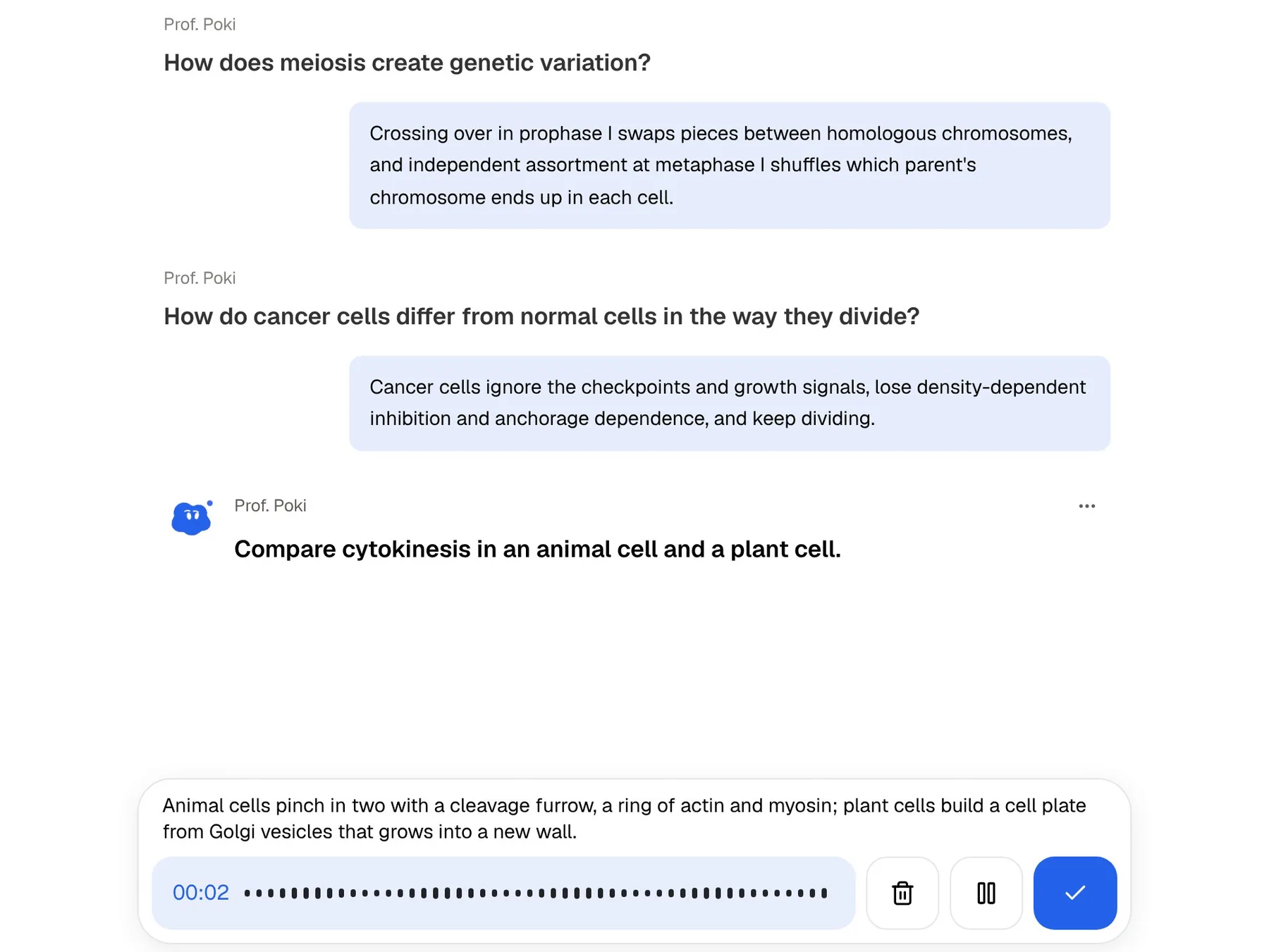
Explaining an idea in your own words is a hard test, which is why tutorials work. PocketNote's oral exam has Prof. Poki ask a question out loud or in text, listen to your answer, and follow up on whatever you left vague until the explanation holds together.
Heptabase's AI Tutor and PocketNote's oral exam overlap more than anything else in this comparison: both put an AI in a teaching role. The difference is direction. The AI Tutor leads you through lessons towards a goal; the oral exam checks what you already studied and pushes on the gaps.
On paid plans, live voice turns the same idea into a conversation: ask Poki to quiz you on one topic and it asks the next question back, out loud. Heptabase's mobile app supports voice notes for capture, but a spoken quiz isn't something it advertises.
Whiteboards versus generated mind maps
On a Heptabase whiteboard, you place every card and draw every connection. Doing that is itself a way of learning the material. You can also share a whiteboard with classmates and work on it together.
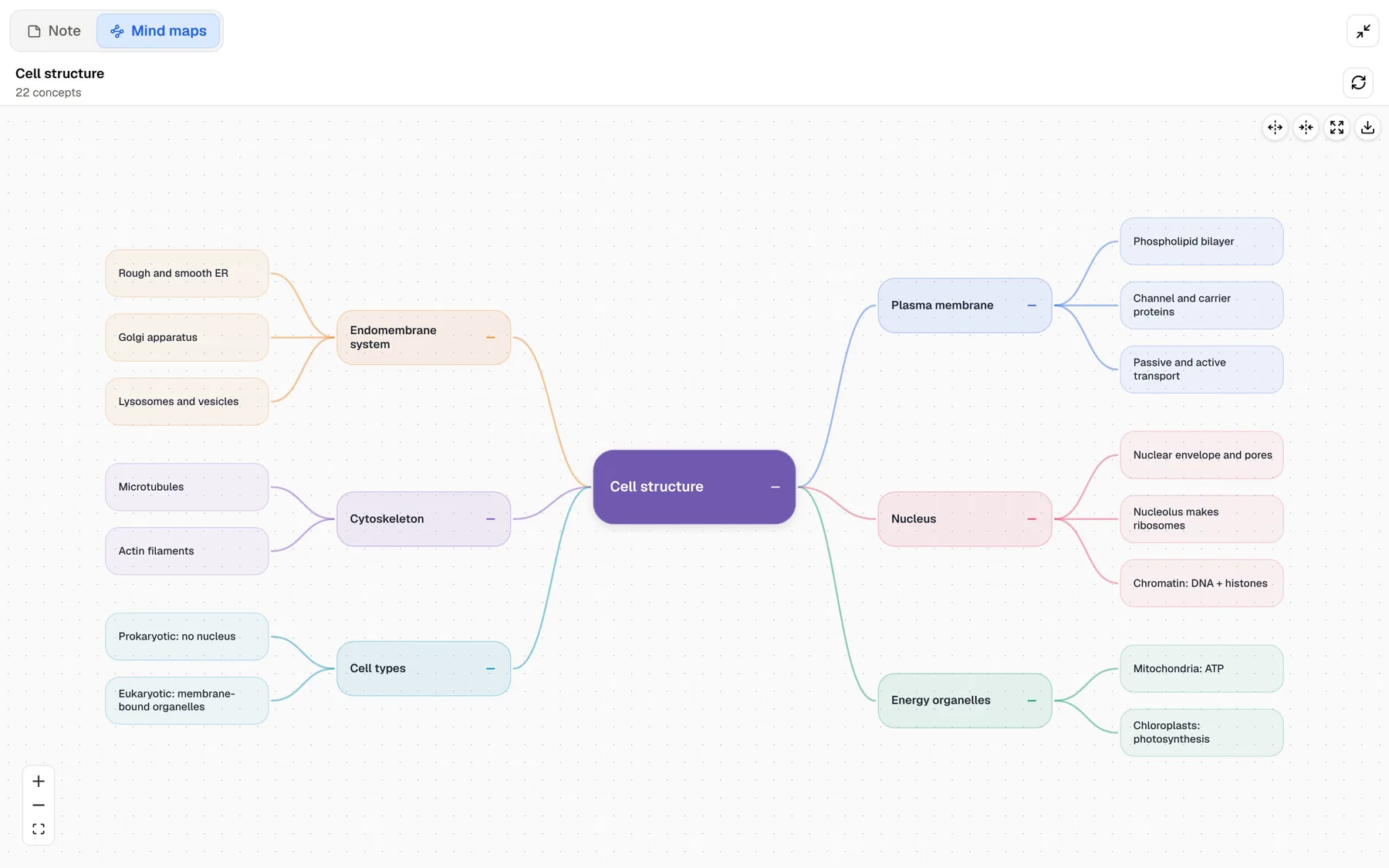
PocketNote generates the structure instead: a mind map with colour-coded branches, written notes and summaries, slide decks and data tables, all from the same sources and all editable. PocketNote also has an infinite whiteboard for handwriting on iPad, but it isn't a card-based canvas like Heptabase's. For gathering material, PocketNote's academic search finds papers on arXiv and SSRN inside the app and saves one to your library.
If building the map yourself is how you learn, Heptabase is the better tool for that step. If you mainly need an overview to check yourself against, a generated map is faster and leaves more time for practice.
What Heptabase and PocketNote cost
Heptabase's pricing page doesn't list a free plan; the homepage offers a 7-day trial. At the time of writing (November 2026), Pro is listed at $8.99 a month billed yearly, Premium at $17.99 a month and Premium+ at $53.99 a month, also billed yearly, and the page says yearly billing saves 25% compared with monthly. The page says Heptabase is trusted by customers at leading universities but doesn't list a student discount.
Note where the study features sit: the AI Tutor, unlimited PDF uploads and the choice of GPT and Claude models are Premium features, so a student who wants them is looking at the $17.99 tier rather than Pro.
PocketNote is free to start. Basic adds live voice with Poki, premium models and connectors such as Google Drive, Notion and Outlook; Plus adds unlimited notebooks and apps, the longest audio reviews and all models. See pocketnote.app for current prices.
Where Heptabase is the better choice, and using both
Heptabase is the stronger tool for research and for subjects where the hard part is seeing how ideas connect: literature reviews, theses, philosophy, history. It also wins on reach and teamwork, with desktop and Android apps and real-time collaboration, where PocketNote runs on the web and on iPhone and iPad.
The two also combine well, because both start from the same files. One sensible split is to read, annotate and map a topic in Heptabase, then put the same PDFs, slides and lecture recordings into PocketNote in the weeks before the exam for flashcards, quizzes, the oral exam and a plan. If you are a researcher more than a test-taker, Heptabase is probably the better single app; PocketNote earns its place when exams are on the calendar.
- You understand a subject by laying it out visually, card by card.
- You do research with Zotero or Readwise and want highlights and cards in one place.
- You want real-time collaboration and apps on Windows, Linux or Android.
- You want an AI Tutor to lead structured lessons and are happy to pay for Premium.
The verdict
Which one should you pick?
Pick PocketNote if…
- you want flashcards with spaced repetition, quizzes and an oral exam generated from your material.
- you have a fixed exam date and want a day-by-day plan with mastery tracking.
- you record lectures and want transcripts, summaries and notes from them.
- you want to start free and handwrite notes on an iPad.
Pick Heptabase if…
- you understand a subject by laying it out visually, card by card, on whiteboards.
- you do research with Zotero or Readwise and want highlights and cards in one place.
- you want real-time collaboration and apps on Windows, Linux or Android.
- you want an AI Tutor to lead structured lessons (Premium).
Try it yourself
See it with your own notes
PocketNote is free to start on the web and on iPhone and iPad, so you can try it without ending a Heptabase trial or subscription. Import the PDFs and slides from one topic you have already mapped, generate flashcards and a quiz, and see how much of the map you can recall without looking.
Frequently asked questions
Sources
Keep reading