
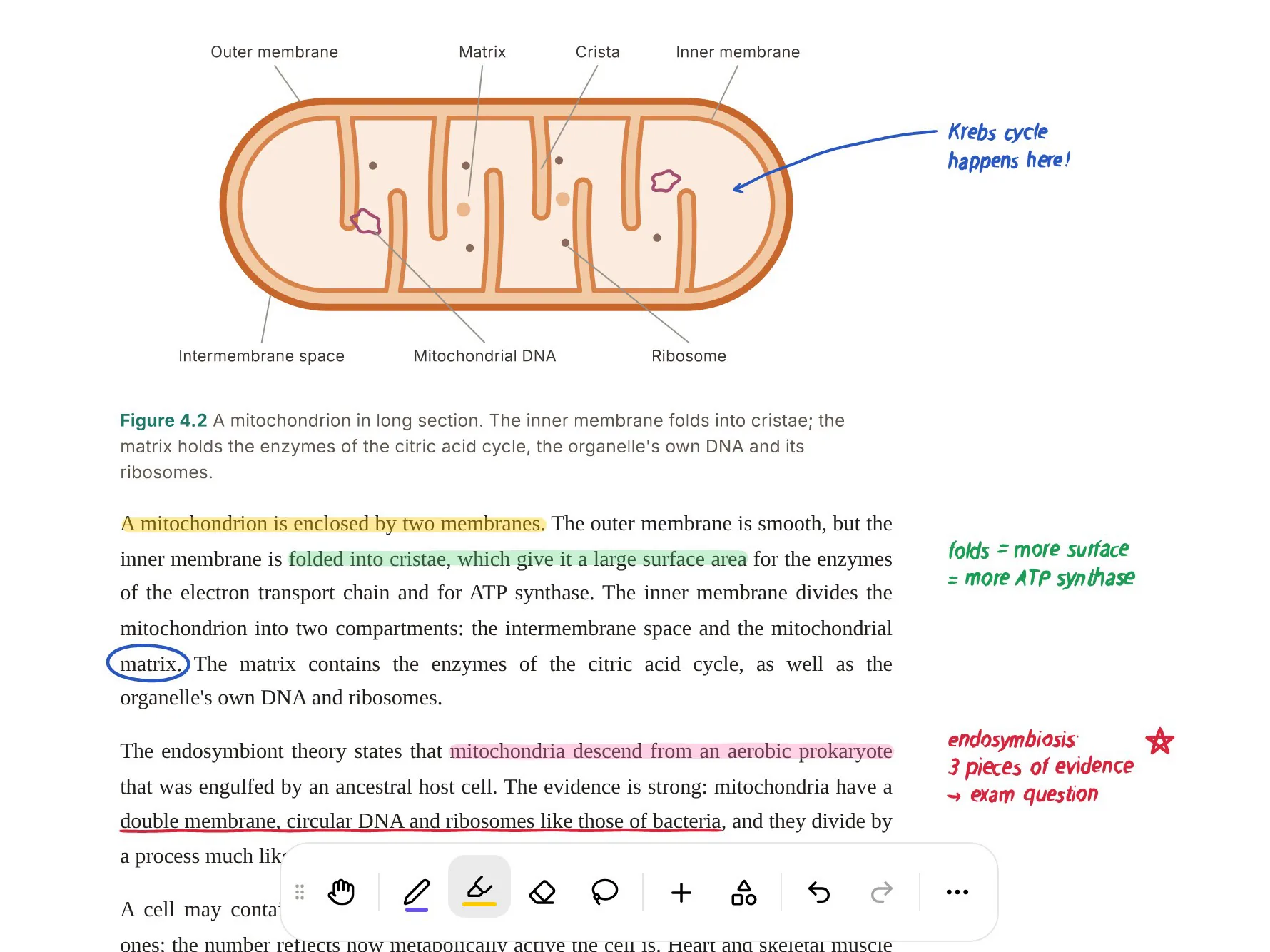
MarginNote is a reading app for people who study from long books. You open a PDF or EPUB, highlight a passage, and that highlight becomes a card: the same card shows up as a node in a mind map and as a flashcard when you review. Its own scenario pages are written for medical, law and finance exam candidates, and that fits. It rewards students who read a textbook slowly and want to build the structure themselves.
PocketNote starts from the other end. You bring the material (a chapter, a slide PDF, a recorded lecture, a YouTube link) and Poki, its AI, builds the study set: flashcards with spaced repetition, quizzes that explain each answer, a mind map, notes and an audio review. You can still read, highlight and handwrite, but you don't have to excerpt every card yourself.
This comparison is for a student choosing between the two for a real course. It covers what MarginNote does well (a lot), where its manual workflow costs time, how the same chapter looks in each app, and what each costs at the time of writing (November 2026). MarginNote's current version is MarginNote 5, a free update for MarginNote 4 owners.
At a glance
PocketNote vs MarginNote
| Feature | PocketNote | MarginNote |
|---|---|---|
| How cards get made | Generated from your material by Poki | From your excerpts; AI generation on Max |
| Platforms | Web app, iPhone and iPad | iPhone, iPad and Mac |
| Material you can add | PDF, Word, Excel, audio, YouTube, web links | PDF, EPUB, web pages, video |
| Mind maps | Generated from each source | Hand-built, linked to every excerpt |
| Spaced repetition | Yes: Again, Hard, Good, Easy | Yes: FSRS review deck |
| Quizzes with explained answers | Yes, built in | Not advertised |
| Lecture recording | Record, transcribe and summarise in the app | Not advertised; Study Sets hold lecture files |
| AI questions on your files | Poki, with citations to the source | AI Q&A and summaries on Max |
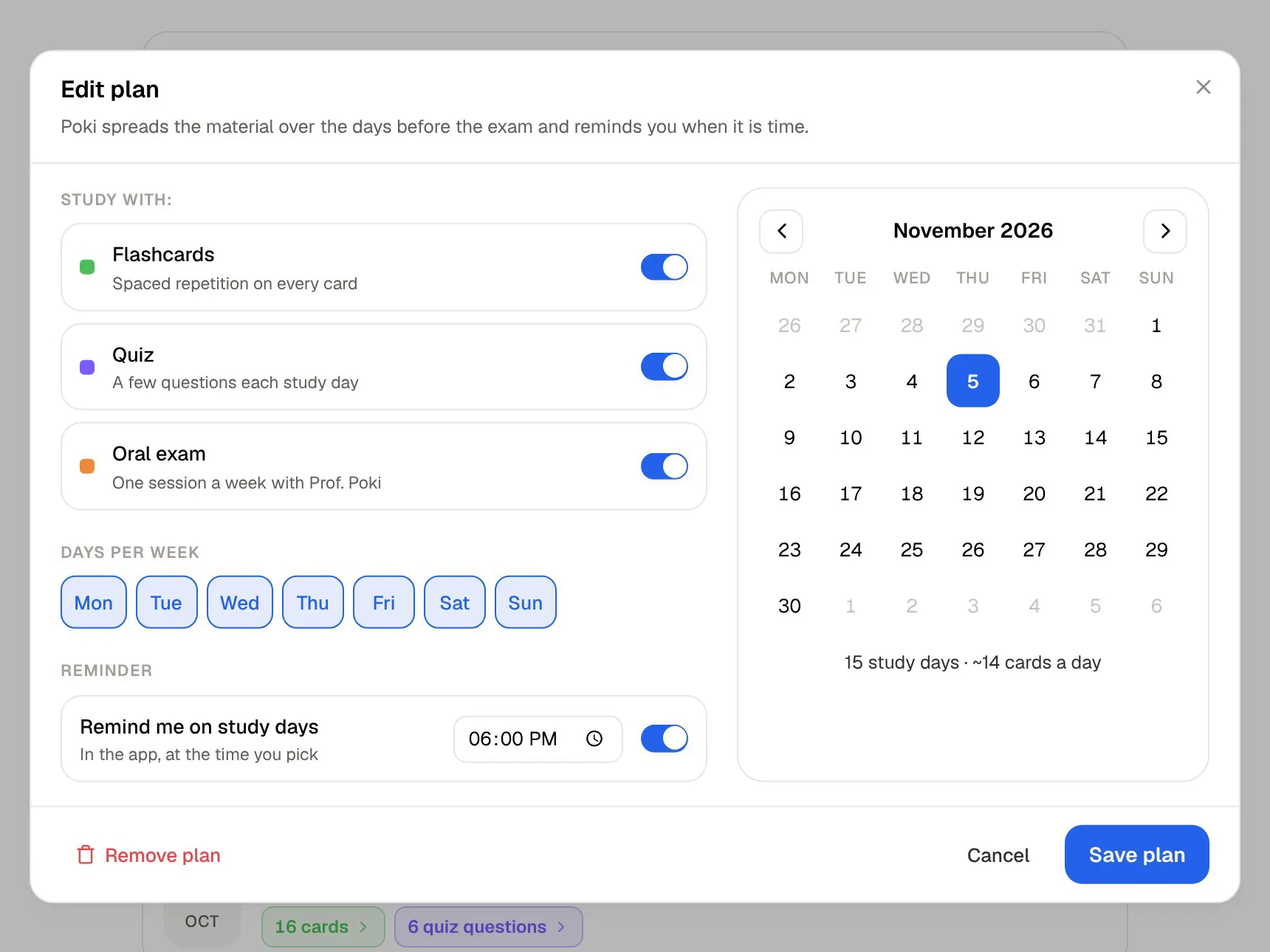
| Exam-date study plan | Yes, with reminders and mastery scores | Not advertised |
| Handwriting | Apple Pencil on iPad; drawing in the browser | On pages, mind maps and cards |
| Price model | Free to start; Basic and Plus plans | Trial, then Pro or Max (one-time or yearly) |
Checked against each product's own website, November 2026. Plans and features change; confirm current details there.
What MarginNote does that other PDF readers don't
The core idea is the card. In MarginNote an excerpt is not a highlight in one place and a note somewhere else: it is one object, shown as a highlight in the document, as a node in the mind map and as a flashcard in review. Each card links back to the page it came from, so a mind map built across three textbooks still opens the right paragraph when you tap a node.
Around that sit tools for serious reading. Title Link turns a card's title into a keyword that is highlighted automatically when it appears in other documents. You can compare two books side by side, reorder chapters, and compile chapters from several books into one study book. Version 5 adds scenario templates, such as Card Practice and Reading Vocabulary, that show only the tools for the current step, and a Study Set that keeps one course's PDFs, EPUBs, lecture videos and lecture audio in one place.
For memory, MarginNote has a recall mode that hides your highlights or collapses the mind map so you test yourself before revealing, and a review deck scheduled with FSRS, a modern spaced-repetition algorithm that Anki also offers. MarginNote can export cards to Anki and import text cards from an Anki .apkg file, which matters to medical students who already rely on shared Anki decks.
Where the manual workflow costs you time
MarginNote's strength is also its price in hours. Most cards start as an excerpt you choose. That is good for understanding, because deciding what matters is part of learning, but a 60-slide lecture PDF in the week before a midterm means a lot of selecting, dragging and arranging. MarginNote has added AI, including summaries, Q&A, card generation and an AI book breakdown, but on its pricing page those features sit in the Max tier and draw on a monthly AI credit allowance.
It is also built around reading. A Study Set can hold lecture audio and video files, but MarginNote doesn't advertise recording a lecture in the app and turning it into a transcript and notes. There is no web app: it runs on iPhone, iPad and Mac, and on the Mac you need Max or the separate Mac licence sold on its site. If your course lives in recordings, YouTube explainers and slides rather than one textbook, much of it never reaches the mind map.
One chapter, two workflows
Take a single chapter on mitochondria, as a PDF, a week before the exam.
In MarginNote you read it and excerpt the definitions, the steps of the electron transport chain and the labels on the key diagram. Each excerpt lands in the mind map, where you drag it under the right branch. When the map looks right, you add the cards to the review deck and FSRS schedules them. You come away with a map you built yourself, and the building is part of how you learn it.
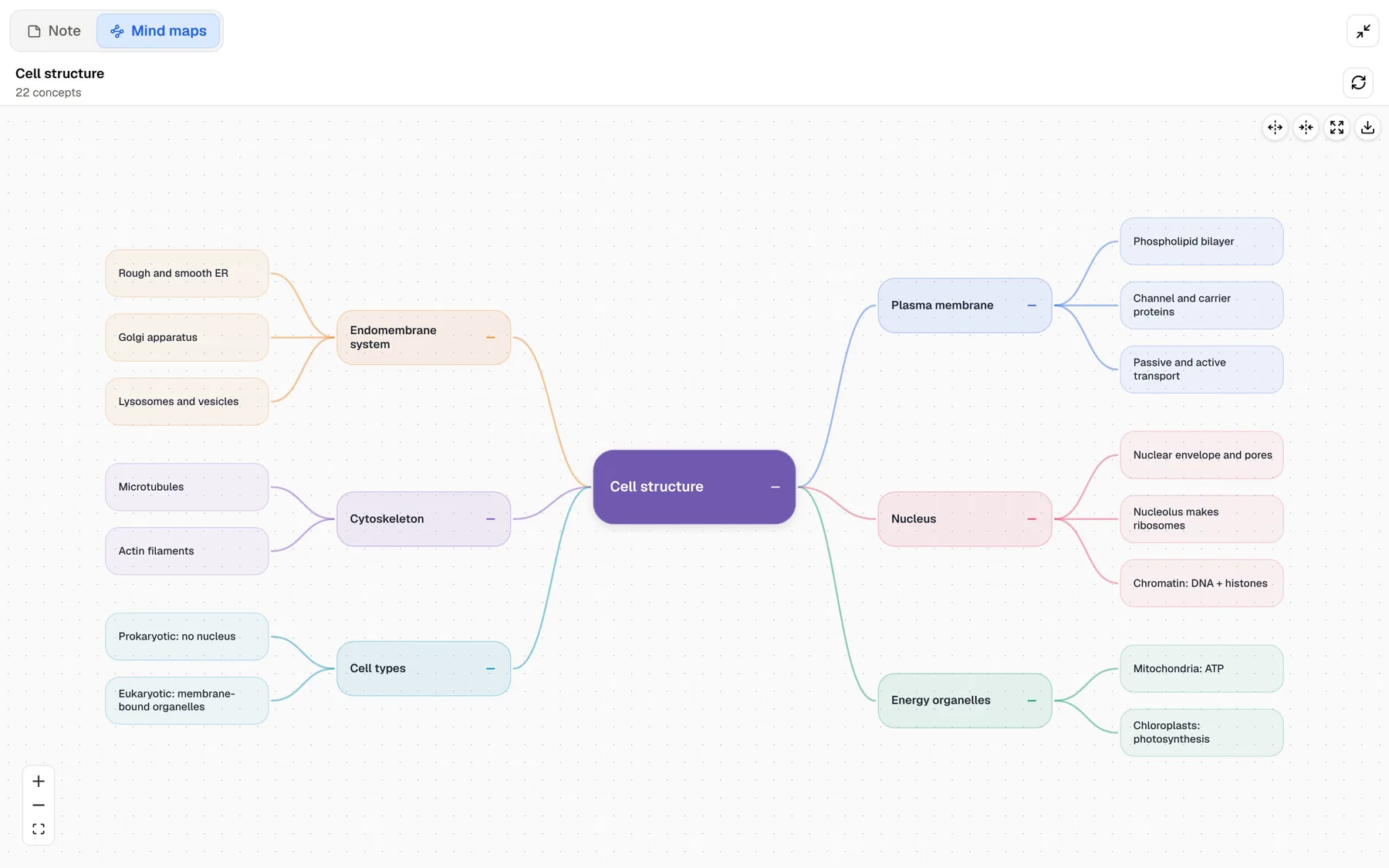
In PocketNote you import the same PDF from your device, Google Drive, OneDrive or Dropbox. Poki reads it and generates flashcards, a quiz, a mind map and written notes. You review the cards by rating each one Again, Hard, Good or Easy, and they come back when you are about to forget them. If you want to read closely as well, you can highlight and write on the PDF, or ask Poki to "highlight the key definitions on page 3" and undo its marks with one tap if they aren't what you wanted.
Now add the lecture that went with the chapter. In PocketNote you can record it in the app and get a transcript, a summary and notes, or import the audio file (MP3, WAV, M4A or OGG) if you recorded it on something else. Poki can then answer "what did the lecturer say about the proton gradient?" from the transcript and the chapter, with citations to each. In MarginNote the recording can sit in the Study Set next to the book, but MarginNote doesn't advertise transcribing it, so turning it into cards is up to you.
The real difference is where your effort goes: into building the cards, or into answering them.

Mind maps you build vs mind maps you're given
MarginNote's mind maps are the best reason to choose it. They are hand-built on an infinite canvas, every node is a live link into the book, you can handwrite on the map, and layers let you show or hide parts of it. Mind Map Recall turns the map itself into a self-test. For subjects with deep hierarchies, such as anatomy, statutes or accounting standards, this is a real study method rather than decoration.
PocketNote's mind maps are generated. Poki reads your source and lays out the topic as colour-coded branches (plasma membrane, organelles, cytoskeleton, nucleus) with the details underneath. It is a fast overview of a chapter or a lecture, useful for seeing the shape of a topic before you drill the details, and it comes from the same source as your flashcards and quiz.
If building the map is how you learn, MarginNote does that better. If you want the map to orient yourself and would rather spend the time on recall, PocketNote gets you there faster.
Spaced repetition, and what surrounds it
Both apps build spaced repetition in, which sets them apart from a plain PDF reader. MarginNote schedules its review deck with FSRS and can send cards to Anki. PocketNote schedules flashcards from your Again, Hard, Good or Easy ratings, so a card you missed comes back soon and one you knew waits longer.
PocketNote adds a layer around the deck. Set an exam date and it plans what to cover each day, reminds you, and tracks memory, applied and mastery scores as you work through flashcards, quizzes and the oral exam. Quizzes explain why each option is right or wrong. In the oral exam, Prof. Poki asks questions out loud or in text and keeps probing until you can explain the idea in your own words. MarginNote doesn't advertise an exam-date planner or a spoken examiner; its review is built on cards and recall mode.
Pricing, side by side
MarginNote is free to download with a trial. At the time of writing (November 2026), its pricing page lists Pro Lifetime at $12.99 (iPhone and iPad), a Max annual subscription at $16.99 a year and Max Lifetime at $51.99 (iPhone, iPad and Mac), plus a Mac-only licence sold outside the App Store at $35. Max includes 500 AI credits a month; on the lifetime plan that monthly allowance runs for the first three years. Prices vary by region, and MarginNote offers an education discount you apply for.
PocketNote is free to start. The paid plans are Basic, which adds live voice, premium AI models and connectors such as Google Drive and Notion, and Plus, which adds unlimited notebooks and apps, the longest podcasts and all models. See pocketnote.app for current plans.
MarginNote's one-time Pro price is low for a reading tool this deep, but most of its AI sits in Max. PocketNote's free start lets you try the generated study tools on your own course before paying anything.
Where MarginNote is the better choice
MarginNote is the stronger pick in these cases, and they are common ones:
- You want a native Mac app. MarginNote runs on the Mac; PocketNote runs in the browser on a computer.
- Building the structure is how you learn. Hand-made mind maps, linked to every source passage, are MarginNote's signature.
- You read EPUBs or work across several textbooks. Title Link, side-by-side comparison and book compiling are made for that.
- You already use Anki. MarginNote exports cards to Anki and imports text cards from .apkg files.
- You prefer paying once. Pro Lifetime is a single purchase for iPhone and iPad.
Using both, and switching
You don't have to pick one. A sensible split is to read the core textbook in MarginNote and build the map there, and to use PocketNote for everything that isn't a book: recorded lectures, slide PDFs, YouTube explainers and past papers. The study plan then pulls the course together before the exam.
If you move from MarginNote to PocketNote, nothing transfers automatically. Your source PDFs are ordinary files, so you can import them into PocketNote, and MarginNote can export a mind map as a PDF, which imports the same way. Your MarginNote cards, review history and linked maps stay in MarginNote.
Whichever you choose, give it a full week on one course before deciding. Spaced repetition only shows its value once cards start coming back on schedule, and a mind map proves itself when you return to it days later and it still makes sense.
The verdict
Which one should you pick?
Pick PocketNote if…
- You study from lectures, slides and videos as well as textbooks, and want flashcards, quizzes and a mind map made for you.
- You want spaced repetition plus an exam-date plan that tells you what to cover each day.
- You want to be questioned out loud by an oral examiner who asks follow-ups.
- You move between a phone, an iPad and a laptop browser.
Pick MarginNote if…
- You learn by building your own mind maps from excerpts, each linked back to its page.
- You want a native Mac app and the option of a one-time purchase.
- You rely on Anki and want a reader that sends cards to it.
Try it yourself
See it with your own notes
PocketNote is an AI study app for the web, iPhone and iPad. Import PDFs, Word files, audio, YouTube or web links, or record a lecture, and Poki builds flashcards with spaced repetition, quizzes with explanations, mind maps, notes and audio reviews from them. Its answers cite your own material rather than the open web.
It is free to start, so the quickest test is your hardest chapter: import it, review the generated cards for a few days, and see whether it saves you the excerpting time.
Frequently asked questions
Sources
Keep reading