
Tana is two products now. In March 2026 the company announced a new Tana, which its homepage calls "the agentic meeting platform for teams", and renamed its original app Tana Outliner: the infinite outliner with supertags and nodes that earned Tana its following among people who like to design their own knowledge systems. The two share a name and a domain, which makes searching for Tana confusing this year.
PocketNote is an AI study app. You bring lecture recordings, slides, PDFs and your own notes; it makes flashcards with spaced repetition, quizzes that explain every answer, an oral exam and a study plan, and its assistant, Poki, answers from your material with citations.
For studying, the Outliner is the relevant comparison, so it is the main one here, with a section on where the new meeting-focused Tana fits. You will see what supertags are good for, what building your own system costs in time, and where a study app takes over.
At a glance
PocketNote vs Tana
| Feature | PocketNote | Tana |
|---|---|---|
| What it is | AI study app for your course material | Two products: Tana Outliner and a team meeting platform |
| Structure | Course folders and notes, study tools per item | Outliner: nodes, supertags and fields |
| AI | Poki answers from your material with citations | Outliner: AI chat and command nodes; Tana: meeting agents |
| Recording | Lectures: transcript, summary, notes | Outliner: voice memos and meeting notes; Tana: live meeting transcripts |
| Flashcards with spaced repetition | Built in | Not advertised |
| Quizzes and oral exam | Generated from your material | Not advertised |
| Exam planning | Study plan to your exam date | Not advertised; Outliner has calendar views |
| Free plan | Yes, free to start | Yes, for both products |
| Paid plans | Basic and Plus (see pocketnote.app) | Outliner: Plus and Pro, 50% off for students |
| Handwriting | Apple Pencil on iPad, drawing in the browser | Not advertised |
| Platforms | Web, iPhone and iPad | Outliner: web, Mac, Windows, Linux, iOS, Android |
Checked against each product's own website, November 2026. Plans and features change; confirm current details there.
First, which Tana?
The new Tana, at tana.inc, is built for teams in meetings. It has its own video calls with screen sharing and real-time transcription in 33 languages, and its desktop app can capture Zoom, Google Meet and Microsoft Teams calls without a bot joining. During the call, AI agents list tasks, decisions and requests and route them to the right person; you can bring your own Claude or ChatGPT, and the AI proposes changes rather than making them without your approval.
Tana Outliner, now at outliner.tana.inc, is the original product. Tana's March 2026 update says it has a dedicated team and will continue to be actively developed, that existing Outliner subscriptions are not changing, and that nobody will be forced to migrate. Its near-term priorities included performance, editor fixes, mobile updates and better export.
For coursework, the Outliner is the one that competes with a notes or study app. The new Tana is relevant if you run group-project meetings, and we come back to it below. Its free plan keeps 30 days of searchable meeting history, and its iPhone and iPad app is for joining meetings on the go; it doesn't present itself as a place to keep course notes.
What Tana Outliner does well
In Tana Outliner every bullet is a node. A node can appear in several places as a reference, and editing it anywhere updates it everywhere; zoom into any bullet and it becomes a page. Daily notes give each day its own page, with optional templates and week, month and year pages.
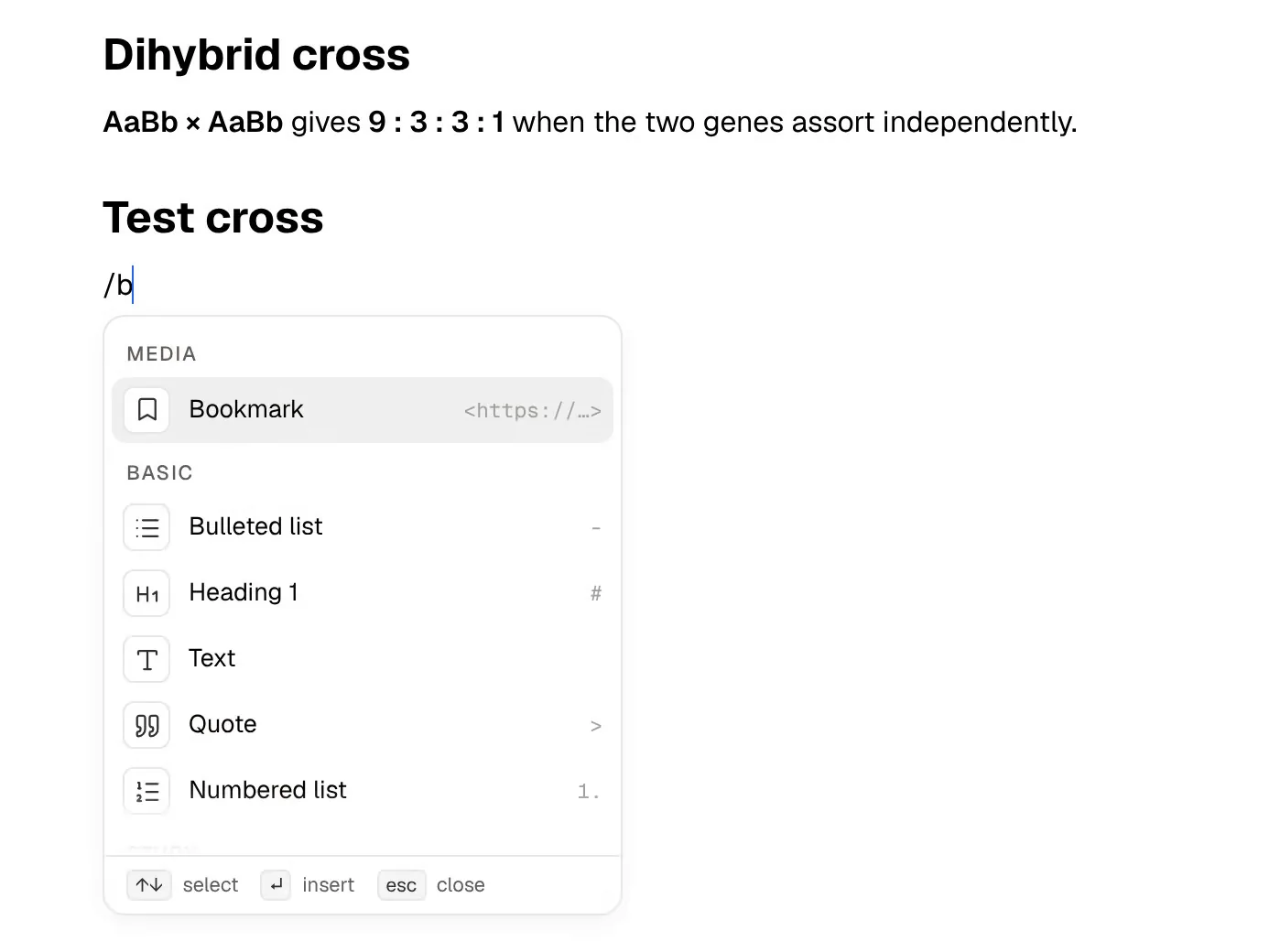
Supertags are the signature feature. Tag a node #lecture and it picks up a template of fields, say course, date and lecturer; tag another #concept and it gets a definition field. Search nodes are live queries, so one search can list every #concept from one module, and views show the same data as an outline, a table, a calendar or a kanban board.
There is AI throughout: a chat, AI command nodes that process notes and write results back, image generation and AI agents. On mobile, voice memos are transcribed into structured notes, and the desktop app's notetaker transcribes meetings without adding a bot to the call. The Outliner runs on the web, as a desktop app for Mac, Windows and Linux that works offline, and as Tana Mobile on iOS and Android. Paid plans add things like Google Calendar sync and password-protected shared pages, and Pro adds a Readwise integration for reading highlights.
- Best at: a personal knowledge graph shaped exactly the way you think.
- Who loves it: people who enjoy designing systems and will maintain them.
- Standout: supertags with typed fields, and live search nodes over them.
The cost of building your own system
The Outliner's flexibility comes with setup. Deciding on supertags, fields and searches, then keeping them consistent across a term, takes real time. For some people that design work is how they understand a subject. For others it becomes something to tinker with in the week before exams instead of revising.
It also doesn't add the study step on its own. Tana doesn't advertise flashcards, quizzes or spaced repetition. You could make a #flashcard supertag with question and answer fields, but the scheduling, the testing and the record of what you keep getting wrong would be a system you design and run.
That is the honest split. Tana Outliner gives you materials to build any structure. PocketNote gives you a fixed set of study tools and generates them from whatever you put in.
There is a cost in AI credits as well. The Outliner's AI features draw on a monthly credit allowance, larger on the paid plans and topped up by buying more, so heavy use of AI command nodes across a term is something to budget for.
Getting lectures in: voice memos, meetings and recordings
Tana Outliner's capture is aimed at thoughts and meetings: voice memos on your phone become structured notes, live transcription works anywhere in a workspace, and a separate paid meeting agent can join Google Meet, Zoom or Teams calls. The new Tana goes further on meetings, with transcription in 33 languages on its own calls, though it is built around online calls you host or join rather than a phone on a lecture-hall desk.
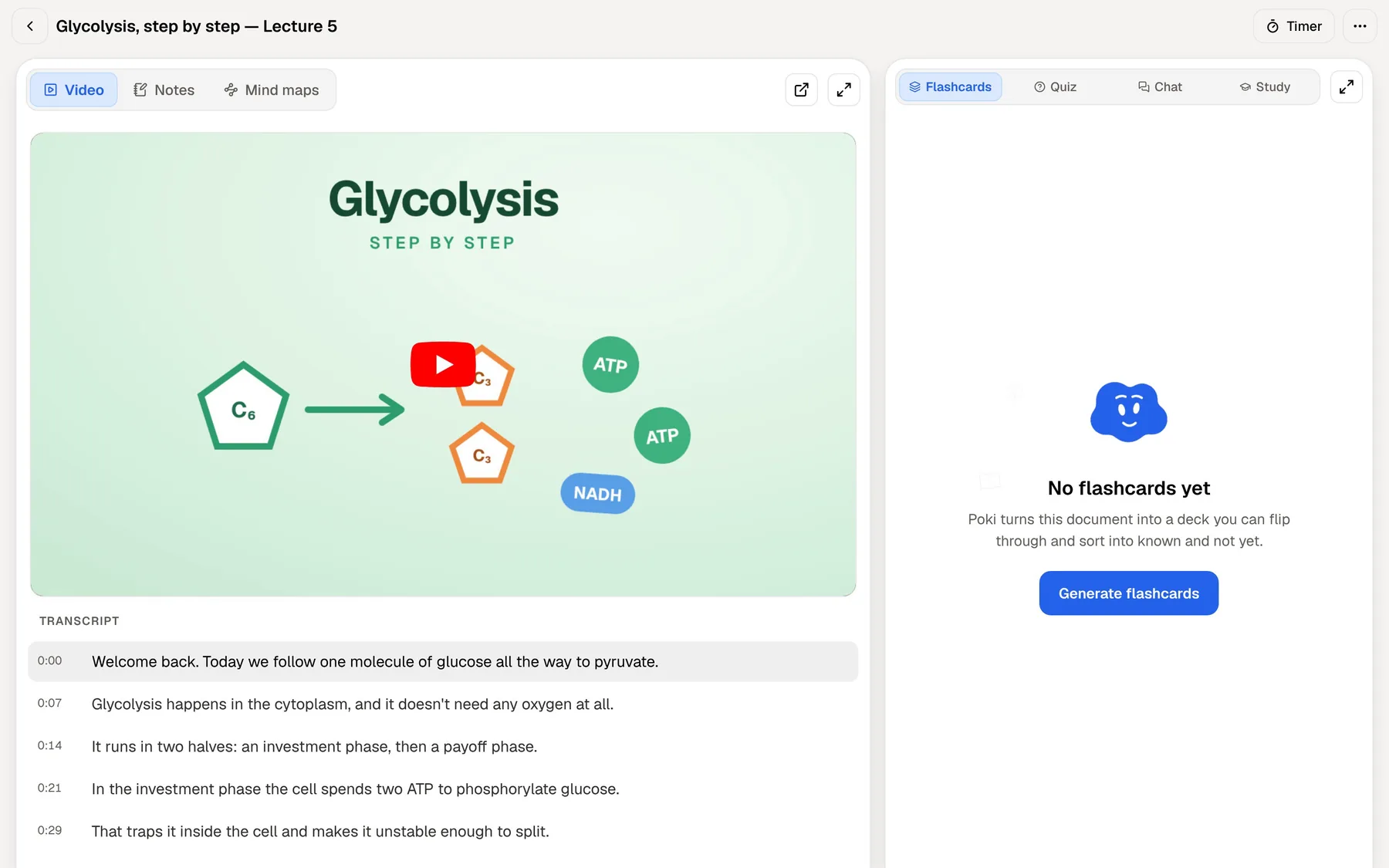
PocketNote's recorder is aimed at lectures. You tap Record and get the audio, a transcript, a summary and notes, and the recording becomes a source for flashcards, quizzes and the oral exam. Paste a YouTube link and the transcript comes with it, so a recorded lesson sits next to its timed transcript and the cards made from it.
If you write by hand during a lecture, Note Replay records audio while you write; playing it back shows the strokes you were making at each moment.
Revising in PocketNote
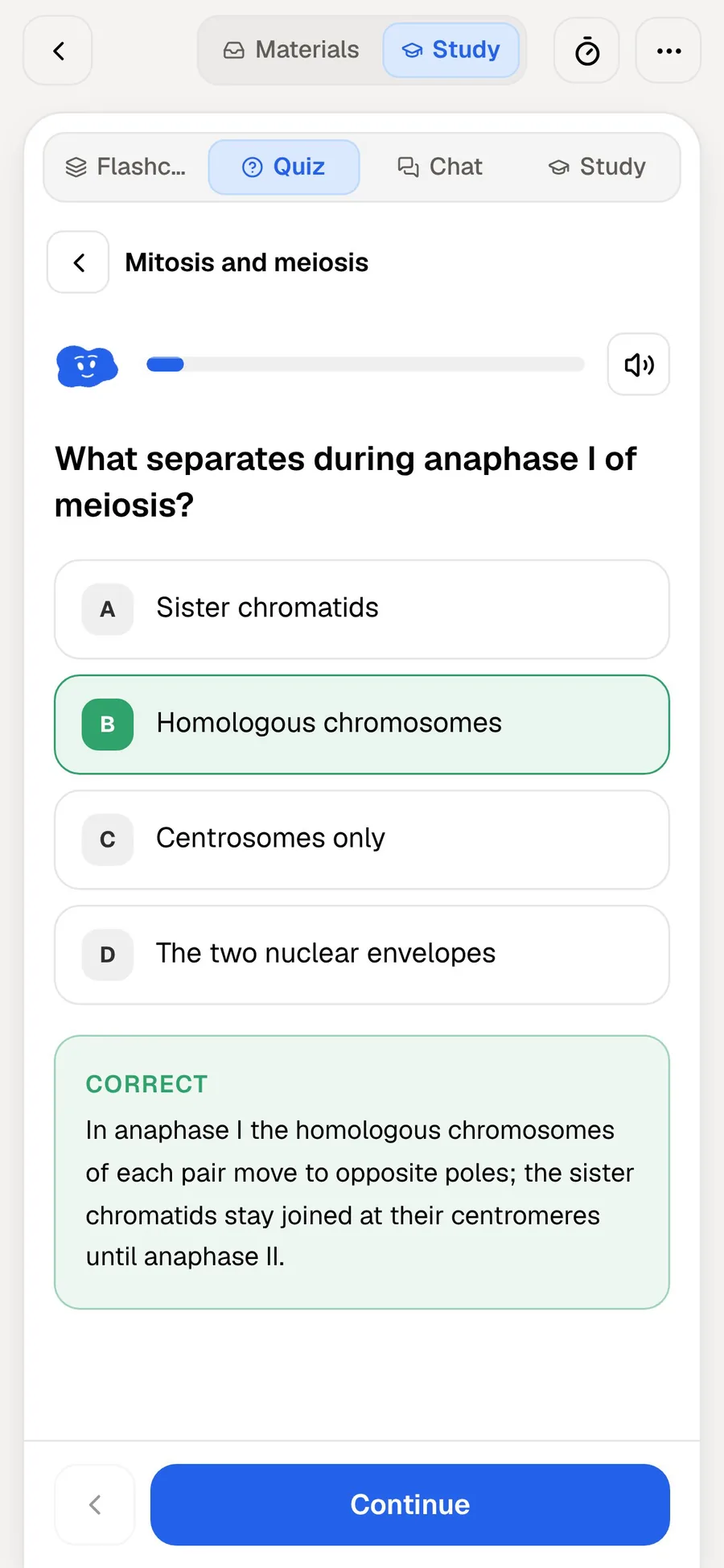
Flashcards come from your sources rather than from fields you fill in. You rate each card Again, Hard, Good or Easy, and it returns when you are about to forget it. Each quiz question explains the right answer and the wrong ones. In the oral exam, Prof. Poki asks a question out loud or in text and keeps following up until you can explain the idea in your own words.
Set the exam date and the study plan works out what to cover each day, sends reminders, and tracks memory, applied and mastery scores across the tools you use. For listening, an audio review turns the material into a podcast-style episode with captions.
Poki itself answers from your own material with citations, shows the steps it took, and can write into your notes from the chat. It can also look at a PDF page as you see it, including your highlights and handwriting, and highlight, underline or circle passages when you ask; one tap undoes its marks. On paid plans, connectors let it use Google Drive, Notion or Outlook as context.
Structure you build versus structure you're given
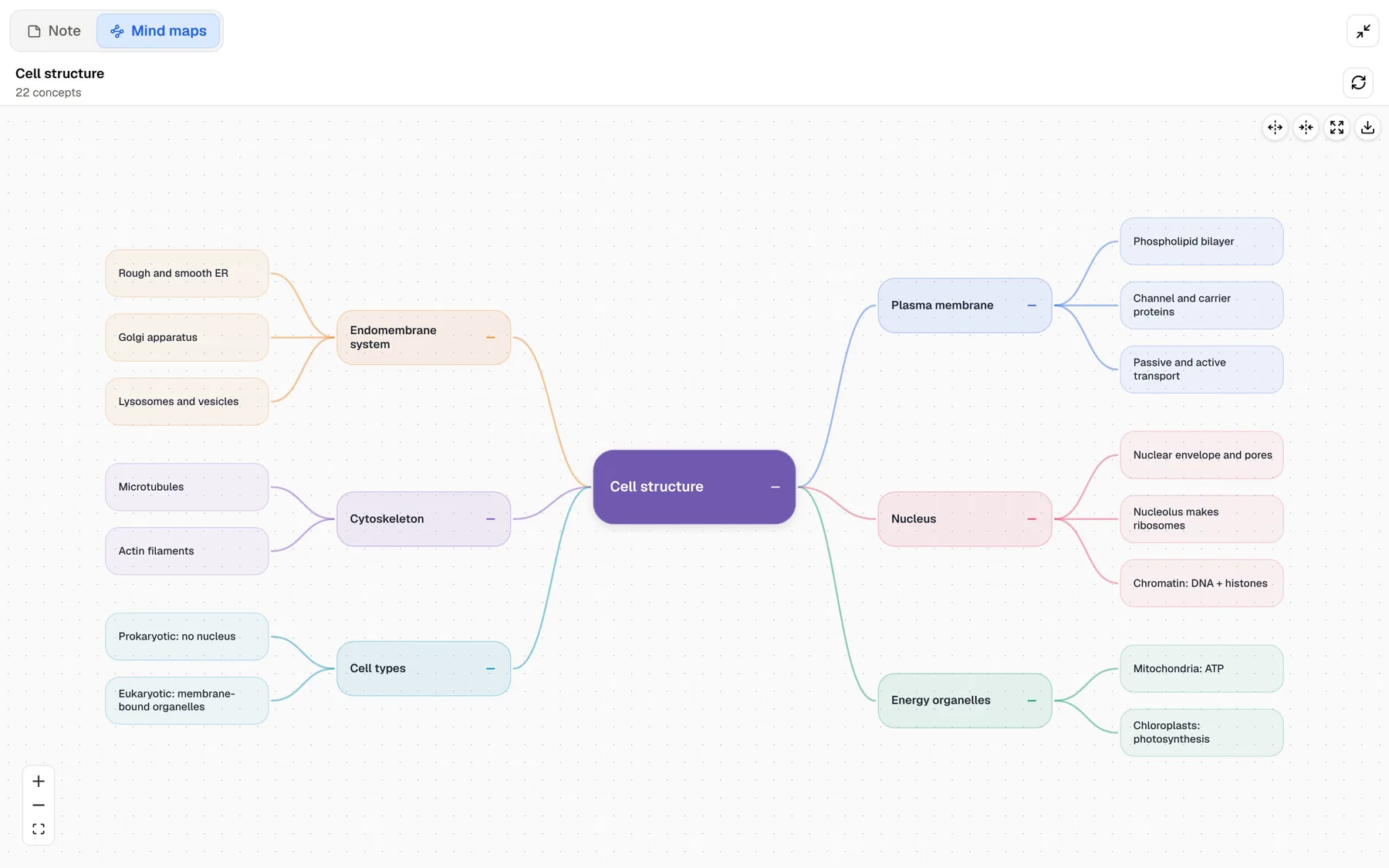
In Tana you build structure node by node. In PocketNote, structure is generated: a mind map with colour-coded branches, written notes and summaries, slide decks and data tables, all from the same sources, and all editable.
There is a fair argument that building a concept map yourself teaches you more than reading one. If that is how you learn, the Outliner rewards it. The generated version is faster, gives you something to correct, and frees time for testing yourself.
PocketNote's typed notes do support page mentions, so one note can point to another, but there is nothing like supertags or typed fields. If you want that kind of modelling, it lives in Tana.
Prices and the student discount
Tana Outliner has Free, Plus and Pro plans, billed monthly or yearly, with more AI credits on the paid tiers; the free plan includes supertags, task management, up to three workspaces and Markdown or JSON export. Its pricing page offers students, academics and NGOs a 50% discount, applied by emailing Tana with proof of eligibility. Check the page for the current figures, as the plan cards and the FAQ on it list different numbers.
The new Tana, at the time of writing (November 2026), has a free plan with a bring-your-own agent, a botless meeting agent, 30 days of searchable meeting history and about 50 AI queries. Pro is $15 per member per month billed yearly, and Business starts at $35 per member per month, also billed yearly.
As for PocketNote, you can start free and move to Basic (live voice, premium models, connectors) or Plus (unlimited notebooks and apps, the longest audio reviews, every model) if you need more. Current prices are on pocketnote.app.
Where Tana is the better choice, and moving notes across
Tana Outliner is the better tool if your notes are a long-term system you enjoy shaping, with tasks, calendar and reading notes in one graph. It also has Android and desktop apps, where PocketNote runs on the web and on iPhone and iPad. The new Tana is the pick for a team that meets often and wants agents working on the call.
Moving material is simple. Tana Outliner exports Markdown and JSON, even on the free plan, and PocketNote imports Markdown, so you can export one module's notes and import them into a PocketNote folder with that module's slides and recordings. Supertags and fields stay in Tana; in PocketNote, folders and stars do the organising.
- You enjoy designing a knowledge graph with supertags, fields and live searches.
- You want notes, tasks and calendar views in one outliner on every platform.
- You run group or team meetings and want AI agents working during the call.
- You qualify for Tana Outliner's 50% discount for students and academics and already like outliners.
The verdict
Which one should you pick?
Pick PocketNote if…
- you want study tools generated from your material, not a system you design and maintain.
- you need flashcards with spaced repetition, quizzes and an oral exam before an exam date.
- you record lectures, watch YouTube lectures or study from PDFs.
- you write by hand on an iPad.
Pick Tana if…
- you enjoy building a personal knowledge graph with supertags, fields and live searches (Tana Outliner).
- you want one outliner for notes, tasks and calendar across web, desktop, iOS and Android.
- you run team meetings and want AI agents working on the call (the new Tana).
Try it yourself
See it with your own notes
PocketNote is free to start, in a browser or on iPhone and iPad. Export one module from Tana Outliner as Markdown, add its slides and a lecture recording, and generate a quiz and flashcards. If the Outliner is where you think, keep it there and use PocketNote for the revision it doesn't do.
Frequently asked questions
Sources
Keep reading