
MindMeister is a mind-mapping tool that runs in your browser, with apps for iOS and Android. It is made by Meister, the German company behind MeisterTask, and it has been around since 2007. Its student page pitches it for exactly what students do: planning essays, taking visual notes, revising for exams and working on group projects. Its AI can also turn a PDF or a slide deck into a first-draft map.
PocketNote comes at the same student from the other direction. It is a study app first: your lectures, readings and notes become flashcards with spaced repetition, quizzes with explanations, an oral exam and a study plan, and a mind map is one of the things it can generate from the same source.
Both apps can make a map from your lecture PDF. They differ in what you can do with that map and what else you get alongside it. This comparison covers maps, AI, testing yourself, group work and price, including MindMeister's free-plan limit and its student discount.
At a glance
PocketNote vs MindMeister
| Feature | PocketNote | MindMeister |
|---|---|---|
| Built for | Studying your course material | Making and sharing mind maps |
| How maps are made | Generated from your sources | By hand, or drafted by Meister AI |
| AI map from a file | Yes, from any source in your library | Yes, one file per map (PDF, slides, sheet, image) |
| Freeform map editing | Not a freeform editor | Yes, full editor with outline mode |
| Flashcards with spaced repetition | Yes, rated Again/Hard/Good/Easy | Not listed; suggests hiding branches |
| Quizzes and oral exams | Yes, generated from your sources | Not listed |
| Real-time collaboration | Not offered | Yes, unlimited collaborators |
| Presenting | Generated slide decks | Presentation mode from the map |
| Free plan | Free to start | Up to 3 mind maps, 500 AI credits a month |
| Apps | Web, iPhone, iPad | Web, iOS, Android |
| Student pricing | Free to start; Basic and Plus | 50% off paid plans |
Checked against mindmeister.com (pricing, student and AI pages) and PocketNote, November 2026. MindMeister prices vary by region; confirm on each site.
MindMeister's pitch to students
MindMeister's student page is specific about how it wants to be used. For essays, you brainstorm on a blank canvas, build and check your argument visually, and turn the map into an outline you can write from. For notes, you capture ideas on the fly, organise them later, and attach images, links and references to each topic. For exams, you map how concepts connect, spot gaps, and hide branches to test your recall. For group projects, you edit a map together in real time, comment on topics and present from the map.
The editor behind that is mature. It has themes and colour schemes, mapping styles that let you place topics by hand, add floating topics or let MindMeister arrange them, an outline mode for linear thinkers, focus mode, keyboard shortcuts and an icon and emoji library. Every plan allows unlimited collaborators, including people without a paid account, and you can invite them with a link.
It runs in the browser, so it works on a school computer or a borrowed laptop, and the iOS and Android apps let you review maps on your phone.
Turning a lecture PDF into a map: both can
MindMeister's AI mind map generator takes a prompt or one uploaded file, such as a PDF, a presentation, a spreadsheet or an image, and Meister AI pulls out the key ideas as branches. Every branch stays editable, and you can ask the AI to expand, shorten or restyle a branch, or tidy up and rebalance the whole map. Generating a map uses 100 AI credits, and the free plan includes 500 credits a month, enough for about five generations or edits.
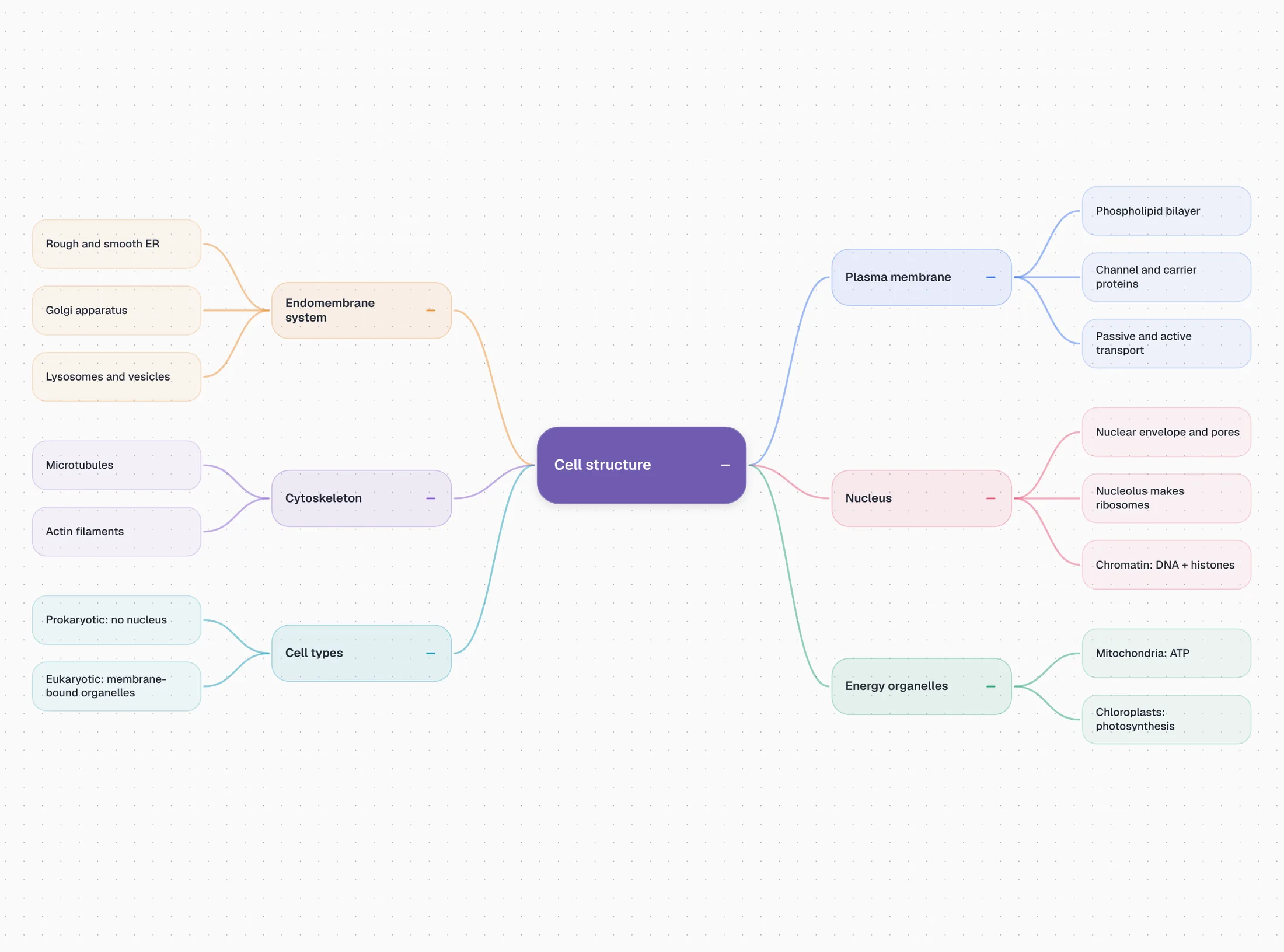
PocketNote generates a mind map from anything in your library, including a lecture recording or a YouTube video's transcript as well as documents, and the map sits alongside the other study tools for that source. A lecture on cell structure comes out as colour-coded branches for the membrane, organelles, cytoskeleton and nucleus, with the details underneath.
The difference is in editing. PocketNote's maps are generated overviews rather than freeform canvases, so if you want to rearrange, rename and restyle every branch by hand, MindMeister's editor is the stronger tool. It also lets you place several maps on one canvas and add floating topics, which helps when a lecture covers two loosely related ideas.
Testing yourself: hidden branches or generated questions
MindMeister's own advice for exam revision is to hide branches and test your recall. That is a sound technique: it costs nothing, it keeps your map at the centre of revision, and recalling a hidden branch is real retrieval practice. The limits are practical. You decide what to hide, you judge your own answer, and nothing records which branches you keep forgetting or brings them back at the right time.
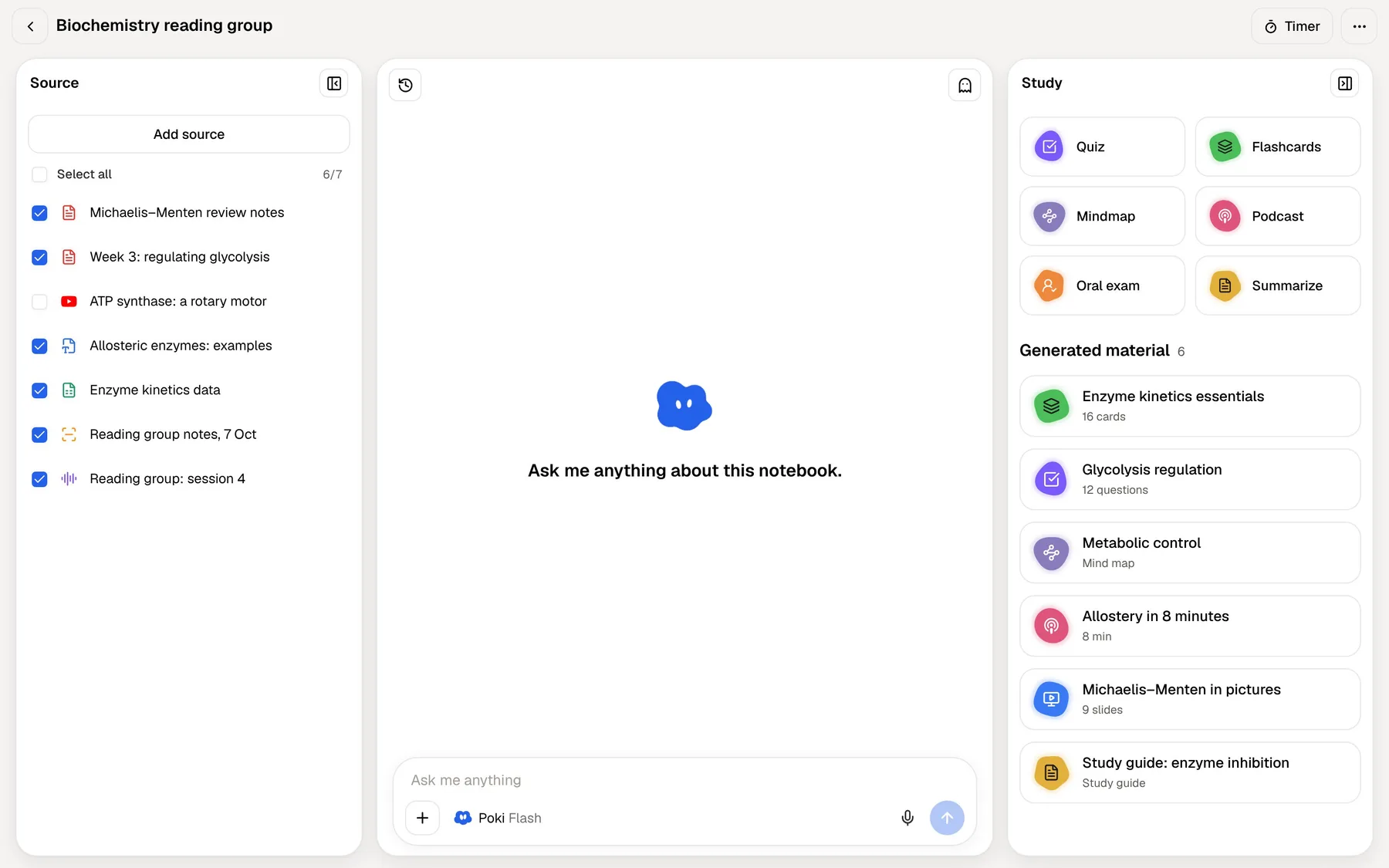
PocketNote's tools do that tracking. Flashcards made from your lecture are rated Again, Hard, Good or Easy and come back when you are about to forget them, so the weak ones get more attention without you keeping a list. Quizzes explain why each option is right or wrong. Prof. Poki's oral exam asks you to explain a topic in your own words, out loud or in text, and keeps probing until you can.
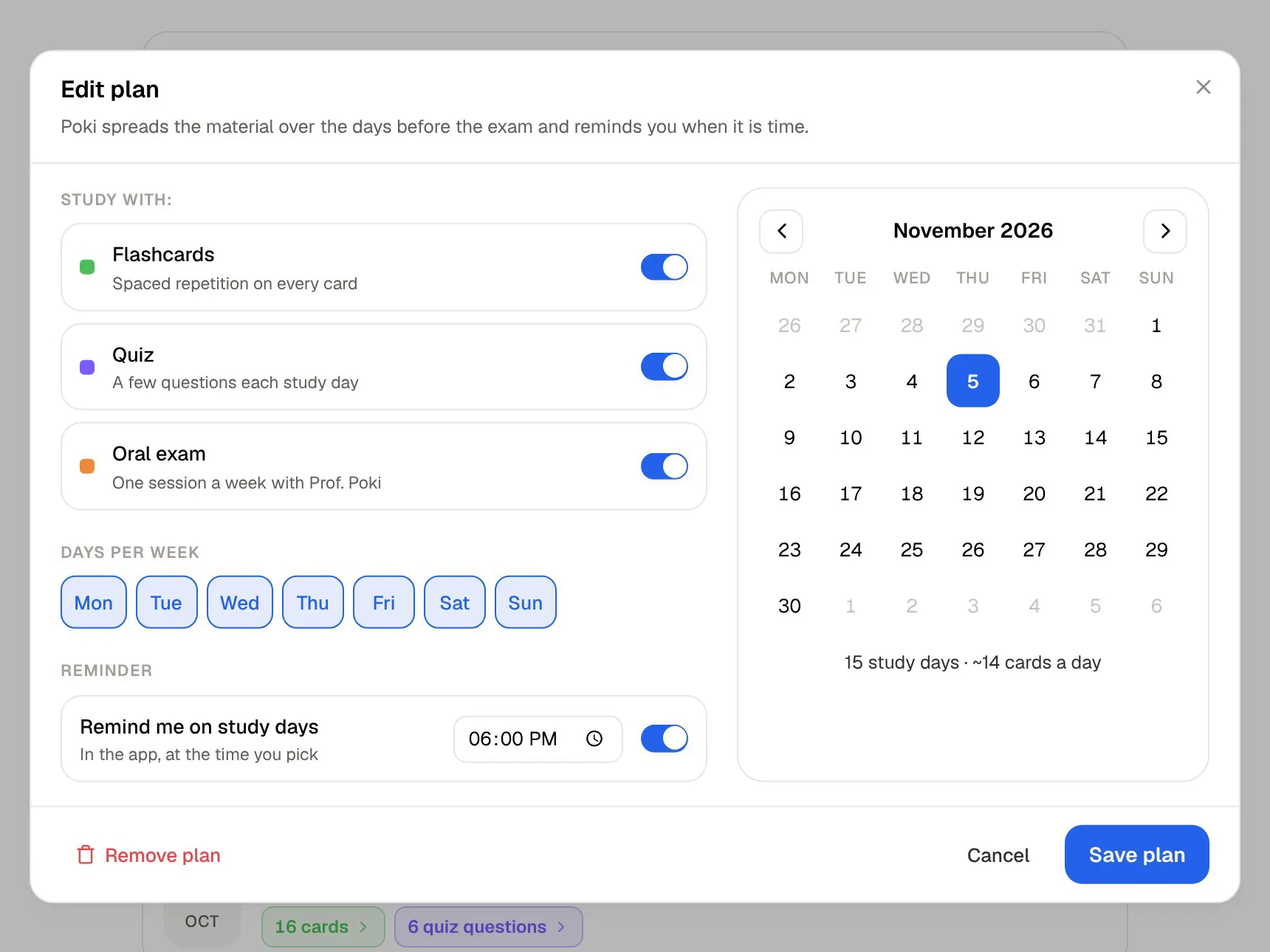
A study plan ties it together: set your exam date and PocketNote plans what to cover each day, reminds you, and tracks memory, applied and mastery scores.

Group work and presenting
This is MindMeister's home ground. Share a map with classmates and everyone edits it live, with comments on individual topics. Presentation mode walks an audience through the map without leaving it, which suits a seminar presentation built as a map. Topics can be sent to MeisterTask as tasks if your group uses it, and there is a Microsoft Teams integration on every plan, plus Google Workspace on Pro.
PocketNote is a personal study app. You can share a link to a note, but there is no live co-editing of maps and no shared task board. For a group brainstorm, a joint concept map or a presentation built from a map, MindMeister is the better tool, and PocketNote fits alongside it for each person's own revision.
One pattern for study groups: split a module between members, have each person build the MindMeister map for their topics and share it with the group, then let everyone export the finished maps and import them into PocketNote for their own flashcards and quizzes. The group gets the shared overview, and each person still does their own retrieval practice.
Where MindMeister is the better choice
Choose MindMeister if you think in maps and want to build them yourself, in a browser, on any computer. It is the better pick for essay planning, visual notes you will keep refining, group projects and presenting from a map. Its AI gives you a draft from a PDF, but you stay in control of every branch, and the outline mode turns a finished map into a writing plan.
It also suits Android users and anyone working on shared or school computers, since it needs only a browser, and students who care that their data is hosted in Germany and handled under the GDPR. Meister says information processed by Meister AI is not sold or used to train third-party language models.
And if you already learn well by hiding branches and quizzing yourself, there is no need to change. MindMeister supports that method directly.
Price, AI credits and the student discount
At the time of writing (November 2026), MindMeister's pricing lists a free Basic plan with up to 3 mind maps and 500 Meister AI credits a month, and three paid plans billed every 6 or 12 months rather than monthly. The EUR reference prices on 12-month billing are Personal from €6.50 per user a month, Pro from €10.50 and Business from €15.50. MindMeister uses regional pricing, so the figure you see may differ.
Personal adds unlimited maps, 2,000 AI credits a month, attachments, 7-day version history and exports to PNG, JPG, PDF and Markdown. Pro adds 5,000 credits, all-time version history, Word and PowerPoint exports and Google Workspace integration. MindMeister offers a 50% discount on paid plans for students and educators; its pricing page says to contact the support team to apply.
The free plan's three-map limit is the number to watch. One map per module is enough for some students; one map per lecture is not. PocketNote is free to begin with, and its Basic and Plus plans are listed on pocketnote.app.
Making a revision map that earns its keep
Whichever app draws the map, a few habits make it more useful when the exam is close. None of them needs a paid plan.
- One map per topic. A map that tries to hold a whole module gets too dense to scan in a minute, and on MindMeister's free plan it also uses one of your three maps.
- Keywords on branches, detail in notes. Short labels keep the structure visible; MindMeister lets you attach notes, links and images to a topic for the detail.
- Colour with a purpose. MindMeister's student page suggests using colour to separate themes, flag what you haven't learned yet and mark what keeps coming up in past papers.
- Check the map against the source. A map PocketNote generates from the lecture is a quick way to spot a section your own map left out.
- Finish with recall, not review. Close the map and try to rebuild it, hide branches, or move to flashcards on the same material.
A workflow that uses both
Here is a split that plays to both strengths. Build your own concept maps for each topic in MindMeister, with classmates if you like, because constructing the map is part of how you learn it. Keep the source material, the slides, readings and recordings, in PocketNote. When the exam date is set, let PocketNote's study plan schedule flashcards, quizzes and an oral exam from the lectures.
To bring a MindMeister map into PocketNote, export it as PDF or Markdown (Personal plan and above) and import it as a source. PocketNote can then generate questions from your own map alongside the lecture slides, and Poki can answer questions about it with citations. Going the other way, use PocketNote's generated notes as the starting outline for a map you build yourself in MindMeister. There is no live sync between the two apps, so moving maps across once a week, rather than after every lecture, keeps the effort small.
The verdict
Which one should you pick?
Pick PocketNote if…
- You want flashcards with spaced repetition, quizzes and an oral exam generated from your lectures, not just a map.
- You want maps from recordings and YouTube lectures as well as PDFs.
- You want to ask questions about your lectures and get answers with citations.
- You need a study plan that counts down to your exam and tracks mastery.
Pick MindMeister if…
- You want to build and edit maps yourself in a mature browser editor with outline mode.
- You do group projects and want real-time editing with unlimited collaborators and presentation mode.
- You use Android or shared computers, or want EU hosting under the GDPR.
- You can use the 50% student discount and need more than three maps.
Try it yourself
See it with your own notes
PocketNote is an AI study app built on your own course files. Lecture PDFs, Word documents, audio, YouTube and web links, and lectures recorded in the app all become sources, and from them PocketNote generates mind maps, flashcards with spaced repetition, quizzes, oral exams, notes and audio reviews. Poki, its assistant, answers from those sources and cites them.
It is free to start, in the browser at pocketnote.app or on iPhone and iPad. Build your own maps in MindMeister, and use PocketNote to practise the material behind them.
Frequently asked questions
Sources
Keep reading