
Xmind is one of the best-known mind-mapping apps. You build maps by hand or with its AI, choose structures such as timelines and matrices, style every branch, present a map with Pitch, and edit together in real time on the Premium plan. It runs on Windows, macOS, Linux, iOS, iPadOS, Android and the web.
PocketNote also makes mind maps, but it is not a mind-mapping editor. Its maps are generated from your course material, such as a lecture PDF, a recording or a YouTube video, and sit next to flashcards, quizzes, notes and audio reviews made from the same source. You don't draw them branch by branch.
So this is less a head-to-head than a choice between two jobs: designing a map yourself, or studying from material that a map is one view of. Here is where each one fits, where Xmind is clearly ahead, what each costs, and how students use both.
At a glance
PocketNote vs Xmind
| Feature | PocketNote | Xmind |
|---|---|---|
| How maps are made | Generated from your sources | Built by you, or drafted by AI |
| Freeform map editing | Not a freeform editor | Yes, full editor |
| Map structures | Mind maps | Mind maps, timelines, matrices and more |
| AI map from a PDF or link | Yes, from any source in your library | Yes, with AI credits |
| Flashcards with spaced repetition | Yes, rated Again/Hard/Good/Easy | Not advertised |
| Quizzes and oral exams | Yes, generated from your sources | Not advertised |
| Presenting | Generated slide decks | Pitch mode from the map |
| Real-time collaboration | Not offered | Premium plan |
| Gantt charts and tasks | Not offered | Premium plan |
| Apps | Web, iPhone, iPad | Windows, macOS, Linux, iOS, Android, web |
| Student pricing | Free to start; Basic and Plus | Education discount with proof of status |
Checked against xmind.com (pricing, education and AI pages) and PocketNote, November 2026. Plans and AI credits change; confirm on each site.
Two tools that both say "mind map"
In Xmind, the map is the document. You choose the central topic, the branches, the layout, the colours and the stickers, and the result is something you made: a revision poster, an essay plan, a project timeline. Building it is part of the value, because deciding where each idea goes makes you work out how the ideas relate.
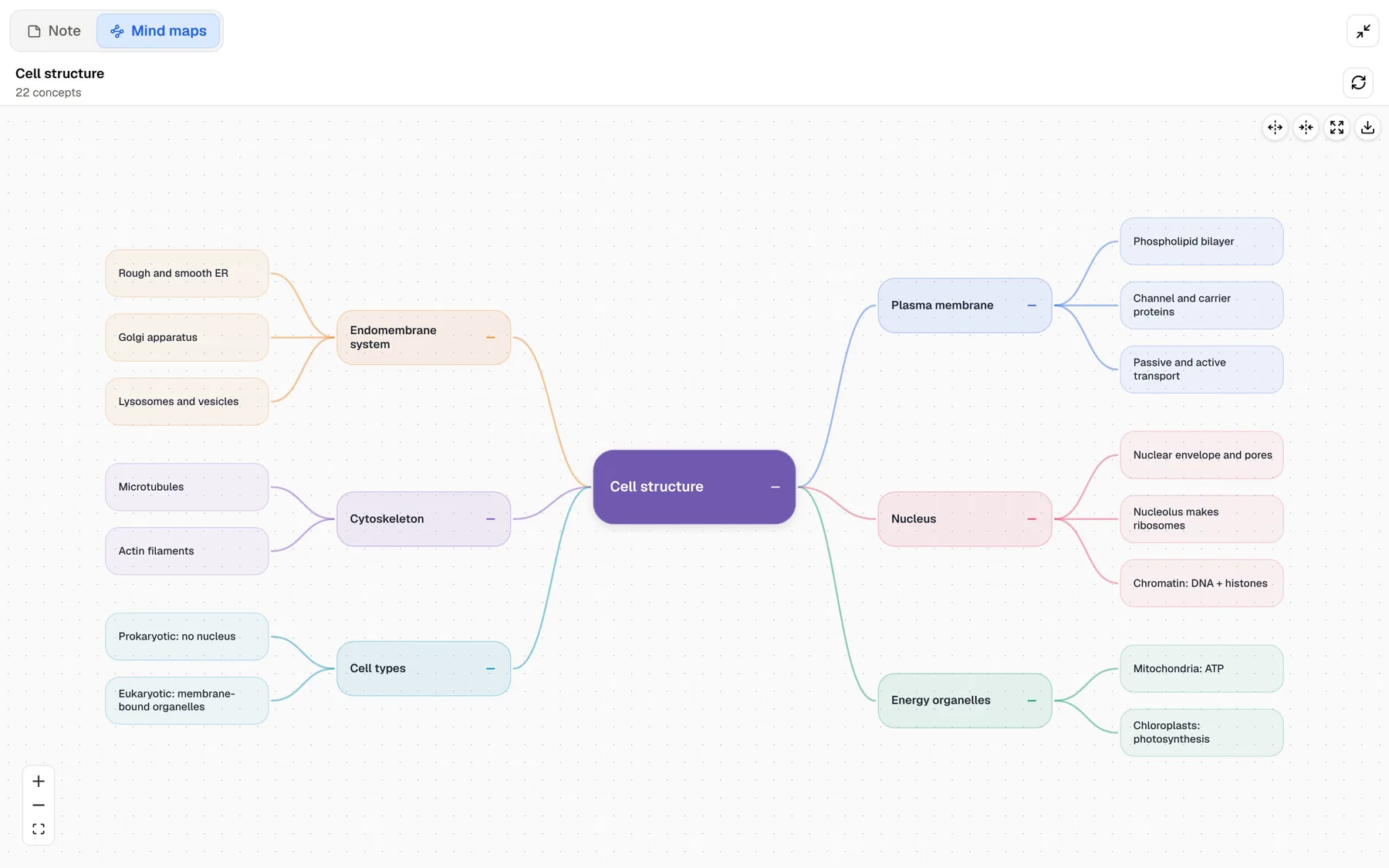
In PocketNote, the map is a summary of a source. You import a lecture or a reading, generate a mind map, and get a colour-coded overview of how the topics connect. It is a quick way to see the structure of a chapter before you study it, and it is one of several outputs from the same material.
If what you want is a blank canvas and full control over every node, PocketNote isn't that tool, and this comparison won't pretend it is. The question is whether you need a mapping tool, a study tool, or both.
Mind maps tend to help at two points in a course: at the start of a topic, when you need to see how the parts fit together, and while planning written work, when you need to arrange an argument. Xmind is strong at both. PocketNote's generated maps help mostly with the first, and its other tools take over for the weeks of practice that follow.
What Xmind does that PocketNote doesn't
Xmind's editor is deep. Beyond classic mind maps it offers structures such as timelines and matrices, Zones for grouping related topics, themes and visual styles, ZEN mode for distraction-free mapping, and Pitch, which turns a map into a presentation. Paid plans add links, numbering, attachments and custom themes, and Premium adds real-time collaboration, Gantt charts and tasks with assignees.
Export is broad as well. On Pro and above, maps export to PNG, SVG, PDF, Markdown and Office formats without a watermark, which matters if a map is going into an essay appendix or a slide. Xmind's FAQ says one subscription covers up to five computers and five mobile devices.
None of this has an equivalent in PocketNote. PocketNote generates slide decks from a source, but it has no map editor, no timeline or matrix structures, and no shared map that a group edits live.
Xmind's AI can map a PDF, too
It would be unfair to frame this as hand-drawn against AI. Xmind's AI page says you can start with an idea, file, image or link, drop in a webpage, document, PDF or YouTube link, capture spoken ideas, or turn an image into an editable map. Its newest version is presented as Xmind Agent, which builds and reshapes a map through conversation. The site also links to converters that turn Markdown, Word documents, OPML files and NotebookLM output into maps.
On Xmind's pricing page, the Premium plan includes 500 AI credits a month for text to mind map, summarising long texts, files and links, growing and explaining ideas, refining a map and breaking projects into tasks. The Free and Pro plans get 50 AI credits at sign-up.
So both apps can turn a lecture PDF into a map. The difference is what happens next. Xmind's output is an editable map and, if you want them, tasks or a presentation. Xmind's pages don't mention flashcards or quizzes, which is where PocketNote takes over.
How PocketNote's maps fit into studying
In PocketNote you start with the source. Import the PDF, paste the YouTube link or record the lecture, then open the notebook's Study panel and generate a mind map. A lecture on cell structure comes out as branches for the membrane, organelles, cytoskeleton and nucleus, each in its own colour, with the details underneath.
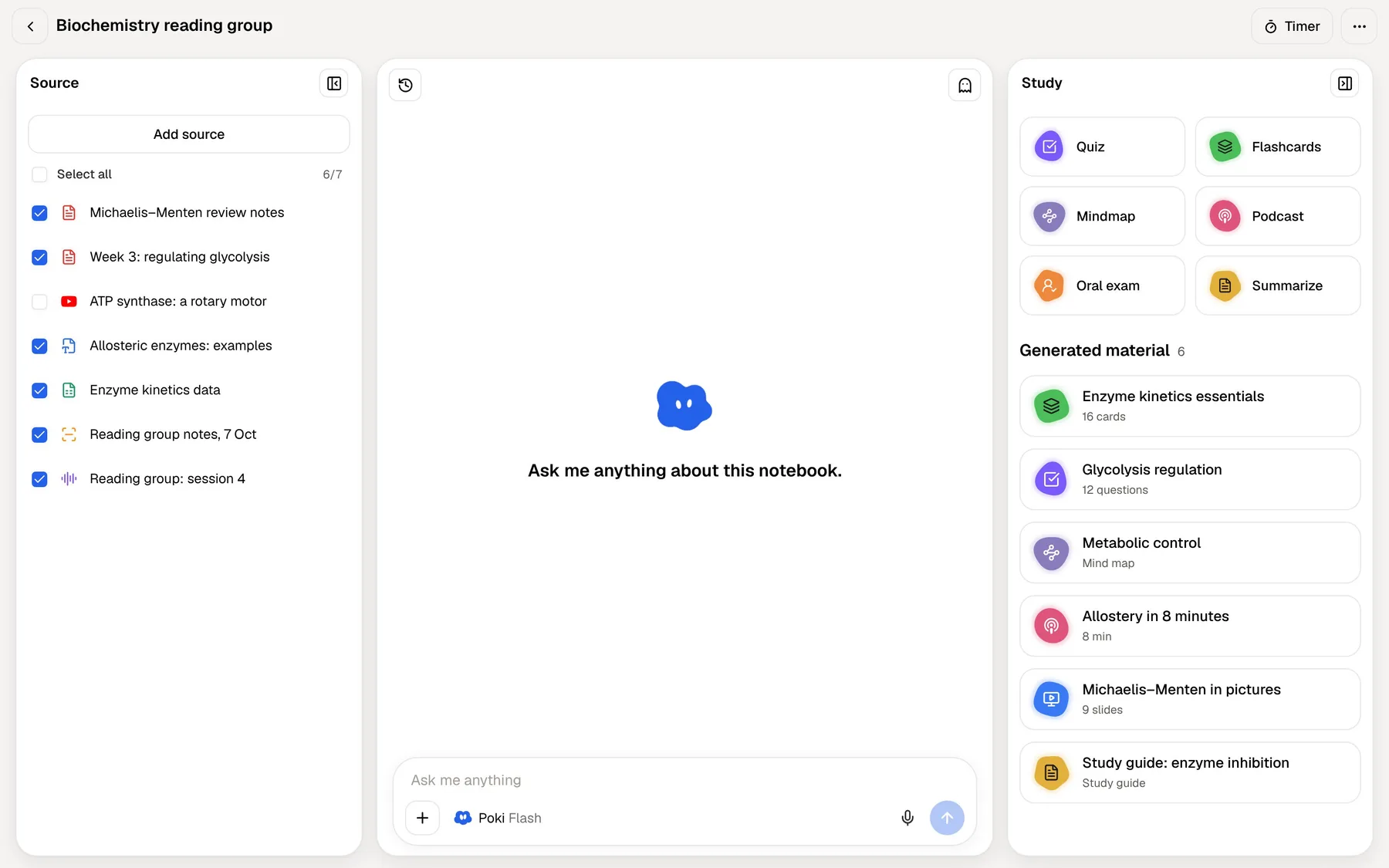
From the same source, without uploading anything again, you can generate flashcards, a quiz, written notes, a slide deck or a podcast-style audio review, and ask Poki questions that it answers with citations to the material. The map gives you the overview, and the other tools are how you check that you actually know what is on it.
This works for sources that are hard to map by hand in a hurry, too. A 60-page reading or a long recorded lecture becomes an overview in a few moments, which helps you decide where to spend your time before you start revising.
After the map: checking you know it
A map is good at showing structure and weaker at proving recall. Looking at a finished map can feel like knowing it, in the same way that rereading notes can. Retrieval practice, pulling the answer out of memory, is the more reliable test, and that is what PocketNote's tools are built around.
Flashcards ask you to recall each fact, then schedule the card again with spaced repetition based on your rating: Again, Hard, Good or Easy. Quizzes explain every option, right or wrong. The oral exam goes furthest: Prof. Poki asks you to explain a topic in your own words, out loud or in text, and follows up where your answer is thin.
You can test yourself with any map by covering a branch and recalling what is underneath. That works, and it is free. The difference is that you have to remember which branches you got wrong, while PocketNote's flashcards keep track for you.

Where Xmind is the better choice
Choose Xmind when the map itself is the goal. Planning an essay or a dissertation chapter, laying out a project with a Gantt chart, building a revision poster you will print, presenting with Pitch, or brainstorming live with a group: Xmind is built for each of these, and PocketNote isn't.
It is also the right pick if you want to edit every node, rearrange branches by hand, switch between structures, or export maps to Office, SVG or Markdown. And Xmind runs on Windows, Linux and Android as well as Apple devices and the web, while PocketNote runs on the web, iPhone and iPad.
Finally, if you learn best by building the map yourself, keep doing that. Generated maps save time; they don't replace the thinking you do when you draw your own. Xmind's site also lists integrations with Notion and with AI tools such as Claude, ChatGPT and Cursor, if your workflow already runs through them.
Plans and the student discount
Xmind has three plans for individuals. Free lets you create up to 10 online maps by hand, with basic themes, 3-day version history, up to 5 Pitch slides and 50 AI credits at sign-up. Pro raises that to 50 online maps and adds links, numbering, attachments, custom themes, unlimited Pitch slides and exports without a watermark. Premium adds unlimited collaborative maps, real-time collaboration, 30-day version history, Gantt charts and 500 AI credits a month. Prices are on Xmind's pricing page, which advertises yearly billing at up to 50% off.
Xmind's education page offers discounted Pro and Premium plans to students, educators and academic staff at accredited institutions. You apply with proof such as a dated student ID or a current registration receipt, and the discount lasts one year before you reapply with updated proof.
For PocketNote, you can start free and upgrade to Basic for live voice, premium models and connectors, or to Plus for unlimited notebooks and apps, the longest podcasts and all models. See pocketnote.app for current plans.
Using Xmind and PocketNote together
The two fit together well because they do different things. Use PocketNote to get through the material: generate a map to see the shape of a topic, then work through flashcards, quizzes and an oral exam. Use Xmind when you want to rebuild that topic yourself as a map you will revise from, hand in or present.
To move content across, export an Xmind map as Markdown or PDF (Pro and above) and import it into PocketNote as a source, so Poki can quiz you on your own map alongside the lecture slides. Going the other way, use PocketNote's written notes as the outline for a map you build in Xmind. Rebuilding a generated summary as your own map is a useful revision exercise in itself.
For an essay-based module, the weight falls on Xmind: generate a map from each week's reading in PocketNote to see what the author argues, then build one Xmind map across all the readings as your essay plan. For an exam-based module, it flips: the PocketNote map is the overview, and most of your time goes into flashcards, quizzes and the study plan.
The verdict
Which one should you pick?
Pick PocketNote if…
- You want maps generated from your lectures and readings, then flashcards, quizzes and an oral exam from the same source.
- You want an assistant that answers from your course files with citations.
- You need a study plan that counts down to your exam date.
- You study on iPhone, iPad or in the browser and want everything for a course in one place.
Pick Xmind if…
- You want a full mind-map editor with structures such as timelines and matrices, themes and Pitch presentations.
- The map is the deliverable: an essay plan, a project timeline, a poster or a presentation.
- You need real-time collaboration on maps or Gantt charts with a group.
- You work on Windows, Linux or Android.
Try it yourself
See it with your own notes
PocketNote is an AI study app. Import lecture PDFs, Word files, audio, YouTube and web links, or record lectures in the app, and it generates mind maps, flashcards with spaced repetition, quizzes, oral exams, notes, slide decks and audio reviews from that material. Poki answers your questions from the same sources, with citations.
Use it at pocketnote.app in any browser, or on iPhone and iPad; it is free to start. Keep Xmind for the maps you design yourself, and use PocketNote to study the material behind them.
Frequently asked questions
Sources
Keep reading