

If you are looking for Nebo, you will find it under a new name. On iOS and Android the app is now called MyScript Notes; on Windows it keeps the Nebo name, and MyScript says notes still sync between them and lifetime purchases remain valid. The reason people choose it hasn't changed: MyScript's handwriting recognition, which turns fast, untidy pen notes into clean typed text you can edit with gestures.
PocketNote solves a different problem. It is an AI study app: you bring handwritten notes, PDFs, slides and recorded lectures, and it builds flashcards with spaced repetition, quizzes that explain every option, an oral exam, a study plan to your exam date and podcast-style audio reviews. It can convert handwriting to text with a lasso, but recognition is not its specialty in the way it is MyScript's.
This page compares the two for a student who writes by hand and wants to study from those notes. It covers the rename, what MyScript Notes' AI beta does today, and where Nebo, under either name, is still the better tool. Details were checked on MyScript's site and help pages in November 2026.
At a glance
PocketNote vs MyScript Notes (Nebo)
| Feature | PocketNote | MyScript Notes (Nebo) |
|---|---|---|
| Name in 2026 | PocketNote | MyScript Notes on iOS and Android; Nebo on Windows |
| Built for | Studying from your material | Handwriting you can convert, edit and reflow |
| Handwriting to text | Lasso a selection to convert it | Core feature; 66 recognition languages |
| Pen gestures | Shape snapping and lasso | Scratch to erase, gestures for space and formatting |
| Lecture recording | Note Replay and a lecture recorder | Not advertised (dictation supported) |
| AI study tools | Flashcards, quizzes, oral exam, plan, audio reviews | Summarize, Explain, Quiz, Chat (beta) |
| Flashcards with spaced repetition | Yes, rate Again / Hard / Good / Easy | Not advertised; multiple-choice study sets on iOS |
| Quizzes | Every option explained | True/false or multiple choice (beta) |
| Exports | Handwritten notes to PDF; share a link | PDF, PNG, SVG, Word, Nebo |
| Maths | LaTeX in typed notes | Math solver; copy as LaTeX |
| Apps | Web, iPhone, iPad | iOS, Android, Windows, Mac (Apple silicon) |
| How you pay | Free to start; Basic and Plus plans | 7-day trial; monthly, yearly or lifetime |
Checked against each product's own website and help pages, November 2026. Plans and features change; confirm current details there.
First, the name: Nebo is now MyScript Notes
MyScript, the company behind Nebo, renamed the app MyScript Notes on iOS and Android. Its FAQ says that on Windows it keeps the Nebo name with full functionality and compatibility, so your notes still sync across devices, and that lifetime purchases remain valid with no extra charge for existing features. If you bought Nebo before, MyScript Notes is yours at no additional cost.
So the app hasn't gone anywhere. The app you may have read about in older reviews is the same one, with generative AI added on top. In this article, MyScript Notes and Nebo mean the same product.
One practical consequence: older tutorials, forum threads and the Windows app still say Nebo, so if a guide's menus don't match what you see on an iPad, it may be describing an earlier version.
What MyScript's handwriting engine does well
Handwriting recognition is the whole point of MyScript. You write freely with a pen, then convert to typed text that is ready to share, in any of 66 recognition languages. A custom dictionary lets you add your own abbreviations and course terms. You edit with pen gestures rather than menus: scratch out a word to erase it, and use gestures to add or remove space and format text.
It also gives you four kinds of page. Notebooks have fixed-size pages; Documents reflow your handwriting and typed text as the layout or screen orientation changes; Boards are an expandable whiteboard; and PDFs can be imported and annotated, including Word and PowerPoint files brought in as PDFs. Hand-drawn diagrams convert to clean text and shapes and stay editable in PowerPoint, and Math objects solve calculations across several lines and copy out as images or LaTeX.
Exports are generous: PDF, PNG, SVG, Word or Nebo format, with several pages in one file if you like. Cloud sync works through iCloud on iOS, Google Drive or Dropbox, and you can publish a note to a web link with access control. For a student who wants typed notes but thinks with a pen, it is a very good fit.
MyScript Notes' AI study tools, as of November 2026
MyScript Notes now has generative AI, labelled as beta. The homepage lists four jobs: Summarize long notes or readings, Explain a selected term, Quiz (turn a note into true/false or multiple-choice questions) and Chat, which MyScript describes as ChatGPT with your pen. AI features need a MyScript account and an internet connection, and a monthly usage quota applies during the beta; MyScript's help page says each credit comes back 30 days after you use it. You can switch the AI features off in the settings if you would rather keep the app purely for writing.
There is also a Study space, which turns notes into study sets of multiple-choice study cards. MyScript's help page says you pick up to four notes from a folder, the app generates the questions, and the Study space tracks what you have mastered and where to focus next. Editing your notes doesn't refresh an existing set; you create a new one. Study sets work in English and German.
Availability differs by platform. MyScript's FAQ says Android users currently get Summarize, Explain and Quiz, while Chat and study sets are iOS only. MyScript doesn't advertise spaced repetition, an exam plan or audio reviews.
Handwriting to text, the PocketNote way
PocketNote's handwriting canvas on iPad works differently. You write with the Apple Pencil using pens, highlighters, fountain-pen, watercolour or crayon inks, with shape snapping, a zoom window for small writing and page templates such as lined, grid and Cornell. When you want text, you lasso a passage and turn it into text, recolour it, or ask Poki about the selection. PocketNote also searches through your handwriting.
That covers the occasional conversion, but it is not MyScript's continuous, gesture-driven typed document. If your goal is a clean typed copy of every lecture, MyScript is the better tool for that step.
Where PocketNote helps is what comes next. Poki answers questions from your notes with citations, shows its steps as it searches your notes and reads the item, and can lay out a comparison as a table when you ask. It can also write a summary back into your notes from the chat.
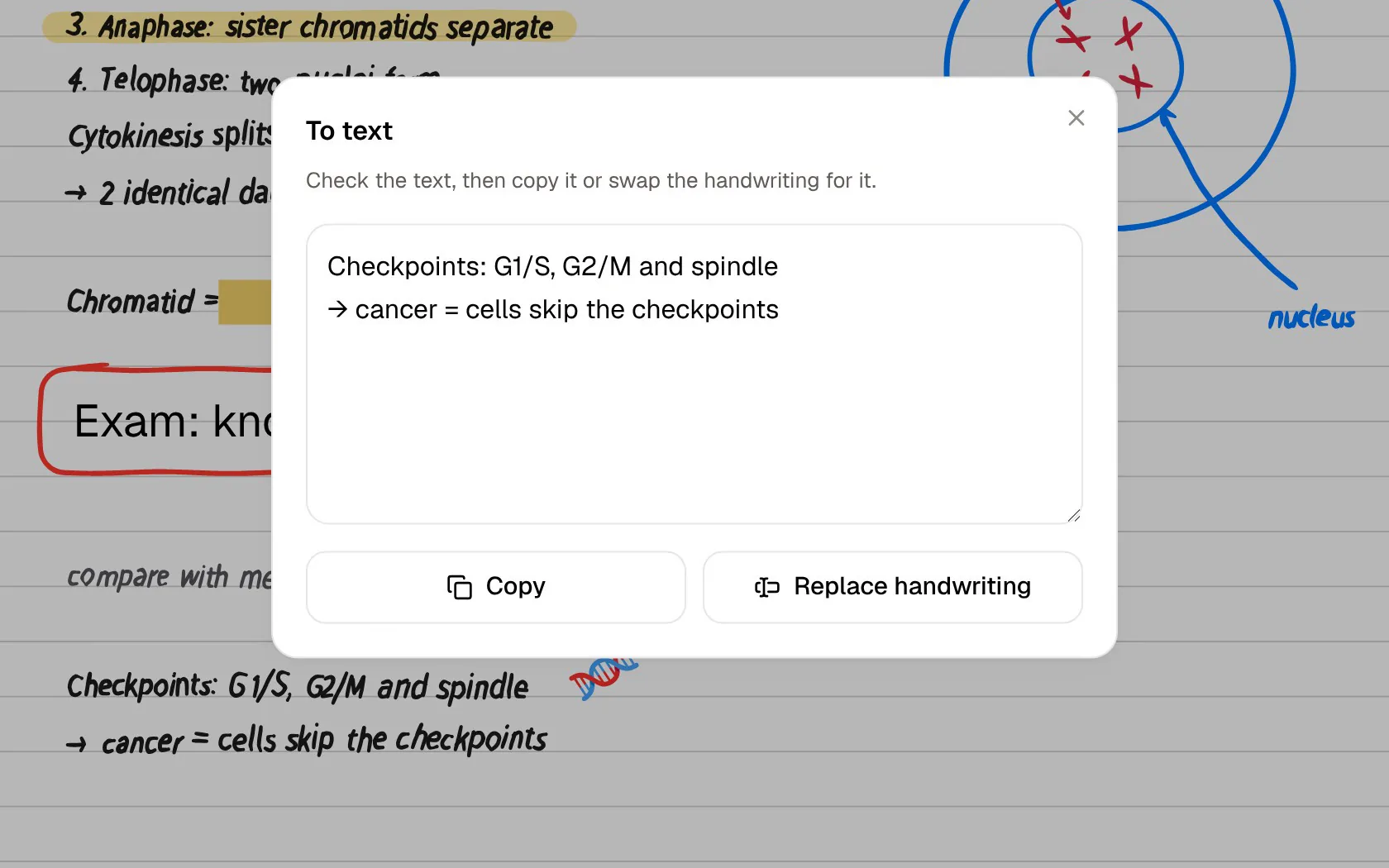
From converted notes to questions you learn from
Both apps can quiz you from a note, so the difference is in the feedback and the follow-up. In PocketNote every answer comes with the reason it is right, and every wrong option comes with the reason it is wrong, which is where you learn what you had confused. Quizzes can be built from lecture notes, PDFs, a recorded class or a YouTube lecture.
Flashcards come with spaced repetition. You rate each card Again, Hard, Good or Easy, and it returns when you are about to forget it. The oral exam goes a step further: Prof. Poki asks you a question out loud or in text and keeps probing until you can explain the idea in your own words. And the study plan takes your exam date, works out what to cover each day, sends reminders and tracks memory, applied and mastery scores.
Lectures are the other gap. MyScript doesn't advertise audio recording, though it supports dictation. PocketNote has Note Replay, which records while you write and shows the strokes you were writing as the audio plays back, and a lecture recorder that produces a transcript, a summary and notes. From either, PocketNote can make a podcast-style audio review with captions that follow the voices.
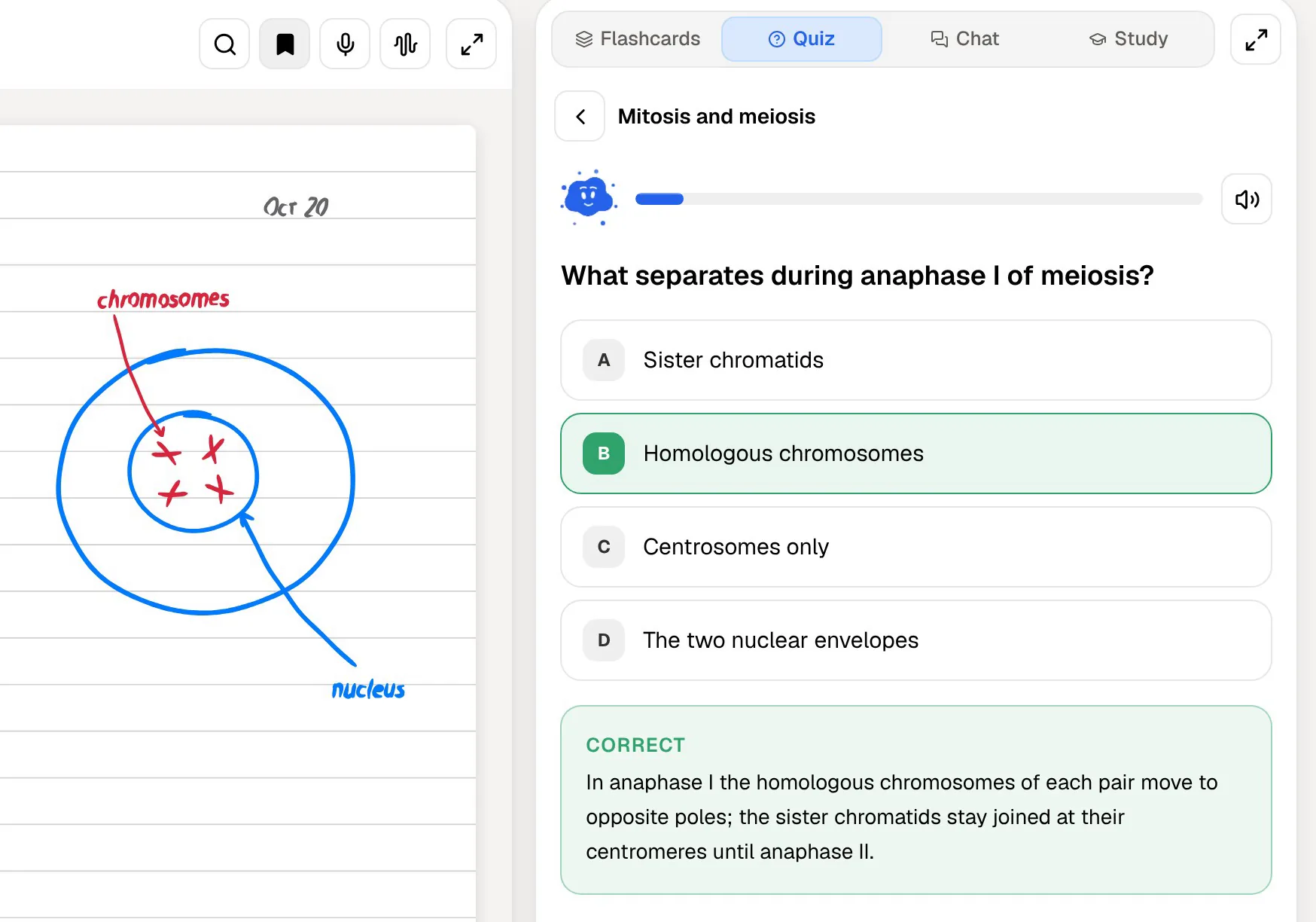
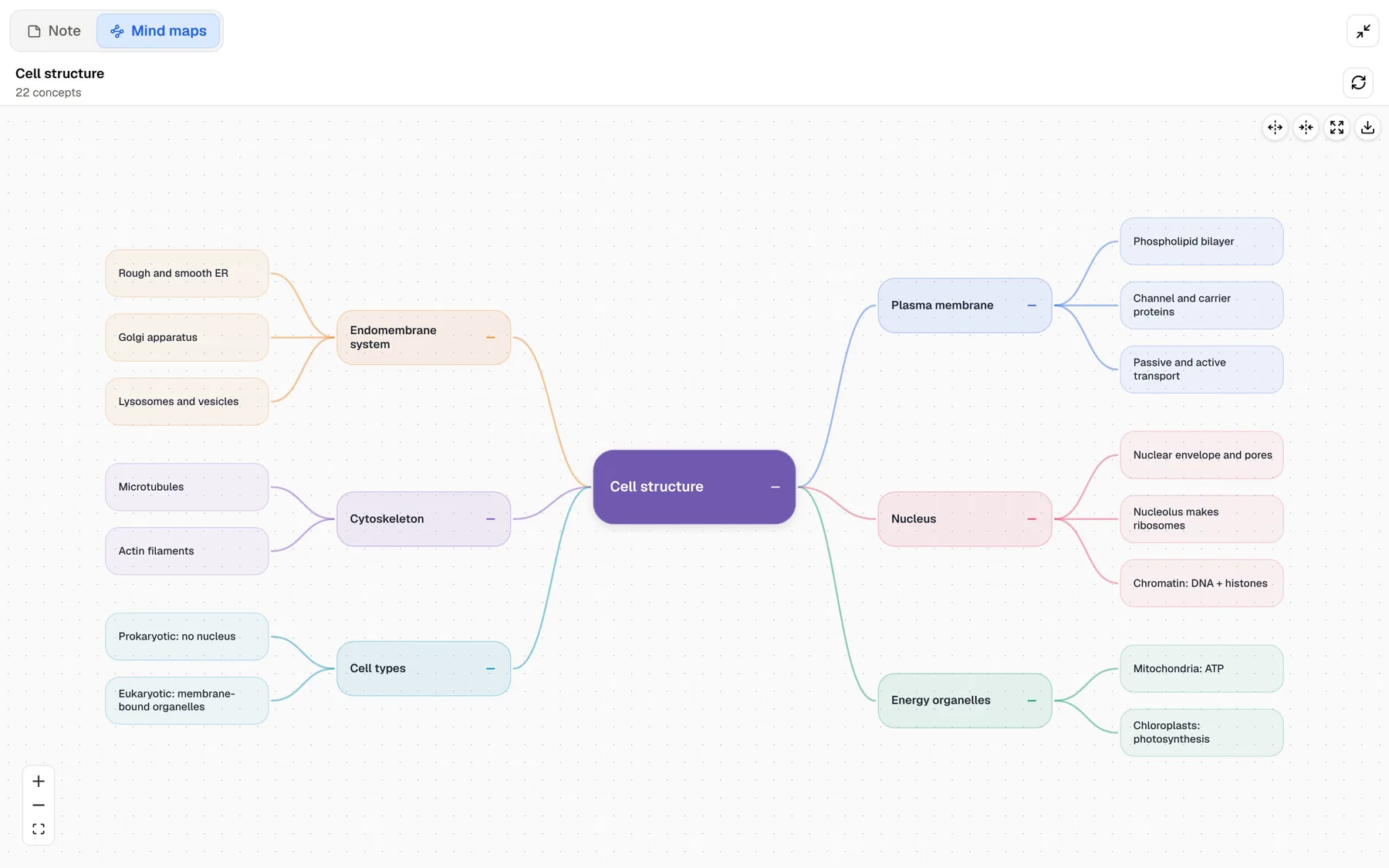
Seeing structure: hand-drawn diagrams and generated mind maps
MyScript's interactive diagrams are a real strength: you draw boxes and arrows by hand, reposition them freely and convert them to clean text and shapes that survive the trip into PowerPoint. If you build your own concept maps, that is hard to beat.
PocketNote takes the other route and generates the map for you. From a chapter, a lecture or your notes it builds a mind map with colour-coded branches, so you can follow a topic such as the plasma membrane down to the phospholipid bilayer, channel and carrier proteins, and passive and active transport. Drawing your own map teaches you the structure; a generated one is quicker when you need an overview of a topic you haven't organised yet.
Where MyScript Notes is the better choice
MyScript Notes is the stronger app whenever the goal is the note itself, especially a typed one. Handwriting recognition is what MyScript builds its whole business on, and PocketNote doesn't try to compete with it there. Pick MyScript Notes, or keep it, if these sound like you.
- Handwriting-to-text accuracy is your top priority, and you want documents that reflow as you edit with pen gestures.
- You write in one of the many languages MyScript recognises and want a custom dictionary for course terms.
- You draw diagrams by hand and want them editable in PowerPoint, or you solve maths in Math objects.
- You need apps on Android or Windows as well as Apple devices.
- You prefer a one-time lifetime purchase to a subscription.
Pricing, and moving notes into PocketNote
MyScript's pricing page offers monthly and yearly subscriptions and a one-time lifetime payment, with a 7-day free trial; after the trial you can upgrade or carry on with a free limited version. MyScript says prices vary by region and promotion, so check the App Store or Google Play for yours. PocketNote is free to start, with Basic (live voice, premium models and connectors) and Plus (unlimited notebooks, the longest podcasts and all models) plans; see pocketnote.app for current prices.
Moving notes across is straightforward because MyScript exports so well. Export a note to Word and PocketNote imports the .docx with its typed text, which is the cleanest input for flashcards and quizzes. Export to PDF if you want the handwriting, diagrams and page layout as they look on screen, and Poki can read the page as you see it. If you would rather finish notes inside PocketNote, its block editor handles headings, lists, tables, callouts and LaTeX maths, and you can ask Poki questions from inside a note.
Many students will keep both: write and convert in MyScript Notes during the week, export the finished notes, and let PocketNote turn them into a revision plan before the exam.
The verdict
Which one should you pick?
Pick PocketNote if…
- You want flashcards with spaced repetition, explained quizzes and an oral exam built from your notes.
- You study from slides, PDFs, recordings and YouTube lectures as well as handwriting.
- You want a study plan to your exam date and audio reviews for revising away from a desk.
Pick MyScript Notes (Nebo) if…
- You want specialist handwriting-to-text conversion and gesture editing.
- You need Android or Windows apps, or a lifetime licence.
- You build your own diagrams and maths by hand and want them editable elsewhere.
Try it yourself
See it with your own notes
PocketNote is an AI study app for iPhone, iPad and the web. Bring your handwritten notes, typed notes, PDFs, slides and recorded lectures, and it generates flashcards with spaced repetition, quizzes with explanations, an oral exam, mind maps, audio reviews and a study plan to your exam date. Poki answers questions from your own material with citations.
If MyScript Notes already turns your handwriting into clean text, export it to Word or PDF and see what PocketNote builds from it. It is free to start.
Frequently asked questions
Sources
Keep reading