
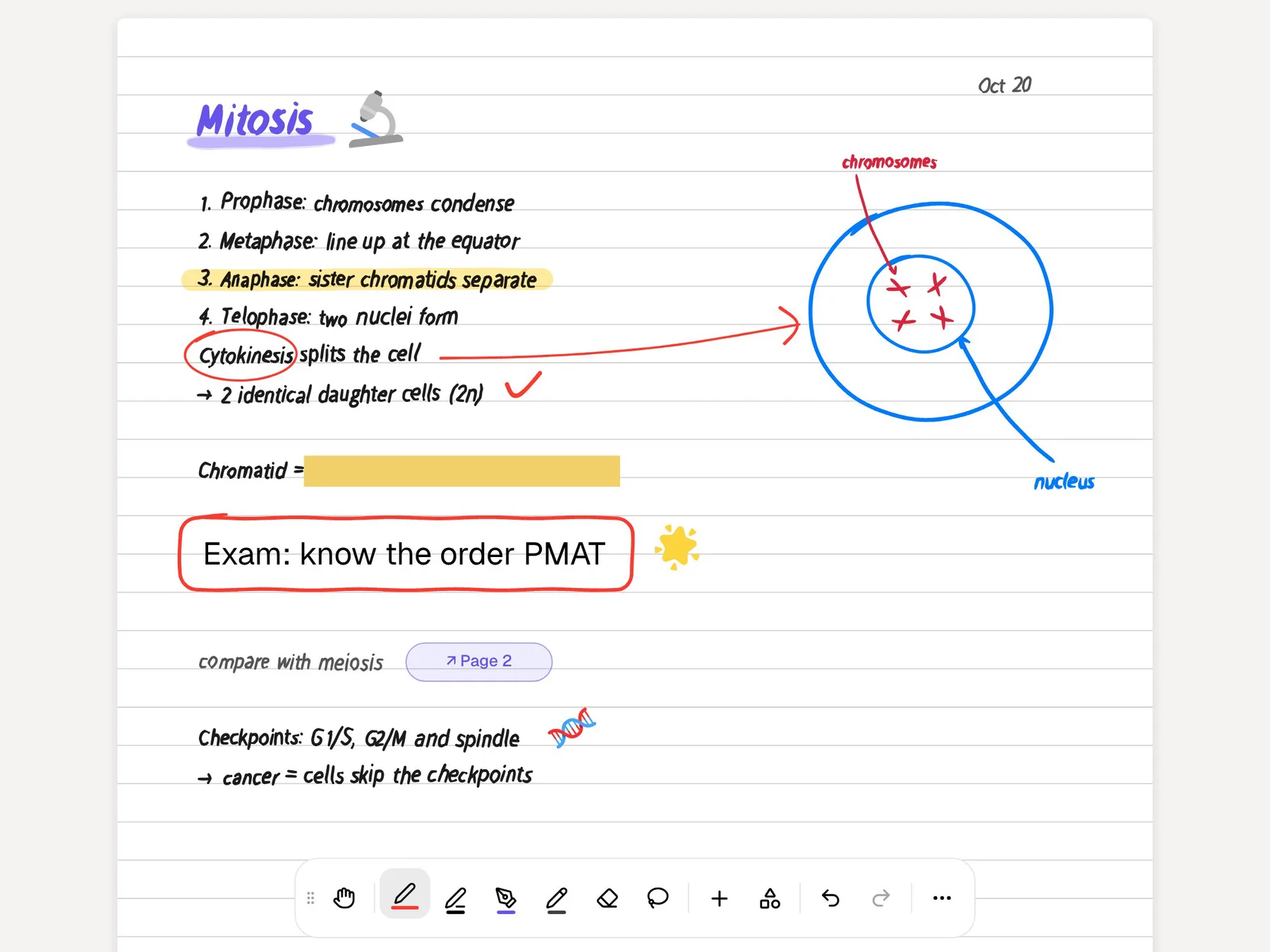
Notability has been one of the standard iPad apps for lecture notes for years, and its signature move is still the reason people choose it: record the lecture while you write, then tap any word on the page to hear what was being said when you wrote it. It also generates summaries, quizzes and flashcards from your notes through a feature called Learn, and it now runs on Android and Windows as well as Apple devices.
PocketNote starts from the other end. It is an AI study app: you bring slides, PDFs, recordings and your own handwritten notes, and it builds flashcards with spaced repetition, quizzes that explain every answer, an oral exam, a study plan built around your exam date and podcast-style audio reviews. It has its own handwriting canvas on iPad, including Note Replay for audio synced to ink, but that canvas is younger than Notability's.
So the useful question is what each app does with a lecture after the writing stops. This page compares them on that, using Notability's own pricing and help pages as they stood in November 2026, and it says plainly where Notability is still the better pick.
At a glance
PocketNote vs Notability
| Feature | PocketNote | Notability |
|---|---|---|
| Built for | Studying your course material with AI | Handwritten and typed notes, plus AI study tools |
| Handwriting | iPad with Apple Pencil; drawing in the browser | Its core feature, with years of polish |
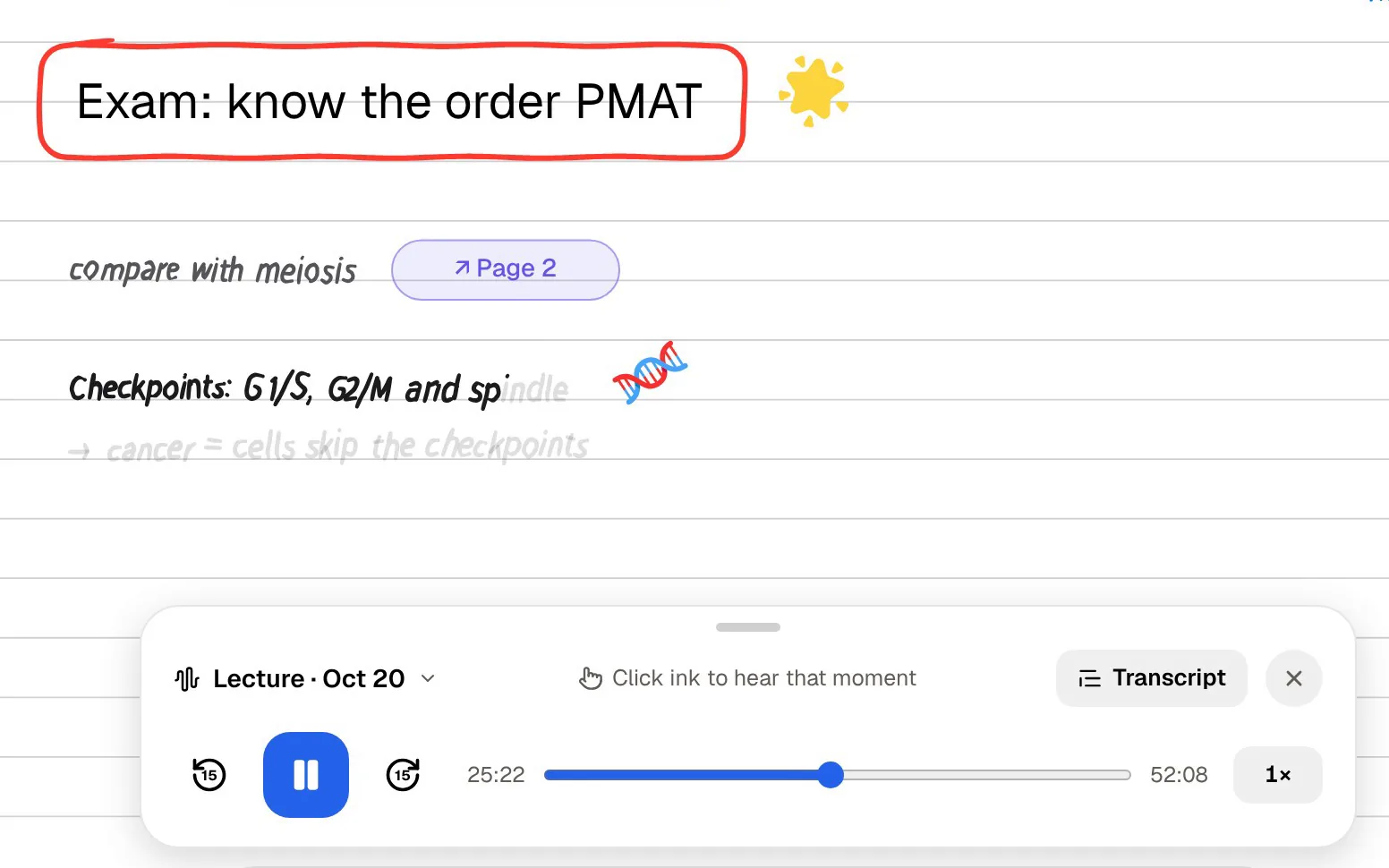
| Audio synced to writing | Note Replay shows the strokes as audio plays | Tap a word or sketch to hear that moment |
| Lecture transcript | Recorder gives transcript, summary and notes | Limited on Plus, live and unlimited on Pro |
| Flashcards | Generated; rate Again / Hard / Good / Easy | Generated by Learn; spaced repetition on imported sets |
| Quizzes | Every option explained | Learn quizzes, one note at a time |
| Oral exam | Prof. Poki asks and follows up | Not advertised |
| Exam planning | Daily plan to your exam date, reminders, mastery | Exam prep on the Home tab with progress |
| Audio reviews | Podcast-style episode with captions | Not advertised |
| AI chat | Poki answers from your material, with citations | Chat with your note (Pro) |
| AI marks your PDF | Highlights, underlines or circles on request | Not advertised |
| Apps | Web, iPhone, iPad | iPad, iPhone, Mac, Windows, Android, web |
| Pricing | Free to start; Basic and Plus plans | Free Starter (5 notes); Lite, Plus, Pro yearly |
Checked against each product's own website and help pages, November 2026. Plans and features change; confirm current details there.
What Notability does well, and why students stay
Notability's strength is that the recording and the writing live in the same note. Its help centre puts it simply: recordings are linked to your annotations, and in playback mode you tap a word, sketch or photo with the Hand tool to hear what was said at that exact moment. Anything you add while a recording plays is synced as well. Playback runs at 0.7x, normal, 1.25x, 1.5x or 2x, clips can be trimmed, split and merged, and a Voice Boost slider lifts a lecturer recorded from the back of the room.
It also runs almost everywhere now. Notability's apps page lists Mac, Windows, iPad, iPhone, Android (version 12 and up) and the web, so a student with an iPad at lectures and a Windows laptop at home can keep one library. Recent releases added version history, PDF outlines, folders, live collaboration and a Business plan.
And the basics people judge a handwriting app by have had years of refinement: the ink, PDF markup, the template gallery (its pricing page mentions more than 20,000 templates) and a library that feels like a binder. If you already have three semesters of notes in Notability, that history is worth something.
Notability's study features, checked in November 2026
Notability is no longer only a note app. Its Learn feature, available on the Plus and Pro plans, creates summaries, quizzes, flashcards and fill-in-the-blank exercises from a note, a PDF or a recording. Since the August 2026 releases, flashcards, quizzes and exam prep sit on a Home tab that tracks your progress, quizzes pick up where you left off, and a Study Timer runs focused sessions with breaks.
Flashcards gained spaced repetition too. Notability's help page on flashcard import says imported sets, typed in by hand or brought over from Anki as TXT, CSV or APKG files, are rated Again, Hard, Good or Easy, and the rating decides when a card returns. The same page notes that this works on Notability Cloud only.
A few limits are worth knowing before you rely on it. Learn needs at least 250 words of content and tops out around 20,000. A quiz can only be built from one note, and quizzes can't currently be exported or added to a note. Plus includes a set amount of Learn usage shared across features, while Pro is unlimited. Chat with your note, live transcripts and real-time Smart Notes are Pro features.
Recording a lecture: tap-to-hear versus Note Replay
Both apps let you record while you write and connect the two afterwards, but they show the link differently. In Notability you press play and tap the page, and the recording jumps to the moment you wrote that word. In PocketNote, Note Replay plays the audio back and shows the strokes you were writing at each moment, so you see the page fill in alongside the lecturer's voice.
PocketNote also has a separate lecture recorder for when you would rather listen than write. Record in the app and the lecture becomes one item with the audio, a transcript, a summary and notes, and that item can feed flashcards, a quiz or an audio review straight away. Recordings you already have can be imported as MP3, WAV, M4A or OGG.
On the recording tools themselves, Notability is ahead. Speed presets, clip editing, Voice Boost and live transcripts on Pro have had more time to mature. If tapping a word to hear the sentence behind it is something you do every evening, Notability does it with less friction.
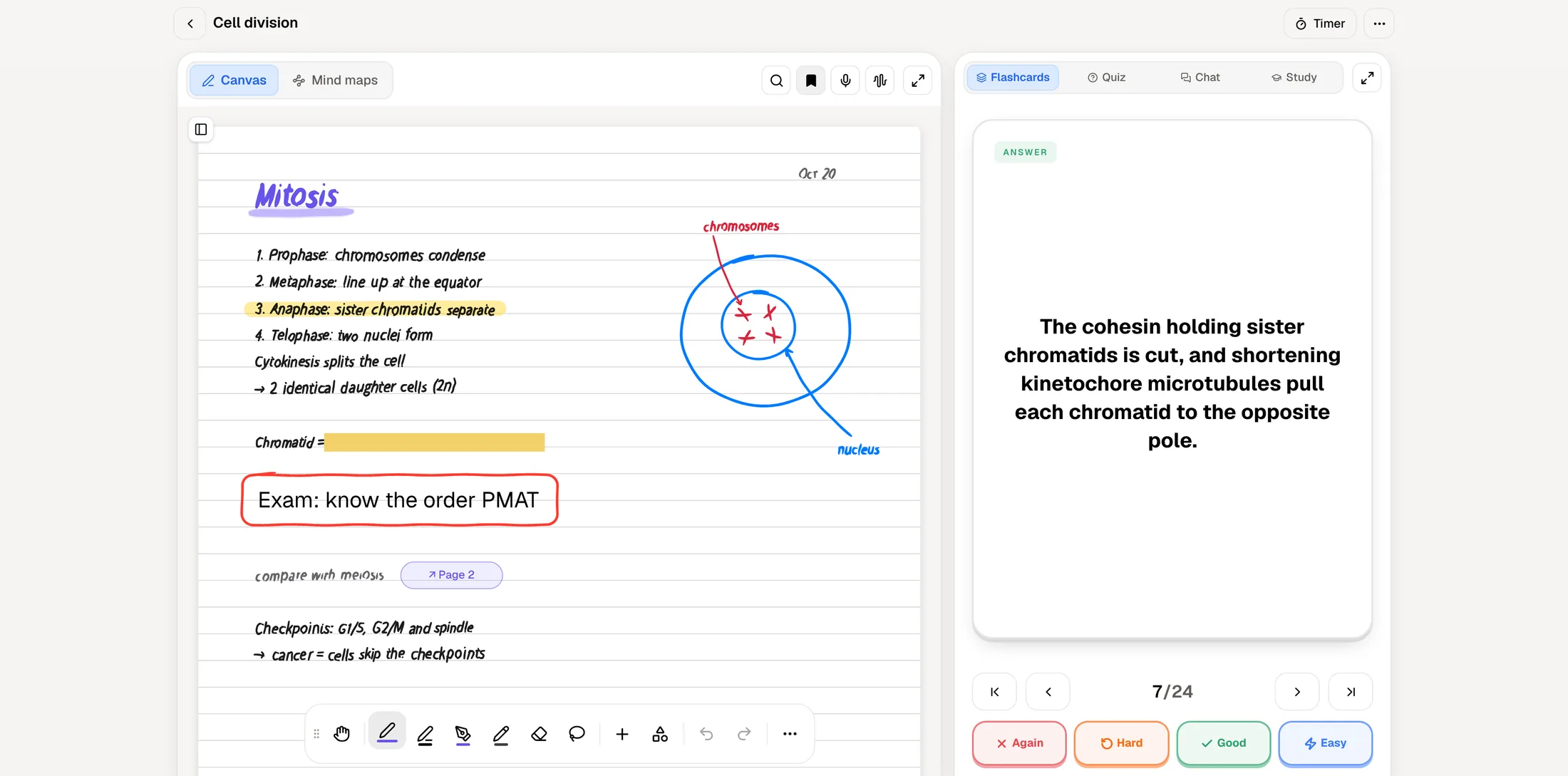
The writing side of PocketNote covers what a lecture needs: pens, highlighters and fountain-pen ink, shape snapping, a zoom window for small writing, page templates including Cornell, and a lasso that turns handwriting into text or sends a selection to Poki. It also has a tape tool that hides answers on the page so you can test yourself later, which is a revision feature disguised as a pen.
What PocketNote does after the writing stops
PocketNote's edge is the range of study material it builds from the same source. From a handwritten note, a PDF or a recorded lecture it makes flashcards you rate Again, Hard, Good or Easy, quizzes where every option comes with the reason it is right or wrong, mind maps, written summaries, slide decks and a podcast-style audio review with captions that follow the voices.
The oral exam is the tool Notability doesn't advertise. Prof. Poki asks a question out loud or in text, you answer in your own words, and it keeps probing until you can explain the idea rather than just recognise it. That is a different kind of practice from picking an option in a multiple-choice quiz, and it suits subjects where the exam asks you to explain.
Poki can also work on the page itself. It sees a PDF page as you see it, including your highlights and handwriting, and when you ask it to highlight the key definitions on page 3 it marks them on your PDF; one tap undoes its marks. Answers in chat come from your own material with citations, not from the open web.
Exam prep: Notability's Home tab and PocketNote's study plan
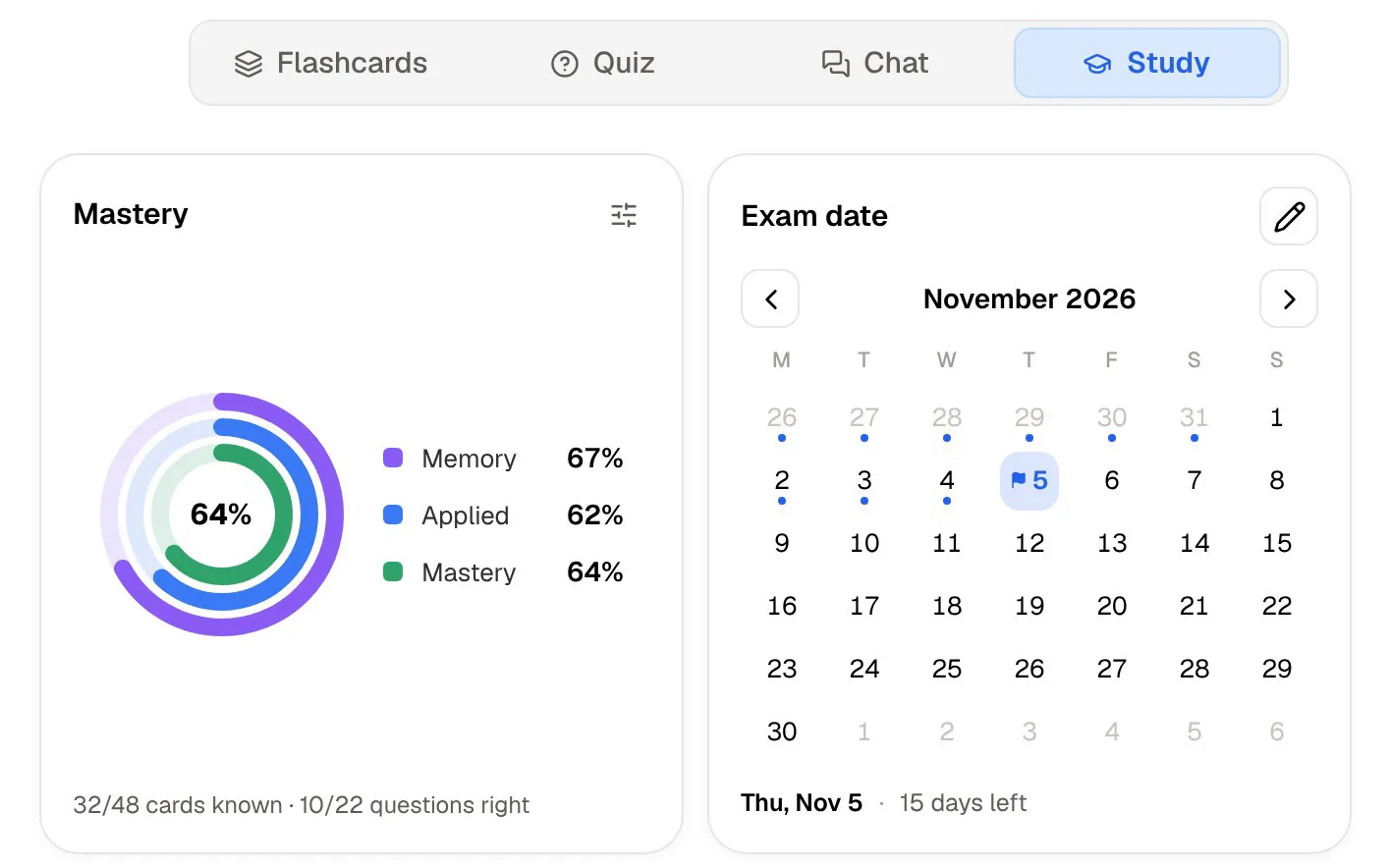
Notability's Home tab gathers flashcards, quizzes and exam prep and shows your progress as you go. PocketNote's study plan starts from a date instead. You set the exam, and it plans what to cover each day, sends reminders and tracks three scores (memory, applied and mastery) across flashcards, quizzes, the oral exam, slide decks, podcasts and live chat.
The bigger difference is scope. Notability builds a quiz from one note at a time. In PocketNote a notebook collects a course's sources in one place, with the study panel beside them, and Poki searches across your notes when you ask a question. When an exam covers twelve lectures, two textbook chapters and your own notes, studying across all of it matters more than polishing any single page.
Where Notability is the better choice
Notability wins when the note itself is the main product, and when you need it on devices PocketNote doesn't cover. PocketNote's handwriting is newer than Notability's, and it has no Android or Windows app, so be honest with yourself about which side of studying takes most of your time.
- You want native apps on an iPad, an Android tablet, a Windows laptop or a Mac. PocketNote is iPhone, iPad and the web.
- Tap-to-hear playback is your main revision habit, and you value clip editing and Voice Boost.
- You want live transcripts while the lecture is happening (Notability Pro).
- You collaborate on notes in real time, or your workplace uses Notability for Business.
- You have years of notes in Notability and the feel of its ink matters more to you than extra study tools.
Pricing, side by side
At the time of writing (November 2026), Notability's pricing page lists a free Starter plan with 5 notes, all editing tools and PDF import, and three yearly plans: Lite at $14.99 (unlimited notes), Plus at $19.99 (adds limited Learn, YouTube link-to-note and transcription) and Pro at $99.99 (unlimited Learn, live transcripts and chat with your notes). All three were shown with a 20% discount. A one-time Classic purchase is also offered again. Learn itself needs Plus or Pro.
PocketNote is free to start. The Basic plan adds live voice, premium AI models and connectors, and Plus adds unlimited notebooks, the longest podcasts and all models. Prices change, so see pocketnote.app for current plans. Notability's homepage also advertises a Learn Guarantee for the semester; read its terms on Notability's site before counting on it.
Moving notes from Notability, or using both
Notability can share a note as a PDF, and with the Recordings toggle switched on it bundles the audio in a .zip file. PocketNote imports the PDF, and the recordings too if they are MP3, WAV, M4A or OGG. Your handwriting arrives as part of the PDF page: Poki can read it, answer questions about it and build study material from it, and you can keep annotating on top, but the strokes are no longer editable ink.
Many students won't switch at all, and that is a reasonable choice. Keep writing in Notability during the week, share that week's notes as PDFs on Sunday, and let PocketNote turn them into flashcards, a quiz and an audio review for the bus. Notability stays your notebook, and PocketNote handles the revision built on top of it.
The verdict
Which one should you pick?
Pick PocketNote if…
- You want study material built for you: spaced-repetition flashcards, explained quizzes, an oral exam and audio reviews from the same notes.
- You revise from many sources at once (slides, PDFs, YouTube lectures, recordings) and want answers cited back to them.
- You want a day-by-day plan to an exam date, with reminders and mastery scores.
- You would like an AI that can read your annotated PDF page and mark it up when you ask.
Pick Notability if…
- Handwriting and tap-to-hear audio are the heart of how you study, and you value years of polish there.
- You need native apps on Android, Windows or Mac as well as iPad.
- You want live transcripts during class and real-time collaboration on notes.
Try it yourself
See it with your own notes
PocketNote is an AI study app for iPhone, iPad and the web. You add your lecture slides, PDFs, recordings, YouTube links and handwritten notes, and Poki answers questions from them with citations. From the same material it builds flashcards with spaced repetition, quizzes with explanations, an oral exam, a study plan to your exam date and podcast-style audio reviews.
If Notability already holds your notes, you don't have to move them. Share a week's notes as a PDF, import it, and see whether the study side is worth adding to your routine. It is free to start.
Frequently asked questions
Sources
Keep reading