

Noteshelf is the handwriting app for students who care how their notes look. Noteshelf 3 comes with realistic pens, hundreds of stickers, a shelf of notebook covers, washi tape and sticky notes, plus Noteshelf AI, which can summarise a handwritten page, explain a term, translate text and generate notes on a topic. It runs on iPad, iPhone and Mac, and on Android and Windows too.
PocketNote is an AI study app with a handwriting canvas attached, rather than a notebook with AI attached. You bring your notes, slides, PDFs and recorded lectures, and it builds flashcards with spaced repetition, quizzes that explain every answer, an oral exam, mind maps, a study plan to your exam date and podcast-style audio reviews.
The two overlap less than their feature lists suggest. This page looks at what each does well, where Noteshelf stops and PocketNote starts, and how to use them together without rewriting a single page, based on Noteshelf's own site and App Store listing in November 2026.
At a glance
PocketNote vs Noteshelf
| Feature | PocketNote | Noteshelf |
|---|---|---|
| Built for | Studying from your material | Beautiful handwritten notebooks |
| Pens and stationery | Pens, fountain, watercolour, crayon; hundreds of stickers | 4 pens, 2 highlighters, 500+ stickers, 100+ covers |
| PDF annotation | Highlight, write and draw on the page | Highlight, underline, strikeout, sticky notes |
| Recording | Note Replay; recorder with transcript and notes | Record and replay; AI transcription and summary |
| Handwriting to text | Lasso a selection to convert it | Premium: recognition and search in 65 languages |
| AI on a page | Poki sees the page and marks it on request | Summarise, explain, translate, generate notes |
| Flashcards with spaced repetition | Yes, generated from your notes | Not advertised |
| Quizzes and oral exam | Explained quizzes; Prof. Poki oral exam | Not advertised |
| Audio reviews | Podcast-style episode with captions | Not advertised |
| Apps | Web, iPhone, iPad | iPad, iPhone, Mac, Android, Windows |
| Free version | Free to start | Up to 3 notebooks with core pens and paper |
Checked against each product's own website and App Store listing, November 2026. Plans and features change; confirm current details there.
What Noteshelf gets right
Noteshelf is built around the pleasure of a paper notebook. Its site lists four pen styles and two highlighter styles, more than 500 stickers, more than 100 notebook covers, sticky notes and washi tape, and a toolbar you can rearrange by dragging tools in or out. Focus mode clears every menu off the screen so only the page is left. For students who take notes partly because they enjoy it, that matters more than any AI feature.
The organisation is sensible too: notebooks in folders and subfolders, filters for photos and tags, and handwriting search that finds a word across every notebook. You can type notes, convert handwriting to text, draw shapes that snap into clean lines and arrows, and annotate PDFs with highlights, underlines and strikeouts. The App Store listing adds Word documents, PowerPoint files and images to what you can import and mark up.
Platform coverage is broad. Noteshelf 3 syncs across iPad, iPhone and Mac through iCloud, and there are Android (Google Play and Galaxy Store) and Windows versions that sync with each other through Google Drive. Noteshelf's FAQ says full sync across every platform is still in the works, and auto-backup to Google Drive, OneDrive, Dropbox or WebDAV covers the gap.
Noteshelf AI: help on the page you're looking at
Noteshelf AI works on the page in front of you. Its FAQ lists four jobs: summarise handwritten pages, explain tricky concepts, translate text and generate notes on a topic. The AI page adds audio transcription that summarises key points, plus Apple Intelligence features on iOS such as suggested tags and Image Playground. A recent update also lets you turn audio transcriptions into short summaries and ask questions about them, again through Apple Intelligence.
Noteshelf is open about how it works. The FAQ says Noteshelf AI is powered by OpenAI's API, so when you use it the content of your current page is sent to OpenAI for processing, and that Fluid Touch, the developer, has no access to what you create. AI use runs on credits, and the App Store listing says Premium includes 100 a month.
What Noteshelf doesn't advertise is study material: no flashcards, no quizzes, no review schedule. That is not a flaw in a notebook app, but it is the gap a student usually feels a few weeks before exams.
From a finished page to a revision session
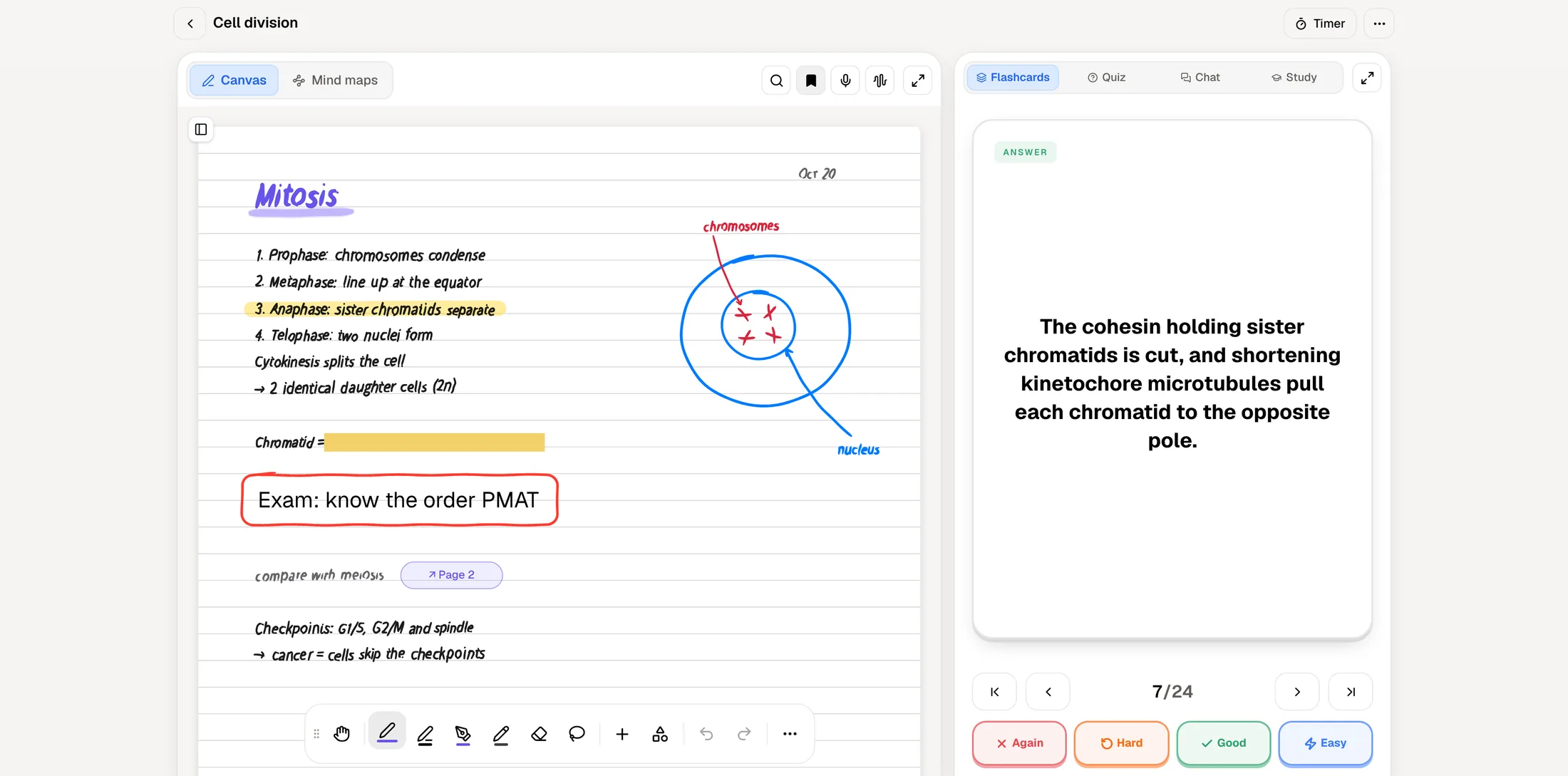
In PocketNote, a page of notes is where the studying starts. Write by hand on iPad, or import a PDF of notes you wrote elsewhere, and ask for flashcards: you rate each one Again, Hard, Good or Easy and it comes back when you are about to forget it. Ask for a quiz and every option comes with the reason it is right or wrong. Ask for written notes and you get an editable summary of the lecture with the key concepts laid out.
Poki, the assistant, answers from your own material with citations instead of the open web. It can look at a PDF page as you see it, including your highlights and handwriting, and highlight, underline or circle passages when you ask. Your files are not used to train public AI models.
PocketNote's handwriting canvas is capable but younger than Noteshelf's. It has pens, highlighters, fountain-pen, watercolour and crayon inks, shape snapping, a zoom window for small writing, templates including Cornell and planners, and hundreds of stickers. It doesn't try to match Noteshelf's cover shelf or its depth of journaling stationery.
Two tools go further than a notebook usually does. The oral exam has Prof. Poki ask you questions out loud or in text and keep probing until you can explain the idea in your own words. The study plan takes your exam date, works out what to cover each day, reminds you, and tracks memory, applied and mastery scores as you work through flashcards, quizzes and the rest.
Lectures: recording in Noteshelf and in PocketNote
Noteshelf lets you record lectures, meetings or discussions while you write and replay them later, and its AI transcribes recordings and summarises the key points. Noteshelf's own pages don't describe tapping a stroke to jump to that moment in the audio, so check that in the app if it is how you like to review. The same recorder works for group-project meetings and seminar discussions.
PocketNote offers two routes. Note Replay records while you write on iPad, and playback shows the strokes you were writing at each moment. The lecture recorder turns a class into one item with audio, a transcript, a summary and notes. Either can then become flashcards, a quiz or an audio review: a podcast-style episode about the lecture, with captions that follow the voices, that you can play while walking to the exam hall.

Seeing a whole course at once
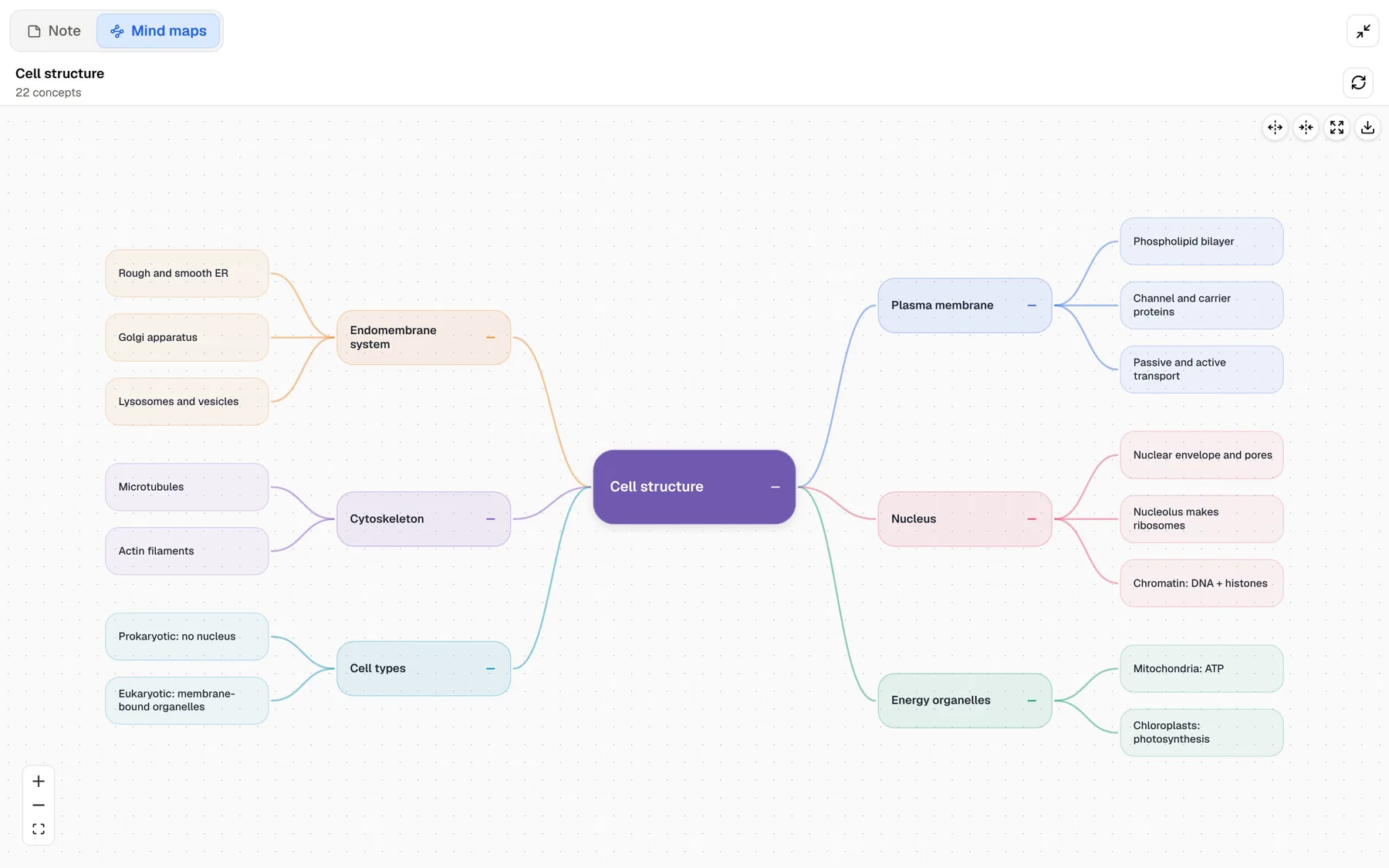
Notebooks are good at holding pages in order and less good at showing how a course fits together. PocketNote generates a mind map from your material, with colour-coded branches you can follow from a topic down to the details, whether the source is a textbook chapter, a recorded lecture or your own notes.
This is where the difference in purpose shows: Noteshelf helps you make a page you are proud of, while PocketNote helps you see what is on all of those pages and check whether you can recall it.
The same source can also become a slide deck, a data table or a short explainer video, and PocketNote produces study material in more than 50 languages, so notes taken in one language can be revised in another. None of this replaces writing the notes yourself; it picks up where the notebook leaves off.
Where Noteshelf is the better choice
Noteshelf is the right pick for a good number of students, and PocketNote is not trying to replace it for them. If the list below sounds like you, keep Noteshelf as your main app and treat PocketNote as an optional extra for exam season.
- Your notes double as a journal or planner, and stickers, covers and washi tape are part of why you write.
- You need the app on Android or Windows as well as Apple devices. PocketNote is iPhone, iPad and the web.
- You want handwriting recognition and search in many languages (Noteshelf's App Store listing says 65).
- You mostly want quick help on the page in front of you, such as a summary, an explanation or a translation, rather than a full study system.
- You prefer a calm writing space with Focus mode and a toolbar arranged exactly your way.
- You annotate PowerPoint files directly. PocketNote imports PDF, Word, Excel, CSV, TXT and Markdown, so slides need exporting to PDF first.
Plans and prices
Noteshelf 3 is free to download, with up to 3 notebooks and the core pens and paper. Premium adds unlimited notebooks, all templates, handwriting recognition, auto-backup and more AI credits. Subscriptions are sold through the App Store, Google Play or the Microsoft Store, and the price depends on the store and your region, so check the listing on your device. The US App Store listing showed weekly, monthly and yearly subscriptions alongside a lifetime option. Noteshelf's FAQ says it can't offer individual student discounts, though schools can buy through Apple School Manager.
PocketNote is free to start. Paid plans are Basic (live voice, premium AI models and connectors) and Plus (unlimited notebooks, the longest podcasts and all models). See pocketnote.app for current plans and prices.
Using Noteshelf and PocketNote together
You don't have to give up your notebooks. Noteshelf's App Store listing says it exports and shares notes as PDFs or images in one tap, and PocketNote imports PDFs directly or from Google Drive, OneDrive and Dropbox, so the pages you want to study can come straight across. Your handwriting arrives as part of the page: Poki can read it and build cards and quizzes from it, though it won't be editable ink in PocketNote.
A routine that works for many students: write and decorate in Noteshelf during the week, move that week's pages over on Sunday, and spend ten minutes a day on the flashcards PocketNote schedules. Closer to the exam, set the date in the study plan and let it decide what to cover each day. Handwritten notes made in PocketNote export to PDF and can be shared by link, so a page can travel back the other way if a classmate uses Noteshelf.
The verdict
Which one should you pick?
Pick PocketNote if…
- You want your notes turned into flashcards with spaced repetition, explained quizzes and an oral exam.
- You revise from slides, PDFs and recordings as well as your own pages, and want answers cited back to them.
- You want an audio review of a lecture and a study plan counted down to the exam.
Pick Noteshelf if…
- Stickers, covers and journaling-style pages are part of why you take notes.
- You need Android or Windows apps alongside iPad, iPhone and Mac.
- You want light AI help on one page at a time rather than a study system.
Try it yourself
See it with your own notes
PocketNote is an AI study app for iPhone, iPad and the web. It takes your handwritten notes, PDFs, slides, YouTube lectures and recordings and turns them into flashcards with spaced repetition, quizzes with explanations, an oral exam, mind maps, audio reviews and a study plan to your exam date. Poki answers your questions from that material, with citations.
Keep Noteshelf for the notebooks you enjoy keeping, and bring the pages here when it is time to revise. PocketNote is free to start.
Frequently asked questions
Sources
Keep reading