

Noteful is the iPad note app for people who want less. Its developer describes the goal as the best paper-like writing experience on a tablet, and the app keeps to it: a custom vector ink engine, three brushes, tags instead of folders, layers, synced audio recording and a minimal interface. It is free to use without a time limit, and Noteful Pro is a one-time purchase rather than a subscription. There is no AI in its feature list.
PocketNote is close to the opposite. It is an AI study app that takes your notes, PDFs, slides and lecture recordings and builds flashcards with spaced repetition, quizzes that explain every option, an oral exam, a study plan to your exam date and podcast-style audio reviews. It has a handwriting canvas on iPad, but its reason to exist is the revision that comes after.
Comparing them is really asking whether you want your note app to stay quiet. This page explains what Noteful does well, what it leaves out on purpose, and how a student can keep its calm notebook while still getting the study tools before exams. Noteful details come from its own site and App Store listing, checked in November 2026.
At a glance
PocketNote vs Noteful
| Feature | PocketNote | Noteful |
|---|---|---|
| Approach | AI study app with a notes canvas | Minimal handwriting notebook |
| How you pay | Free to start; Basic and Plus plans | Free; Noteful Pro is a one-time purchase |
| Pens | Pens, highlighters, fountain, watercolour, crayon | Ballpoint, fountain pen, highlighter |
| Organisation | Colour-coded folders, stars, recent, search | Tags and nested tags |
| Audio synced to notes | Note Replay shows the strokes as audio plays | Playback position synced with the notes |
| Import | PDF, Word, Excel, CSV, TXT, Markdown, audio, links | PDFs and Microsoft Office documents |
| Handwriting to text | Lasso converts a selection; handwriting search | Experimental lasso-to-text (iOS 27+) |
| AI assistant | Poki: cited answers, can mark your PDFs | No AI features described |
| Flashcards and quizzes | Generated; spaced repetition; explained answers | Not advertised |
| Study plan and reminders | Plan to your exam date | Not advertised |
| Apps | Web, iPhone, iPad | iPad and iPhone (also listed for Apple silicon Macs) |
Checked against each product's own website and App Store listing, November 2026. Plans and features change; confirm current details there.
Why students pick Noteful
Noteful's appeal starts with the ink. Its site describes a custom-built engine that turns strokes into high-resolution vector ink, with three brushes (ballpoint, fountain pen and highlighter), adjustable sizes and colours, and shape recognition. The lasso moves and resizes what you wrote, the eraser is precise, a double tap on the Apple Pencil switches to it, and undo and redo are unlimited.
Organisation is tag-based. You add a #tag, or a nested #subject/topic tag, anywhere in a notebook, then browse notebooks or pages by tag and rename, delete or reassign tags as the term changes. Noteful argues this is more flexible than folders, since notes can be organised by subject, by topic or by priority.
Layers let you annotate on top of an imported PDF or slide without touching the original, and you can hide, show or reorder them. Audio recording sits in the free tier: record while you take notes, and playback is synced with the notes. The interface is deliberately sparse, with a toolbar you can place in different orientations and nothing that competes with the page.
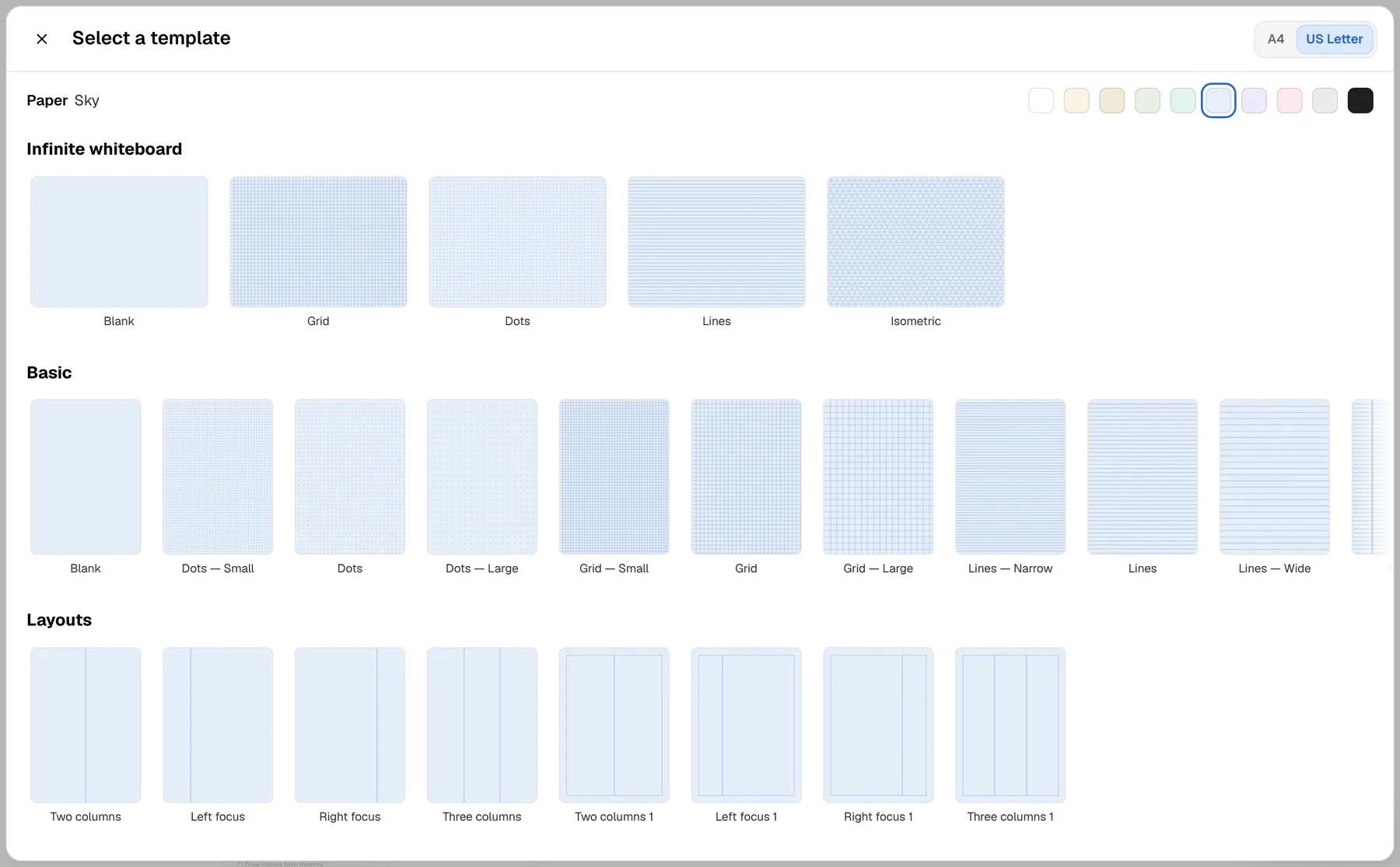
The practical basics are covered too. You can mix several paper templates in one notebook, import PDFs and Microsoft Office documents, add images, shapes and typed text, and start a quick sketch with Quick Create. Split View support lets Noteful sit beside another app, and annotations export and share as PDF when you are done.
What Noteful leaves out on purpose
Noteful's App Store listing describes no AI features. The closest thing is an experimental option, added recently, that converts a lasso selection including handwriting to text, and it requires iOS 27 or later. There are no flashcards, quizzes or study schedules in its feature list, and its site invites users to suggest what should come next.
For many students that is a feature. A notes app without AI buttons is a notes app with nothing to distract you in a lecture, nothing to pay for monthly and no question about where your pages are being sent. The only cost of that simplicity shows up later, when the exam is close and the notes need turning into something you can test yourself on.
Handwriting search isn't in Noteful's feature list either, which matters at revision time when you remember a term but not which lecture it came from. PocketNote searches through your handwriting, and Poki searches your notes when you ask about a topic.
Getting a term's material into PocketNote
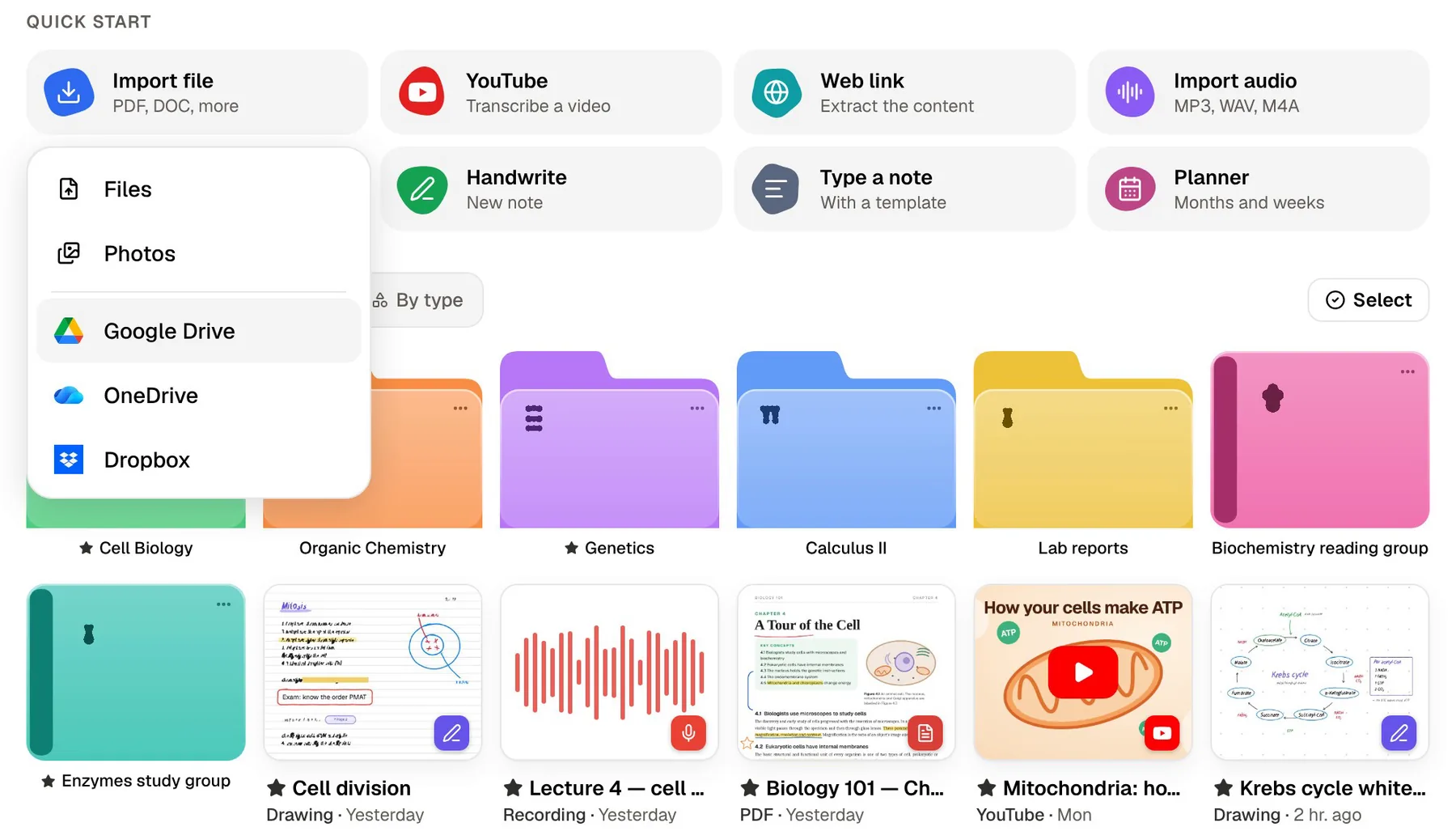
PocketNote is built for that later moment, and it starts by taking in everything the course hands you. You can upload PDF, Word, Excel, CSV, TXT and Markdown files, import audio as MP3, WAV, M4A or OGG, paste a YouTube link (the transcript comes with it) or a web link (the article is extracted), and pull files from Google Drive, OneDrive or Dropbox. If your course involves papers, you can search arXiv and SSRN inside the app and save one to your library.
Notes you wrote in Noteful come across too. Noteful exports and shares handwritten annotations as PDF, and once the PDF is in PocketNote, Poki can look at each page as you see it, including your handwriting and highlights. It answers questions from those pages with citations, and it can highlight, underline or circle passages when you ask, with one tap to undo.
Everything is organised in colour-coded folders, with starred and recent items and search across the library. It is busier than Noteful by design, because it holds the whole course rather than one notebook.
Recall practice from your own pages
Once your notes are in, PocketNote generates flashcards from them. You rate each card Again, Hard, Good or Easy, and it comes back when you are about to forget it, which is the spaced-repetition idea that flashcard apps have used for years. Quizzes explain every option, so a wrong answer tells you what you confused.
There is also a low-tech version of self-testing in PocketNote's own handwriting canvas: a tape tool that covers answers on a page so you can reveal them one at a time. Noteful's layers can be hidden and shown, though Noteful doesn't present them as a study tool; PocketNote's tape is built for exactly that job.
When you need to explain rather than recognise, the oral exam has Prof. Poki ask questions out loud or in text and keep probing until you can explain the idea in your own words. For the run-up to an exam, the study plan takes the date, plans what to cover each day, reminds you and tracks memory, applied and mastery scores, and a study timer with ambient sounds covers the sessions themselves.
Audio: Noteful's synced playback and PocketNote's two recorders
Noteful records audio while you write and keeps the playback position synced with your notes, and an update added 0.5x playback speed, which helps when a lecturer races through a derivation you need to hear twice. For a free feature in a minimal app, that covers the basic need of going back over a lecture you half caught.
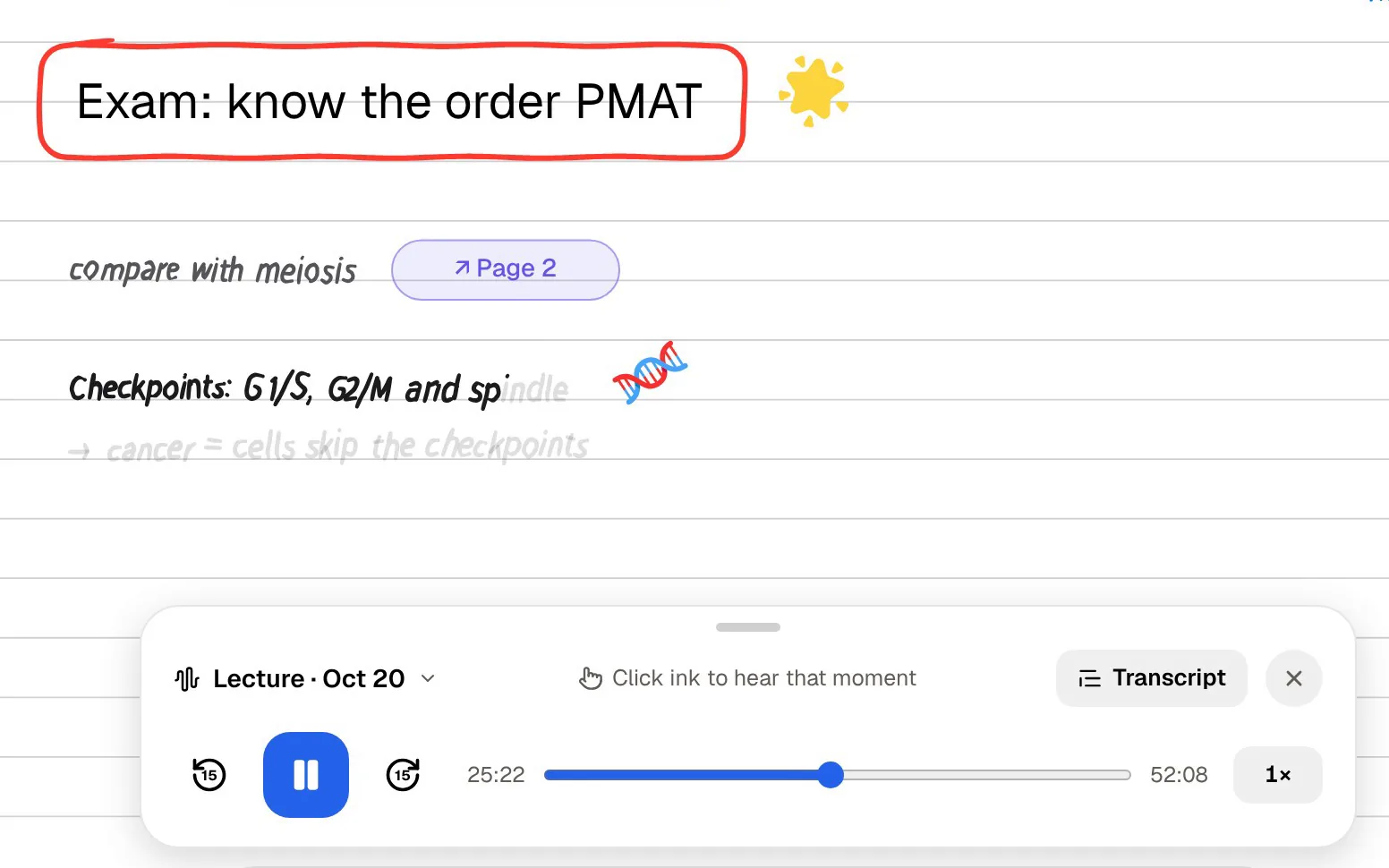
PocketNote offers two recorders. Note Replay records while you write on iPad, and playing it back shows the strokes you were writing at that moment. The lecture recorder is for when you want to listen and not write: it turns the class into one item with the audio, a transcript, a summary and notes, which can become flashcards or a quiz straight away.
PocketNote can also give audio back to you. An audio review is a podcast-style episode about your material with captions that follow the voices, made for a commute or a walk, and on paid plans live voice lets you ask Poki to quiz you out loud and hear the answer.
Where Noteful is the better choice
Noteful is the better app for a student who wants writing to stay simple and cheap, and it does that well. PocketNote's handwriting canvas is capable, but it is part of a larger app with more on screen. If the bullets below describe you, PocketNote is at most an add-on for exam season.
- You want a calm notebook with no AI features and nothing to distract you in lectures.
- You prefer a one-time purchase to any subscription.
- You organise by tags, including nested tags, rather than folders.
- You annotate on layers so the original PDF or slide stays clean.
- You import Microsoft Office documents to write on directly.
Cost: one purchase versus a study subscription
Noteful is free to use without a time limit. Features marked with an asterisk in its App Store listing, including layers and sync across your iPhone and iPad, need Noteful Pro, which is a one-time in-app purchase that keeps them switched on for good. The App Store shows the current price for your region, and there is nothing to renew.
PocketNote is free to start. Its paid plans are Basic (live voice, premium AI models and connectors) and Plus (unlimited notebooks, the longest podcasts and all models); see pocketnote.app for current prices. If you like Noteful's no-subscription approach, start with PocketNote's free plan for one course and only pay if the study tools save you time.
A simple two-app routine
Keep Noteful as your everyday notebook. Write in lectures with its three brushes, tag pages by course, and record audio whenever the lecturer moves fast.
Once a week, or when a topic ends, export the pages as PDF and add them to the course folder in PocketNote alongside the slides and readings. Generate flashcards and a quiz, review the cards on your phone in spare minutes, and set the exam date in the study plan when it is announced. Your notes stay in Noteful exactly as you wrote them, and the revision lives in PocketNote.
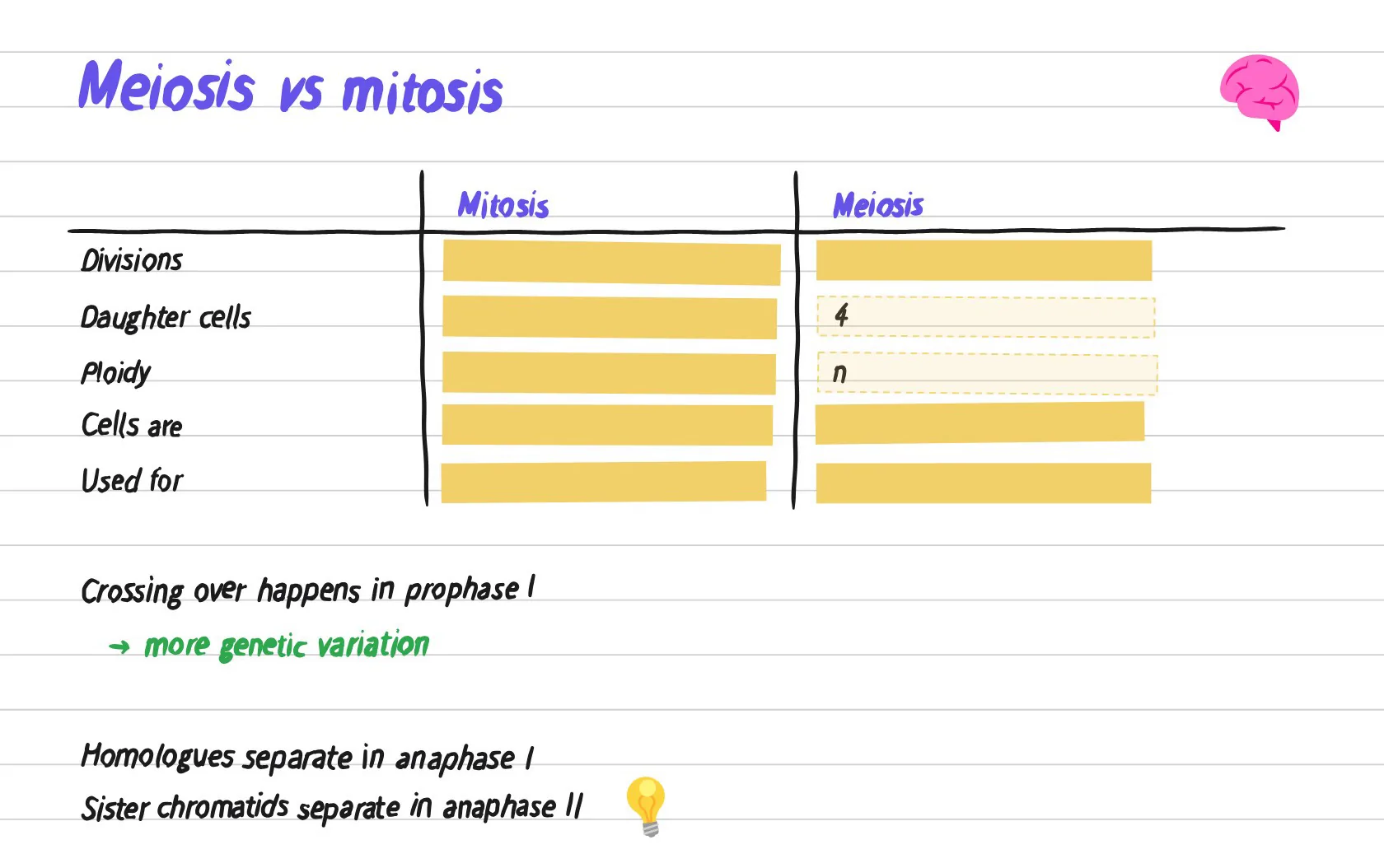
If you later want everything in one place, PocketNote's own canvas has lined, grid, Cornell and planner templates, a zoom window for small writing, shape snapping and a lasso that turns handwriting into text. Notes keep saving offline and sync when you are back online, so a lecture hall with poor Wi-Fi is not a problem for writing.
The verdict
Which one should you pick?
Pick PocketNote if…
- You want your handwritten notes turned into flashcards with spaced repetition and explained quizzes.
- You want an oral exam, audio reviews and a study plan that counts down to the exam.
- You study from slides, PDFs, recordings and YouTube lectures as well as your own pages.
Pick Noteful if…
- You want a minimal notebook with no AI and nothing to manage.
- You prefer a one-time purchase and tag-based organisation.
- Layers and a clean vector ink engine matter more to you than study tools.
Try it yourself
See it with your own notes
PocketNote is an AI study app for iPhone, iPad and the web. It takes your handwritten notes, PDFs, slides, YouTube lectures and recordings and generates flashcards with spaced repetition, quizzes with explanations, an oral exam, mind maps, audio reviews and a study plan to your exam date, with Poki answering questions from that material with citations.
You can keep Noteful as your quiet notebook and use PocketNote only for revision. It is free to start.
Frequently asked questions
Sources
Keep reading