
StudyFetch and PocketNote are about as close as two study apps get. Both take your course material, record lectures, generate notes, flashcards with spaced repetition, quizzes, audio and video, build a study plan, and give you an AI to ask questions. Line up their feature lists and you'll be ticking the same boxes for a while.
The difference is in how each one teaches. StudyFetch centres on Sparky, an AI tutor with a personality, lessons it delivers on your material, plugins that change its style and study games. PocketNote centres on your notebook: the notes you write, the PDFs you mark up and the files you import, with its assistant, Poki, working inside them and citing where each answer came from.
This page compares the two on the details, using StudyFetch's own feature pages and App Store listing as of November 2026, and says plainly where StudyFetch is the better pick.
At a glance
PocketNote vs StudyFetch
| Feature | PocketNote | StudyFetch |
|---|---|---|
| Core idea | Your notes and files, with Poki working inside them | An AI tutor, Sparky, built around your materials |
| Inputs | PDF, Word, Excel, CSV, TXT, Markdown, audio, YouTube, web links | PDFs, slides, Word, photos of notes, audio, video, YouTube |
| Citations | Yes, in Poki's answers | Yes, on flashcards and quiz questions |
| Lecture recording | Yes: transcript, summary, notes | Yes: Live Lecture with enhanced notes |
| Flashcards | Spaced repetition: Again / Hard / Good / Easy | Spaced repetition; five card formats incl. cloze |
| Testing | Explained quizzes; oral exam with Prof. Poki | Quizzes, practice tests, exam-specific questions |
| Study plan | Exam date, daily plan, reminders, mastery | Milestones and a cram mode |
| Audio | Podcast-style reviews with captions | Summary, lecture, podcast, audiobook or song |
| Writing your own notes | Block editor, Apple Pencil handwriting, PDF annotation | AI notes; upload photos of handwritten notes |
| Games | Not offered | Arcade study games |
| Platforms | Web, iPhone, iPad | Web, iOS, Android |
| Price | Free to start; Basic and Plus plans | Free to start; Premium subscription |
Checked against StudyFetch's and PocketNote's own sites, November 2026. Plans and features change; confirm current details with each product.
Two feature lists that mostly match
Start with what's the same, because it's most of the list. Both apps take PDFs, Word documents, audio and YouTube links. Both record a lecture in the app and turn it into notes: StudyFetch's Live Lecture transcribes in real time, then an Enhance Notes step produces summarised, in-depth or comprehensive notes, while PocketNote returns a transcript, a summary and notes.
Both generate flashcards with spaced repetition. StudyFetch asks you to rate your confidence on each card and brings back the ones you struggle with more often; PocketNote asks you to rate each card Again, Hard, Good or Easy and brings it back when you're about to forget it. Both build quizzes, both make podcast-style audio from your material, both make explainer videos, and both plan your studying towards a deadline.
Both also tie their output to your sources. StudyFetch says every flashcard and quiz question comes with citations back to your original materials; Poki answers from your files with citations to the source. If you were hoping one of them answered from your notes and the other made things up, that isn't the difference.
Even the logistics match. StudyFetch syncs your study materials across web and phone, and PocketNote syncs your library across the web app, iPhone and iPad by account. So the decision comes down to the parts that differ, which the rest of this page covers.
Where StudyFetch is the better choice
StudyFetch has a longer list of extras, and several of them are genuinely useful.
- You use Android. StudyFetch has web, iOS and Android apps. PocketNote has no Android app yet and runs in the browser instead.
- You like learning through games. Arcade turns your material into game-style challenges, such as matching pairs. PocketNote has no study games.
- You want varied card formats. StudyFetch cards can be term and definition, multiple choice, fill in the blank, audio or cloze deletion, mixed in one set.
- You're preparing for a named exam. StudyFetch offers exam-specific question practice in real exam formats, and its FAQ mentions students preparing for the MCAT, NCLEX, LSAT, GMAT, board exams and AP exams.
- You'd like to text your tutor. Text Sparky lets you study with Sparky from iMessage.
- You don't have material yet. StudyFetch can build study tools from a topic you type, without uploads.
- You want more audio styles. Audio Recap can be a summary, a lecture, a podcast, an audiobook or a song, and you can ask questions while it plays.
A tutor that teaches, or an assistant inside your notes
StudyFetch is built around Sparky as a teacher. Tutor Me delivers a lesson on your material, Sparky Visuals give visual explanations of your material, and plugins change how Sparky writes and teaches; you can choose from ready-made ones such as a mnemonic maker or an exam mode, or write your own. There are also community-published tutor characters with their own voice and manner.
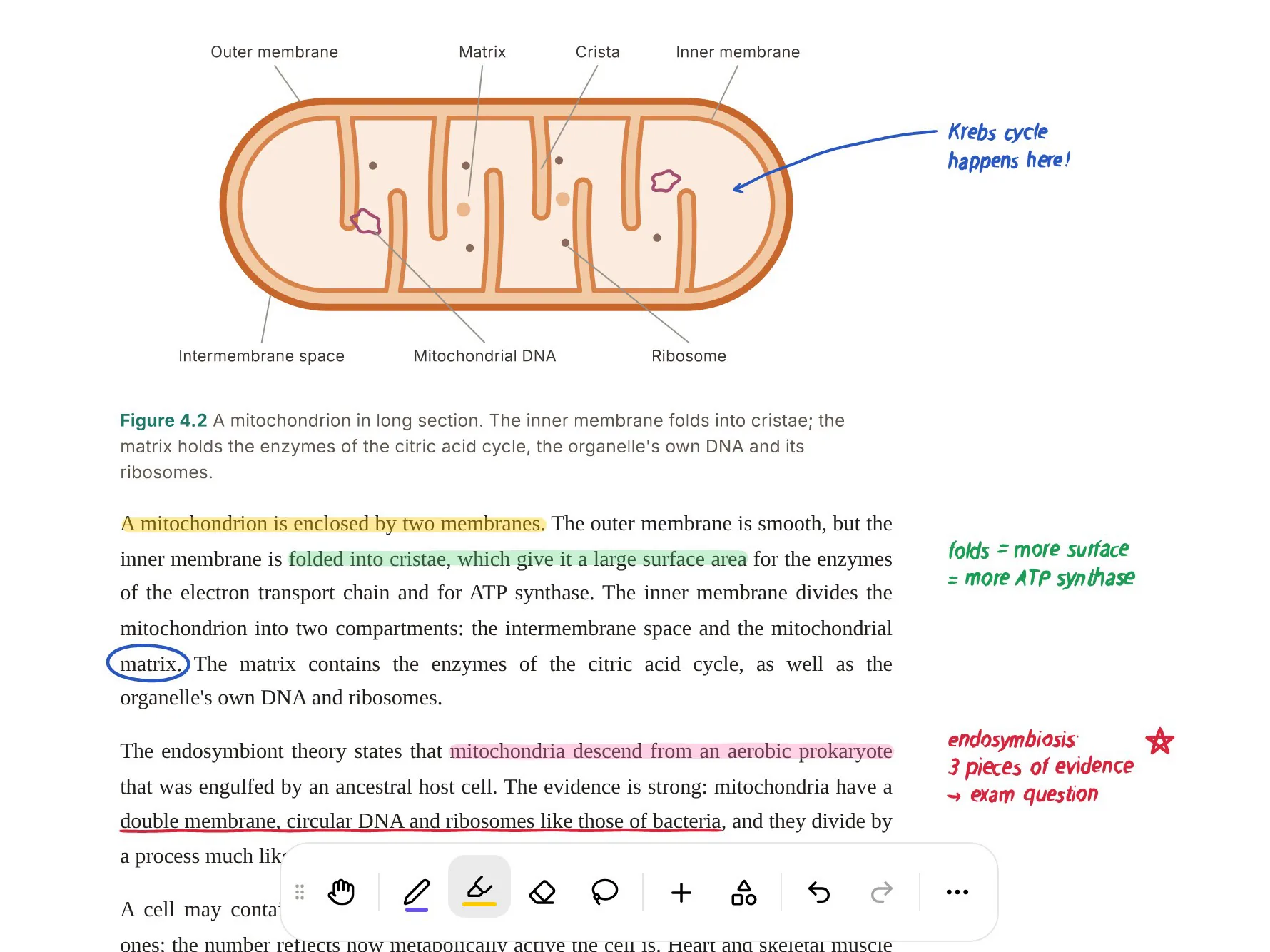
PocketNote's Poki is built around your notes. It shows its steps as it works, such as searching your notes or reading a specific item, so you can see where an answer came from. It can write into your notes from the chat, look at a PDF page as you see it, including your own highlights and handwriting, and highlight, underline or circle passages on your PDF when you ask. You can choose between leading AI models from several providers, with premium models on paid plans.
Neither approach is better in general. If you want to be taught, Sparky's lessons fit. If you want help working through your own material, Poki's way of working inside the notebook fits.
Both take questions mid-flow. In StudyFetch you can type or speak a question while an audio recap plays, and Sparky answers before picking up where it left off. In PocketNote you can ask Poki from inside a note while you write, without switching to a separate chat.

Handwriting and PDFs
This is where the two differ most. StudyFetch accepts photos of handwritten notes as an upload. PocketNote is also a place to write: handwritten notes on iPad with Apple Pencil, with pens, highlighters and other inks, shape snapping, a lasso that can turn handwriting into text, page templates such as Cornell and grid, an infinite whiteboard and search through your handwriting.
You can annotate PDFs directly, highlighting, writing and drawing on the page, and Note Replay records audio while you write so playback shows the strokes you were writing at that moment. Tape can hide answers on a page for self-testing, and notes keep saving offline and sync when you're back online. Presentation mode and PDF export are there for when notes need to leave the app, and you can share a link to a note.
If you take notes by hand in lectures or mark up readings with a pencil, this part of PocketNote has no direct counterpart in StudyFetch's feature pages.
Bringing in the rest of your work
PocketNote imports from Google Drive, OneDrive and Dropbox, and it can search arXiv and SSRN for academic papers and save one to your library, which is handy for essays and dissertations.
On paid plans, connectors let Poki use context from Google Drive, Notion and Outlook, plus Gmail sending, Google Calendar, OneDrive and Dropbox. For example, you can ask it to add a summary to a Notion page you name, and it does the work from the chat.
StudyFetch's strengths here are different: a calendar for planning study sessions and, on its institutional side, products for teachers and schools. If your university provides StudyFetch, that may settle the question for you.
Testing yourself before the exam
StudyFetch has a broad testing toolkit: QuizFetch quizzes, full-length practice tests, exam-specific questions and the Arcade games. Its study plan also has a cram mode that picks out the most important material if your exam is close.
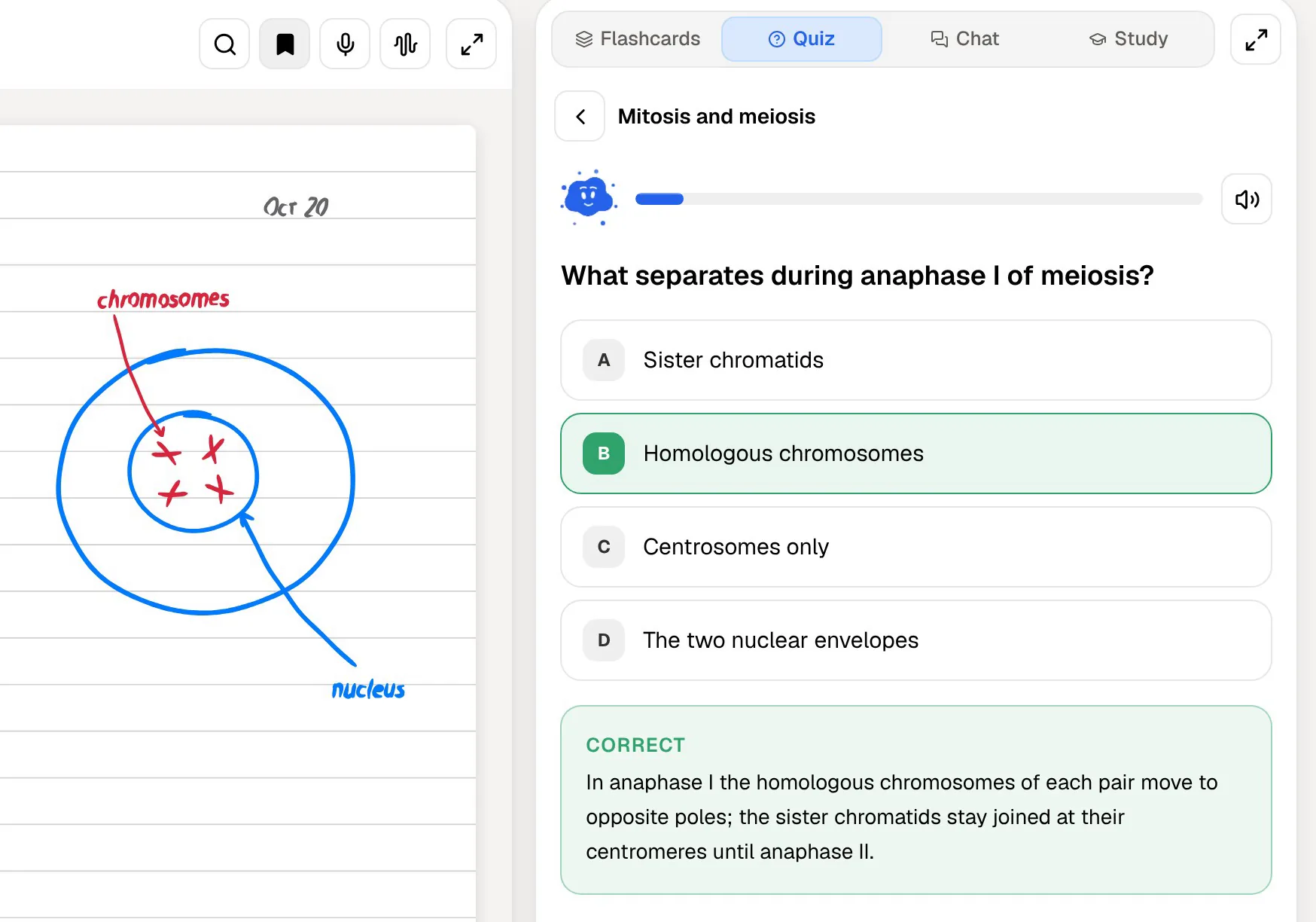
PocketNote's quizzes explain every answer, including why each wrong option is wrong. Its oral exam has Prof. Poki ask you questions out loud or in text and keep probing until you can explain the idea, and paid plans add live voice, so you can talk to Poki and hear the answer. The study plan tracks memory, applied and mastery scores, with progress for each tool.
For full-length or standardised exams, StudyFetch's practice tests and exam-specific questions are a close rehearsal. For exams where you need to explain, PocketNote's oral exam is the closer one.
From a recorded lecture, both go straight to practice. StudyFetch's Turn Into button converts a captured lecture into flashcards, a practice test or an audio recap, and you can set a skill level so the notes match where you are in the course. In PocketNote the recorded lecture becomes a source like any other, so the same quiz, flashcard, mind map and audio tools work on it.
Organising a semester of material
StudyFetch keeps a library of everything you generate. Live Lecture sessions are indexed by date and course, and your flashcard bank grows as you study, with stats on how much of each set you have reviewed and how each card rated.
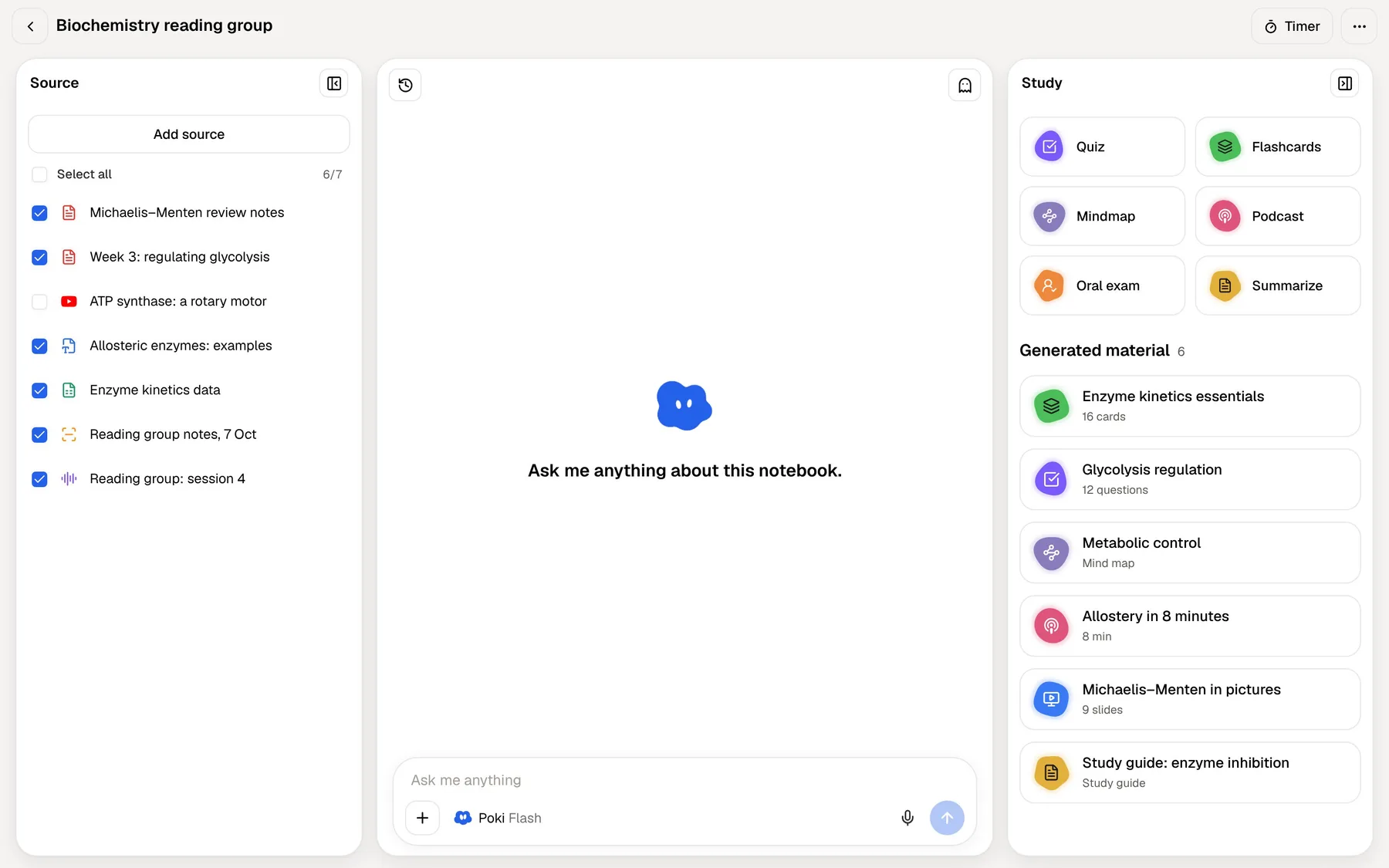
PocketNote organises by folders and notebooks. Everything sits in colour-coded folders, with starred items, recent items and search, including search through your handwriting. A notebook workspace puts your sources on the left, a cited chat in the middle and the study panel with quiz, flashcards, mind map and podcast on the right, so one course's material stays in view while you work on it.
Either structure works for a full semester. The question is whether you think in generated sets and sessions, as StudyFetch arranges them, or in folders of your own notes and sources, as PocketNote does.
Plans and switching
StudyFetch says getting started is free, with a Premium subscription for fuller use. Its App Store listing shows Premium billed monthly, quarterly or yearly, plus separate purchases for explainer videos and hours of voice calls with its tutor. Check current prices in the app or on its site.
PocketNote is free to start. Basic adds live voice, premium models and connectors; Plus adds unlimited notebooks and apps, the longest podcasts and all models. See pocketnote.app for current plans.
Switching is mostly about your source files. PDFs, Word documents, audio and YouTube links import straight into PocketNote; save slides as PDF first. Decks and audio recaps generated in StudyFetch don't transfer, so you would regenerate them in PocketNote from the same sources.
The verdict
Which one should you pick?
Pick PocketNote if…
- You write notes by hand or annotate PDFs, and want that work in the same place as your study tools.
- You want to see where answers come from, with Poki's steps and citations, and its marks on your PDF.
- Your work lives in other tools like Notion, Google Drive or Outlook, and you want Poki to use them.
- You want an oral exam that keeps asking until you can explain the topic.
Pick StudyFetch if…
- You're on Android or want to study with your tutor over iMessage.
- You like games and varied card formats, including cloze and audio cards.
- You're preparing for a named exam and want exam-specific practice questions.
- You want to be taught by a tutor persona you can customise with plugins.
Try it yourself
See it with your own notes
PocketNote is an AI study app built around your own notebook. Import files, links and audio, record lectures, write by hand with Apple Pencil, and it turns all of it into flashcards with spaced repetition, explained quizzes, an oral exam, audio reviews, mind maps and a study plan to your exam date. Poki answers from your material with citations and can work directly on your PDFs and notes.
It runs at pocketnote.app and on iPhone and iPad, and it's free to start.
Frequently asked questions
Sources
Keep reading