
Xodo is a PDF toolkit that is free to start and runs almost everywhere. There is a free reader, a mobile app for iPhone, iPad and Android, a set of online tools that work in the browser, and a desktop editor for Windows, Mac and Linux. It annotates, fills in forms, signs, scans paper into PDFs and converts files, and its AI tool, AskPDF, lets you chat with a document.
PocketNote does a different job. It is an AI study app: you bring your PDFs, Word files, lectures, YouTube links and handwritten notes, and Poki, its AI, makes flashcards with spaced repetition, quizzes with explained answers, mind maps and audio reviews from them, then helps you plan revision up to the exam.
If you are deciding what to install for a new term, this post compares the two honestly: what Xodo does better, what AskPDF can and can't do for revision, how a marked-up PDF becomes study material in PocketNote, and what each costs as of November 2026.
At a glance
PocketNote vs Xodo
| Feature | PocketNote | Xodo |
|---|---|---|
| Built for | Studying course material | Reading, editing and converting PDFs |
| Platforms | Web app, iPhone and iPad | Web, Windows, Mac, Linux, iOS, Android |
| Annotate PDFs | Highlight, write and draw | Markup tools with Apple Pencil support |
| Convert, compress, redact, sign | Not what it's built for | Yes; free use is limited |
| AI chat over your files | Poki, across every source in a notebook | AskPDF, on an uploaded PDF |
| Checking AI answers | Citations to your sources | Links to source pages |
| Where AI results live | Study tools saved in your library | Chat clears when you close the PDF |
| Flashcards with spaced repetition | Yes, built in | Not advertised |
| Quizzes | Yes, every option explained | Not advertised |
| Lectures and video | Record lectures; import audio and YouTube | Not advertised |
| Cloud storage | Import from Google Drive, OneDrive, Dropbox | iCloud, OneDrive, Google Drive, Dropbox |
| Price model | Free to start; Basic and Plus plans | Free reader; paid suite, web or desktop plans |
Checked against each product's own website, November 2026. Plans and features change; confirm current details there.
Why students reach for Xodo
Xodo's appeal is reach and price. The mobile app is a free download for iOS and Android with Apple Pencil support, and in reader mode you can highlight, underline and strike through text. It can scan a page with your camera into a new PDF, sign documents with a drawn or typed signature, and open files from iCloud, OneDrive, Google Drive and Dropbox.
Beyond the app, Xodo Web offers dozens of browser tools for annotating, redacting, compressing, organising, filling in and converting PDFs, and Xodo PDF Studio is a desktop editor for Windows, Mac and Linux. Covering Linux and Android as well as Apple devices makes Xodo practical on a mixed set of devices or a shared lab computer.
For students, the everyday uses are practical ones: signing a placement agreement, reorganising the pages of a scanned handout, compressing a PDF to fit an upload limit, or highlighting a reading on an Android tablet. Xodo does all of these without asking you to change devices.
The free tier has limits. Xodo's pricing page describes one free action per day on its premium online tools, and the mobile app sells a subscription for its full set of more than 30 tools.
AskPDF: useful, but built around one document
AskPDF is Xodo's chat-with-a-PDF tool. You upload a PDF, then ask a question or pick a suggested prompt such as a summary. Answers include links to the source pages in your PDF, so checking them takes a click. Without an account you can chat with one PDF per day; a Xodo Pro trial or the Document Suite plan gives unlimited access, and the pricing page lists AI summaries among the suite's features.
Xodo is upfront about the limits. AskPDF answers only from the text in the PDF, so a scanned handout needs OCR first and answers depend on how good that OCR is. The chat history clears when you close the PDF, so anything useful has to be copied out. It is a quick way to get the gist of a reading. It isn't designed to hold a term's worth of material together or to test you on it later.
Used for revision, AskPDF works best as a preview. Ask for a summary before a seminar, ask two or three specific questions, and follow the page links to read those parts properly. Xodo's own guidance is to ask precise questions and to use well-structured PDFs for better answers.
From marked-up PDF to revision in PocketNote
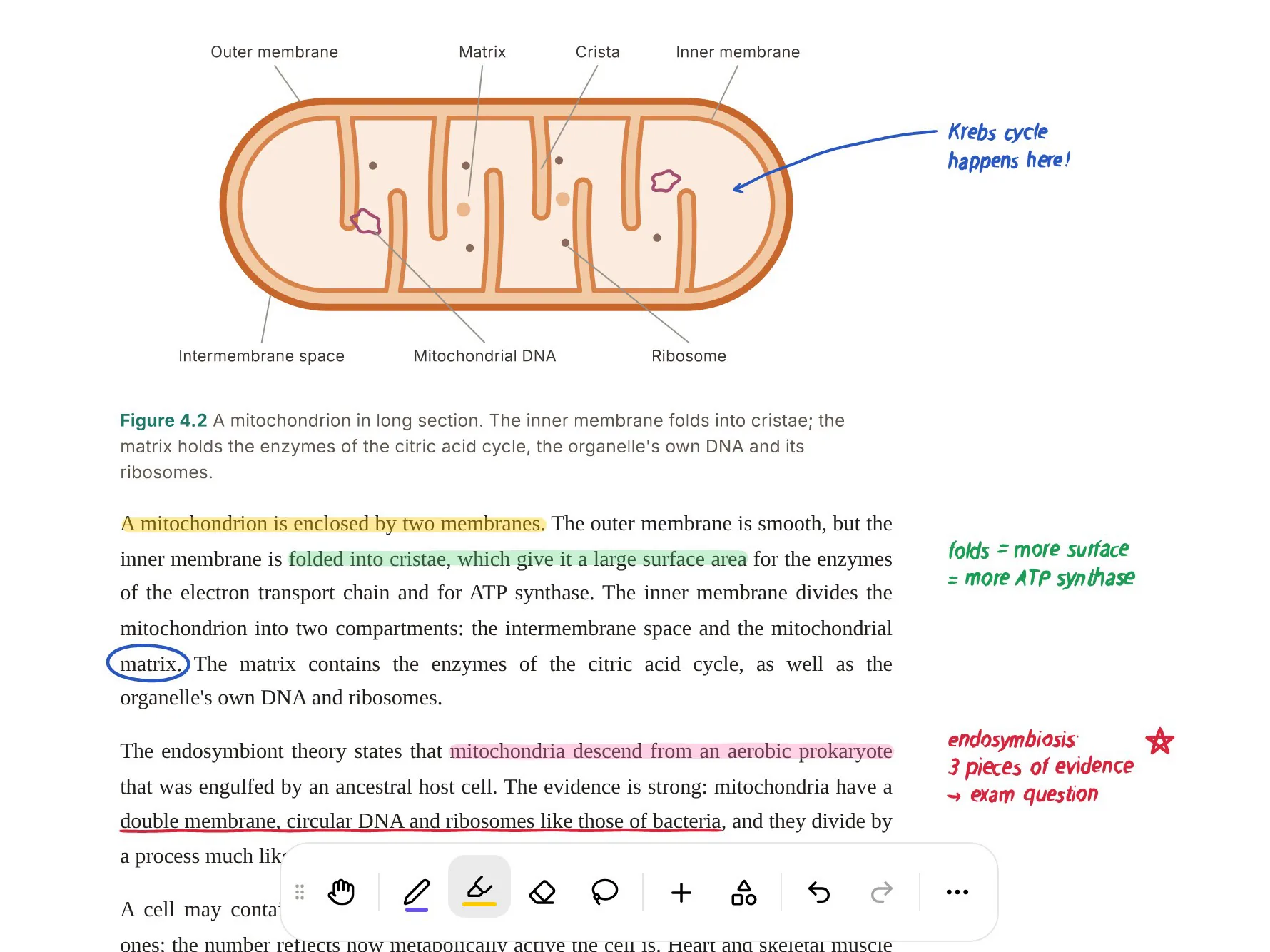
Take the PDF you highlighted in Xodo last week. Import it into PocketNote from your device, Google Drive, OneDrive or Dropbox. You can keep marking it up there, with highlights, handwriting and drawing, using Apple Pencil on iPad.
Now the PDF stops being something you only read. Ask Poki a question and the answer draws on that PDF and anything else in the notebook, with citations. Ask it to circle the terms you need to know on page 5, and it marks the page; one tap undoes its marks. Poki can also look at the page as you see it, including the highlights and margin notes you added, so "explain what I underlined" works.
Then generate the study set: flashcards, a quiz, a mind map, notes or a podcast-style audio review. Unlike a chat that clears when you close the file, these stay in your library, and the flashcards keep coming back on a spaced-repetition schedule until you know them.
Organisation helps here too. PocketNote keeps material in colour-coded folders, lets you star the items you return to and search across your library, so the reading from week 3 is still easy to find in week 10.

Remembering, not just reading
Reading and highlighting feel productive, but learning research has long found that testing yourself does more for memory than rereading, especially when the tests are spread out over days. PocketNote is built around that idea.
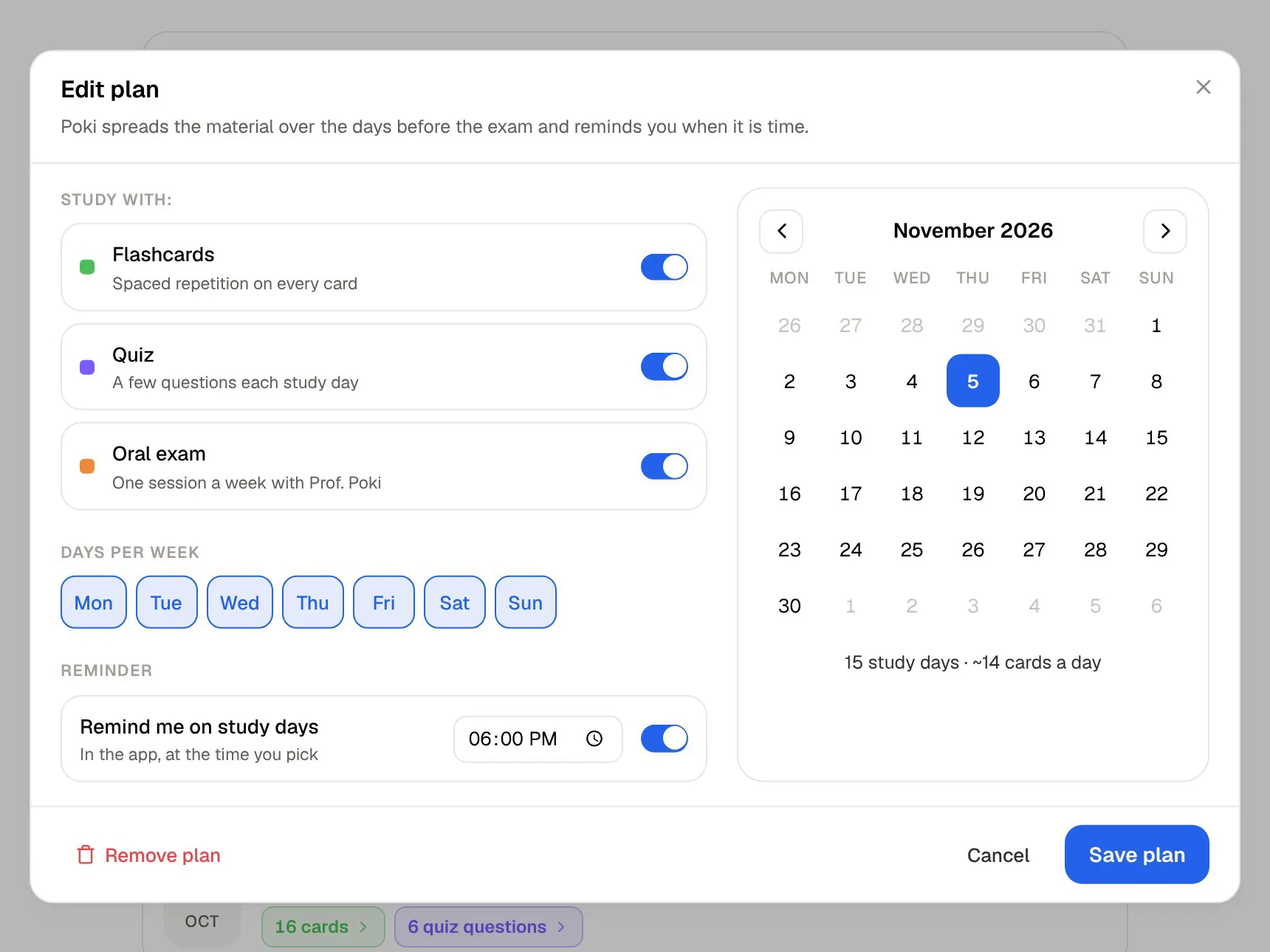
Flashcards come back on a schedule set by your Again, Hard, Good or Easy ratings. Quizzes explain why each option is right or wrong, so you learn from a wrong guess. The oral exam has Prof. Poki question you out loud or in text and follow up until you can explain the idea in your own words. And the study plan, set to your exam date, decides what to cover each day and tracks memory, applied and mastery scores.
Xodo doesn't advertise any of these study tools. That isn't a gap in a PDF app; it is a different product doing a different job. If you already keep flashcards somewhere else, the practical gain is skipping the step of typing them up from your highlights.
Lectures, videos and the rest of the course
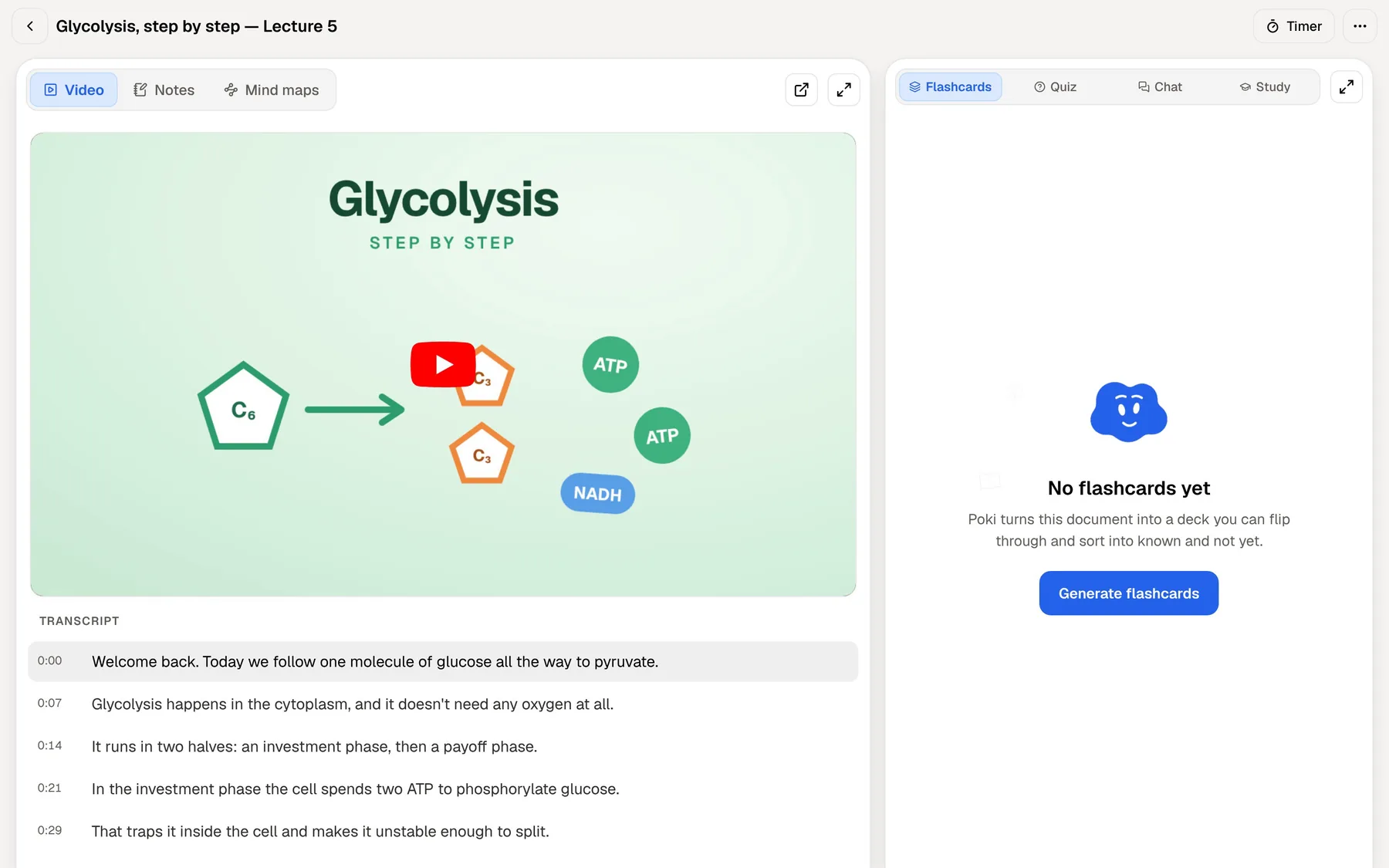
A course is more than PDFs. PocketNote takes a YouTube link with its transcript, a web article, audio files (MP3, WAV, M4A, OGG) and lectures recorded in the app, which come back as a transcript, a summary and notes. Word, Excel, CSV, Markdown and plain-text files import too, and you can search arXiv and SSRN for papers without leaving the app.
All of it can sit in the same notebook as your PDFs, so one question to Poki or one flashcard deck covers the lecture, the reading and the video together. Xodo focuses on documents: it converts files and scans paper, but it doesn't advertise handling lecture audio or video.
Your own notes count as material too. On iPad you can write by hand with Apple Pencil in notebooks with lined, grid or Cornell templates, or type notes in a block editor with headings, tables, checklists and maths. Poki can read both, and the lasso can turn a handwritten paragraph into text.
What you pay
Xodo's PDF Reader and mobile app are free to download, with paid subscriptions for the full toolset. On its pricing page, the paid options are a Document Suite subscription across web, desktop and mobile (with AskPDF and AI summaries), separate Xodo Web and Xodo Desktop plans, and custom plans for teams. Its prices included a time-limited discount when we checked, so look at the pricing page for current numbers. The mobile app also sells its own monthly and yearly subscriptions in the App Store.
PocketNote is free to start, with paid Basic and Plus plans; Basic adds live voice, premium AI models and connectors, and Plus adds unlimited notebooks and apps and all models. See pocketnote.app for current plans.
Both are free to start, so the money question comes later. Xodo's paid plans buy document tools and unlimited AskPDF; PocketNote's paid plans buy study features such as live voice with Poki, premium models and connectors. Pay for the job you actually do most.
Where Xodo is the better choice
Xodo is the better pick, or the one to keep, when:
- You use Android, Windows or Linux. Xodo has an app or editor for all three. PocketNote's native apps are for iPhone and iPad, with a web app for everything else.
- You need PDF tools. Converting, compressing, redacting, reorganising pages and signing are what Xodo is for.
- You scan paper handouts. The mobile app turns camera photos into PDFs.
- You fill in a lot of forms. Filling in PDF forms is part of Xodo's toolset, alongside signing.
- You only want the gist of a reading. AskPDF's summary and page-linked answers are a quick way to preview a document.
- You want a free download to start with. Xodo's PDF Reader is free.
Run them side by side
There is no reason to uninstall Xodo. Keep it for signing, scanning and converting, and for any PDF you need to edit. When a PDF becomes course material, import it into PocketNote, where the reading turns into flashcards, quizzes and a plan. The hand-off is simple because both connect to the same cloud drives: save the PDF to Google Drive, OneDrive or Dropbox from Xodo, then import it into PocketNote from there.
The one thing to avoid is splitting a module across both. Make PocketNote the home for anything you will be examined on, so Poki and the study plan can see all of it, and leave Xodo for the paperwork.
In practice that might look like this: a handout arrives as a scan, so you clean it up and run OCR in Xodo; the finished PDF goes into the module's PocketNote notebook beside the lecture recording; and that evening the study plan puts its flashcards into your review.
The verdict
Which one should you pick?
Pick PocketNote if…
- You want your PDFs turned into flashcards, quizzes and an exam plan, not only marked up.
- Your course includes lectures, YouTube videos and Word files as well as PDFs.
- You want AI answers that cover all your material, with citations, and study tools that stay in your library.
- You study on an iPhone or iPad and in a browser.
Pick Xodo if…
- You need a PDF app on Android, Windows or Linux.
- You convert, compress, sign or scan PDFs regularly.
- A quick summary of one PDF is all the AI you need.
Try it yourself
See it with your own notes
PocketNote is an AI study app for the web, iPhone and iPad. Import PDFs, Word or Excel files, audio, YouTube or web links, or record a lecture, and Poki builds flashcards with spaced repetition, quizzes with explanations, mind maps, notes and audio reviews from your material, with citations back to it.
It is free to start and annotates PDFs too, so the files you already mark up in Xodo can move straight in.
Frequently asked questions
Sources
Keep reading