
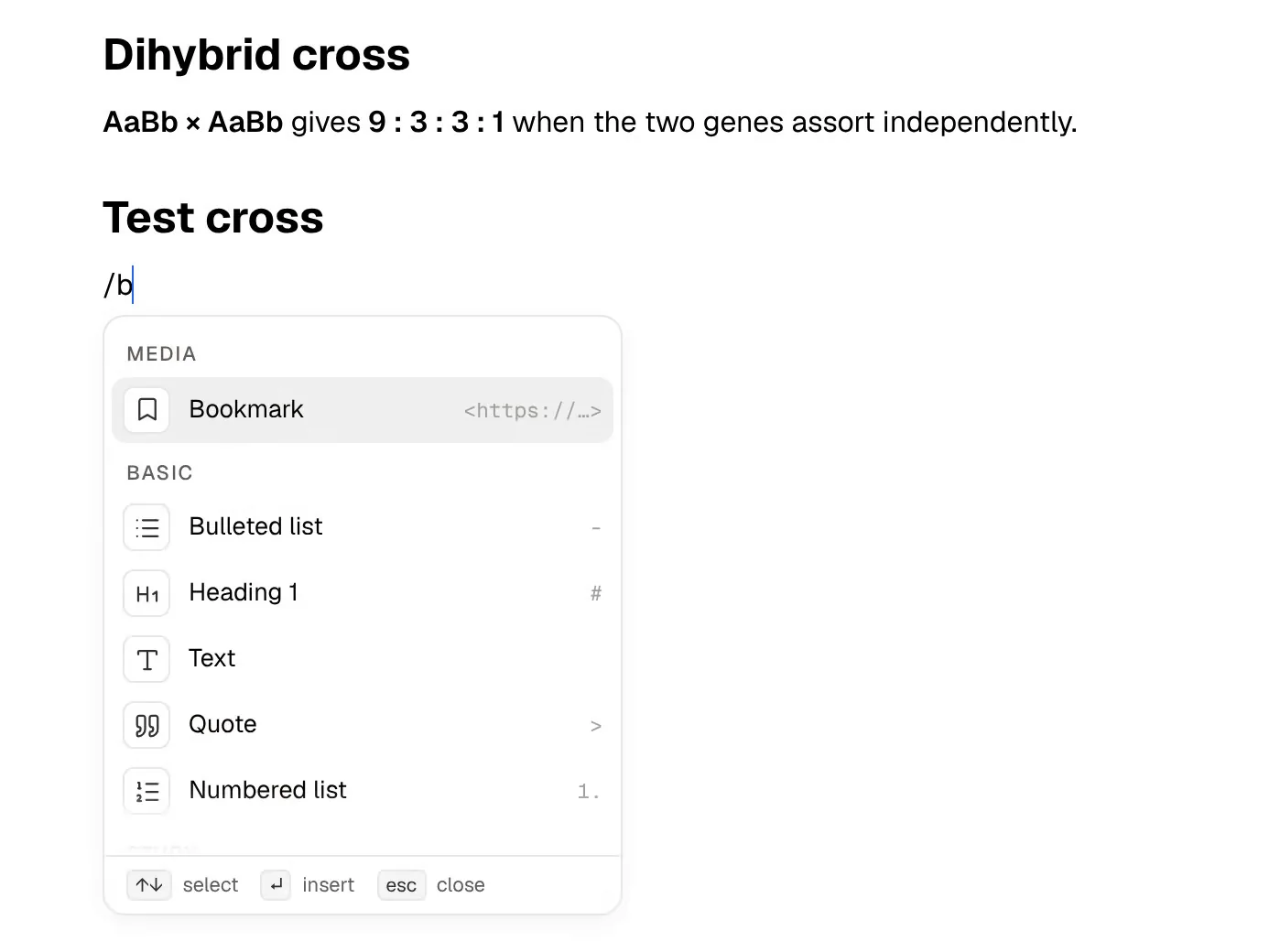
Anytype describes itself as "a safe haven for digital collaboration". It is a local-first workspace: what you create lives on your device first, is end-to-end encrypted, and syncs between your devices (peer-to-peer on a local network, through Anytype's network, or through a backup node you host yourself). Inside, it feels close to Notion, with a block editor, databases with table, kanban and gallery views, templates and a graph of linked objects. It runs on Mac, Windows, Linux, iOS and Android.
PocketNote is an AI study app. You bring lecture recordings, slides, PDFs and your own notes, and it builds flashcards with spaced repetition, quizzes that explain every answer, an oral exam and a study plan from them. Its assistant, Poki, answers questions from that material with citations.
The two make opposite trade-offs. Anytype keeps your data where no service can read it and doesn't advertise a built-in AI assistant; PocketNote reads your material so its AI can teach from it. This guide explains what that means for a student, where each one is stronger, and how they work together.
At a glance
PocketNote vs Anytype
| Feature | PocketNote | Anytype |
|---|---|---|
| Core idea | Study tools from your course material | Local-first, encrypted workspace of objects |
| Where data lives | Your PocketNote account, synced | Your device first; encrypted sync or self-hosting |
| End-to-end encryption | No: Poki reads your files to work | Yes |
| AI | Poki, built in, cites your material | None advertised; local API for outside agents |
| Databases and views | Not a database tool | Types, queries, table, kanban, gallery |
| Collaboration | Share a link to a note | Shared channels with chat |
| Flashcards with spaced repetition | Built in | Not advertised |
| Lecture recording | Transcript, summary and notes | Not advertised; audio files as objects |
| Handwriting and PDF annotation | Apple Pencil on iPad; annotate PDFs | Not advertised |
| Platforms | Web, iPhone and iPad | Mac, Windows, Linux, iOS, Android |
| Price | Free to start; paid Basic and Plus | Free; paid from $4/month billed yearly |
Checked against each product's own website, November 2026. Plans and features change; confirm current details there.
What Anytype gets right
Anytype is built around ownership. When you create an account, your device generates a 12-word recovery phrase that acts as your master key, and Anytype's FAQ says this prevents anyone, Anytype included, from decrypting your data. Data is encrypted before it leaves your device. You can sync only across devices on your local network, run your own backup node, or use Anytype's network.
Because your vault lives on your device, the app works fully offline, and the docs make a point of there being no lock-in: you keep access to your data and to the software regardless of any subscription. The protocols are open source under the MIT licence; the apps themselves are source-available rather than open source.
The workspace is rich. Objects have types and properties, queries and collections gather them, templates speed up repeated pages, and views show them as tables, kanban boards or galleries. The editor has toggled headings, inline LaTeX and a table of contents. Files are objects too, so one PDF can be linked from many pages without duplicates. Shared channels add chats and discussions next to the documents, and you can publish an object as a web page.
- Best at: a private, offline-capable workspace you fully control.
- Who it suits: people who want Notion-style structure without a cloud service reading their data.
- Platforms: Mac, Windows, Linux, iOS and Android, with releases aimed at once a month.
Building a course hub in Anytype
A student can do a lot with Anytype. You might create a Course type, a Lecture type linked to it, and an Assignment type with a due date and a status, then show assignments on a kanban board and list each course's lectures with a query. Slides go in as file objects linked from the right lecture, and a lecture template gives every week's notes the same headings.
For a study group, a shared channel holds the notes, files and a chat in one encrypted space. The community Experience Gallery has templates you can install if you would rather not design everything from scratch.
Inline LaTeX helps in maths-heavy modules, and the graph view shows how lectures, concepts and readings connect. Over a long degree, a well-kept Anytype vault can stay useful as a reference long after the exams.
The cost is the same as with any database-style tool: setup and upkeep. The structure is only as useful as the time you put into it, and none of it tests you on the material. That last part is where the comparison turns.
No assistant inside: what Anytype offers instead
Anytype doesn't advertise a built-in AI assistant. What its documentation describes instead is a Local API and an open-source Anytype Agents' Skill: a toolkit that lets AI agents such as Claude Code, Cursor, Gemini CLI or GitHub Copilot read, search and modify your objects through the API, running scripts in an isolated runtime on your own device.
The examples in the docs are bulk property updates, data transformations, clean-ups and reports: "set the status of every task in this collection to done". That is a capable setup for technical users, and it keeps the AI outside the app, which privacy-minded people may prefer.
For most students it is a developer workflow. You need an agent that supports tool use, a local API key and some comfort with setup, and even then you would get an agent that edits your workspace, not one that writes flashcards from your slides and schedules your reviews. If you already use one of those agents for coding, it is worth a try; if not, it is a lot of setup for a study aid.
What PocketNote adds: practice from your own material
PocketNote starts where Anytype stops. Flashcards are generated from your lectures and readings, and you rate each one Again, Hard, Good or Easy so it comes back when you are about to forget it. Quizzes explain why each option is right or wrong. In the oral exam, Prof. Poki asks a question out loud or in text and keeps probing until you can explain the idea yourself.
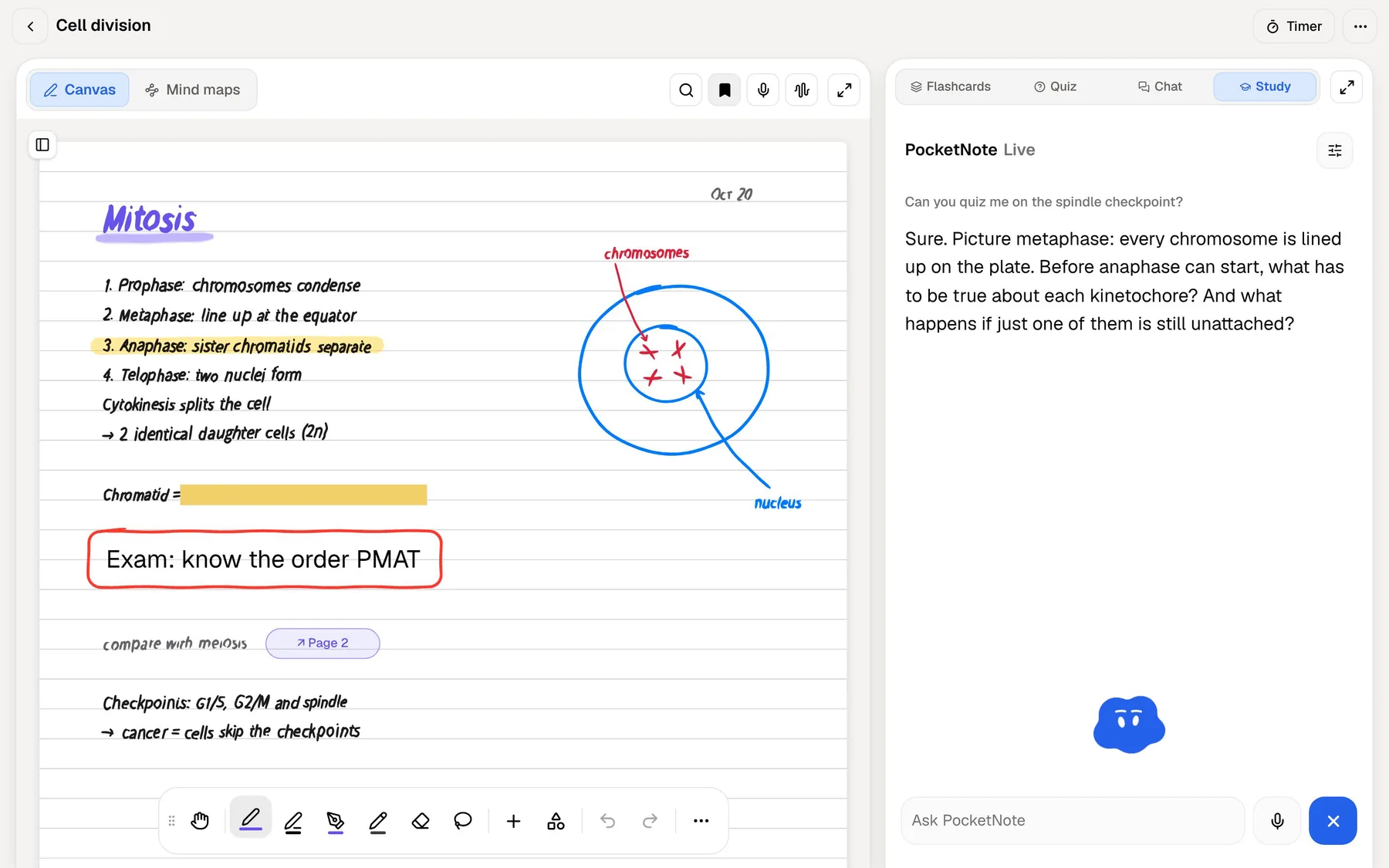
On paid plans you can also talk to Poki in live voice and be quizzed out loud, as in the exchange below. Set the exam date and the study plan spreads the material across the days left, sends reminders and tracks memory, applied and mastery scores.
Poki answers from your own material, cites the source, and shows its steps. It can write into your notes from the chat, and the same sources can become mind maps, summaries, slide decks, data tables or a podcast-style audio review, in any of 50+ languages, even from sources in another language.
Handwriting, PDFs and lectures
Anytype stores images, video, audio and files such as PDFs as objects, with embedded players for audio and video. It doesn't advertise PDF annotation, handwriting or turning a lecture recording into a transcript.
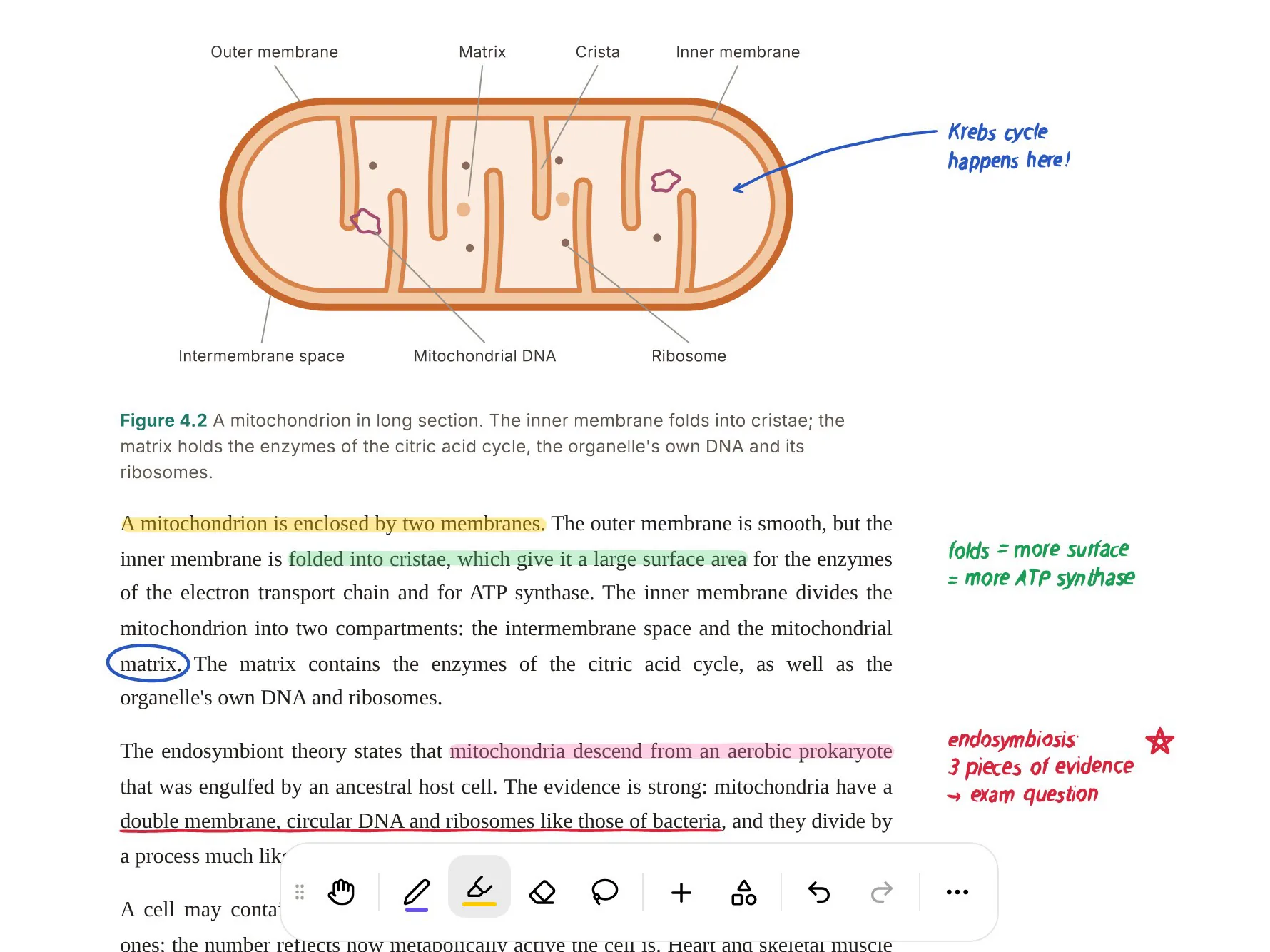
Those are everyday study formats in PocketNote. You can annotate a PDF with highlights, handwriting and drawings, and Poki can look at the page as you see it, then highlight, underline or circle passages when you ask; one tap undoes its marks. On iPad, handwritten notes with Apple Pencil have pens, highlighters, page templates, a lasso that converts handwriting to text, and "tape" to hide answers for self-testing.
Recording a lecture gives you a transcript, a summary and notes, and pasting a YouTube link brings its transcript in. Everything you import becomes material Poki can answer from, and a study timer with ambient sounds is there for focused sessions.
Privacy, compared honestly
Anytype is the more private tool by design. Your data is encrypted with keys only you hold, and you can keep sync entirely on your own network. Nothing in PocketNote competes with that. Collaboration is encrypted as well: in a shared channel, only the members you invite can read the content, which suits a study group sharing personal notes.
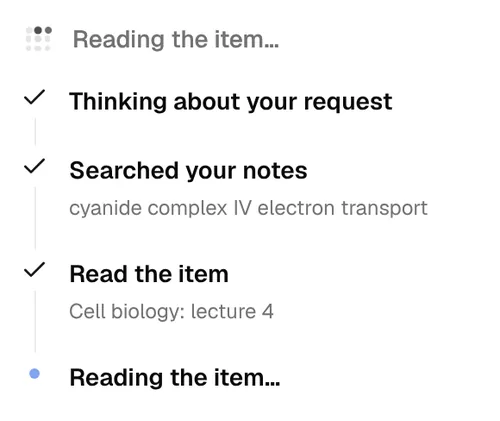
PocketNote's AI has to read your files to answer from them and to write study material, so it is not end-to-end encrypted. Your files are not used to train public AI models, and Poki lists which items it searched and read for each answer, so you can see what it used.
A workable rule: anything that must stay on your devices belongs in Anytype. Lecture slides, readings and recordings you want to be tested on are what PocketNote is built for.
What it costs a student
At the time of writing (November 2026), Anytype's free plan includes 100 MB of remote storage, 10 shared channels and unlimited private channels. Paid memberships are listed at $4 a month billed yearly for Plus (1 GB of remote storage), $8 for Pro (10 GB) and $16 for Ultra (100 GB), with a 30-day money-back guarantee. Paid plans also reserve an ANY ID, a name on the Anytype network that can be used for web publishing. Educators and students can apply for a 50% discount, and if you self-host your own network, no membership is needed.
Remote storage is what syncs through Anytype's network, so 100 MB fills quickly if you sync lecture recordings and PDFs that way. The plans are priced by remote storage, not by what you keep on your device.
PocketNote is free to start. Basic adds live voice with Poki, premium models and connectors; Plus adds unlimited notebooks and apps, the longest audio reviews and all models. See pocketnote.app for current plans.
Where Anytype is the better choice, and using both
Anytype is the better choice when privacy and control decide it, or when you want a full workspace with databases and kanban boards, which PocketNote doesn't offer. It also runs natively on Windows, Linux and Android, where PocketNote has no app and you would use the web version in a browser.
Using both works well. Anytype's desktop app exports objects, views or a whole channel as Markdown, PDF or HTML, and PocketNote imports Markdown and PDF. Export a module's lecture notes, import them with the slides and recordings, and study there. Chats and discussions can't be exported, and types and properties stay behind in Anytype. If you use Anytype on a Windows laptop and an Android phone, PocketNote's web app in a browser covers the study side.
- You want a private, local-first workspace that works offline, with keys only you hold.
- You want databases, kanban boards and templates for courses, assignments and projects.
- You need apps on Windows, Linux or Android, or want to self-host sync.
- You would rather keep AI out of your workspace, or connect your own agent through the local API.
The verdict
Which one should you pick?
Pick PocketNote if…
- you want practice material (flashcards, quizzes, an oral exam) made for you from lectures and readings.
- you want an AI that answers from your own material and cites it.
- you record lectures, annotate PDFs or write by hand on an iPad.
- you want a study plan that counts down to your exam.
Pick Anytype if…
- you want a private, local-first workspace that works offline and keeps your encryption keys with you.
- you want Notion-style databases, kanban boards and templates without a cloud service reading your data.
- you need apps on Windows, Linux or Android, or want to self-host sync.
Try it yourself
See it with your own notes
PocketNote's free start runs on the web and on iPhone and iPad, so nothing has to leave Anytype except what you choose to study. Keep Anytype as your private workspace, export one module's notes as Markdown, and import them into PocketNote with the slides and a lecture recording. Generate a quiz and a deck of flashcards and you will see quickly whether the two belong side by side for you.
Frequently asked questions
Sources
Keep reading