

Penbook is a handwriting notebook for iPad and iPhone that sets out to feel like paper. Its library has more than four hundred kinds of stationery, from ruled and dot grid to Cornell, music staves, chemistry and isometric pages, and its Live Paper planners fill themselves in: the monthly planner shows real dates, the weekly planner shows your connected calendars, and the daily planner lets you write on top of your meetings. It has been an App Store Editors' Choice and, in December 2025, App of the Day.
PocketNote is a study app that also does handwriting. You can write lecture notes with Apple Pencil on lined, grid or Cornell pages, and then Poki, its AI, turns those notes, along with your PDFs, recordings and YouTube links, into flashcards with spaced repetition, quizzes with explained answers, mind maps and an exam-date study plan.
So the question isn't which app has nicer paper. It is whether you need a notebook that organises your life, one that helps you pass exams, or both. This comparison covers what Penbook does better, where a planner notebook stops for studying, and how the two fit together, as of November 2026.
At a glance
PocketNote vs Penbook
| Feature | PocketNote | Penbook |
|---|---|---|
| Main job | Studying course material | Planning, journaling and handwritten notes |
| Platforms | Web app, iPhone and iPad | iPad and iPhone; runs on Apple silicon Macs |
| Page templates | Lined, grid, Cornell, planners and more | More than 400 stationery types |
| Planning | Exam-date study plan with reminders | Live planners that show your calendar |
| PDF import and annotation | Yes | Yes |
| Search your handwriting | Yes | Yes |
| Handwriting to text | Lasso converts a selection to text | Copy as Text from a lasso selection |
| AI | Poki answers from your notes, with citations | On-device Apple Intelligence for to-dos and page titles |
| Flashcards and quizzes | Generated, with spaced repetition | Not advertised |
| Audio with your notes | Note Replay and lecture recording | Not advertised |
| Export | Handwritten notes to PDF | A notebook or your whole library to PDF |
| Price model | Free to start; Basic and Plus plans | Free; Premium yearly or lifetime |
Checked against each product's own website and App Store listing, November 2026. Plans and features change; confirm current details there.
What Penbook is built for
Penbook's centre of gravity is planning and journaling. Live Paper is the idea that sets it apart: pages that update with the information you need as you use them. The yearly planner blocks out holidays and family visits, the weekly planner shows your calendars right on the page, and the daily planner puts your appointments where you can write next to them. The Book Maker lets you design your own notebooks and planners with repeating sections, and recent versions added a Health Journal that pulls live data from an Apple Watch, plus a sleep journal.
Its AI is deliberately modest. Penbook 8 uses Apple Intelligence on the device to turn handwritten to-dos into Reminders, give your pages titles and suggest Image Playground prompts, and the developer says notes never leave the device for these features. Siri can search your notes or add a note to your inbox notebook.
Navigation is thoughtful too. Each page has an Idea Feed for typed notes beside the handwriting, and page titles, bookmarks and a jump bar make long notebooks quick to move around.
The writing itself has had a lot of attention. With Penbook 8 on iOS and iPadOS 27, new notebooks run on Apple's PaperKit framework, with a reed pen for calligraphic strokes, more reliable shape recognition (hold the Pencil still and a rough circle snaps into a clean one), and a lasso that can resize, recolour, straighten or reflow handwriting. Copy as Text recognises a selection and puts it on the clipboard. Handwriting search, PDF import and export of a notebook or your whole library to PDF round it out.
Where a planner notebook stops for studying
Penbook's notes are, in the best sense, paper. You write them, you find them again with handwriting search, and you can export them. What they don't do is test you. Penbook doesn't advertise flashcards, quizzes, spaced repetition or AI that answers questions about your notes, and its Apple Intelligence features are aimed at organising pages and to-dos rather than revision.
It also doesn't advertise audio recording. If a lecturer moves quickly, there is no recording to fall back on, and nothing ties what was said to what you wrote. For a student, that leaves the heavy part of exam preparation, turning notes into questions and reviewing them on a schedule, to another app or a stack of index cards.
None of this makes Penbook a poor choice for class notes. Writing by hand is how some students process a lecture best, and Penbook is a pleasant place to do it. The gap opens later, in the weeks of review, when what you need from your notes is questions rather than pages.
Your handwritten notes, turned into revision
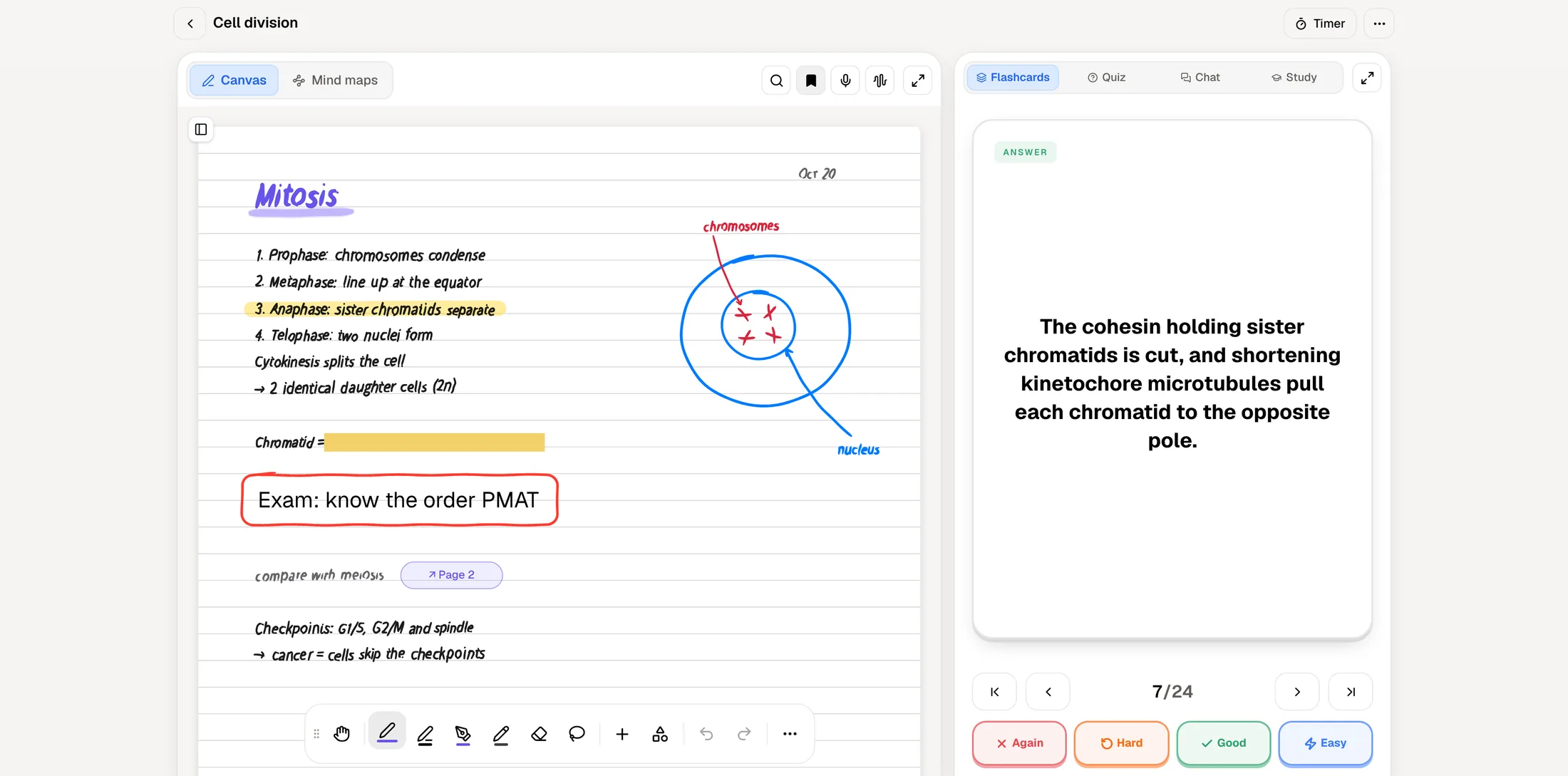
Here is the same lecture in PocketNote. You write your notes on iPad with Apple Pencil, on a Cornell or lined template, with pens, highlighters and fountain-pen ink. With Note Replay, PocketNote records audio while you write, and playback later shows the strokes you were making at each moment of the lecture, so a hurried scribble comes with the explanation that went with it.
After class, make flashcards from the page and review them by rating each one Again, Hard, Good or Easy; PocketNote brings each card back when you are about to forget it. A quiz on the same notes explains why each answer is right or wrong. If you want a typed version, the lasso turns a handwritten section into text, and you can ask Poki about any selection.
For testing yourself on the page itself, PocketNote has tape: hide an answer under it and reveal it when you think you know it, the digital version of covering a column with your hand.
When recognising an answer isn't enough, the oral exam goes further. Prof. Poki asks about the lecture out loud or in text, listens to your answer in your own words, and follows up on whatever you left vague, until you can explain the topic rather than just recognise it.
Handwriting tools, side by side
On paper variety and planner design, Penbook is ahead: four hundred stationery types, Live Paper, the Book Maker and years of focus on the page itself. PocketNote's handwriting is newer, and Penbook's depth here is real.
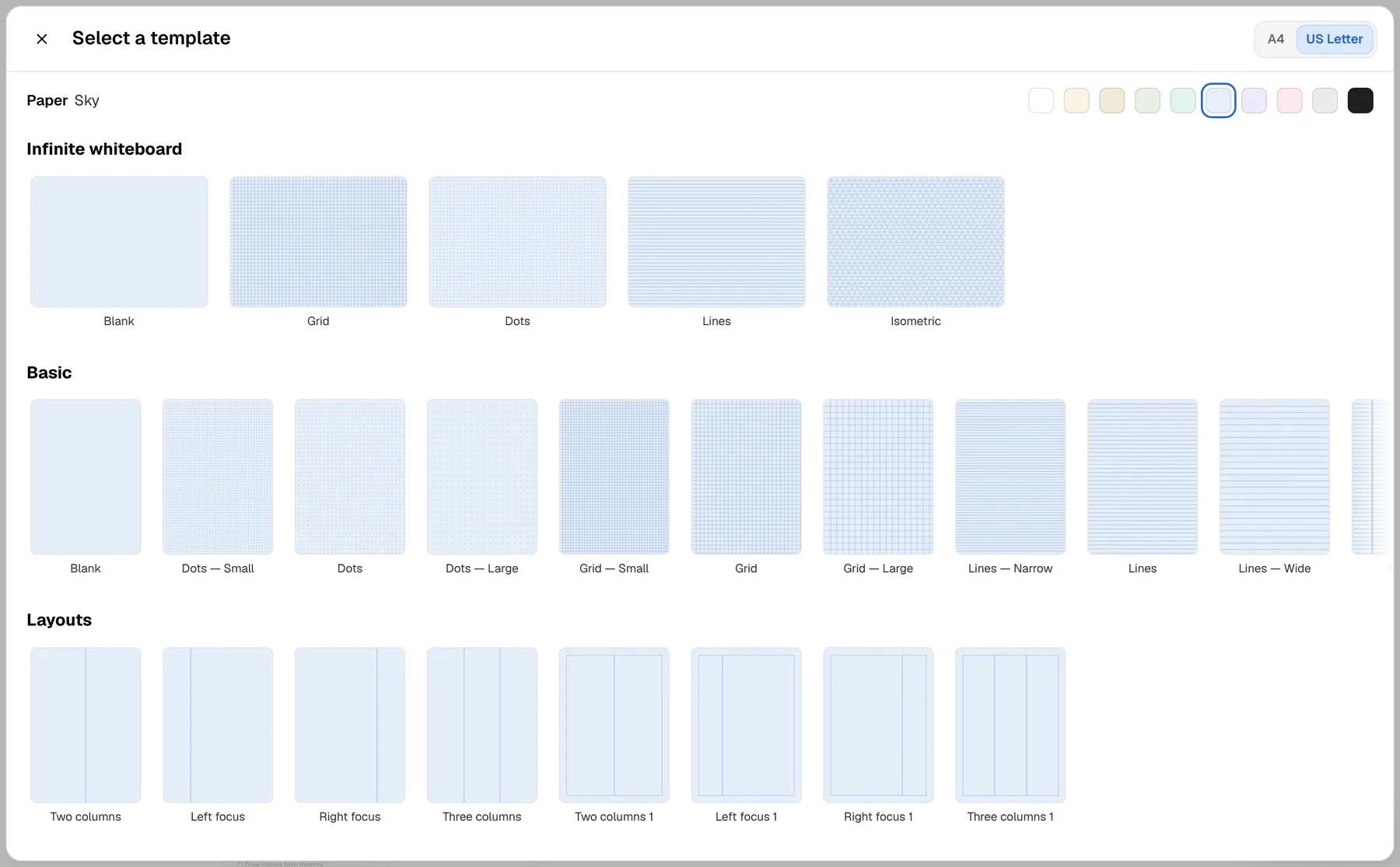
PocketNote's handwriting tools are aimed at studying. You get pens, highlighters and fountain-pen, watercolour and crayon inks; shape snapping; a zoom window for small writing; page templates including lined, grid, Cornell and planners; hundreds of stickers; an infinite whiteboard for diagrams; page outlines and links; presentation mode; search through your handwriting; and export to PDF. The lasso can recolour a selection, turn it into text, or send it to Poki with a question.
Both apps import a PDF and let you write on it. Penbook 8 is especially flexible here: you can add just a range of pages to a notebook, use your own PDF as stationery, and export only a few pages as a smaller file. In PocketNote, Poki can also see that page, including your marks, and can highlight, underline or circle passages for you when you ask.
Planning your life vs planning your revision
Both apps plan, but they plan different things. Penbook's planners are for your life: days, weeks and years laid out on paper that knows your calendar, with room to write around it.
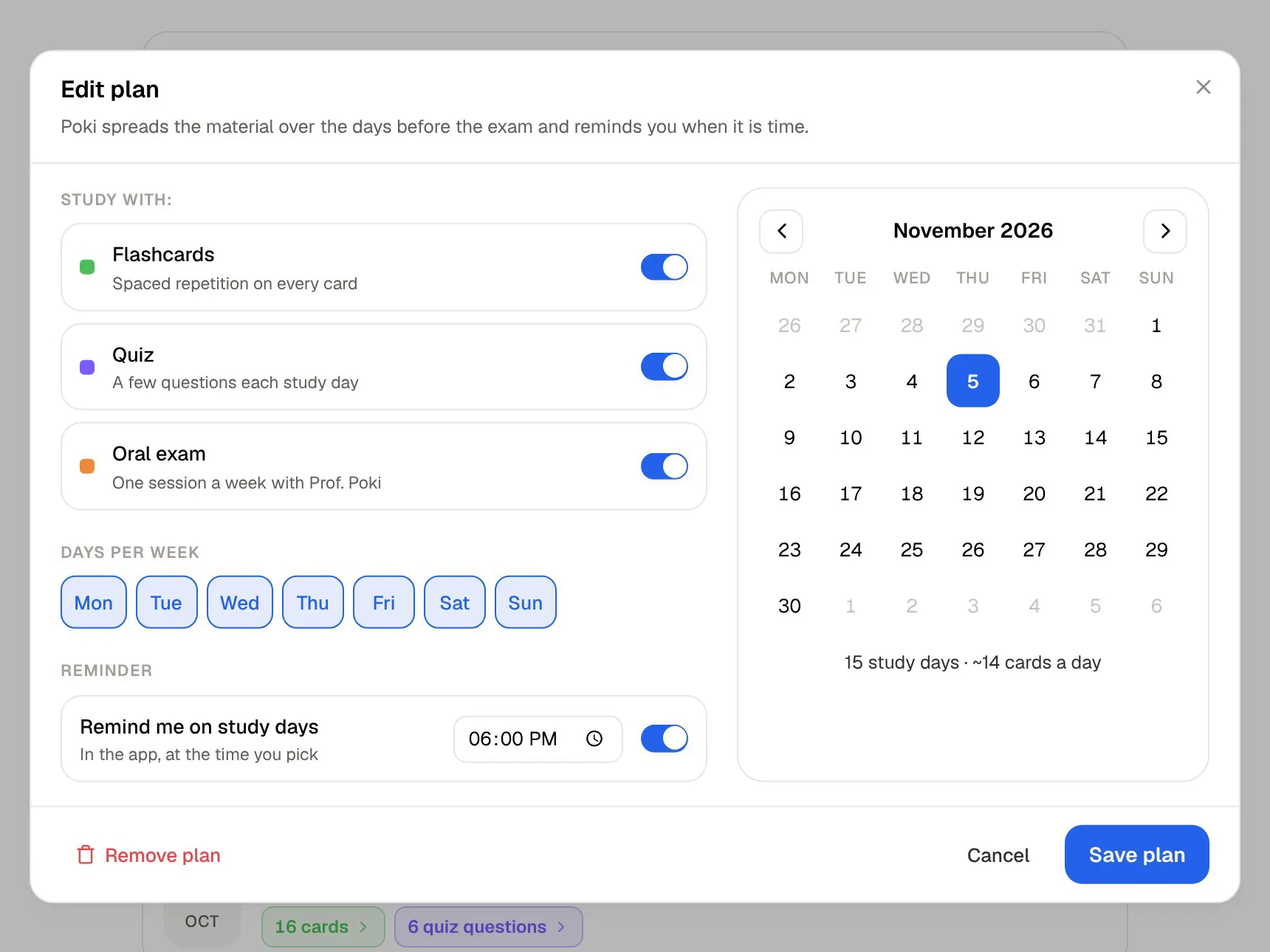
PocketNote has planner pages too, but its stronger planning tool is the study plan. You give it your exam date and it works out what to cover each day, reminds you, and tracks memory, applied and mastery scores across flashcards, quizzes, the oral exam and audio reviews. It answers "what should I revise tonight?" rather than "what's on this week?"
If you need both questions answered, that is a good argument for using the two apps side by side rather than forcing one to do the other's job.
The two also look at time differently. Penbook's pages are anchored to the calendar you already keep. PocketNote's plan counts down to an exam, so the question it keeps putting to you is whether you are ready, not what is scheduled.
Cost and where each runs
Penbook is a free download. Penbook Premium adds unlimited notebooks and exports plus new stationery and covers, and it is sold as a yearly subscription with a seven-day free trial or as a one-time lifetime purchase. The App Store lists several price points, so check it for your region. Penbook runs on iPad and iPhone, and on Apple silicon Macs as an iPad app.
PocketNote is free to start, with paid Basic and Plus plans; see pocketnote.app for current plans. It runs as a web app in any browser and as an app on iPhone and iPad, and your library syncs across them. Notes keep saving offline and sync when you are back online.
Where Penbook is the better choice
Penbook is the better pick if these sound like you:
- You want a paper planner that knows your calendar. Live Paper's daily, weekly and yearly planners are its signature.
- Stationery matters to you. More than four hundred page types, plus the Book Maker to design your own.
- You journal as well as take notes. The Health Journal pulls in live data from your Apple Watch, and there is a sleep journal too.
- You want AI to stay on your device. Penbook's Apple Intelligence features run locally.
- You like paying once. Penbook Premium has a lifetime option.
Using Penbook and PocketNote together
The cleanest split is by purpose. Plan your week, track habits and journal in Penbook. Take lecture notes in PocketNote, or bring them across: export a Penbook notebook as a PDF and import it into PocketNote, where Poki can look at the pages, handwriting included, and you can build study material from them.
If you would rather keep one app, choose by what fills most of your pages. If it is planning and journaling, Penbook. If it is lecture notes you will be examined on, PocketNote.
A week with both might look like this: Monday's plan and to-dos live in Penbook's weekly planner; lecture notes go into PocketNote with Note Replay on; and each evening the PocketNote study plan hands you that day's flashcards and a short quiz before you close the iPad.
The verdict
Which one should you pick?
Pick PocketNote if…
- Your handwritten notes are for exams, and you want flashcards, quizzes and an oral exam made from them.
- You want audio recorded with your notes, with Note Replay linking what was said to what you wrote.
- You want a study plan that works back from your exam date.
- You also study from PDFs, recordings and YouTube, on iPad, iPhone and the web.
Pick Penbook if…
- You want a paper-like planner that shows your real calendar on the page.
- Stationery variety, journaling and a calm writing experience matter most.
- You prefer on-device AI and the option of a lifetime purchase.
Try it yourself
See it with your own notes
PocketNote is an AI study app for the web, iPhone and iPad, with handwritten notes on iPad built in. Write or import your notes, add PDFs, recordings and YouTube links, and Poki turns them into flashcards with spaced repetition, quizzes with explanations, mind maps and an exam-date study plan.
It is free to start. Try it on one module's lecture notes and keep Penbook for the planner.
Frequently asked questions
Sources
Keep reading