
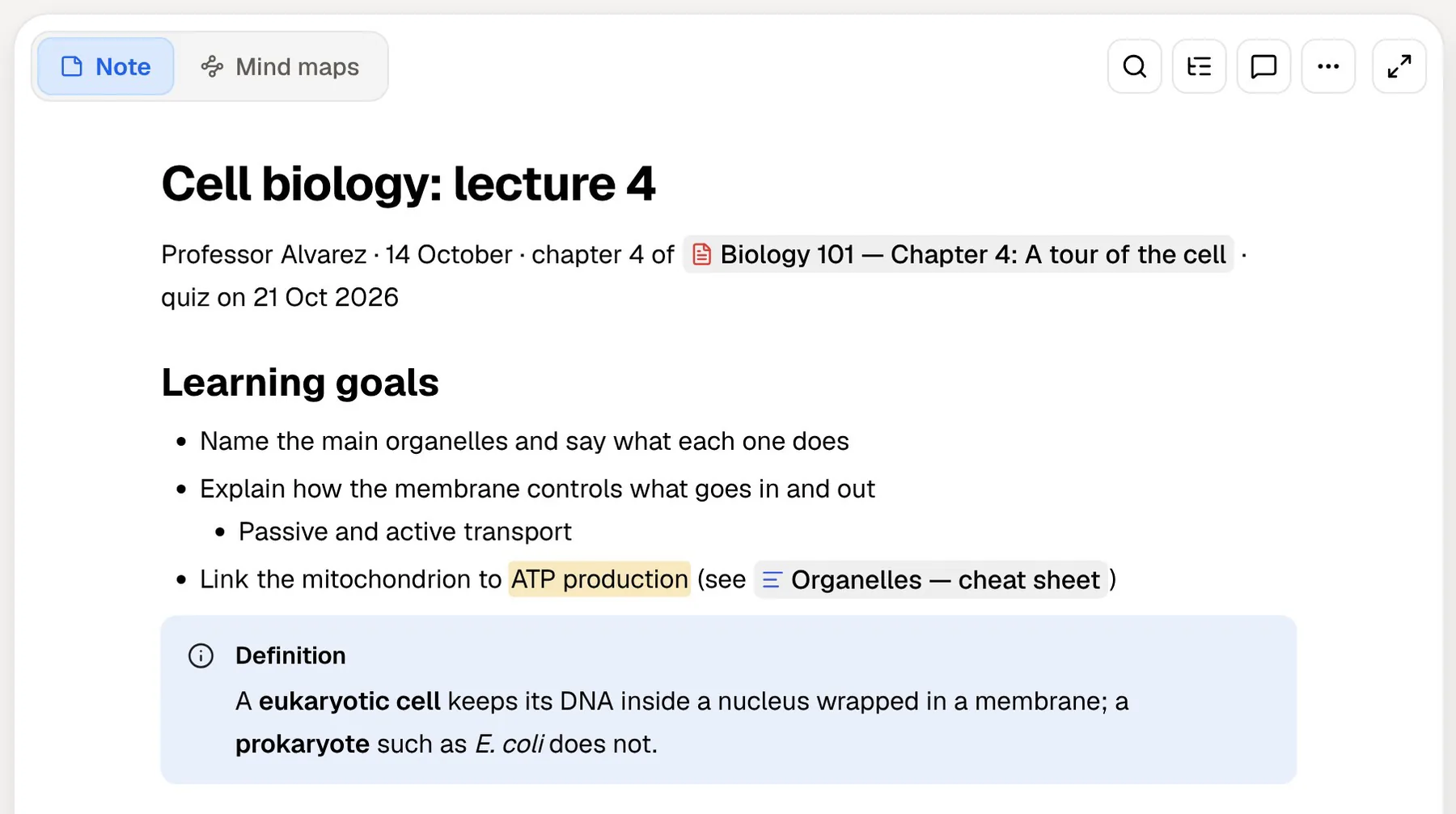
Reflect is a networked notes app. You write in a daily note, link ideas with backlinks, and over time build a graph of everything you have thought about. It suits people who think in writing, such as writers and researchers. In July 2026 it split into two apps: the original hosted Reflect, which continues, and Reflect Open, a new open-source app that keeps your notes as Markdown files on your own Mac.
PocketNote solves a different problem. It is an AI study app: you give it lecture recordings, slides, PDFs and your own notes, and it produces flashcards with spaced repetition, quizzes that explain every answer, an oral exam and a study plan. Its assistant, Poki, answers from that material with citations.
For a student weighing the two, the real question is whether you need a place to think, a way to revise, or both. This page explains the two Reflects, what they do well, where they stop for exam preparation, and how Reflect Open's Markdown files can go straight into PocketNote.
At a glance
PocketNote vs Reflect
| Feature | PocketNote | Reflect |
|---|---|---|
| What it is | AI study app for your course material | Daily notes and backlinks: hosted app plus Reflect Open |
| Price | Free to start; paid Basic and Plus | Reflect Open for Mac free; hosted Reflect is a subscription |
| Platforms | Web, iPhone and iPad | Mac, iPhone, iPad; hosted Reflect also on the web |
| Linking notes | Page mentions inside notes | Backlinks at the core |
| Where notes live | Your PocketNote account, synced | Open: Markdown files on your Mac; hosted: encrypted sync |
| AI | Poki built in, choice of models | Hosted: built-in assistant; Open: your own API key |
| Audio | Record lectures: transcript, summary, notes | Voice memos transcribed into notes |
| Flashcards with spaced repetition | Built in | Not advertised |
| Quizzes and oral exam | Generated from your material | Not advertised |
| PDF annotation and handwriting | Annotate PDFs; Apple Pencil on iPad | Not advertised |
Checked against each product's own website, November 2026. Plans and features change; confirm current details there.
Two Reflects: which one are you comparing?
The original Reflect is a hosted app for iPhone, Mac and the web. Its help site lists backlinks and tags, offline use, Kindle highlight sync, web clipping, a Zapier integration and end-to-end encrypted notes. It also has an AI assistant that can use GPT or Claude models, saved custom prompts, a chat-with-your-notes mode built on Advanced Search, and audio memos that are transcribed into your daily note.
Reflect Open, announced on 14 July 2026, is a separate app rather than an update. It stores daily notes, notes and attachments as ordinary files in a folder you choose, syncs through iCloud Drive or a Git repository, and has no Reflect account or Reflect-hosted database behind it. The Mac app is free and open source; iPhone access is through a limited TestFlight beta, free for now, and Reflect says it expects to charge for the mobile app later. There is no Windows or Android version yet.
If you already pay for Reflect, nothing changes: Reflect says the existing app is staying, there is no deadline to move, and your subscription continues to cover it. The two apps don't sync edits with each other. The reflect.app homepage now leads with Reflect Open, which is why searches for Reflect can be confusing this year.
What Reflect does well
Reflect's daily note is a low-friction inbox. You open the app, today's page is there, and you write. Links between notes are cheap to make, and backlinks show every place an idea has come up, which over months forms what Reflect calls a graph of ideas.
For a student, that pays off in reading-heavy and writing-heavy courses. A note on a concept can collect every lecture, book and seminar where it appeared, across modules. If you read on Kindle, the hosted app can pull your highlights in, so a term's reading notes build up without retyping.
Privacy is handled carefully in both versions. The hosted app encrypts notes end to end. Reflect Open keeps notes as local files, lets you mark notes private so they are never sent to AI or to other services that read note content, and leaves encryption to your Mac, iCloud or Git setup. In 2026 Reflect also added an MCP server so coding agents such as Claude and Codex can search and edit notes, which matters to a smaller group of users.
- Best at: daily writing, linking ideas, long-term reading and research notes.
- Who loves it: people who think in writing and want connections to surface over time.
- New in 2026: Reflect Open, a free open-source Mac app built on plain Markdown files.
Where a graph of notes stops short for exams
Backlinks help you understand how ideas relate. They don't check whether you can recall them. Exams reward retrieval: closing the notes and producing the answer, then coming back to the things you missed after a gap. Reflect doesn't advertise flashcards, quizzes or any kind of review schedule.
Its AI can help around the edges. You can highlight text and run a prompt to summarise or reorganise it, or chat with a filtered set of notes. You could ask it to write practice questions, but keeping them, testing yourself on them and tracking which ones you get wrong would be a manual system you build yourself.
The other gap is course material that isn't a note. Lecture slides, PDF readings and recorded lectures are where most of a syllabus lives, and Reflect is built around the notes you write about them rather than around studying the sources themselves.
Nor does a graph know when your exam is. Deciding which topics to revise on which day, and noticing that you have not touched one for a fortnight, falls to a calendar or a to-do list.
Voice memos versus recorded lectures
Reflect's audio memos are built for capturing thoughts. In the hosted app you can record from the desktop, from iPhone or iPad, or from a lock-screen widget; the audio is transcribed in the background and the text lands in your daily note a few minutes later, ready for an AI prompt to tidy it up. Reflect's own guide suggests end-of-day reflections and ideas on the go. On a Mac, a Labs setting can capture system audio to transcribe the other side of a call. Reflect Open transcribes voice notes through a transcription provider you set up.
PocketNote's recorder is built for lectures. You tap Record, and afterwards you have the audio, a transcript, a summary and notes on what was covered. That recording becomes a source for flashcards, quizzes and the oral exam. If you write by hand while recording, Note Replay shows the strokes you were making at each moment of the audio.
Audio also works in the other direction. PocketNote can turn your material into an audio review, a podcast-style episode with captions that follow the voices, so you can revise a topic on a walk or a commute.

Turning a reading into revision in PocketNote
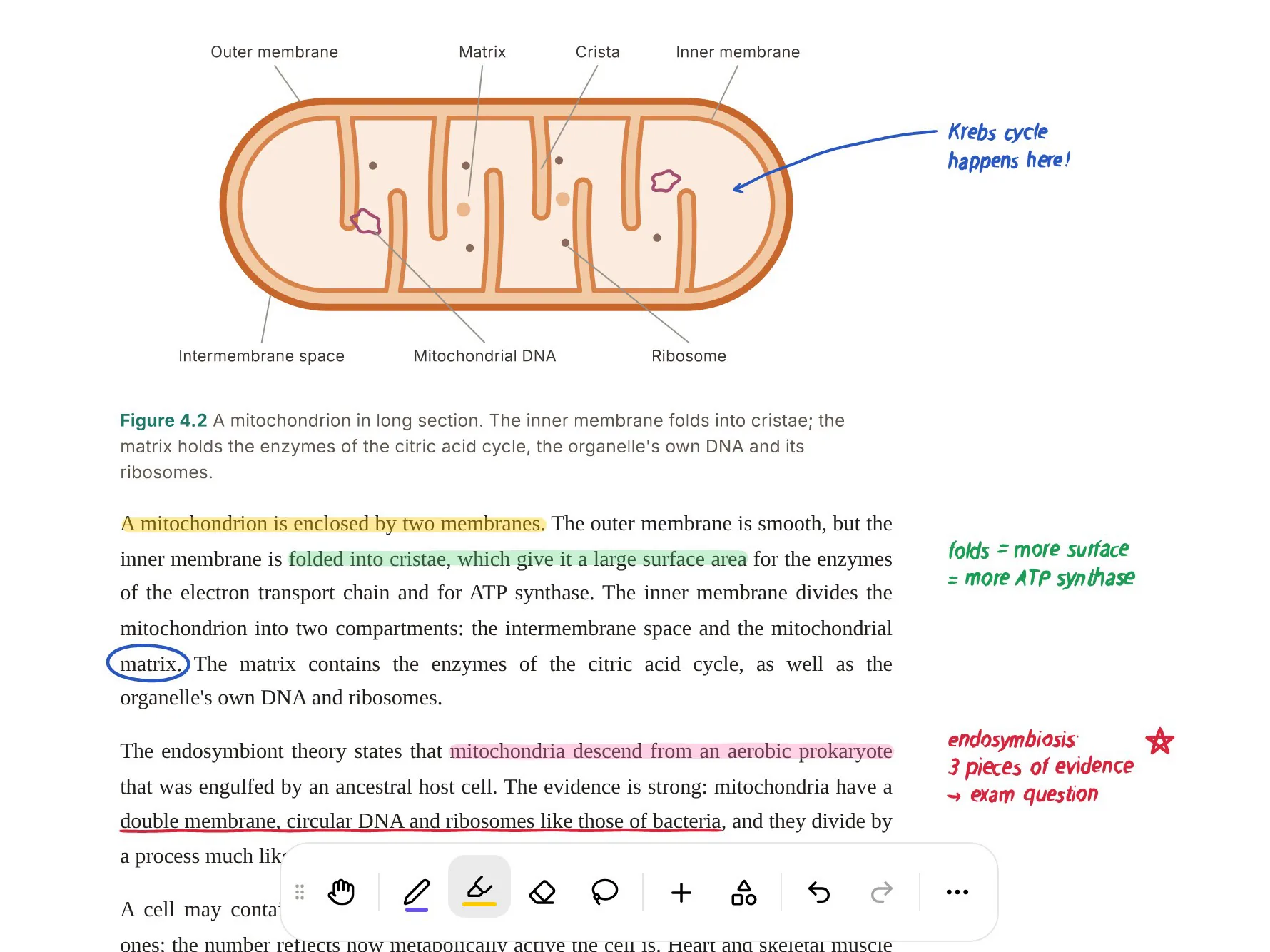
Take a research paper assigned for a seminar. You import the PDF, and it opens in PocketNote's viewer, where you can highlight, write and draw on the page. Poki can look at the page as you see it, including your own marks, and highlight, underline or circle passages when you ask, for example to pick out the key definitions on page 3. One tap undoes its marks.
From the same PDF you generate flashcards, shown beside the paper, and rate each one Again, Hard, Good or Easy so the hard ones come back sooner. A quiz explains why each option is right or wrong. In the oral exam, Prof. Poki asks you to explain the paper's argument out loud or in text and follows up where your answer is thin.
Set the exam date and the study plan decides what to cover each day, sends reminders, and tracks memory, applied and mastery scores across all of it.
AI: bring your own key, or built in
Reflect Open's AI is bring-your-own-key. You add a key from OpenAI, Anthropic, Google or OpenRouter, requests go directly to that provider, and the provider bills you separately. Keys are stored in your system keychain and set up on each device. For people who already pay for API access, that is flexible and private; for a student who doesn't, it is one more account and one more bill. It also means AI stays off until you add a key, which some people will count as a plus.
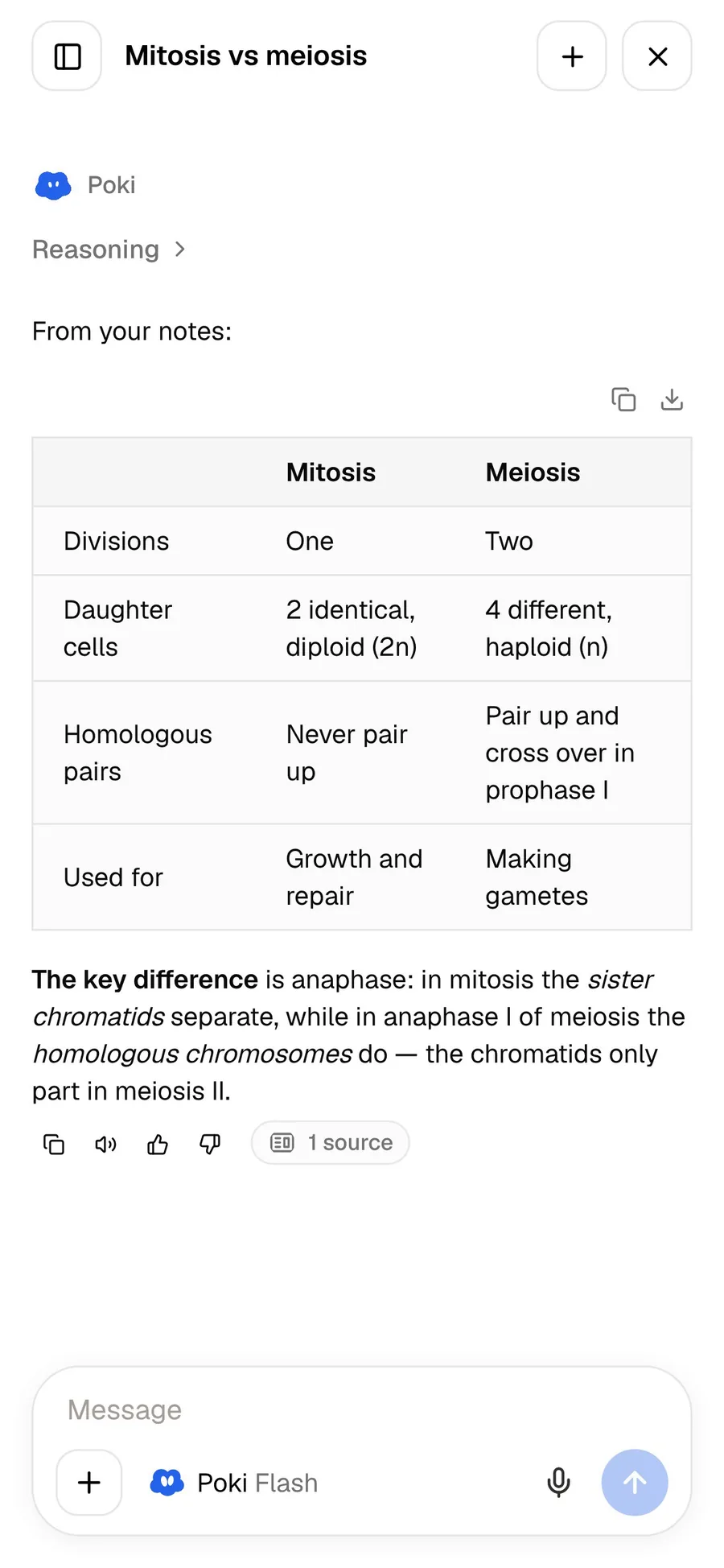
PocketNote includes Poki. You can choose between leading AI models from several providers, with premium models on paid plans. Poki answers from your own material rather than the open web, cites its sources, and shows the steps it took. Your files are not used to train public AI models.
The hosted Reflect sits in between: a built-in assistant using GPT or Claude models, aimed at writing, summarising and chatting with your notes.
What each costs
Reflect Open for Mac is free and open source. The iPhone app is free during its TestFlight beta, and Reflect expects to charge for it eventually without having set a price or a date. The reflect.app homepage says the iPhone and iPad app needs a paid subscription and points to the App Store for local pricing, and the original hosted Reflect is a paid subscription with a free trial. Check reflect.app or the App Store for the current price.
PocketNote is free to start. Basic adds live voice with Poki, premium models and connectors such as Google Drive and Notion; Plus adds unlimited notebooks and apps, the longest audio reviews and all models. See pocketnote.app for current plans.
Where Reflect is the better choice, and using both
Reflect is the better tool for thinking over months: drafting a dissertation, keeping a research journal, or following an idea across several modules. Reflect Open in particular suits anyone who wants their notes as plain files that will outlast any app.
Using both is easy with Reflect Open, because your notes are already Markdown files in a folder and PocketNote imports Markdown. Import one module's notes into its own folder, add that module's slides and recordings, and generate study tools from the lot. From the hosted app the route is one step longer: Reflect's export to Reflect Open brings over daily notes, notes, attachments, links, tags and tasks, after which they are files on your Mac.
- You think in daily notes and want backlinks at the centre of everything.
- You want an open-source app that stores notes as Markdown files on your Mac.
- You read on Kindle and want highlights flowing into your notes (hosted Reflect).
- You already pay for an AI API and want to use your own key.
The verdict
Which one should you pick?
Pick PocketNote if…
- you need to remember course content for exams, not only connect ideas.
- you want flashcards, quizzes and an oral exam generated from your lectures and readings.
- you study from PDFs and slides you want to annotate, by hand or with Poki's help.
- you want AI included rather than setting up your own API key.
Pick Reflect if…
- you think in daily notes and want backlinks at the heart of your notes.
- you want notes as plain Markdown files on your own Mac, in an open-source app.
- you read on Kindle and want highlights in your notes (hosted Reflect).
Try it yourself
See it with your own notes
PocketNote has a free start on the web, iPhone and iPad, so testing it alongside Reflect costs nothing. If you use Reflect Open, import one module's Markdown folder alongside its slides, generate a quiz and a deck of flashcards, and keep Reflect for the thinking. The two do different jobs and don't get in each other's way.
Frequently asked questions
Sources
Keep reading