
Whimsical is a visual workspace that puts speed and a clean look first. You can lay out a flowchart, a mind map or a wireframe in a few minutes and it looks clean without fiddling, and its AI can turn a single prompt into a flowchart, a branched mind map or an editable wireframe. It calls itself the whiteboard for product builders, but students use it too, especially in computer science, design and any course where a process needs drawing.
PocketNote comes at mind maps from the study side. Poki, its AI, reads your lecture, PDF or video and generates a mind map of what was actually taught, next to flashcards with spaced repetition, quizzes that explain each answer and an exam-date study plan. It isn't a diagramming tool, and it isn't a shared whiteboard.
This comparison is for a student deciding where their diagrams and their revision should live. It covers what Whimsical does better, where a diagram stops being revision, how the two make mind maps, the education plan and prices as of November 2026, and how to use both.
At a glance
PocketNote vs Whimsical
| Feature | PocketNote | Whimsical |
|---|---|---|
| Built for | Studying from your material | Flowcharts, mind maps, wireframes and docs |
| Mind maps | Generated from your lectures and files | Built by hand or with AI Mind Maps |
| Flowcharts and wireframes | Not what it's built for | Yes, including AI generation |
| What the AI works from | Your sources, with citations | The idea or process you describe |
| Flashcards with spaced repetition | Yes, built in | Not advertised |
| Quizzes | Yes, every answer explained | Not advertised |
| Lecture recording | Record, transcribe and summarise | Not advertised |
| Real-time collaboration | Not offered | Yes, with comments and version history |
| Handwriting | Apple Pencil on iPad; drawing in the browser | Not advertised |
| Apps | Web, iPhone and iPad | Web; desktop apps for Mac and Windows |
| For students | Free to start | Free for a year via the education plan |
Checked against each product's own website, November 2026. Plans and features change; confirm current details there.
What Whimsical does well
Speed is Whimsical's signature. Its boards are an infinite canvas for diagrams, wireframes and whiteboards, and its flowchart, mind map and wireframe tools are built for getting a clean diagram down quickly. For a student drawing the steps of an algorithm, a user flow for a design project or the structure of an essay, it is about as low-friction as diagramming gets.
It has Docs as well, so a project's write-up can sit next to its diagrams, and collaboration is built in: real-time editing with several people at once, comments where the work happens, and version history you can restore from. It runs in the browser, with desktop apps for macOS and Windows, and it connects to other tools, including a ChatGPT app that turns a description into a flowchart, mind map, sequence diagram or wireframe.
Its AI is focused and useful. AI Flowcharts turn a described process into a structured flowchart, AI Mind Maps expand a starting idea into a fully branched map, and AI Wireframes turn a text prompt into editable screens for web and mobile.
For students, it fits three situations well: a computer science course that needs algorithms, data flows or state machines drawn out; a design module where wireframes are part of the assignment; and essay planning, where a quick map of the argument helps before writing.
A diagram is not a revision session
Whimsical is a drawing tool, not a study tool, and it doesn't pretend otherwise. It doesn't advertise flashcards, quizzes, spaced repetition or any way of testing you on a map once you have made it. Its AI works from your prompt, so an AI mind map of the Krebs cycle reflects what the model knows about the Krebs cycle, not what your lecturer emphasised or what is on your syllabus.
Drawing a diagram is a good way to understand something, because organising the pieces forces you to see the structure. Remembering it in an exam three weeks later is a different job. That depends on retrieval practice, testing yourself repeatedly with gaps in between, and that is where a study app does work a diagram can't.
There is also the question of where the facts come from. A map generated from a prompt can include things your course never covered and skip what it stressed, and a map drawn from memory can quietly miss whole sections. Either way, the gaps only show up when you are tested.
Mind maps, head to head
Whimsical's mind maps are built for speed of thought. You type an idea, add branches and rearrange as you think; with AI Mind Maps you can start from one idea, let it branch out, then edit. Your group can comment on and edit the same map in real time.
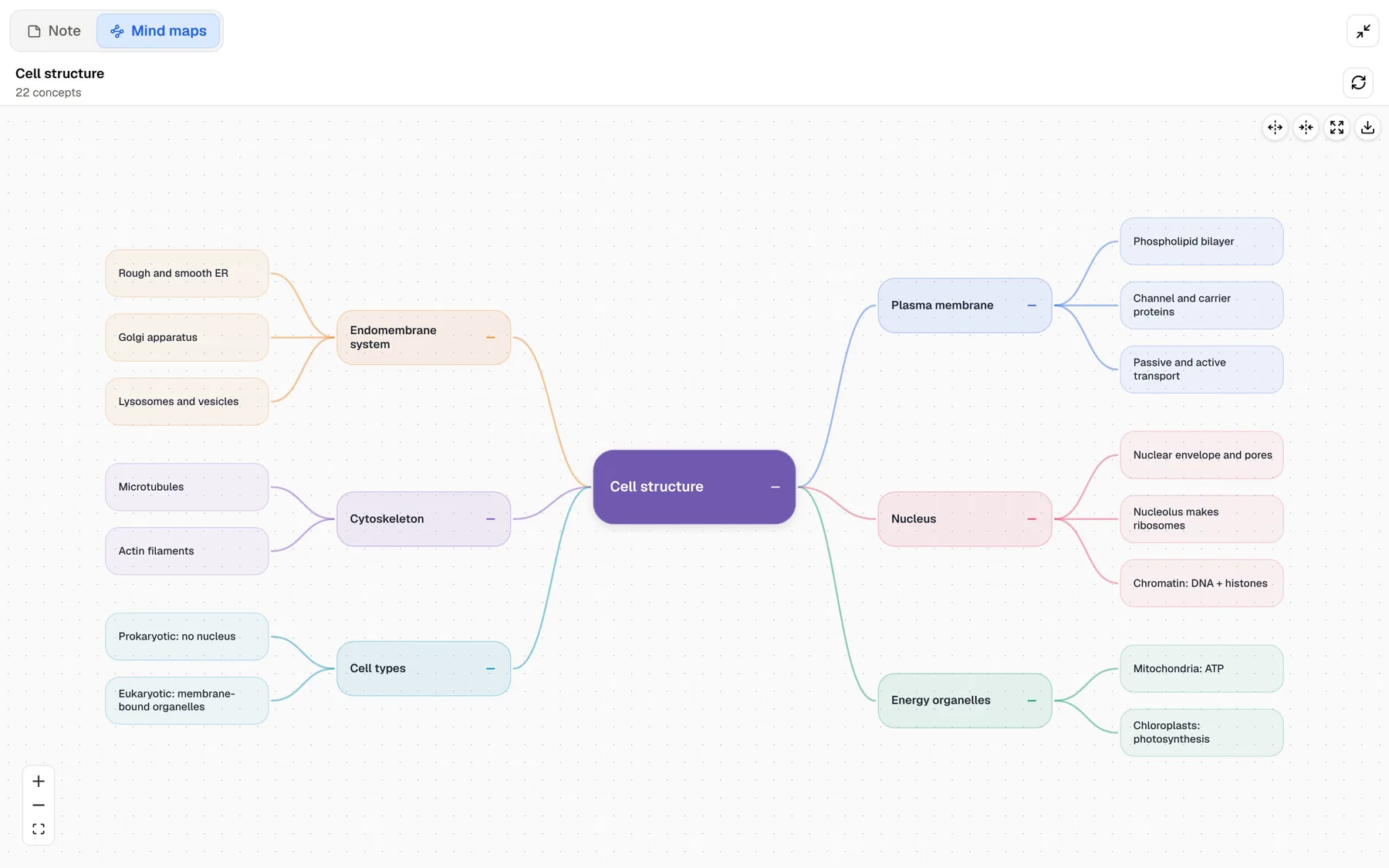
PocketNote's mind maps are built from your material. Poki reads the source (a recorded lecture, a slide PDF, a YouTube lesson) and lays the topic out as colour-coded branches with the details underneath. For a cell-biology lecture that might be membrane, organelles, cytoskeleton and nucleus, each broken down into the specifics the lecturer covered.
The practical difference is fidelity to your course. A prompt-based map is a good starting point when you are exploring a topic. A source-based map is a closer summary of what you will be examined on. In PocketNote it also sits beside flashcards, a quiz and notes made from the same source, so you can move straight from overview to testing.
Two PocketNote tools go further than any diagram. The oral exam has Prof. Poki ask about the lecture out loud or in text and follow up until you can explain it, which is close to redrawing the map from memory and talking it through. And any question about the lecture gets an answer with a citation to the transcript or slides.
From lecture to mind map to flashcards in PocketNote
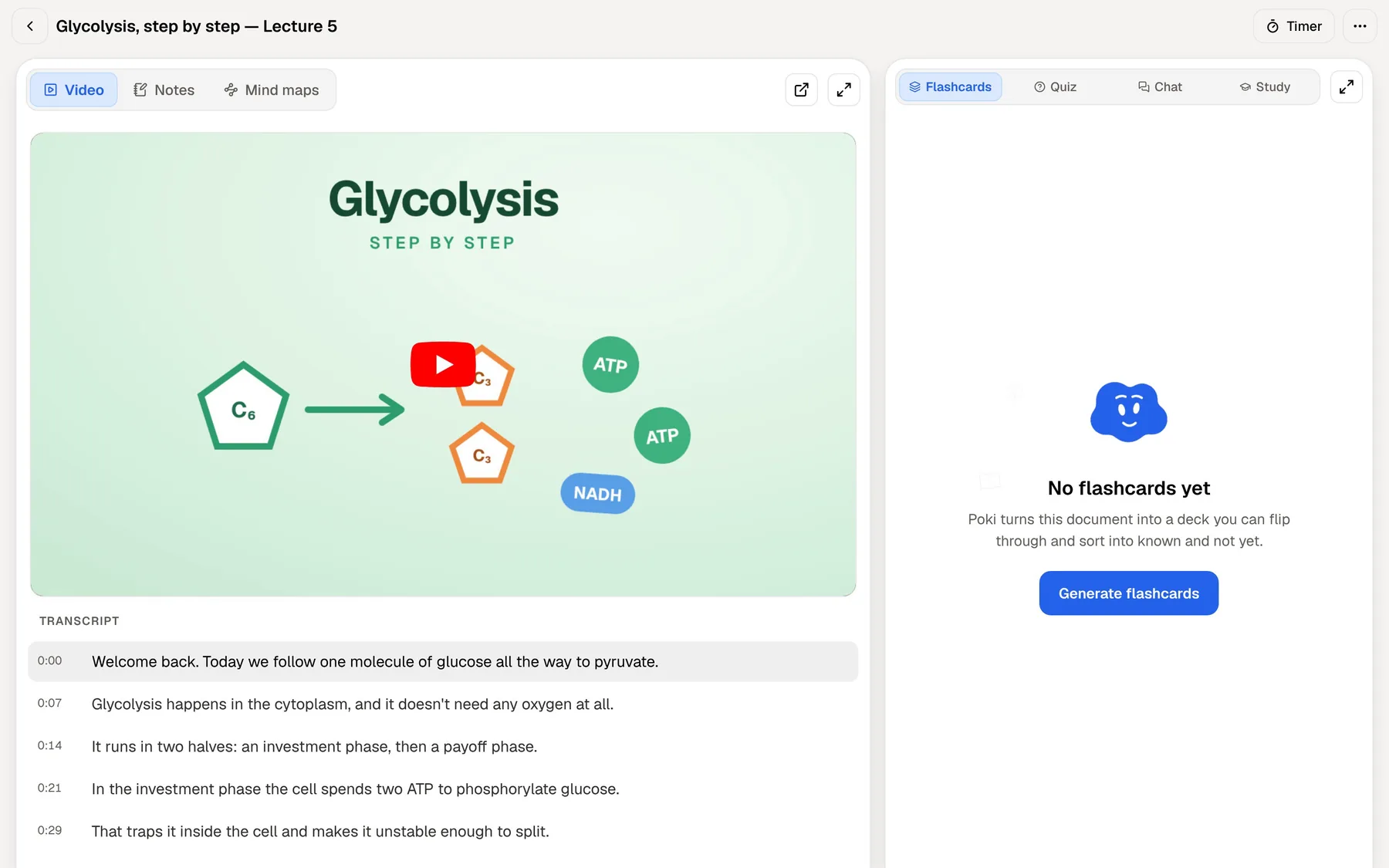
Here is one lecture, start to finish. Record it in the PocketNote app, or import the audio afterwards (MP3, WAV, M4A or OGG), and you get a transcript, a summary and notes. Add the slides as a PDF if you have them, or a YouTube link if the lecturer posted the video; its transcript comes with it.
Generate a mind map for the overview, then flashcards and a quiz for the detail. Review the cards by rating each one Again, Hard, Good or Easy, and PocketNote brings each one back when you are about to forget it. Quiz answers come with an explanation of why each option is right or wrong. If part of the transcript is unclear, ask Poki, and it answers from the lecture with a citation.
For the commute, turn the same material into an audio review, a podcast-style episode with captions that follow the voices. Set the exam date, and the study plan schedules all of this across the days you have left, with reminders and memory, applied and mastery scores.
Collaboration and drawing: an honest note
Whimsical is collaborative by design: several people can edit a board at once, leave comments and restore earlier versions. PocketNote isn't. It has no real-time co-editing or shared boards; you can share a link to a note, but group diagramming belongs in a tool like Whimsical.
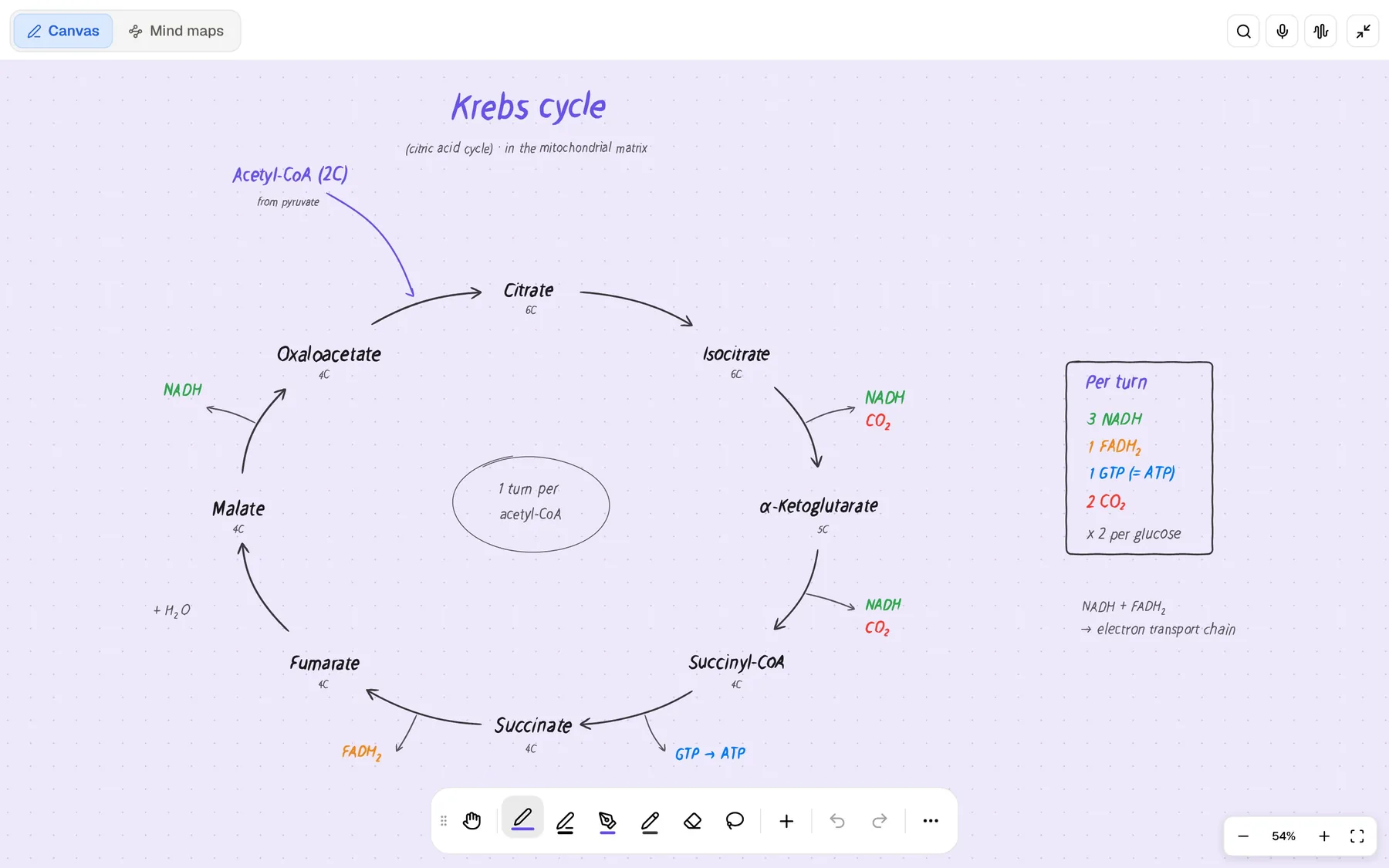
PocketNote's own canvas is personal. On iPad you can draw with Apple Pencil on an infinite whiteboard, use shape snapping to tidy boxes and arrows, and add stickers; in the browser you can draw too. It suits a diagram you are making to understand something yourself, not a polished flowchart for a group report. For that, Whimsical's diagram tools are the better fit.
If you like drawing your own maps, you can still do it in PocketNote: sketch on the whiteboard with Apple Pencil, lasso a section, and ask Poki about it or turn the handwriting into text.
Pricing and the education plan
Whimsical's pricing page says students and teachers can use it free of charge: you sign up and fill in an education application form. Its help centre describes this as a year of free access with the same features as the Pro plan, so the free plan's monthly limits don't apply.
The free plan is generous on structure, with unlimited boards, docs, teams and guests; the limit is on content. You can create up to 50 board objects and 50 doc blocks a month, exports carry a watermark, version history covers seven days, and you get a small allowance of AI credits to try Whimsical AI. At the time of writing (November 2026), the pricing page lists Pro at $10 and Business at $20 per editor per month, billed annually; Pro removes the monthly limits and the export watermark. Whimsical says annual billing saves 17% compared with monthly.
PocketNote is free to start, with paid Basic and Plus plans; see pocketnote.app for current plans.
Where Whimsical is the better choice
Whimsical is the better pick when:
- You need flowcharts or wireframes. These are Whimsical's home ground; PocketNote doesn't generate them.
- You diagram with a group. Real-time editing, comments and version history are built in.
- You want to sketch an idea from nothing. AI Mind Maps and AI Flowcharts start from a prompt, which suits exploring a topic before you have material.
- You work on a Windows or Mac desktop. Whimsical has desktop apps for both; on a computer, PocketNote runs in the browser.
- You want diagrams and a write-up in one place. Whimsical Docs sit next to your boards.
Using both without doubling the work
For a computer science or design student, a sensible split is diagrams in Whimsical and revision in PocketNote. When a diagram explains something you will be examined on, make sure the lecture and slides behind it are in a PocketNote notebook, so the facts it summarises end up in your flashcards and quizzes, not only on a canvas you look at.
For students whose courses are mostly lectures and reading, PocketNote's generated mind maps may cover most of what they wanted Whimsical for, and Whimsical stays useful for the occasional group project or process diagram.
One habit that helps either way: a few days after drawing a diagram, try to redraw it from memory. If you can't, that topic belongs in your flashcards.
The verdict
Which one should you pick?
Pick PocketNote if…
- You want mind maps generated from your own lectures and readings, not from a prompt.
- You need flashcards with spaced repetition, quizzes with explanations and an exam-date plan.
- Your material includes recorded lectures, PDFs and YouTube videos.
- You study on an iPhone or iPad as well as in a browser.
Pick Whimsical if…
- You need flowcharts, diagrams or wireframes that look clean quickly.
- You diagram with a group and want real-time editing and comments.
- You qualify for the education plan and want a year of Pro features for free.
Try it yourself
See it with your own notes
PocketNote is an AI study app for the web, iPhone and iPad. Import PDFs, Word files, audio, YouTube or web links, or record a lecture, and Poki generates mind maps, flashcards with spaced repetition, quizzes with explanations, notes and audio reviews from it, with citations back to your sources.
It is free to start. Try it on one lecture and compare its mind map with the one you would have drawn yourself.
Frequently asked questions
Sources
Keep reading